Fix CRM Leaks in 30 Minutes with an AI Efficiency Audit for GTM

An AI efficiency audit for CRM and GTM teams is a rapid, structured assessment of your data, integrations, and automations that produces prioritized, actionable fixes, not a lengthy consulting exercise. Run properly, it takes 30 to 60 minutes with the right people in the room and identifies where AI is failing to improve lead qualification, pipeline management, or tech-stack efficiency. The output is a ranked list of remediation steps, not a diagnosis alone.
TL;DR:
- Most AI efficiency issues stem from poor data quality, including duplicate records, stale information, and incomplete core fields, which can account for over half of bottlenecks.
- Running a 30 to 60-minute audit properly focuses on data, integrations, agent configuration, and governance, with the most impactful fixes often being simple and quick to implement.
- Prioritizing fixes based on impact and effort can lead to quick wins within 30 days, while larger projects may take up to 180 days, with high-leverage use cases improving efficiency by 10 to 15%.
- Effective remediation includes assigning clear ownership, defining scope with measurable milestones, and embedding updates into seller workflows for better adoption and lasting results.
- The most critical step before expanding AI is verifying that current systems can pass a smoke test with messy, real-world data; many organizations need to upgrade to AI-native platforms for sustainable improvements.
Table of Contents
- A 30 to 60 minute audit checklist for CRM and automation gaps
- How to prioritize audit findings by impact and effort
- An action playbook to close the top inefficiencies
- Why an AI-native architecture changes the math on remediation
- Case studies that show what a rapid audit actually catches
- Tools and technologies used in an AI efficiency audit
- Common pitfalls that undermine an AI efficiency audit
- Keeping AI efficiency high after the initial audit
- What the audit conversation usually gets wrong
- Book the AI Efficiency Diagnostic and see your leaks in 30 minutes
- Sources
- FAQ
A 30 to 60 minute audit checklist for CRM and automation gaps
Most AI efficiency audits fail because teams try to evaluate everything at once. A tighter, sequenced checklist surfaces the highest-value problems first and leaves the rest for a follow-up pass.
- Data quality first. Check completeness of core fields, whether records use canonical IDs across systems, how fresh the data is, and what percentage of records are duplicates.
- Integration health second. Confirm each connector is authenticated and pulling live data, not cached snapshots, and that agents can reach both internal systems and third-party sources.
- Agent readiness third. Verify what knowledge sources each AI agent actually draws from and whether it can access your full reservoir of enterprise data or only a fraction of it.
- Use-case smoke tests fourth. Run one sample lead through qualification end to end and watch whether the record updates itself without manual intervention.
- Governance and cost checks last. Look for unmetered versus metered AI usage, unclear total cost of ownership, and gaps in permissioning around who can trigger which agent actions.
Within each of these five areas, a few specific checks matter more than the rest:
- Are duplicate records concentrated in one lead source or spread evenly, which points to a specific intake problem?
- Do agents pull from authenticated internal connectors, since custom research connectors that surface organization-specific data reduce hallucination risk and improve seller trust in agent outputs?
- Is there a written owner for each automation, or does responsibility disappear once a workflow goes live?
Poor data availability and quality is not a side issue in this checklist, it is the central one. Research from IBM found that 53% of organizations cite poor data availability and quality as the leading barrier to agentic AI adoption, ahead of budget, skills, or change management. An audit that skips straight to agent configuration without first checking record quality will misdiagnose the real bottleneck almost every time.
Pro Tip: Run the smoke test with a real, messy lead, not a clean demo record. If the audit only ever touches perfect data, it will never expose the failure modes your sellers deal with daily.
How to prioritize audit findings by impact and effort
A checklist produces a list of problems. Turning that list into a plan means scoring each finding by impact and effort, then mapping it to a timeframe your team can actually commit to.
Impact should be measured against outcomes GTM leaders already track: lead conversion uplift, days-to-close, and hours of seller time saved per week. Effort should account for engineering dependencies, data cleanup work, and whether the fix touches one team or several.
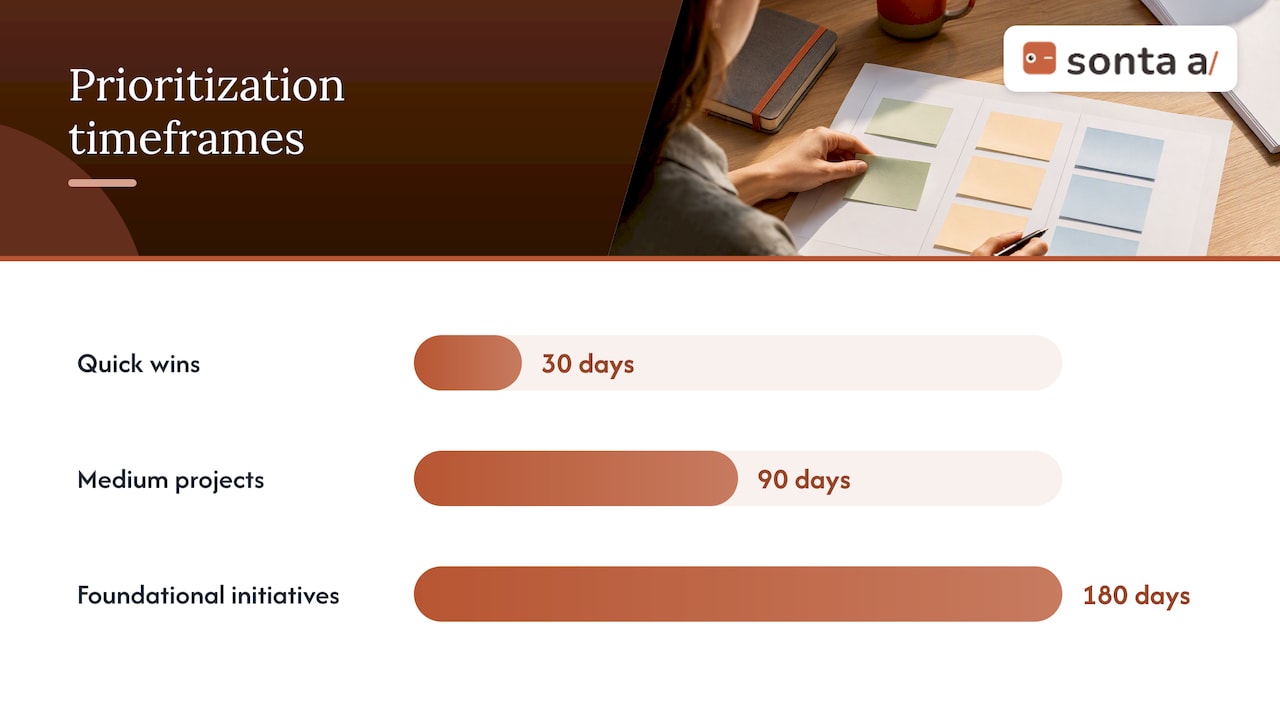
- Quick wins (30 days): fixing duplicate lead records, correcting a broken integration, or reassigning stale ownership on pipeline stages.
- Medium projects (90 days): rebuilding a lead qualification agent’s knowledge sources, or connecting a third-party enrichment tool that closes a data gap.
- Foundational initiatives (180 days): consolidating canonical customer IDs across systems, or replacing manual data entry with self-updating records at the platform level.
McKinsey’s research on B2B growth through gen AI points to the same prioritization logic: focus first on high-leverage use cases like automated account research and real-time CRM updates, because these compound into a broader productivity engine rather than replacing headcount outright.
Targeted gen AI deployments have delivered 10 to 15% efficiency gains and, in some cases, 20 to 30% improvements in customer satisfaction, which gives a useful benchmark range for setting acceptance criteria on medium and foundational projects.
Each finding should also get a “job description,” the practice IBM’s research associates with high performers: a written scope for what the agent is accountable for, tied to a risk-adjusted ROI target and a 30/90/180 milestone, not an open-ended mandate.
An action playbook to close the top inefficiencies
Turning priorities into work means assigning an owner, a deliverable, and a way to verify the fix landed, for every item on the list.
- Assign quick wins to a single owner with a 48-hour deadline. A sales operations lead can usually resolve duplicate records or reconnect a broken integration without engineering support.
- Give medium projects a RACI structure. Data teams own the source-of-truth decisions, engineering owns the connector work, and sales leadership signs off on whether the fix changed seller behavior.
- Route foundational initiatives through a steering group. These touch multiple systems and usually require budget approval, so treat them as a quarter-long program, not a sprint.
- Build adoption into the rollout, not after it. Update seller playbooks the same week a fix ships, and set human-in-the-loop checkpoints for the first two weeks of any new automation.
- Report against the milestones you set, not vanity metrics. Days-to-close and hours saved per rep are easier for an executive team to act on than a generic adoption percentage.
For medium and foundational projects that require outside capacity, a consultancy like NEXTmsp’s AI transformation services can help scope and implement the data and platform work an internal team lacks bandwidth for.
Pro Tip: Present findings to the executive team as a table of three rows, quick wins, medium projects, foundational work, each with one KPI and one date. A long findings deck gets filed away; a three-row table gets funded.
Teams evaluating whether their agents are configured to hit these milestones can also review how AI agents with staged autonomy are typically rolled out, since staged permissioning affects how fast a medium project can move from pilot to production.
Why an AI-native architecture changes the math on remediation
Most inefficiencies this audit surfaces trace back to the same root cause: agents bolted onto a CRM never designed for them, forced to reconcile data across systems that were not built to talk to each other. There are platforms built specifically for AI-first GTM teams, with records that update themselves in real time rather than depending on manual entry.
Its AI Efficiency Diagnostic delivers actionable insights within 30 minutes, testing the same data quality, integration, and agent readiness questions this audit checklist covers, against a live account. Teams that want to go deeper afterward can work through how to test whether a CRM is AI-native in a follow-up 60-minute session.
Case studies that show what a rapid audit actually catches
Audits of this kind tend to surface the same pattern across organizations: the technology was never the constraint, the data feeding it was. McKinsey’s analysis of gen AI in B2B sales documents targeted deployments where automation delivered 10 to 15% efficiency gains once teams fixed the underlying data and process issues an audit would flag, rather than adding more AI on top of a broken workflow.
The pattern shows up at the agent level too. Organizations that configure custom research connectors to pull from authenticated internal knowledge sources, instead of leaving an agent to guess, see fewer hallucinated outputs and faster seller adoption, because sellers stop double-checking every recommendation the agent makes.
The lesson generalizes: a successful audit is rarely the one that finds the most exotic problem. It is the one that finds the boring, structural issue, a stale integration, a missing canonical ID, an agent with no defined knowledge source, and gets it fixed inside a quarter. Organizations that pair this kind of fix with stronger governance and shared data architectures report up to 60% greater efficiency and doubled pipeline expansion in some leader cohorts, a gap wide enough to justify the audit on its own.
Tools and technologies used in an AI efficiency audit
Running this audit does not require a new toolchain, it requires using what you already have more deliberately. A few categories come up repeatedly:
- CRM-native reporting and data model tools, used to check completeness, duplication, and canonical ID consistency directly inside the system of record, such as the reporting and data model references in Sonta Ai’s Academy.
- Agent builders and custom connectors, which define what knowledge sources an agent can reach and whether that access is authenticated, as described in Microsoft’s guidance on accelerating lead qualification.
- Integration monitoring, to catch connectors that have silently stopped syncing rather than failing loudly.
- White-label agent configurators, useful when a team wants to test packaged agent frameworks rather than build from scratch, an approach offered by partners like Agent Release AI’s configurator.
- Benchmarking frameworks, for teams that want an external reference point on adoption maturity, such as the KPI benchmarking work done by benchmarked.
The tools matter less than the discipline of using them in the same order every time: data quality, then integrations, then agent configuration, then governance. Skipping straight to the agent layer is the most common reason audits misdiagnose the actual bottleneck.
Common pitfalls that undermine an AI efficiency audit
The most frequent mistake is treating the audit as a one-time technology review instead of a data quality review with technology attached. Since poor data availability and quality is the leading barrier organizations cite for agentic AI adoption, an audit that starts with agent configuration and never checks the underlying records will miss the real problem.
A second pitfall is scope creep. A 30 to 60 minute audit works because it stays narrow: one sample workflow, one set of integrations, one governance check. Trying to review every automation in the stack in a single session produces a report nobody acts on.
A third pitfall is skipping the “job description” step for agents. Without a written scope tied to a measurable target, it becomes difficult to tell later whether an agent is underperforming or simply doing a job nobody defined clearly. IBM’s research found that only about 33% of AI initiatives meet their ROI targets, and 72% fail to scale across business units, largely because governance, data, and cost management were never formalized.
A fourth pitfall is running the audit once and treating the findings as permanent. Data decays, integrations drift, and new automations get added without review. An audit that is not repeated on a cadence loses its value within a quarter.
Keeping AI efficiency high after the initial audit
An audit is a snapshot, not a guarantee. Data that was clean in January can be full of duplicates by June if intake processes are not monitored, and an agent configured correctly at launch can drift as knowledge sources change.
The most durable practice is scheduling a lighter version of the audit on a recurring basis, quarterly for most GTM teams, monthly for teams scaling fast. Reuse the same five-part checklist each time: data quality, integrations, agent readiness, use-case smoke tests, and governance. Consistency across cycles makes it possible to compare results and see whether fixes actually held.
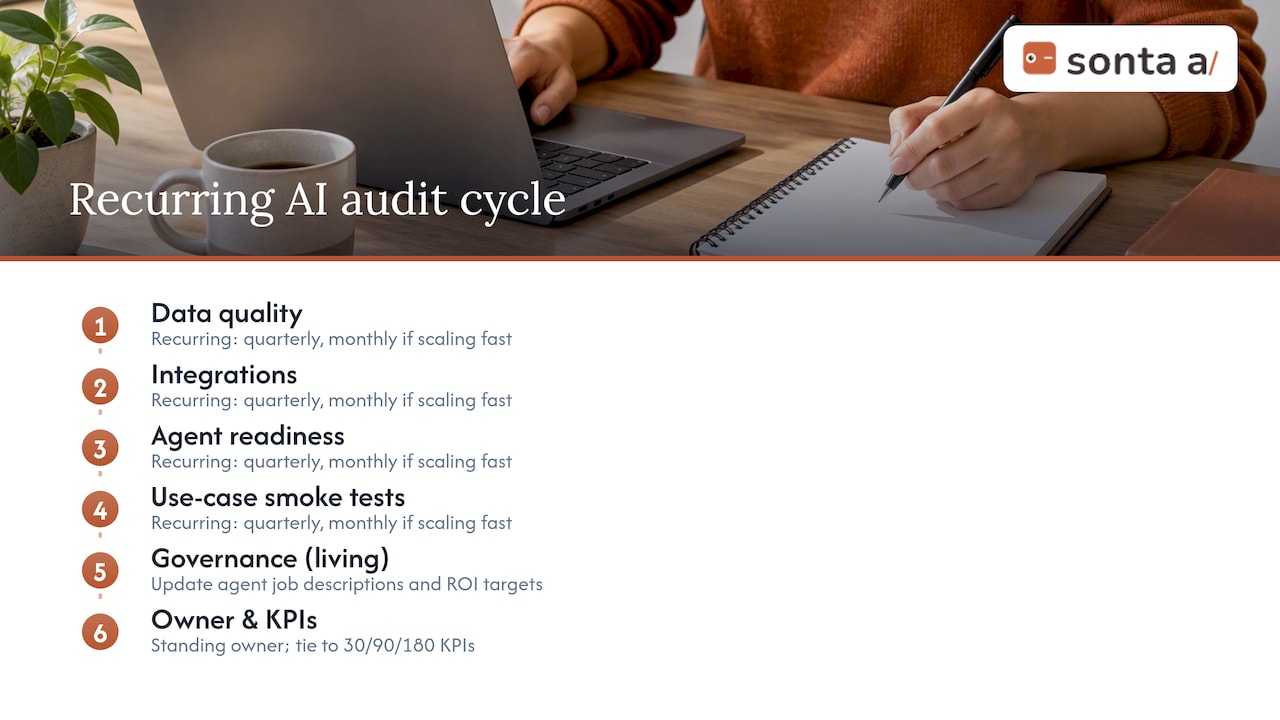
Assign a standing owner for the recurring review, not a rotating one. Continuity matters here because the person running the audit needs to remember what last quarter’s findings were in order to judge whether they recurred.
Tie each recurring audit back to the KPIs set in the original 30/90/180 plan: lead conversion uplift, days-to-close, and seller time saved. Reviewing metrics without rerunning the underlying checklist tends to hide the process problems that caused the metric to move in the first place, so pair the two.
Finally, treat governance as a living document. As new agents get added or new integrations come online, update each agent’s job description and risk-adjusted ROI target rather than leaving the original scope untouched.
What the audit conversation usually gets wrong
Most advice on AI efficiency treats it as a technology problem: pick better tools, add more automation, adopt the newest model. The actual bottleneck, based on the pattern across the research cited here, is almost always data quality and governance discipline, not the sophistication of the AI layer itself.
The overrated fix is buying more agent capability before fixing the data feeding it. An agent with excellent reasoning still produces bad output if it is working from duplicate records and stale integrations. The underrated fix is the boring one: canonical IDs, connector health checks, and a written job description for every agent in production.
What GTM leaders should prioritize first is not which AI vendor to add next, but whether their current stack can pass a 30-minute smoke test on a single messy lead. If it cannot, no amount of additional automation will fix the underlying leak. Fix the plumbing before expanding the system that runs through it.
— Pavel
Book the AI Efficiency Diagnostic and see your leaks in 30 minutes
Running this checklist manually takes an afternoon and a spreadsheet. Some diagnostics perform similar tests in 30 minutes, assessing data, integrations, and agent readiness against a live account and returning a prioritized list of fixes instead of a generic scorecard.

- Who should join: GTM leaders, sales ops, and whoever owns your CRM integrations.
- What you get: a ranked remediation list, mapped to quick wins, medium projects, and foundational work.
- What happens next: teams that need deeper work can move into a workflow build sprint or a full implementation program, priced from $5,000 one-off and $8,000 one-off respectively.
Start with the AI Efficiency Diagnostic and see what your stack is actually leaking.
Sources
- The State of Salesforce 2025-2026
- Unlocking profitable B2B growth through gen AI
- The State of Salesforce 2025-2026 (IBM IBV)
FAQ
How long does an AI efficiency audit actually take?
A focused audit can be run in 30 to 60 minutes when it stays narrow: one sample workflow, core integrations, and a governance check. Sonta Ai’s AI Efficiency Diagnostic is built around this same timeframe, delivering actionable insights within 30 minutes.
What is the most common blocker AI efficiency audits find?
Poor data availability and quality is consistently the top barrier organizations report for agentic AI adoption, cited by 53% of organizations surveyed. Most audits trace slow or failed automations back to this root cause rather than to the AI model itself.
What ROI should I expect after fixing audit findings?
Targeted gen AI deployments have produced 10 to 15% efficiency gains and, in some cases, 20 to 30% improvements in customer satisfaction, though results depend heavily on data quality and governance maturity. Organizations with stronger governance and shared data architectures have reported up to 60% greater efficiency in some leader cohorts.
Should I replace my CRM or just add AI agents to it?
That depends on whether your current CRM can support authenticated, real-time connectors and self-updating records, which an audit will reveal directly. Teams whose audit surfaces deep integration and data model gaps often find it faster to move to an AI-native platform like Sonta Ai than to keep patching agents onto a legacy system.
What happens after the diagnostic if I need more help?
Depending on what the diagnostic finds, next steps range from a workflow build sprint, priced from $5,000 one-off, to a full implementation program, priced from $8,000 one-off, both listed on Sonta Ai’s pricing page. Teams with more complex data migration needs can also start with migration and data modeling services, priced starting at $2500 one-off.