6–8 Week Pilot Plan: Claude CRM Integration for GTM Leaders

Claude integrates with CRM platforms through two routes: prebuilt directory connectors, such as the one HubSpot ships for Claude, or custom connectors built on Remote MCP that talk to Salesforce or any other system via Anthropic’s API. Directory connectors deploy in minutes and fit teams that want fast, low-risk pilots. Custom Remote MCP connectors take more engineering but give you control over data residency, cross-system workflows, and write permissions. Before choosing either, validate your security and residency requirements first. That decision drives everything else.
TL;DR:
- Prebuilt directory connectors like HubSpot’s offer rapid deployment with minimal engineering but cover only supported objects and actions.
- Custom Remote MCP connectors provide full control over data residency and workflows but require ongoing maintenance and a publicly reachable endpoint.
- Claude’s permissions align with the logged-in user’s access, and sensitive data should be excluded from connector scope to ensure compliance and security.
- Secure, effective integration demands initial planning on data retention, least privilege access, and network configurations, especially for regulated data handling.
- Using agentic CRM features can reduce data staleness, shrinking the gap between CRM records and real-time deal activity, which expedites pilot timelines.
Table of Contents
- What Is Claude CRM Integration and How Does It Work?
- Which CRM Objects Can Claude Read and Write?
- How Do You Set Up a Claude CRM Connector?
- What Are the Best Claude CRM Use Cases by Team?
- Is Claude CRM Integration Secure Enough for Regulated Data?
- How Do Custom Connectors and Remote MCP Architecture Work?
- What Governance Rules Should You Set Before Rollout?
- How Do You Troubleshoot Claude CRM Connector Errors?
- Why Agentic CRMs Change the Claude Integration Equation
- Get Claude-Ready CRM Data With Sonta AI
- Sources
- FAQ
What Is Claude CRM Integration and How Does It Work?
Claude CRM integration works through what Anthropic calls connectors: components that let Claude access an outside application, pull data from it, and take actions inside it on the user’s behalf. There are two flavors, and picking the wrong one early costs teams weeks of rework later.
Directory connectors are prebuilt, vendor-maintained integrations you switch on from a menu. HubSpot’s connector for Claude is the clearest example in the CRM space right now, and it works because HubSpot maintains the connection logic on its end. Custom connectors run on Remote MCP, the open protocol Anthropic uses to let Claude talk to any backend you expose over the internet, including Salesforce, a data warehouse, or a proprietary system with no off-the-shelf connector.
Connector support varies by surface. Claude, Claude Desktop, Claude Code, and the API (through the MCP Connector) all support connectors, though interactive features like in-chat visualizations behave differently depending on where you’re running Claude.
Here’s the practical trade-off breakdown:
- Directory connectors: fastest to deploy, no engineering lift, limited to the objects and actions the vendor built support for.
- Custom Remote MCP connectors: full control over scope, data residency, and cross-system logic, but require a publicly reachable endpoint and ongoing maintenance.
- Interactive features: chart rendering and rich visualizations are strongest in Claude’s web and desktop clients, thinner in API-only integrations.
- Governance: directory connectors inherit the vendor’s permission model; custom connectors require you to build your own.
If your CRM has a maintained connector and your use case fits its object list, start there. If you need Salesforce-specific logic, multi-CRM orchestration, or strict data residency, plan for custom Remote MCP from day one.
Which CRM Objects Can Claude Read and Write?
Claude’s access to CRM data maps directly to the objects a given connector exposes, and every action it takes runs under the permissions of the person connected to it, not some elevated service account. HubSpot’s connector, the most mature example available today, supports contacts, companies, deals, tickets, engagements, and related objects for both reading and writing.
That last point deserves emphasis: Claude cannot see or touch anything the logged-in user couldn’t already access in HubSpot. A rep with restricted deal visibility gets the same restricted view through Claude. This is the permission model working as intended, not a limitation to route around.
Two governance controls matter most for teams rolling this out:
- “Needs approval” write mode: forces Claude to propose a change and wait for a human to confirm before it commits, rather than writing directly to the record.
- Audit log attribution: write actions taken through Claude show up in HubSpot’s audit trail tied to the acting user, so you retain a full change history.
Pro Tip: Exclude sensitive fields, Social Security numbers, health information, financial account details, and anything under a specific compliance mandate, from connector scope entirely rather than relying on prompt instructions to avoid them. A field the connector can’t see is a field that can’t leak.
Anthropic’s own connector documentation confirms that connectors inherit each person’s permissions from the source service by design, which is the single most important fact to communicate to a security team evaluating this rollout.
How Do You Set Up a Claude CRM Connector?
Setup differs meaningfully depending on whether you’re connecting a directory connector like HubSpot or building a custom Remote MCP integration for something like Salesforce. Both benefit from a pre-install checklist.
Before touching either, confirm three things: your Anthropic subscription tier supports connectors, you have admin privileges on the CRM side, and you’re testing against a sandbox or a dedicated test account rather than live production data.
Setting up the HubSpot connector:
- Open the connectors menu in Claude and browse to the HubSpot listing.
- Add the connector and authenticate through HubSpot’s OAuth flow.
- Select which permissions to grant, read-only versus read/write, and which objects to expose.
- Toggle the connector on inside a Claude chat or project.
- Set write tools to require approval before your first real test, so nothing commits without a human confirming it.
- Run a handful of read queries first (deal counts, contact lookups) to confirm scope, then test one write workflow end to end.
Custom connector quick-start (Remote MCP):
- Stand up an MCP server endpoint that exposes the CRM actions you want Claude to call.
- Register the endpoint in Claude with your OAuth client credentials or secret.
- Confirm the endpoint is publicly reachable, or configured behind a proxy that is, since Remote MCP requires it.
- Test with a scoped, non-production API key before granting broader access.
Free-tier Anthropic accounts are limited to one custom connector, which is worth knowing before you plan a multi-CRM pilot.
What Are the Best Claude CRM Use Cases by Team?
The highest-value pilots tend to cluster around a handful of repeatable workflows, and picking one with a clear before/after makes the business case easy to write.
Sales teams get the most immediate traction. A rep can ask for a deal summary before a call, an account briefing pulling engagement history, or a next-step recommendation based on stage and recent activity. Claude’s long-context handling makes it well suited to reading through a full deal history or a long email thread without losing the thread, which matters for accounts with months of back-and-forth.
Marketing teams use connectors for segment checks against live CRM data, quick campaign-slice performance reads, and drafting personalization snippets grounded in actual contact properties instead of guesswork.
Support and service teams lean on Claude for priority ticket triage, drafting a first response to route for review, and flagging tickets at risk of breaching an SLA window.
Customer success teams ask for renewal risk summaries pulling in usage trends and support history, account health rollups across a book of business, and renewal playbook suggestions tailored to a specific account’s signals.
Output format matters as much as the prompt. Ask for a summary paragraph when a human will read it directly, a table when you need to scan multiple accounts, or structured field updates when the output feeds back into the CRM as a proposed write.
Is Claude CRM Integration Secure Enough for Regulated Data?
Security is where most CRM-Claude pilots stall, usually because nobody defined the retention and permission posture before the first real customer record touched the system. Get this settled before your first pilot, not after.
Anthropic maintains default data retention policies, and organizations that need stricter handling can pursue zero-retention configurations for qualifying use cases. Confirm your specific retention terms directly with Anthropic before connecting anything containing regulated data, since terms vary by plan and use case.
A few practices reduce risk meaningfully without slowing the pilot down:
- Least privilege by default: grant read-only access first, and only add write scope once a workflow proves out.
- Field-level exclusion: strip PII and regulated fields from connector scope rather than trusting prompts to ignore them.
- Audit log review: check HubSpot’s (or your CRM’s) audit trail weekly during pilot to confirm write attribution matches expectations.
- Minimum viable context: send only the fields a task actually needs. An email-drafting request needs the latest thread plus eight to twelve key properties, not a full contact record.
Regulated industries, health care, financial services, government contracting, should treat “approved infrastructure” as a prerequisite, not a nice-to-have, before connecting any system holding covered data.
How Do Custom Connectors and Remote MCP Architecture Work?
A production-grade custom integration usually follows a predictable pattern: CRM API pulls data, middleware shapes and sanitizes it, the Anthropic Messages API or a Remote MCP server handles the model interaction, and a writeback step pushes approved changes to the CRM.
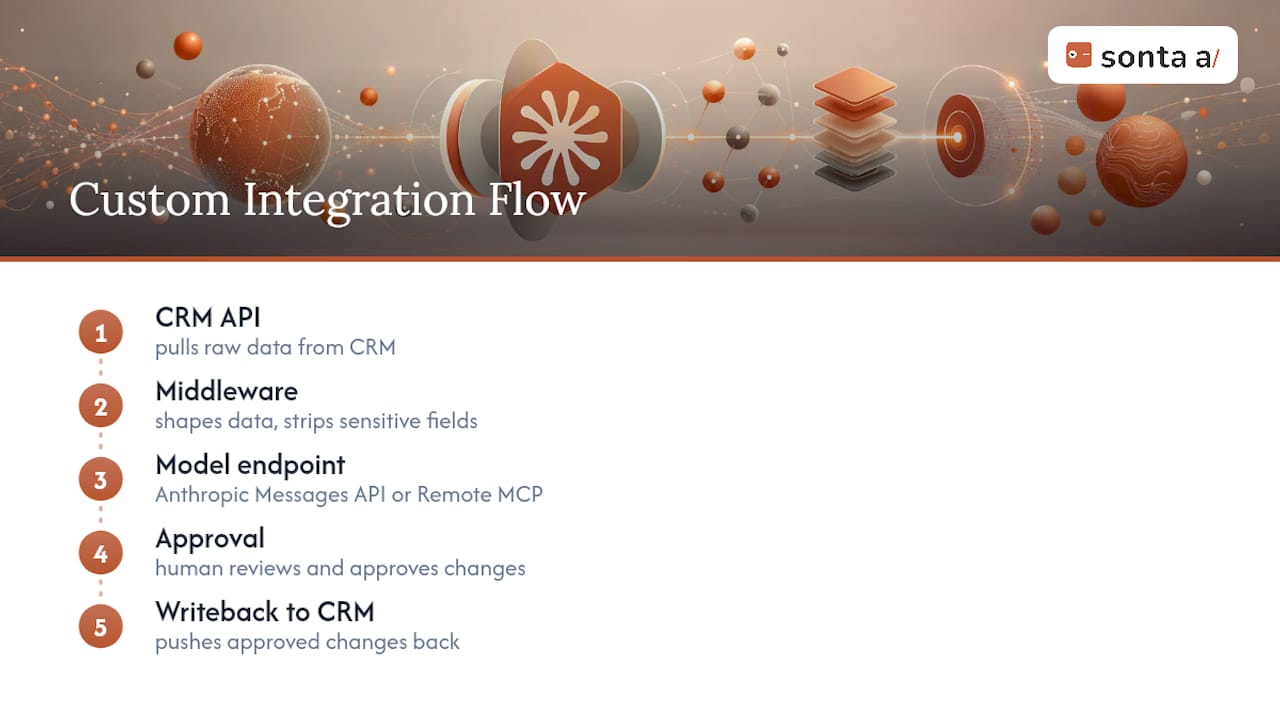
Middleware is doing more work here than it looks like on paper. It centralizes prompt templates, strips sensitive fields before anything reaches Claude, and gives you one place to monitor cost and latency instead of scattering that logic across a dozen call sites. Teams relying purely on native connectors without middleware often hit a wall once they need complex cross-platform orchestration or real-time reconciliation between two systems that don’t share a common object model.
Choose synchronous flows for anything a human is waiting on in real time, a rep asking for a live account brief inside a call. Choose asynchronous batch flows for enrichment work, nightly deal scoring, weekly health-score recalculation, where nobody’s staring at a spinner.
Network requirements deserve their own line item on the project plan. Remote MCP endpoints must be publicly reachable, which means teams behind corporate firewalls typically need to allowlist Anthropic’s IP ranges or route through a VPC egress configuration. Skipping this step is the single most common cause of connector failures in enterprise environments.
Pro Tip: If your security team won’t approve a fully public endpoint, deploy a small dedicated proxy VM that terminates TLS and forwards only the specific MCP traffic inward. It’s a lighter lift than opening your entire internal network.
For teams without in-house engineering bandwidth, an iPaaS or low-code adapter platform can cover simpler CRM-to-Claude flows faster than a custom build, though it trades away some of the control a purpose-built middleware layer gives you.
Sonta AI’s Academy resources on MCP and agent patterns walk through several of these architecture choices in more depth if you’re scoping a custom build.
What Governance Rules Should You Set Before Rollout?
A reasonable pilot runs six to eight weeks: define your two or three highest-value use cases and draft prompts in week one, build middleware in weeks two and three, wire up triggers and any UI in weeks four and five, test in week six, and deploy to production by week seven or eight. Complexity, not ambition, is what stretches that timeline.
Four rules keep the rollout safe as scope expands:
- Anonymize pilot data during initial testing so nothing sensitive is exposed while workflows are still being debugged.
- Gate every write action behind human approval until the workflow has run cleanly for at least a few weeks in production.
- Monitor volume, latency, and error rate on your Claude API calls the same way you’d monitor any production service, with alerts, not just dashboards you check occasionally.
- Minimize what you send. Templated, sanitized prompts with only the necessary fields cost less, run faster, and leak less if something goes wrong.
Staged rollout, one team, then one department, then company-wide, catches problems while the blast radius is still small.
How Do You Troubleshoot Claude CRM Connector Errors?
Most connector failures fall into four buckets, and diagnosing which one you’re in usually takes less time than fixing it.
- Authentication failures: expired OAuth tokens are the most common cause; reauthenticate through the connector settings and confirm the connected account still has active CRM access.
- Permission gaps: if Claude can’t see data a user expects it to, test with a matrixed set of test accounts at different permission levels to isolate whether the issue is the connector or the underlying CRM role.
- Firewall and network failures: if a custom Remote MCP connector won’t connect, confirm the endpoint is genuinely publicly reachable and that Anthropic’s IP ranges are allowlisted on any corporate firewall.
- Rate limits: high-volume use cases should queue and batch requests rather than firing them synchronously, with retry logic that backs off instead of hammering the API on failure.
Most of these resolve in minutes once you know which bucket you’re in. The ones that don’t are almost always network configuration issues, not Claude issues.
Why Agentic CRMs Change the Claude Integration Equation
Most of the friction in a Claude CRM integration comes from a mismatch nobody talks about directly: Claude is built to reason over current data, but traditional CRMs are built around manual entry that goes stale within days. You can build the cleanest middleware layer in the world, and it still hands Claude outdated pipeline data if reps haven’t logged their calls.

This is where an AI-native CRM changes the calculation rather than just adding another layer to it. Sonta AI’s approach, self-updating records driven by agents rather than manual entry, means the data Claude is reasoning over is closer to real-time by default. That shrinks the gap between “what the CRM says” and “what’s actually happening in the deal,” which is the gap every custom middleware project is really trying to close.
Teams pairing agentic CRM features with Claude integrations tend to see shorter pilot cycles, largely because they’re not building sync logic to compensate for stale records. The integration problem gets smaller when the underlying data problem gets solved first.
— Pavel
Get Claude-Ready CRM Data With Sonta AI
Everything in this guide assumes your CRM data is accurate enough to be worth connecting to Claude in the first place, making a CRM data hygiene playbook essential before integration. That’s the part most teams underestimate. Sonta AI is built as an AI-native CRM specifically to solve that upstream problem: records update themselves in real time instead of waiting on reps to log activity, so any AI layer you connect on top, Claude included, is reasoning over current data rather than a snapshot from three weeks ago.

If you’re evaluating a Claude integration and want to know where your current CRM setup is losing time or accuracy before you build anything, Sonta AI’s AI Efficiency Diagnostic gives you actionable findings in about 30 minutes. For teams in professional services specifically, the Sonta AI platform built for consulting firms shows how agentic record updates and staged-autonomy AI sales agents fit into workflows like the ones covered above. Run the diagnostic or book a demo to see what your stack looks like once the data feeding Claude is finally trustworthy.
Sources
Setup steps, permission behavior, and network requirements referenced above come from Anthropic’s connector documentation, HubSpot’s connector guide, Claude’s HubSpot connector page, and Anthropic’s Remote MCP guidance.
- Use connectors to extend Claude’s capabilities | Anthropic Help Center
- Set up and use the HubSpot connector for Claude
FAQ
Can Claude Be Used as a CRM?
No. Claude is an AI assistant that connects to a CRM through connectors; it reads and acts on CRM data but doesn’t replace the underlying system of record. AI-native platforms like Sonta AI serve that role instead, with Claude or similar assistants layered on top.
Which CRM Is Best for Integrating With Claude?
HubSpot currently offers the most mature prebuilt connector, supporting contacts, companies, deals, and tickets out of the box. Salesforce and other platforms without a directory connector require a custom Remote MCP build for the same depth of access.
Is There a Claude Integration With Salesforce?
There’s no prebuilt directory connector for Salesforce at this time, so integration runs through a custom connector using Remote MCP or the Anthropic API, with middleware handling the Salesforce API calls and data shaping.
Can Claude Be Integrated Into HubSpot?
Yes. HubSpot ships a dedicated connector for Claude that supports natural-language queries against CRM data plus the ability to create and update records, log activity, and generate in-chat visualizations, with write actions attributed in HubSpot’s audit logs.
Do I Need Engineering Resources to Set Up a Claude CRM Connector?
Not for a directory connector like HubSpot’s, which any admin can enable in minutes. A custom Remote MCP connector for a platform like Salesforce requires engineering work to build and maintain the middleware and endpoint.