CRM Change Management: The Playbook for Adoption That Sticks

The single best approach to CRM change management is a two-stream delivery model that treats technical rollout and human adoption as equal priorities, run under a cross-functional governance committee with a phased launch. Confirm your executive sponsor this week, finalize the data migration plan, and define role-based “first value” scenarios before the first pilot user logs in. Everything else in this playbook builds from those three moves.
TL;DR:
- Effective CRM change management requires running both technical and human workstreams under a shared governance body and treating them as equally important.
- Locking the project scope early, completing thorough stakeholder analysis, and conducting test migrations at least three weeks before go-live are critical to prevent delays and data issues.
- Sponsorship must be actively visible through regular updates and CRM usage, with a small governance committee making timely decisions to sustain momentum.
- Training should be scenario-based, delivered just before use, and reinforced with follow-up sessions, while resistance is best managed through early listening sessions and identifying champion advocates.
- Gradual AI feature rollout, combined with real-time record updates, speeds trust-building and reduces friction, with tools like Sonta AI offering operational diagnostics and automation support.
Table of Contents
- What Successful CRM Change Management Looks Like
- Step-by-Step CRM Change Management Playbook
- Stakeholders, Sponsorship, and Governance Structure
- Communication, Training, and Resistance Management
- Data Migration, Configuration, and Preventing Field Bloat
- Choosing Between Phased and Big-Bang Rollout
- Measuring Adoption and Sustaining Momentum
- Pragmatic Notes on AI-Enhanced CRM Adoption
- How Sonta AI Speeds Up the Adoption Curve
- Sources
- FAQ
What Successful CRM Change Management Looks Like
Most CRM projects fail for a reason that has nothing to do with software. Industry writeups consistently point to the human side of the rollout, not the technology itself, as the primary reason initiatives stall or get abandoned. Teams treat implementation as an IT ticket instead of an organizational shift, and adoption never recovers from that framing.
The fix is structural. Run two parallel workstreams: one technical (data, configuration, integrations), one human (communication, training, sponsorship). Neither stream owns the project. They report into the same governance body and hit the same milestones. This two-stream structure matters because treating CRM as a purely technical rollout is the single most common project management failure in these deployments.
A handful of principles hold the two streams together:
- Executive sponsorship that is visible and recurring, not a kickoff appearance.
- WIIFM messaging (“what’s in it for me”) tailored to each role, not a company-wide announcement.
- Clear governance with a named committee that owns roadmap and data decisions.
- Role-specific enablement instead of one generic training deck for the whole company.
- Measurement built in from day one, not bolted on after usage drops.
If you want a formal framework, ADKAR and Kotter’s eight-step model both map cleanly onto this structure. ADKAR’s Awareness, Desire, Knowledge, Ability, Reinforcement sequence works well for individual-level communication planning. Kotter’s model is better suited to the governance and sponsorship layer. Use one as a checklist, not a religion. Teams that overengineer the framework spend more time labeling activities correctly than doing them.
Step-by-Step CRM Change Management Playbook
This is the sequence that keeps a CRM implementation from drifting into scope creep or silent abandonment. Treat each phase as a gate, not a suggestion.
-
Discovery and scope. Lock Phase 1 scope before any configuration work starts. Define three to five success metrics up front (adoption rate, data completeness, time to first value), build a RACI matrix naming who decides what, and set up a change-control intake form so new requests get logged instead of quietly added to the build. HubSpot’s deployment guidance flags scope creep and unrealistic timelines as the two most common reasons implementations run long, and a documented intake process is what keeps Phase 1 deliverable-focused rather than open-ended.
-
Stakeholder analysis and sponsor confirmation. Map every group affected by the CRM change, not just sales. Assign a named owner to each stakeholder group with a monthly check-in cadence written down, not implied.
-
Data governance and migration. Cleanse before you map. Standardize naming conventions, dedupe records, and run at least two test migrations into a sandbox before touching production. Set explicit rollback criteria: if data completeness or match rates fall below an agreed threshold after a test run, you stop and fix the source data rather than migrating anyway. Agency guides on CRM implementation name data migration as one of the two make-or-break phases of the entire project, alongside adoption itself.
-
Configuration and pilot. Validate configuration in a sandbox with a small group representing each major role, not just power users. Build role-based scenarios (“qualify this lead,” “log this call,” “update this deal stage”) and have pilot users run them live, then collect friction points in a structured feedback form rather than hallway comments.
-
Training and enablement. Deliver training just before people need it, not weeks in advance when it will be forgotten. Use scenario-based sessions tied to actual job tasks, back them with in-app help, and schedule a refresher roughly six weeks after go-live to counter the natural drop-off in retained knowledge.
-
Go-live support. Staff up for the first two weeks specifically. Set issue response SLAs (same-day for blockers), run daily check-ins with the pilot group, and give every user a clear escalation path so small frustrations don’t calcify into “the new system doesn’t work.”
-
Post-launch governance. Stand up the governance committee permanently, not as a project-closeout formality. Build adoption dashboards that track real usage, and maintain a prioritized backlog of optimization requests instead of letting every new idea jump the queue.
Pro Tip: Run your first test data migration at least three weeks before go-live, not three days. Migration problems almost always surface as data quality issues you didn’t know existed, and three days leaves no time to fix them without delaying launch.
Stakeholders, Sponsorship, and Governance Structure
A stakeholder map is only useful if you update it. Build a power-versus-support grid at kickoff, plotting each group by how much influence they have and how enthusiastic they are about the change, then revisit it at each phase gate. Groups move on this grid as the project progresses. A skeptical sales manager in week one can become your loudest advocate by week six if the pilot goes well, and your plan should account for that shift rather than treating the initial map as permanent.
Assign a named owner to every stakeholder cluster. “Sales leadership” is not an owner. “Maria, VP of Sales” is.
Sponsor behavior is where most projects quietly fail. A title on a project charter does not move adoption. Active, visible engagement does: sponsors who show up regularly and use CRM outputs in their own decisions raise both adoption and compliance rates meaningfully compared to sponsors who delegate everything after kickoff. Look for these behaviors specifically:
- Monthly updates delivered by the sponsor personally, not by the project team on their behalf.
- Visible use of CRM data in the sponsor’s own meetings and decisions.
- Public recognition of early adopters, by name, in team settings.
Set up a governance committee early, and keep it small. A governance committee owning the roadmap, change-request prioritization, and data standards works best at six to eight members with a published turnaround SLA for requests, typically two weeks for a decision. Any bigger and the committee becomes a debate club instead of a decision body.
Communication, Training, and Resistance Management
Generic company-wide emails about “our new CRM” get ignored. WIIFM messaging works because it answers a narrower, more selfish question: what changes for me, specifically, this week? A field sales rep needs to hear that logging a call now takes fifteen seconds instead of two minutes. A sales ops manager needs to hear that the report they build manually every Friday will generate itself. Write separate messages for each persona and repeat them across at least three channels (team meeting, email, in-app banner) over the first month, since one exposure rarely changes behavior on its own.
Training sticks better with a consistent structure per scenario:
- A 20-minute video walkthrough of the specific task.
- A 45-minute hands-on session where users complete the task in a sandbox.
- A one-page reference card they can pull up mid-task.
- A refresher session roughly six weeks out to counter the forgetting curve that hits most new-system training.
Resistance is data, not a discipline problem. Run listening sessions early and ask directly: what would make this fail? A “tell me why this will fail” workshop, held before go-live, surfaces objections you can actually fix instead of ones that show up as silent non-adoption three months later. Identify two or three pilot champions per department, people who are naturally curious rather than naturally compliant, and give them direct access to the project team so friction gets escalated fast instead of festering.
Pro Tip: If a workshop attendee says “this will never work because of X,” write X down verbatim and assign it an owner before the meeting ends. Vague resistance becomes manageable the moment it has a name and a deadline attached.
Data Migration, Configuration, and Preventing Field Bloat
Migration problems are almost always data quality problems wearing a technical disguise. Before any field mapping starts, run a cleansing pass: standardize formats, remove duplicate records, and get the business owners of that data to sign off that what’s about to move is accurate. Skipping this step is the single most common reason new CRMs feel untrustworthy in week one, because a system full of stale or duplicate records looks broken even when the configuration is flawless.
Field mapping should happen iteratively, not in one pass. Map a subset, run a test migration into a sandbox, and check it against defined acceptance criteria: match rates, required field completeness, and referential integrity between related records. Set a rollback threshold ahead of time. If a test migration falls short, fix the source data and re-run it rather than pushing forward and hoping downstream cleanup will catch it.
Configuration choices made under deadline pressure are where field bloat starts. Every “can we just add a field for that” request feels small in isolation and becomes unmanageable in aggregate.
- Require every new field or workflow request to go through a written intake form, not a Slack message.
- Route every request through the governance committee before it gets built, no exceptions during Phase 1.
- Schedule a schema audit every quarter to identify unused fields and retire them.
A CRM with 40 required fields on a single record gets filled out carelessly or not at all. A CRM with 12 well-chosen fields gets filled out accurately, which is the entire point of the exercise.
Choosing Between Phased and Big-Bang Rollout
Phased rollout wins for most organizations, but the decision comes down to three factors: how different your business units are, how many systems the CRM needs to integrate with, and how much risk tolerance leadership actually has once you ask them directly.
-
Choose phased/Agile when business units have meaningfully different workflows, when you have more than two or three critical integrations, or when leadership cannot absorb a full-organization disruption. Structure work in two- to four-week sprints, each ending with a working, testable increment rather than a status update.
-
Run a pilot sprint first. Pick one team or region, define two or three success metrics up front, and build a structured feedback loop into every sprint review. Select pilot champions who will be honest about what’s not working, not just enthusiastic about the project.
-
Choose big-bang only when the organization is small enough, or standardized enough, that a phased rollout would just delay full value without reducing real risk. If you go big-bang, harden the cutover plan: freeze non-essential changes to source systems in the week before launch, staff support at peak levels for the first ten business days, and write runbooks for the five most likely failure scenarios before go-live, not during it.
Measuring Adoption and Sustaining Momentum
Adoption metrics that matter go beyond login counts, which measure presence, not use. Track feature usage by role, records created and updated per week, the mix of activity types logged per user, time to first value for new users, and support ticket trends by category. A spike in “how do I…” tickets three weeks after go-live usually signals a training gap, not a software problem, and it shows up in the data before it shows up as a complaint.
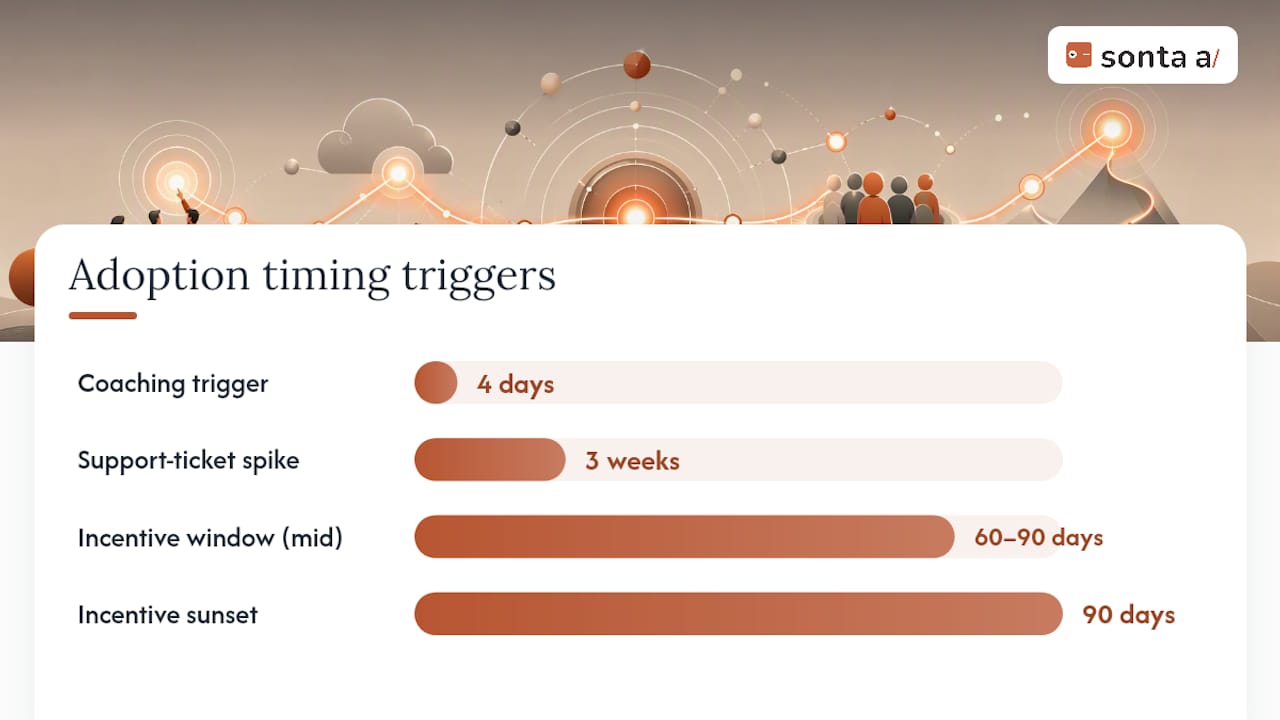
Managers should pull adoption dashboards into weekly one-on-ones, not quarterly reviews. A rep who hasn’t logged an activity in four days is a coaching conversation this week, not a data point discovered at month-end. Sonta AI’s reporting and dashboard tools are built around this kind of near-real-time visibility, since lagging adoption data is functionally useless for coaching.
Reinforcement tactics that hold up over time:
- Public recognition of high-adoption users in team meetings, named specifically.
- Short-term incentives (a contest, a small reward) for the first 60 to 90 days only.
- A monthly adoption review at the governance level, not just at the team level.
- A defined point to sunset incentives once usage becomes habitual, usually around the 90-day mark, so the CRM doesn’t become permanently tied to external rewards.
Structured onboarding also shortens the runway to full autonomy for new hires joining after go-live, a pattern well documented in research on new-employee ramp time. The same principle applies to existing employees adopting a new system: the faster they hit a real, felt “first value” moment, the faster the CRM becomes habit instead of homework.
Pragmatic Notes on AI-Enhanced CRM Adoption
AI features change the adoption conversation in a way most change management frameworks weren’t built for. A CRM that updates records automatically saves real time, but it also asks users to trust something they didn’t type themselves, and that trust gap shows up in week one even when the automation is accurate. The fix isn’t more documentation. It’s sequencing: show users the automation working correctly on their own data before asking them to rely on it for a decision that matters.
Roll AI features in gradually rather than all at once. Let a rep see three auto-updated records that were correct before you ask them to stop manually checking. Teams that skip this step get skepticism that looks like resistance but is really an unaddressed trust deficit, and no amount of WIIFM messaging fixes a trust problem, only demonstrated reliability does.
— Pavel
How Sonta AI Speeds Up the Adoption Curve
Most of the friction in a CRM rollout comes from the gap between “the system is configured” and “people actually trust it enough to stop working around it.” Sonta AI is built to close that gap faster than a traditional bolt-on approach, because records update themselves in real time instead of depending on reps to remember data entry. That removes the single biggest adoption killer this playbook covers: a CRM that looks unreliable because nobody kept it current.

If you’re not sure where your current process is leaking time or data, the AI Efficiency Diagnostic surfaces operational leakages in about 30 minutes, no lengthy audit required. For teams already committed to a migration, Sonta AI’s migration and data modeling service handles the cleansing and mapping work this article walks through in the data section, and the full implementation program pairs that technical work with the governance and enablement structure your rollout needs. Plans start at $16 per seat per month on the Solo tier, scaling up through Core and Pro as your automation needs grow. Run the diagnostic or request a demo to see where your next CRM cycle can start from a stronger baseline.
Sources
For governance and communication planning grounded in vendor-neutral practice, Microsoft’s Dynamics 365 change management guidance walks through planning and stakeholder communication in detail. HubSpot’s step-by-step deployment guide offers a practical RACI and change-control intake template. For sponsor behavior benchmarks and adoption tactics, see CRM Curator’s rollout guide. Teams building a governance committee from scratch can reference Prometheus Agency’s implementation strategy writeup for committee scope and SLA structure.
- CRM deployment: A step-by-step process for growing teams
- Change Management for CRM Rollouts | CRM Curator
- Your Guide to a Winning CRM Implementation Strategy
FAQ
What Is CRM Change Management?
CRM change management is the structured process of preparing people, not just systems, for a new CRM platform. It combines a technical implementation stream with a parallel people stream covering sponsorship, communication, training, and reinforcement, following the two-stream model HubSpot recommends for growing teams.
How Long Does a CRM Change Management Plan Take?
Most CRM implementations run their Phase 1 rollout over eight to twelve weeks, followed by a 90-day post-launch stabilization period focused on adoption metrics and optimization. Timelines stretch mainly when scope creep goes unmanaged, which is why a documented change-control intake matters from day one.
Which Change Management Framework Works Best for CRM Projects?
ADKAR and Kotter’s eight-step model both work well for CRM rollouts, and neither is inherently superior. ADKAR fits individual-level communication planning, while Kotter’s model suits governance and sponsorship structure, so many teams use elements of both rather than committing to one exclusively.
How Do You Measure CRM User Adoption?
Track feature usage by role, records created or updated per user per week, time to first value for new users, and support ticket trends by category, rather than relying on login counts alone. Managers who review these metrics weekly in one-on-ones catch adoption gaps before they become abandonment.
Does Sonta AI Help With CRM Change Management?
Sonta AI supports adoption directly through self-updating records that remove the manual data entry burden most rollouts struggle to sustain past week one. Its AI Efficiency Diagnostic and migration services target the two phases, data migration and adoption, that practitioner guides consistently name as make-or-break for CRM projects.