Scan CRM Data Governance in 30 Minutes: AI-Ready Controls for 2026

CRM data governance is the set of policies, roles, and controls that keep customer records accurate, secure, and compliant across their entire lifecycle. It protects the trust your sales and revenue teams place in the CRM to drive pipeline decisions and reporting. The single highest-leverage first step: name a data owner for each core object and enforce required-field validation at the point of entry, before bad data ever reaches a report.
TL;DR:
- Assign a dedicated data owner and steward for each core object to enforce accountability and prevent gaps in CRM data management.
- Implement validation rules, automated deduplication, and enrichment cycles at the point of data entry to prevent bad records from entering reports.
- Ensure compliance through consent tracking, retention schedules aligned with legal requirements, and maintaining an audit trail for DSARs and access requests.
- Use embedded controls like role-based access, dynamic masking, and human-in-loop approval steps to enforce governance policies in practice.
- Focus on measuring duplicate rates, required-field fill rates, and DSAR turnaround times regularly to identify and address data quality issues promptly.
Table of Contents
- Why CRM Data Governance Matters Now
- The Four Pillars: Ownership, Quality, Compliance, Security
- How to Implement CRM Data Governance Step by Step
- Which Technical Controls Actually Enforce Governance?
- What KPIs Should You Track for CRM Data Governance?
- Common Governance Pitfalls to Avoid
- How Sonta AI Operationalizes CRM Governance in Practice
- What Every CRM Admin Should Fix First
- Get Started With Sonta AI’s Governance Tools
- Sources
- FAQ
Why CRM Data Governance Matters Now
Bad CRM data is not a hygiene issue. It’s a revenue problem. Duplicate accounts split pipeline credit, stale contact records misroute leads, and reps waste hours reconciling records that should have merged automatically. When forecasting runs on unreliable inputs, revenue leaders make decisions on numbers that don’t reflect reality.
The compliance stakes have risen too. Regulators expect data subject access requests (DSARs) to be resolved within 30 days, and missing that window signals a broken compliance workflow, not just a slow support ticket. Audit readiness now means being able to produce a clean data trail on demand, not after a scramble.
Platform trends are pushing governance further into the infrastructure itself heading into 2026:
- Data classification is becoming a prerequisite for AI features, not an afterthought.
- Agent controls now require human approval checkpoints before autonomous actions touch customer records.
- Dynamic masking limits what any given role, or AI agent, can actually see.
The EU AI Act is accelerating this shift by making classification and provenance mandatory for high-risk AI systems, which means the CRM’s data governance model now doubles as your AI governance model.
The Four Pillars: Ownership, Quality, Compliance, Security
Every durable CRM governance program rests on four pillars, and HubSpot’s framework captures them cleanly: ownership, quality, compliance, and security. Skipping any one of them leaves a gap the other three can’t cover.
- Ownership. Assign a data owner per object (accounts, contacts, deals) and a steward who handles day-to-day quality issues. A simple RACI matrix, who is Responsible, Accountable, Consulted, and Informed, prevents the common failure where “everyone owns the CRM” quietly becomes “no one does.”
- Quality. Validation rules at entry, scheduled deduplication runs, and a defined enrichment cadence (weekly, not quarterly) keep decay from compounding. Prevention beats cleanup every time, since fixing a bad record after it has touched five workflows costs far more than blocking it at intake.
- Compliance. Consent tracking, retention schedules tied to actual legal requirements, and a documented DSAR workflow with an audit trail. This is where frameworks like ISO/IEC 27001, HIPAA, GDPR, and CCPA should map directly onto your access and retention policies.
- Security. Role-based access control, field-level masking for sensitive attributes, multifactor authentication, and audit logs that record who touched what and when.
Together these pillars form the operating system underneath your CRM data model, and none of them work in isolation. Weak ownership undermines quality controls; weak security undermines compliance.
How to Implement CRM Data Governance Step by Step
Governance programs fail most often because teams buy tools before defining who does what and why. The sequence below flips that order, starting with assessment and ending with measurement, matching the operational approach Workday recommends for treating governance as a continuously managed program rather than a one-time project.
- Assess your baseline. Run a full data inventory. Measure your current duplicate rate and required-field fill rate before you touch anything, so you have a number to improve against.
- Define the business outcome and pick a pilot domain. Don’t try to govern the entire CRM at once. Choose one high-value object, often the accounts or deals table, where bad data visibly costs money.
- Assign owners and codify policies. Write down who approves schema changes, who resolves duplicate conflicts, and what “clean” means for each field. Build a lightweight change-control process so policies don’t drift the moment someone is on vacation.
- Embed controls at ingestion. Add required-field validation, picklists instead of free text, and automated deduplication rules directly into the intake flow. Automate enrichment on a recurring cycle instead of relying on manual updates.
- Audit quarterly and scale from early wins. Once the pilot domain hits its quality targets, use that result to justify expanding governance to the next object.
Pro Tip: Present your pilot’s before-and-after duplicate rate to leadership in dollar terms, not percentages. For example, show recovered rep time to emphasize impact rather than just percentages.
Which Technical Controls Actually Enforce Governance?
Policy documents don’t stop bad data. Controls embedded in the platform do. Input-layer guardrails, required fields, validation rules, and picklists instead of open text, stop most errors before they ever reach a report, echoing the “prevent, don’t clean up” logic that Integrate’s CRM data management research recommends.
Deduplication needs an explicit strategy, not just a tool. Decide in advance whether near-duplicate records get blocked at creation or flagged for manual merge. Blocking works for tier-1 objects like accounts; marking for review works better where legitimate near-duplicates are common, like contacts at large enterprise accounts.
Beyond entry-point controls, four capabilities separate mature governance programs from paper policies:
- Automated enrichment on a weekly cadence, pulling from integrated data sources rather than waiting for manual updates.
- Lineage and classification, so every field’s sensitivity level and origin are traceable.
- Dynamic masking and attribute-based access policies (ABAC), which restrict visibility by role and context rather than an all-or-nothing permission set.
- Human-in-loop approval gates for any AI agent taking action on customer records, with a logged audit trail for every autonomous decision.
Some governance frameworks now shift quality monitoring from “alert when broken” to “block the pipeline run,” a stricter model CRM Curator’s 2026 analysis recommends for tier-1 data contracts where a bad sync could corrupt downstream reporting.
What KPIs Should You Track for CRM Data Governance?
Governance only works if it’s measurable. The table below lists the operational thresholds that practitioner benchmarks treat as the baseline for a healthy CRM.
When a metric drifts off target, the fix usually traces back to one pillar: duplicate rate points to weak intake validation, decay points to a missing enrichment cadence, and DSAR delays point to an undocumented request workflow.
Common Governance Pitfalls to Avoid
Most failed governance programs share the same handful of mistakes, and research on governance failures points to the same root causes repeatedly.
- Buying tools before defining process. A deduplication tool without a merge policy just automates confusion faster.
- Writing policy that no one enforces. A retention policy in a shared document isn’t governance if no automation checks it.
- Trying to govern everything at once. Scope creep kills pilots. Start with one object and prove the model works.
- Ignoring shadow integrations. Every unaudited connector or AI tool pulling CRM data is an ungoverned data source until you inventory and classify it.
How Sonta AI Operationalizes CRM Governance in Practice
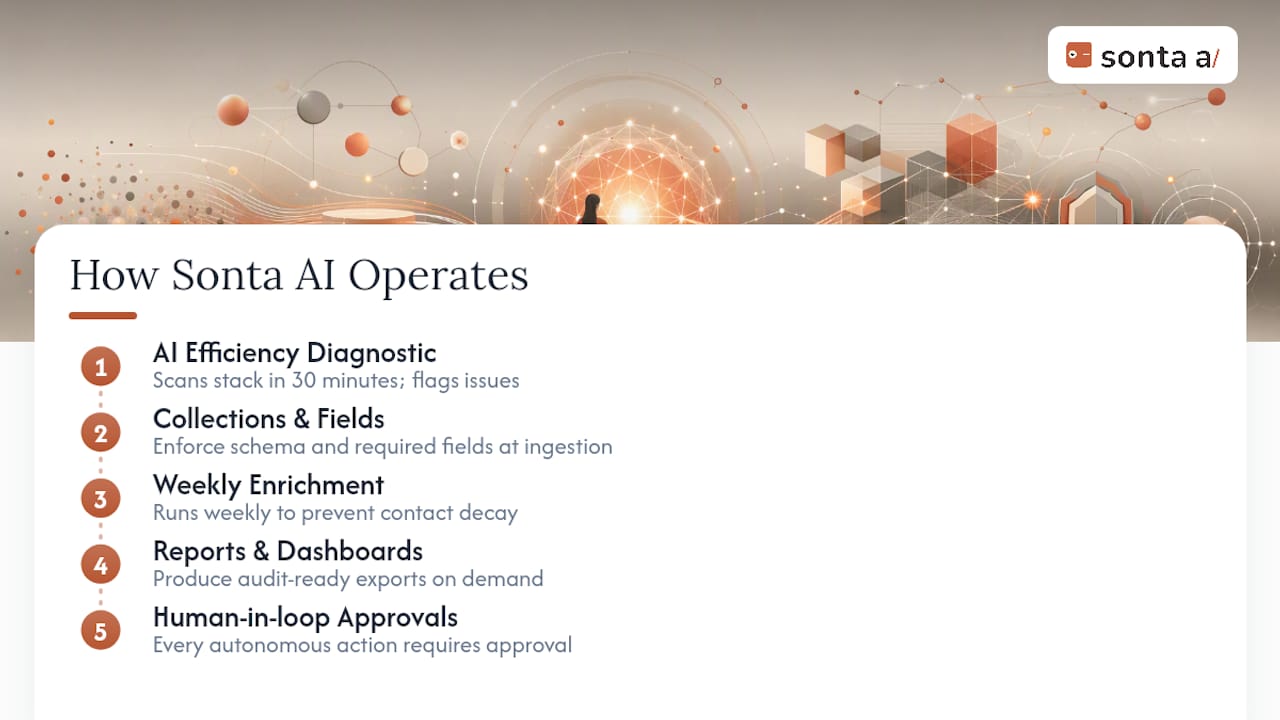
Governance frameworks tend to live in slide decks. Sonta AI’s approach is to surface governance where the work happens, ambient rather than aspirational. Its AI Efficiency Diagnostic scans your existing stack in 30 minutes and flags exactly where duplicate records, stale fields, or unowned data sources are leaking productivity.
Because Sonta AI’s records update themselves rather than waiting on manual entry, Collections & Fields enforce schema and required-field rules automatically at the point of ingestion, and weekly enrichment cycles keep contact decay in check without a steward chasing updates by hand. Reports and dashboards produce audit-ready exports on demand. Every autonomous agent action, from lead qualification to follow-up scheduling, runs through a human-in-loop approval step, so autonomy never comes at the cost of an audit trail.
What Every CRM Admin Should Fix First
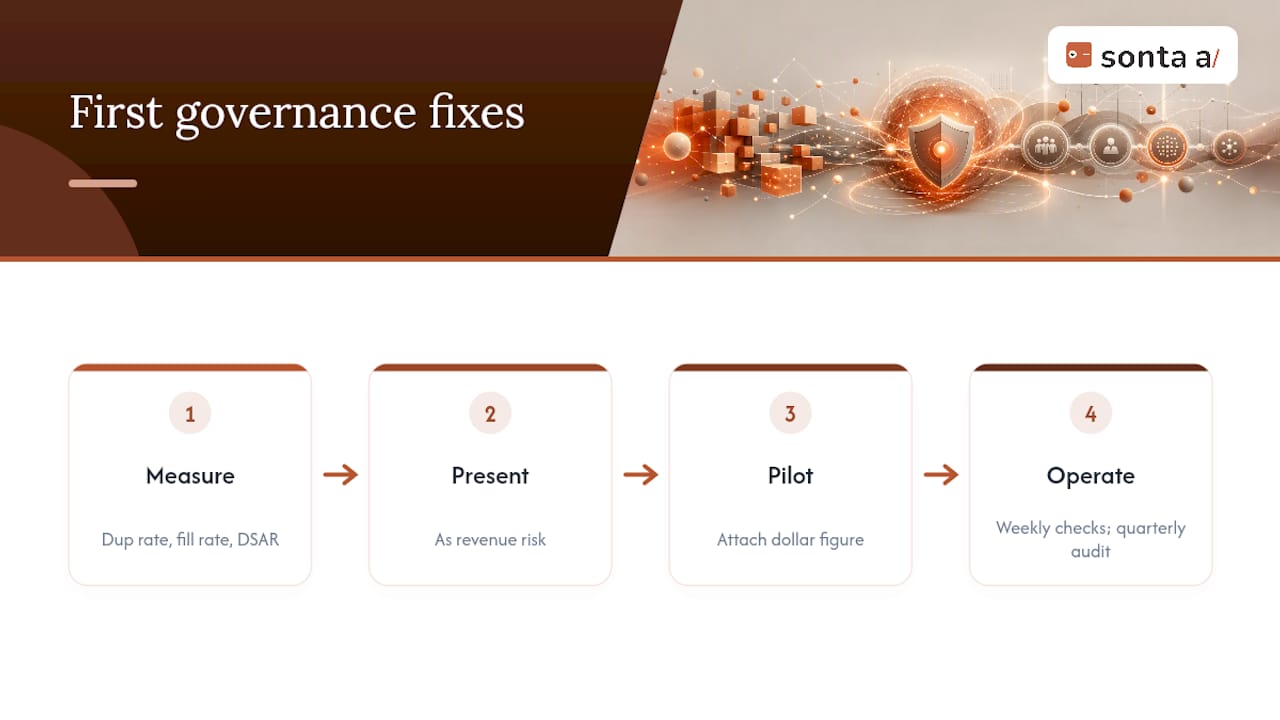
Most CRM admins overcomplicate governance by trying to build the full framework before proving any of it works. Don’t. Pull three numbers this week: duplicate rate, required-field fill rate, and average DSAR turnaround. Present them to leadership as revenue risk, not IT hygiene.
Package your first governance move as a pilot with a dollar figure attached, run weekly spot checks, and formalize a quarterly audit. That rhythm, not a 40-page policy document, is what earns governance a permanent seat at the leadership table.
— Pavel
Get Started With Sonta AI’s Governance Tools
Some platforms offer an alternative to bolting governance onto a legacy CRM after the fact. Instead of writing policy documents that sit unread, they provide self-updating records, automated deduplication, and human-in-loop agent controls built into the platform from the start.

Evaluating an AI-native CRM for governance fit comes down to three questions: does it enforce validation at ingestion, does it give you an audit trail for every automated action, and does it surface data quality inline rather than in a separate dashboard nobody checks? Sonta AI answers yes to all three, and its AI Efficiency Diagnostic will show you exactly where your current stack falls short in about 30 minutes. If you’re weighing a broader systems overhaul alongside governance, a partner like LogicBranch can help align custom integrations with the same controls. Run the diagnostic or request a demo to see how self-updating records change the governance conversation from quarterly cleanup to continuous accuracy.
Sources
FAQ
What Is CRM Data Governance?
CRM data governance is the combination of ownership roles, quality controls, compliance workflows, and security measures that keep customer records in a CRM accurate, protected, and audit ready throughout their lifecycle.
What Are the Five Pillars of Data Governance?
Common frameworks name ownership, data quality, compliance, security, and continuous monitoring as the five pillars, with ongoing training and executive support needed to sustain them over time.
What Is CRM in Data Management?
In data management, a CRM is the system of record for customer and prospect data, and its governance determines whether that record can be trusted for reporting, automation, and compliance.
What Are the Top Tools for CRM Data Governance?
The right tool depends on whether you need standalone data quality software or governance built into the CRM itself; platforms like Sonta AI build validation, deduplication, and audit trails directly into the record layer instead of requiring a separate governance layer.
How Long Can a DSAR Take Under GDPR?
Data subject access requests should be completed within 30 days, and exceeding that window is treated as a compliance failure requiring corrective action.