GTM Ops: 50–200 Document Pilot for Data Entry Automation

Data entry automation is worth adopting when your team handles repetitive, high-volume document or inbox work that follows predictable patterns, like invoices, form submissions, or lead intake. It uses AI to read documents and messages, extract the right fields, and write structured records into your CRM, spreadsheet, or accounting system, cutting manual entry time and reducing transcription errors. If that description matches at least one workflow your team dreads, the next move isn’t buying a platform. It’s pulling 50 to 200 real documents and running a pilot to see what accuracy you actually get.
TL;DR:
- Pilot data entry automation with 50 to 200 real, messy documents to gauge actual accuracy before committing to deployment.
- Use tools that provide layout-aware extraction and semantic labeling, rather than relying solely on OCR or RPA, to ensure better accuracy across different formats.
- Focus on high-volume, low-judgment workflows like invoices, form submissions, or lead updates for the quickest automation wins and ROI.
- Implement staged autonomy with confidence scoring and human review for low-confidence fields to prevent errors and maintain system reliability.
- Assign a dedicated owner for ongoing monitoring and validation to prevent drift in confidence thresholds and ensure persistent data quality.
Table of Contents
- What Is Data Entry Automation, and How Is It Different From OCR or RPA?
- How Do AI Techniques Power Modern Data Entry?
- What ROI Should You Expect From Automating Data Entry?
- Which Workflows Deliver the Fastest Automation Wins?
- How Do You Plan an Implementation Timeline?
- How Do You Handle Accuracy, Validation, and Security?
- How Does an AI-Native CRM Approach This Differently?
- What Do Successful Data Entry Automation Rollouts Look Like?
- What Should You Look for When Choosing a Data Entry Automation Tool?
- What Are the Real Limitations of Data Entry Automation?
- Automation Works Best When Humans Stay in the Loop, Not Out of It
- Sonta AI: See Where Manual Entry Is Costing You Before You Buy Anything
- Sources
- FAQ
What Is Data Entry Automation, and How Is It Different From OCR or RPA?
Data entry automation is the umbrella term for software that reads unstructured or semi-structured input, a PDF, an email, a scanned form, and turns it into structured data inside a business system. That’s a broader claim than what older technologies deliver, and the distinction matters when you’re evaluating vendors.
Optical character recognition (OCR) only converts an image of text into machine-readable characters. It tells you what words appear on a page, but it has no idea which number is the invoice total and which is a tax ID. Robotic process automation (RPA) is different again: it scripts clicks and keystrokes to move data between screens, following rigid rules that break the moment a layout shifts. Neither technology understands context.
Modern data entry automation adds two layers RPA and OCR lack: layout-aware extraction, which recognizes that a number in the top-right corner of an invoice is probably the total, and semantic labeling, which maps that number to the correct field regardless of how the document is formatted. DocuWare describes this as capturing, classifying, and transferring data from documents directly into business systems, which is a fair summary of what separates true automation from a scanner with software attached.
Typical inputs include invoices, purchase orders, intake forms, emails, and voice memos. Typical outputs land in spreadsheets, CRMs like Sonta AI, or accounting platforms, usually through a direct connector rather than a manual export and re-upload.
How Do AI Techniques Power Modern Data Entry?
The core technical shift is combining computer vision with natural language processing. Vision models handle layout, recognizing tables, headers, and field positions on a page. NLP and large language models add context, inferring that “Net 30” refers to payment terms even when the label itself is missing or written differently across vendors.
This split matters when comparing systems. Template-based tools memorize a document’s layout and break when a new vendor sends an invoice in a different format. Zero-shot, template-free models handle documents they’ve never seen because they reason about content rather than matching a fixed layout. Parsinto’s guidance notes that these layout-agnostic models cut setup time and scale better across variable document types, though they demand a more deliberate validation strategy since there’s no fixed template to fall back on for edge cases.
Every extracted field should come with a confidence score, a probability estimate of how certain the model is that it read the value correctly. High-confidence fields, say a well-formatted date, can post straight to your system. Low-confidence fields, a smudged total or a handwritten note, route to a human reviewer instead. Arahi AI’s agent pattern extracts from emails, PDFs, and web portals while scoring confidence per field and routing uncertain results for review, which is close to the standard architecture worth expecting from any serious vendor.
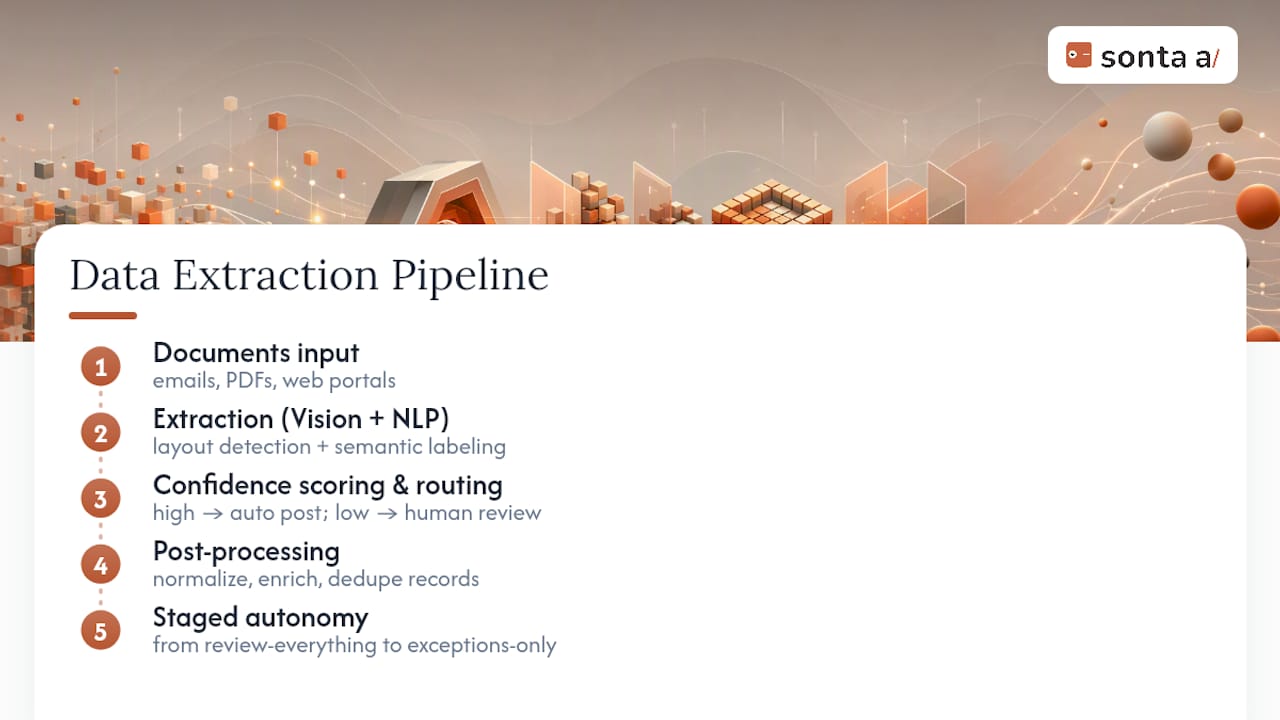
Behind the extraction layer, normalization (standardizing date formats, currency, and units), enrichment (filling gaps from existing records), and dedupe logic prevent the same contact or invoice from creating duplicate entries. Staged autonomy, where the system earns more independence as its accuracy track record proves out, is the safest way to scale from “review everything” to “review exceptions only.”
What ROI Should You Expect From Automating Data Entry?
Time savings are the first number most teams chase, and they’re real, but the size varies by workflow complexity and document quality. Practitioner guidance on CRM hygiene puts achievable time reductions in the 40 to 60 percent range when teams pair automation with disciplined practices like batch entry windows and standardized fields, rather than automation alone.
Error reduction is the number finance teams care about more than time. Manual re-keying introduces transposition errors, missed fields, and inconsistent formatting that compound downstream. Automation with confidence scoring catches most of that before it ever reaches a report.
The softer benefits show up later but matter just as much: faster month-end close, cleaner pipeline reports that sales leaders actually trust, and lower turnover among staff whose job description stops being “copy this PDF into a spreadsheet all day.”
Which Workflows Deliver the Fastest Automation Wins?
Not every task is a good automation candidate. The best early targets share two traits: high volume and low judgment required. A few workflows consistently pay off first:
- Email to CRM. Incoming leads or customer replies auto-create or update contact records and attach the message as a logged activity, no one retyping a name and email from a signature block.
- PDF invoice to accounting. Line items, totals, tax amounts, and vendor names get pulled directly into your accounting system, with confidence scoring flagging anything that looks off before it posts.
- Form submission to spreadsheet or database. Web forms and intake surveys write directly into your system of record, with dedupe logic checking against existing entries so the same lead doesn’t create three duplicate rows.
- Voice memo to structured CRM note. A rep’s post-call voice note gets transcribed and parsed into structured fields, next steps, sentiment, deal stage, rather than sitting as an unsearchable audio file.
Start with whichever workflow combines the highest volume with the lowest judgment call. Invoice processing usually wins that contest because the fields are consistent and the stakes of a wrong read are caught by your existing approval process anyway.
How Do You Plan an Implementation Timeline?
A rushed rollout is how automation projects earn a bad reputation. A disciplined pilot takes a few weeks and tells you almost everything you need to know before you commit budget.
- Scope the pilot with 50 to 200 real documents. Parsinto’s pilot guidance specifically recommends testing on at least 50 documents, including deliberately messy edge cases, not just the clean samples a vendor demo will show you.
- Map fields and set validation rules. Decide which fields are critical (a payment amount) versus cosmetic (a formatting preference), and set confidence thresholds accordingly, tighter for critical fields, looser for anything a human glances at anyway.
- Run an integration test with reversible writes. Before connecting to production, confirm the tool can write to a sandbox version of your CRM or accounting system and that every write can be rolled back cleanly.
- Measure accuracy, throughput, and time saved end to end. Track not just extraction accuracy but the full cycle time from document arrival to record posted, since that’s the number that actually shows up in your team’s calendar.
Pro Tip: Fix data quality at the point of intake rather than planning to “clean it later.” A Lilach Bullock article on CRM efficiency makes this point well: every error caught at the form or email stage is one your team never has to untangle three months later in a report.
Once the pilot clears your accuracy bar, roll out one workflow at a time rather than flipping every process simultaneously. Give each stage two to four weeks before expanding scope.
How Do You Handle Accuracy, Validation, and Security?
Confidence thresholds should vary by field criticality, not sit at one flat number across your whole document set. A payment amount might need a 95 percent confidence floor before it posts automatically; a customer’s middle initial can tolerate far more slack. Anything below your threshold routes to a human review queue instead of posting blind.
Dataentryautomation, which is why vendors that lean on confidence scoring and human review tend to hold up better in production than ones promising blanket accuracy numbers.
Every write to a downstream system should leave an audit trail: who or what made the change, when, and what the previous value was, so a bad extraction can be rolled back without a manual hunt through records. Gartner treats data-quality governance as a core requirement for analytics and automation projects, and that same discipline, logging, versioning, clear ownership, applies directly to data entry automation.
On the compliance side, ask vendors for SOC 2 reports, confirmation of encryption at rest and in transit, and a signed business associate agreement (BAA) if you’re touching healthcare data. Beyond setup, build a monitoring cadence: dedupe runs on a fixed schedule, monthly quality spot checks against a sample of automated entries, and a clear owner accountable for both.
How Does an AI-Native CRM Approach This Differently?
Most legacy CRMs treat data entry as something your team does to the system. An AI-native architecture flips that: agents update records automatically as new information arrives, keeping a field-level audit trail so every change is traceable back to its source.
Sonta AI’s AI Efficiency Diagnostic is built around that idea, a 30-minute assessment designed to surface exactly where manual entry is leaking hours before you commit to a bigger rollout. Instead of guessing where automation will help most, you get a specific list of leakages to fix first.
Concrete patterns worth knowing about:
- Lead qualification agents that score and route incoming leads without a rep manually copying data between forms and pipeline stages.
- Enrichment agents that fill missing contact or account fields from existing records rather than leaving gaps for someone to chase down later.
- Activity logging that captures calls, emails, and notes automatically, with staged autonomy so the system earns more independence as its accuracy holds up.
For teams building their own automations, Sonta AI Academy’s guide to creating and activating automations walks through the setup pattern in more detail.
What Do Successful Data Entry Automation Rollouts Look Like?
Teams that get real value almost always start narrow: one document type, one downstream system, a few weeks of measurement before expanding.
A recruiting firm processing hundreds of resumes weekly is a good illustration of the shape these wins take. Manually re-keying candidate details, work history, contact info, and certifications into an applicant tracking system eats hours every day and invites transcription errors that later cost a recruiter a good candidate’s correct phone number. Automating that intake step, with layout-aware extraction handling wildly inconsistent resume formats and confidence scoring flagging anything unreadable, typically compresses a multi-hour daily task into a review-only workflow lasting minutes.
Auto retail dealerships tell a similar story with paperwork: financing applications, trade-in forms, and service records all arrive in different formats from different sources, and getting them into a dealer CRM without a human retyping every field is one of the clearest volume-plus-low-judgment cases in the industry.
What separates the rollouts that stick from the ones that quietly get abandoned isn’t the sophistication of the AI. It’s whether the team measured a real baseline before automating, ran a pilot on messy real documents rather than clean samples, and assigned someone to own the confidence thresholds and review queue after launch. Automation that nobody monitors drifts. Automation with a named owner and a monthly check tends to keep earning its keep.
What Should You Look for When Choosing a Data Entry Automation Tool?
Vendor demos are optimized to look flawless, which is exactly why they’re the wrong basis for a decision. Insist on testing with your own documents, not the vendor’s curated samples, before you sign anything.
A few criteria separate tools that hold up in production from ones that look good in a sales call:
- Confidence scoring granularity. A tool that gives you one overall accuracy number is less useful than one that scores each field individually, since that’s what actually determines your review workload.
- Connector and export coverage. Zapier’s overview of AI data entry automation stresses that structured exports, CSV, JSON, Excel, and native connectors to CRMs and accounting platforms are non-negotiable for production use. A tool without a direct connector to your CRM just moves the manual step downstream instead of removing it.
- Template-free capability. If your documents vary by vendor or customer, a zero-shot model that doesn’t require pre-built templates will scale far better than one that needs a new template for every new format.
- Audit trail and rollback. Ask specifically how the tool logs changes and whether a bad write can be reversed without manual database work.
- Security posture. SOC 2 compliance, encryption standards, and a BAA option if healthcare data is involved should be table stakes, not a premium add-on.
Pricing structure matters too. Tools that meter usage by document volume or AI calls can penalize you right when automation is working best, at scale. Tools with flat or seat-based pricing avoid that trap.
What Are the Real Limitations of Data Entry Automation?
Automation doesn’t eliminate the need for judgment, it relocates where judgment gets applied. That distinction trips up teams that expect a “set it and forget it” rollout.
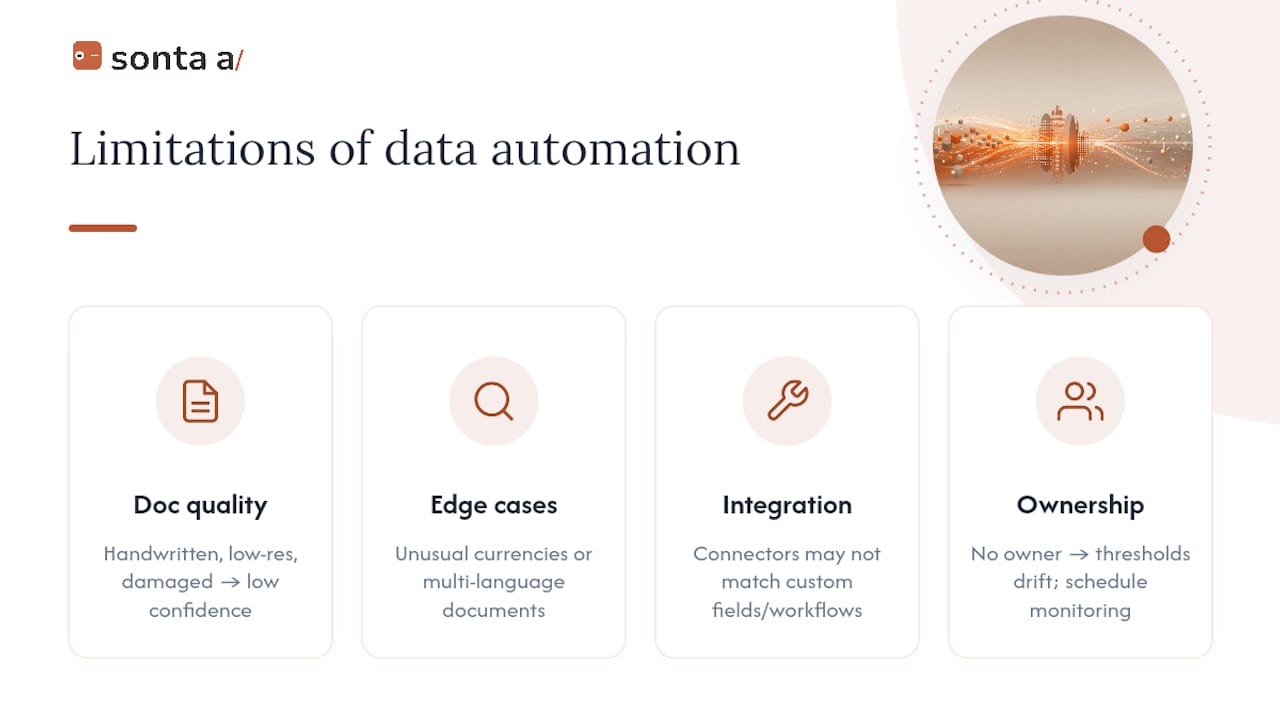
Document quality is the biggest practical constraint. Handwritten forms, low-resolution scans, and heavily damaged documents will always produce lower confidence scores, and no model fully closes that gap. Teams that skip a review queue for these cases end up with quietly wrong records instead of manual entry delays, which is arguably worse.
Edge cases are the second constraint. A model trained mostly on standard invoices may stumble on an unusual currency format or a multi-language document, exactly the kind of case a 50 to 200 document pilot is designed to surface before it becomes a production problem.
Integration friction is underrated as a risk. A tool can extract data perfectly and still fail in production if its connector to your CRM or accounting system doesn’t handle your specific field structure, custom objects, or approval workflow. This is why testing the full write path, not just extraction accuracy, matters during a pilot.
Finally, there’s an organizational limitation that has nothing to do with the technology: automation without a named owner tends to decay. Confidence thresholds that made sense at launch stop matching reality as document types shift, and nobody notices until an error surfaces downstream. The fix is procedural, not technical: assign monitoring, schedule it, and treat it like any other operational process that needs upkeep.
Automation Works Best When Humans Stay in the Loop, Not Out of It
The instinct with any new automation tool is to push for full autonomy as fast as possible. That instinct is usually wrong. The teams that get burned by data entry automation aren’t the ones who moved too slowly, they’re the ones who trusted a 90 percent confidence score on a customer-facing field without ever checking what the other 10 percent looked like.
Automate high-volume, low-judgment tasks first, invoice line items, form intake, routine activity logging. Save staged autonomy and approval gates for anything that touches a customer directly, a pricing change, a contract term, a status update a client will see. And assign a specific owner, not a team, to the monitoring cadence. Diffuse ownership is how confidence thresholds quietly drift out of date until someone downstream notices the damage.
None of this argues against automation. It argues for treating the review queue as a permanent feature of the system, not a training-wheels phase you graduate out of.
— Pavel
Sonta AI: See Where Manual Entry Is Costing You Before You Buy Anything
If the sections above convinced you that a pilot is the right next move, Sonta AI’s AI Efficiency Diagnostic is built for exactly that decision point. It’s a 30-minute assessment that identifies where manual data entry and other operational leakages are actually costing your team time, before you commit budget to a bigger platform switch.

Sonta AI is an agentic CRM built around records that update themselves, powered by AI agents that handle lead qualification, follow-up, enrichment, and activity logging with staged autonomy rather than a flat set of automation rules. Every action carries a field-level audit trail, so nothing updates silently. Pricing starts at $16 per seat per month on the Solo plan, scaling up through Core and Pro for teams that need more automation depth, with implementation and migration support available for teams moving off a legacy CRM.
Run the diagnostic first. It takes half an hour and gives you a concrete list of where automation would actually help, not a generic pitch.
Sources
A short pilot beats a long RFP process for evaluating data entry automation. Test on your own documents, not vendor samples, and measure the full write path, not just extraction accuracy.
- Gartner — Data quality
- Automated Data Entry: What It Is, How It Works and How to Get Started — DocuWare
- Parsinto — AI data extraction and pilot guidance
- Arahi AI — AI data entry agent
Pull 50 to 200 real documents from your own workflow, including the messy ones, before evaluating any vendor further.
FAQ
How Can I Automate Data Entry in Excel?
Most modern tools extract structured data from PDFs, emails, or forms and export it directly into Excel via CSV or native connectors, skipping manual copy and paste entirely. Zapier’s overview confirms that structured exports like CSV and Excel are standard features vendors should support for production use.
How Do I Automate Data Entry Using AI?
Start by identifying a high-volume, low-judgment workflow, invoice processing or form intake are common first choices, then run a pilot with 50 to 200 real documents to test extraction accuracy before rolling out broadly. Tools use computer vision and NLP together to read layout and context, then route anything below a confidence threshold to a human reviewer.
Which Software Is Most Used for Data Entry?
There’s no single dominant tool, since the best fit depends on document type, volume, and which downstream system you need to feed. Look for confidence scoring, template-free extraction, and strong connector coverage to your CRM or accounting platform; an AI-native CRM like Sonta AI folds this directly into record updates rather than treating it as a separate step.
Can ChatGPT Do Data Entry?
ChatGPT and similar large language models can extract and structure data from text you paste in, but they lack built-in connectors, confidence scoring, and audit trails needed for production workflows. Purpose-built data entry automation tools add those layers, layout-aware extraction, field-level confidence scores, and direct writes to your CRM or accounting system, that general-purpose chat tools don’t include natively.