Fix Lead to Account Matching in 90 Days for RevOps: Buying-Group Steps

Lead-to-account matching is the process of linking an inbound lead record to the correct company account in a CRM, typically by comparing company name, email domain, website, and location data. The immediate payoff is operational: once a lead is matched correctly, routing, attribution, and account-based marketing all run on accurate data instead of guesswork, and multi-field logic with fuzzy comparisons and tie-breakers is what makes that accuracy possible.
TL;DR:
- Accurate lead-to-account matching relies on multiple data points, including company name, email domain, website, and geographic location, for reliable automation.
- Fuzzy matching algorithms and multi-field scoring improve match confidence, but require careful configuration of thresholds and tie-breaker rules to prevent errors.
- Regular monitoring through job logs, dashboards, and match reasons helps identify and fix issues caused by inconsistent naming or international formatting problems.
- Implementing a structured setup with clear thresholds, normalization rules, and manual review ensures consistent and trustworthy account linkage.
- Extending matching logic to buying groups and opportunity-level mapping enhances tracking of complex buyer behaviors across multiple leads.
Table of Contents
- What lead-to-account matching is and why it matters for B2B GTM teams
- How matching actually works: inputs, rule types, scoring, and tie-breakers
- When matching runs and how to monitor and troubleshoot matching jobs
- Common pitfalls and fixes (naming, shared domains, subsidiaries, international formatting)
- Actionable best-practice configuration checklist for reliable matching
- Extending matching to buying groups and opportunity-level mapping
- CRM-specific implementation notes (Salesforce and HubSpot style differences)
- A 30/60/90 day plan for fixing lead-to-account matching
- Sonta Ai: how our AI-native approach helps with matching
- Primary sources and further reading
- Sources
- FAQ
What lead-to-account matching is and why it matters for B2B GTM teams
A lead is a raw record generated by a form fill, event scan, or inbound inquiry. A contact is a person already tied to an account. An account is the company itself. Matching is the step that converts a lead into a contact under the right account, and skipping it or getting it wrong breaks everything downstream.
The business stakes are concrete:
- Routing: misrouted leads sit in the wrong rep’s queue or get assigned to no one.
- Attribution: marketing can’t credit campaigns correctly when leads float unattached to accounts.
- Account-based marketing: ABM programs depend on knowing which leads belong to target accounts in real time.
Matching sits between marketing automation ingestion and the sales force automation layer. A lead enters through a form or integration, gets evaluated against existing account records, and either attaches to a match or falls into a queue for review. Get this step wrong and reps waste time chasing duplicates or missing warm accounts entirely.
How matching actually works: inputs, rule types, scoring, and tie-breakers
Most matching engines pull from a short list of fields: company name, email domain, website URL, and geographic data like city, state, or country. Vendor documentation across CRMs and customer data platforms consistently points to these same four inputs as the backbone of matching logic, regardless of the specific product.
The rule types layer on top of those inputs in increasing order of flexibility:
- Exact match: the lead’s domain or company name is character-for-character identical to an existing account field.
- Normalized match: punctuation, suffixes like “Inc.” or “LLC,” and casing are stripped before comparison, so “Acme Corp.” and “acme corp” register as the same entity.
- Fuzzy match: algorithms score similarity between strings that aren’t identical but are likely the same company, such as “Acme Corporation” versus “Acme Corp.”
Each rule produces a confidence score, and most systems apply a threshold below which a match is rejected outright and sent to manual review instead of auto-linking. Multi-field weighting is what separates a reliable engine from a brittle one: a matching engine that only checks company name will misfire constantly, but one that combines domain match, name similarity, and geographic proximity into a single weighted score catches far more true matches while rejecting more false ones.
Tie-breakers matter when two or more accounts score similarly. Common tie-breaker logic favors the account with the most recent activity, the account already owned by the lead’s assigned rep, or the account with the highest existing opportunity value. Without a defined tie-breaker, the system defaults to whichever record it processes first, which is rarely the right answer.
When matching runs and how to monitor and troubleshoot matching jobs
Matching jobs run on one of two schedules: real time, triggered the moment a lead is created, or batch, running on a fixed interval such as every 24 hours. Real-time matching gets leads to the right rep immediately, which matters for inbound demo requests. Batch matching is common in CDPs and some CRMs because it allows enrichment data to populate first, lowering processing cost at the expense of speed.
Monitoring should cover a few concrete outputs:
- Job logs: timestamps, record counts, and error codes for each run.
- Matched versus unmatched dashboards: the proportion of leads that linked automatically versus those that need review.
- Match-reason fields: the specific rule or score that triggered (or failed) a match.
Many B2B organizations use lead-to-account matching to enable routing and attribution, but most stop at the single-lead level rather than extending the logic to opportunities. That gap is usually where mismatches hide. Quick diagnostics: check domain parsing on free or shared email providers, confirm normalization rules are stripping suffixes consistently, and review suppression filters that might be silently dropping valid leads before they ever reach the matching engine.
Common pitfalls and fixes (naming, shared domains, subsidiaries, international formatting)
Inconsistent naming is the most frequent cause of missed matches. “Acme,” “Acme Corp,” and “Acme Corporation Ltd.” can all refer to the same company, and without canonicalization rules, each spelling creates a new orphan account.
- Shared domains and personal emails: leads from gmail.com or shared corporate domains like those used by large enterprises or coworking spaces can’t be matched on domain alone and need a fallback rule.
- Subsidiary and parent resolution: a lead from a regional subsidiary may need to roll up to a parent account, which requires hierarchical account structures rather than flat matching.
- International formatting: company suffixes, address formats, and phone number conventions vary by country, and a normalization pipeline built only for one region will misfire on the rest.
Fixes worth building into the process include enrichment services that standardize company names and domains before matching runs, manual review queues for anything below the confidence threshold, and match-reason transparency so ops teams can see exactly why a record linked or didn’t.
Pro Tip: Build a weekly sample review of 20 to 30 unmatched leads; patterns in why they failed usually point to one or two fixable rules rather than a systemic rebuild.
Actionable best-practice configuration checklist for reliable matching
A reliable matching setup follows a predictable sequence rather than relying on one clever rule.
- Start with exact domain match, since it’s the lowest-risk, highest-confidence rule available.
- Fall back to normalized company name match when domain data is missing or shared.
- Apply fuzzy matching last, with a threshold high enough to avoid false positives.
- Route anything below threshold to manual review rather than forcing an auto-match.
At lead capture, require fields that make matching possible later: company name, work email, website, and at minimum city and country. Skipping these at the form level guarantees downstream matching problems no rule can fully fix.
Tunable knobs worth revisiting quarterly include field weights (how much domain match counts versus name similarity), confidence thresholds, and whether the system is allowed to auto-overwrite existing account data or must flag changes for approval.
| Governance element | What it covers |
|---|---|
| Accuracy sampling | Periodic manual review of a sample of auto-matched leads |
| Audit logs | Record of which rule or score triggered each match |
| Manual review SLA | Time limit for clearing the unmatched queue |
| Override policy | Rules for when a rep can manually reassign a match |
Treat match transparency, meaning a visible reason for every match decision, as an operational trust signal. Teams that can see why a match happened spend less time second-guessing the system and more time working the pipeline it produces.
Extending matching to buying groups and opportunity-level mapping
Forrester’s research on lead-to-account and opportunity matching argues that most B2B systems stop one level too early: they match leads to accounts but rarely extend that logic to opportunities, which is where buying-group behavior actually shows up. A separate Forrester report describes this gap as “buying-group blindness”, a structural mismatch between lead-centric systems and account-centric buying behavior.
| Model | What it captures | Limitation |
|---|---|---|
| Buying-group | Multiple leads aggregated by concurrent activity and intent | Requires data-model and process changes |
Detecting an active buying group means aggregating signals across multiple leads at the same account, such as concurrent activity or overlapping intent data, rather than evaluating each lead in isolation. The practical move is to map a buying-group object to opportunity candidates and then track buying-group-level conversion, not just individual lead conversion, as the real measure of pipeline health.
CRM-specific implementation notes (Salesforce and HubSpot style differences)
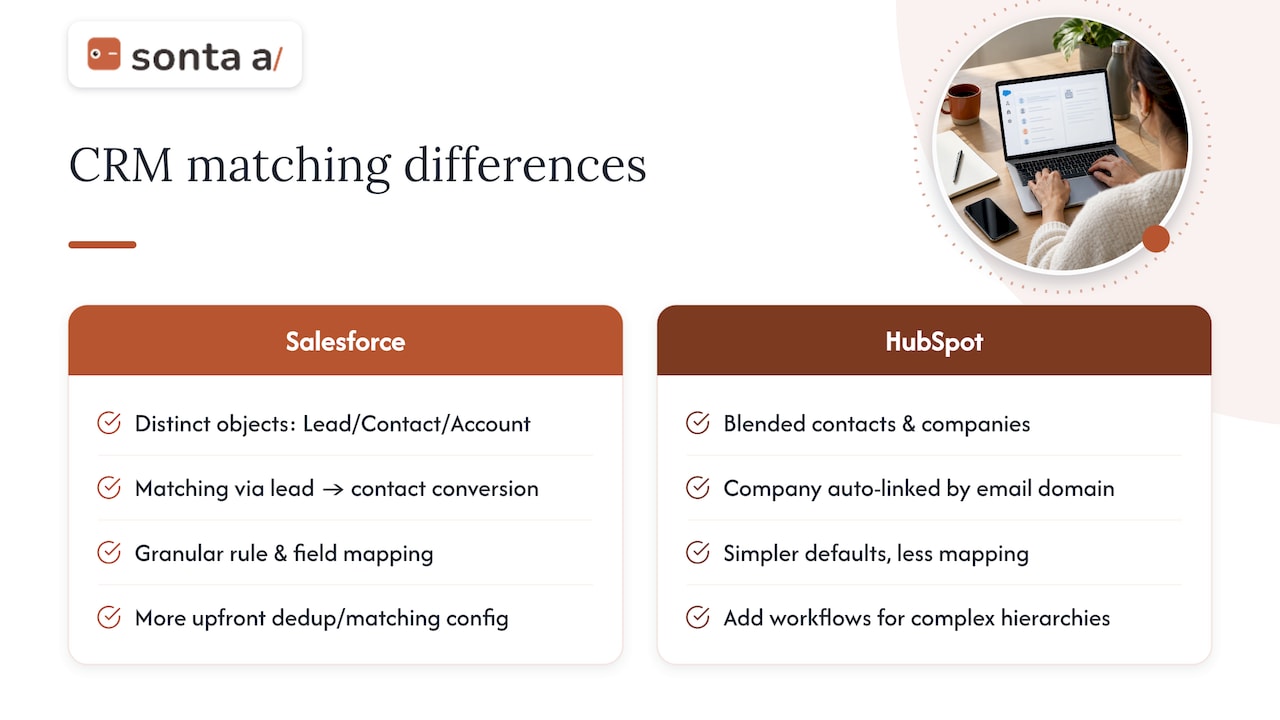
Salesforce and HubSpot approach matching from different architectural starting points, and that shapes how teams configure rules in each system.
Salesforce treats leads, contacts, and accounts as distinct objects from the start, which means matching logic (native or through a managed package) has to explicitly convert a lead into a contact and associate it with an account object. This gives administrators granular control over matching rules, field mapping, and conversion criteria, but it also means more configuration work up front, particularly around deduplication rules and matching criteria sets.
HubSpot, by contrast, blends contacts and companies more fluidly, with company association often happening automatically based on email domain at the point of contact creation. This lowers the configuration burden for simpler use cases, but teams with complex account hierarchies, multiple subsidiaries, or strict territory rules often find HubSpot’s default domain-based association too blunt and need to layer on custom workflows or a third-party matching tool.
In both platforms, the underlying principles hold: domain and name matching remain the primary inputs, fuzzy logic catches what exact rules miss, and a manual review queue catches what both miss. The platform choice changes where the configuration work happens, not whether it’s needed.
A 30/60/90 day plan for fixing lead-to-account matching
In the first 30 days, audit unmatched leads and fix obvious normalization gaps. By 60, add fuzzy matching and tie-breaker logic. By 90, extend to buying-group tracking. The usual blocker isn’t technical, it’s getting marketing and sales ops to agree on one source of truth for account hierarchy.
— Pavel
Sonta Ai: how our AI-native approach helps with matching

Most matching problems come back to stale or fragmented account data, which is exactly what a legacy CRM’s manual entry model tends to produce. Sonta Ai takes a different approach: records update themselves in real time, so the account data your matching rules depend on, domain, name, hierarchy, stays current without someone manually fixing it after the fact. Customizable AI agents handle the qualification and follow-up work that usually piles up around unmatched or misrouted leads. If you want a faster read on where your current stack is leaking match accuracy, the AI Efficiency Diagnostic gives you actionable findings in 30 minutes. You can also look at pricing and plans to see what fits your team.
Primary sources and further reading
Forrester’s measurement mechanics report covers the operational side of matching leads to accounts and opportunities. Its companion piece on assigning buying groups focuses on measurement, specifically how to operationalize buying-group tracking inside standard SFA functionality. Teams building out dashboards for this kind of tracking may also benefit from working with a data strategy and analytics partner.
FAQ
What is the Salesforce CRM lead-to-account matching tool?
Salesforce doesn’t ship one single native tool labeled “lead-to-account matching.” Instead, admins build matching through lead conversion rules, deduplication settings, and often a managed package, comparing fields like company name and email domain against existing account records.
Which comes first, opportunity or lead?
A lead comes first. It represents unqualified interest, and once qualified and matched to an account, it typically converts into a contact, with an opportunity created separately to track a specific potential deal.
What is the difference between a lead and a contact?
A lead is a raw, often unqualified record not yet tied to a company account, while a contact is a person already associated with a specific account. Lead-to-account matching is the process that moves a record from the first category to the second.
How do you convert a lead into a client?
Converting a lead starts with correctly matching it to the right account using domain, name, and other identifying fields, then qualifying it through sales outreach. From there it moves through standard pipeline stages until it closes as a customer, a process some AI-native platforms automate through agents handling qualification and follow-up.