Boost B2B Reply Rates with Personalized AI Outreach in 30 Minutes

The highest-performing AI outreach programs are signal-led, piloted, and human-reviewed, not mass-AI blasts. Before writing a single message, define the ideal customer profile and the campaign’s objective, connect or clean the CRM data, and choose one trigger and one channel for a small test. That sequence, rather than any single tool, determines whether personalized outreach AI produces replies or just volume.
TL;DR:
- Personalized AI outreach achieves higher reply rates when driven by verified triggers linked to specific business events, not just basic firmographic data.
- Connecting and cleaning CRM data before drafting ensures personalization accuracy, reducing errors like incorrect company names or outdated titles.
- Channels like email and LinkedIn voice notes should be used together, with each suited to different response rates and volume limits, following a structured three-step sequence.
- Tracking reply, positive reply, meeting-booked, unsubscribe, and bounce rates during pilots provides meaningful insights into campaign relevance and deliverability health.
- A pilot involving 200 to 500 contacts per segment with human review and refreshed trigger data minimizes risks and uncovers real response signals before scaling.
Table of Contents
- Step-by-step AI outreach workflow you can implement this week
- Which signals and personalization depth move reply rates
- Channel selection, sequence design, and message rules that scale
- Data quality, CRM integration, and operational controls
- Measurement and KPIs for pilots: what to track and benchmark
- Deliverability, consent, and best-practice safeguards
- How an AI-native CRM implements this workflow
- Author perspective: three common blind spots and three quick actions
- How Sonta Ai can accelerate your pilot
- FAQ
- Sources
Step-by-step AI outreach workflow you can implement this week
Most AI outreach programs fail for a boring reason: teams skip straight to message generation before they have defined who they are targeting or what a win looks like. The workflow below follows the sequence that platform documentation recommends for structured rollouts, starting with planning and ending with a measured pilot rather than a full volume launch.
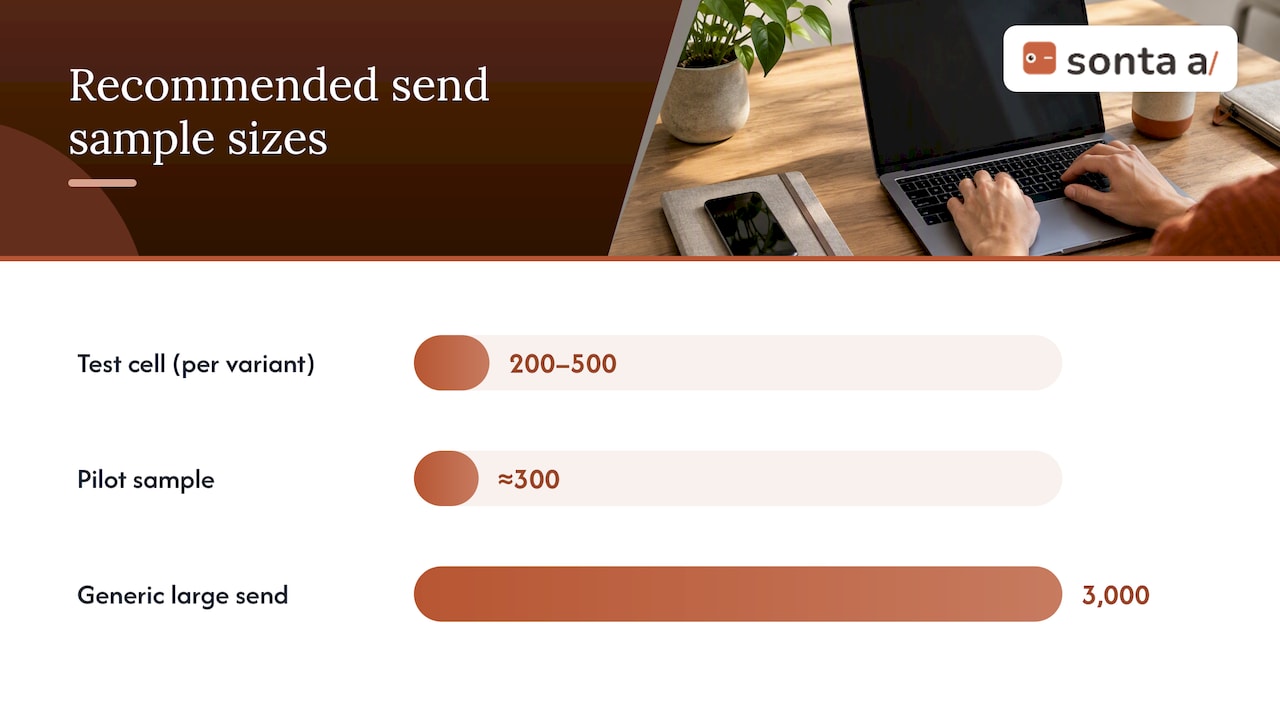
- Define the ICP and campaign goal. Decide which firmographic and behavioral traits define a good-fit account, then segment contacts by the message angle you plan to test and keep each segment large enough to read results from (roughly 200 to 500 contacts per test cell).
- Connect your CRM or upload a mapped CSV. Confirm the fields that personalization depends on, company name, role, recent trigger event, are present and clean before any draft gets generated, following the connect CRM and map fields step that most implementation guides treat as foundational.
- Select triggers and set guardrails. Choose a signal type (a funding round, a leadership change, a product launch, an intent spike) and write brand, tone, and exclusion rules before generation starts so the AI has boundaries, not just inputs.
- Generate drafts and preview every contact. Produce AI-written blocks, then review a sample of individual previews rather than trusting the batch, since AI personalization blocks should remain previewable and editable, with an option to revert any block to plain text.
- Route drafts for human approval before sending. A reviewer checks tone, accuracy, and factual claims; nothing ships without a human sign-off at this stage of the pilot.
- Run the segmented pilot and log outcomes. Send to the test cell, record replies, meetings, and complaints directly in CRM activity records, then decide whether to iterate on the message, widen the trigger definition, or scale.
The order matters because each step depends on the one before it. Skipping the preview step is where most embarrassing personalization errors (wrong company name, stale job title) slip through, and skipping the pilot is where teams discover deliverability problems only after they have already burned their sending reputation.
Pro Tip: Treat the pilot as a data-collection exercise first and a revenue exercise second; the numbers you get from 300 well-targeted sends tell you more than a guess based on 3,000 generic ones.
Which signals and personalization depth move reply rates
Not all personalization is equal, and the difference between a shallow merge-tag and a genuine trigger-based message shows up directly in reply rates. Most frameworks describe three depth levels:
- Level 1, tokens: first name, company name, and basic firmographic fields dropped into a template. It reads as personalized but carries no real insight.
- Level 2, firmographic and persona context: industry, company size, and role-specific pain points tailored to a buyer persona rather than an individual event.
- Level 3, company-event triggers: a specific, verified event (a funding announcement, a hire, a product launch) tied directly to a business problem the outreach addresses.
A benchmark across 5,000 AI-sent cold outbound messages found a 6.8% average reply rate, while messages using Level-3 company-event personalization reached roughly 11.4%, as reported in AI sales agent benchmark data. That gap is the clearest evidence that depth, not volume of tokens, drives response.
The practical lesson is to choose fields by relevance rather than quantity. A single verified trigger connected to a clear business problem outperforms five generic firmographic fields stitched into a sentence, since personalization quality depends on context selection more than on how many fields you pull in.
Enrichment data goes stale quickly: a title changes, a company gets acquired, a trigger event ages out of relevance. Mitigate this by setting a freshness window on enrichment sources, re-verifying triggers immediately before send, and building the preview step into every pilot so an outdated fact never reaches a prospect’s inbox.
Channel selection, sequence design, and message rules that scale
Channel choice should match the tradeoff between reach and response, not just whatever is easiest to automate. Email is the scalable backbone of any outreach program, LinkedIn voice notes produce strong replies but cannot be sent at volume, and InMail carries platform-imposed sending limits that cap how aggressively you can scale it.
A benchmark comparing channels found that LinkedIn voice notes returned a significantly higher reply rate than email, but with a low volume ceiling that keeps them a complement to email rather than a replacement, according to the same AI sales agent benchmark.
For sequence structure, the same research points to a three-step cadence that balances response against complaint risk:
- Day 1, personalized opener. Lead with the trigger and connect it to a specific business problem in one or two sentences, nothing longer.
- Day 4, concise follow-up. Reference a detail from the Day 1 message rather than repeating it, and add one new piece of value (a resource, a short insight, a relevant question).
- Day 9, permission-based breakup. Give the prospect an easy, low-pressure way to say no, which tends to produce a final wave of replies from people who were simply busy earlier.
Subject lines perform best under six words and should reference the company or the trigger directly, since short, specific subject lines materially increase open rates compared to generic ones. Follow-ups should never restate the opener; they should add a new angle, stay short, and point back to the original message in a single clause rather than a full recap.
Data quality, CRM integration, and operational controls
Personalization accuracy is a data problem before it is a writing problem. A trigger pulled from stale enrichment, or a field mapped to the wrong CRM column, produces exactly the kind of error that undermines trust in a single send.
- Map fields explicitly and preview before every send. Confirm which CRM fields feed each personalization block and require a per-contact preview, not a batch approval, before anything goes out.
- Budget for enrichment and verification up front. Treat data enrichment as a line item in the pilot plan rather than an afterthought, since best-performing pipelines verify data before generation rather than after a complaint comes in.
- Write back the trigger and the outcome. Store the specific fact used in the message and the result (reply, meeting, no response) in the CRM activity record so the next campaign can learn from the last one.
- Build suppression and exclusion rules before launch. Maintain a current suppression list, exclude recently contacted accounts, and route anything outside defined guardrails to manual review rather than auto-send.
Rollback procedures matter as much as launch procedures. If a pilot starts generating factual errors or unusual complaint volume, the team should be able to pause the sequence, pull the offending contacts, and fix the data issue without waiting for a full campaign cycle to end.
Pro Tip: Keep a single owner accountable for field mapping accuracy; when ownership is split across sales ops and marketing, stale fields tend to go unnoticed until a prospect replies pointing out the mistake.
Measurement and KPIs for pilots: what to track and benchmark
A pilot without defined KPIs is just a larger, riskier draft. Track five numbers from the first send: reply rate, positive reply rate, meeting-booked rate, unsubscribe or complaint rate, and bounce rate.
- Reply rate tells you whether the message and trigger are relevant at all; positive reply rate separates genuine interest from polite declines.
- Meeting-booked rate is the number that ties the pilot back to pipeline, not just engagement.
- Unsubscribe and complaint rate is your early warning system for deliverability damage; a rising trend here should stop a campaign faster than a disappointing reply rate.
- Bounce rate flags list quality problems before they escalate into domain reputation issues.
The 6.8% average reply rate across 5,000 AI-sent messages, documented in sales agent benchmark data, is a reasonable floor to compare a new pilot against; a cell performing meaningfully below that after a clean send is worth pausing and diagnosing before scaling further.
For sample size, aim for at least 200 to 500 contacts per test cell so one or two outlier replies do not skew the read. A simple A/B design testing Level-2 versus Level-3 personalization on matched segments isolates the effect of depth rather than confusing it with list quality or timing.
Seasonality and domain reputation both introduce noise: a pilot launched the week before a major holiday, or from a domain with a recent reputation dip, will underperform regardless of message quality, so compare pilots against a stable baseline period rather than a single prior campaign.
Deliverability, consent, and best-practice safeguards
Outreach automation lives or dies on sender reputation, and reputation is a consent and hygiene problem before it is a technology problem. Confirmed opt-in (double opt-in) is the recommended standard for protecting deliverability, according to M3AAWG sender best practices, which also stresses list hygiene and active complaint monitoring as ongoing responsibilities, not one-time setup tasks.
- Authenticate sending domains and keep list hygiene current by removing bounced and inactive addresses on a regular schedule.
- Maintain suppression lists that update automatically when a contact unsubscribes or complains, with no manual lag.
- Monitor complaint rates continuously rather than only at the end of a campaign, since a spike is the clearest early signal that a sequence needs to pause.
- Stage autonomous sending. Treat full autonomy as a later phase reached only after a pilot has proven clean metrics, not a default starting point.
Make unsubscribing effortless and honor it immediately. A delayed or confusing opt-out process is one of the most common causes of complaint escalation, and it is entirely avoidable with basic process discipline.
How an AI-native CRM implements this workflow
This workflow maps closely to what we built into Sonta Ai. Records update in real time rather than through manual entry, so the trigger facts that feed personalization stay current without someone remembering to refresh a spreadsheet. Agentic workflows handle drafting, routing for approval, and writing outcomes back to the record automatically.
For teams unsure where their current process leaks time or accuracy, our AI Efficiency Diagnostic identifies operational gaps in about 30 minutes. Our Sonta AI Academy also covers staged agent autonomy and workflow design for teams building their own pilot structure before committing to a platform.
Author perspective: three common blind spots and three quick actions
Three mistakes recur across outreach programs we see. Teams treat AI as a copy engine instead of a research-and-verification tool, skip the preview step because it feels slow, and watch reply rate while ignoring complaint rate until it is already a problem.
Three actions fix most of this: run a short operational diagnostic before scaling anything, lock a mandatory preview gate into the approval flow, and start with a three-step pilot across 200 to 500 contacts rather than a full list. Rising complaints and bounces, not a quiet week of replies, are the real signal something is wrong.
— Pavel
How Sonta Ai can accelerate your pilot
If the workflow above sounds right but your team lacks the hours to wire it together manually, custom AI integrations into the software you already use can fill that gap, which is exactly what we built Sonta Ai to close. Every record in our CRM updates itself in real time, so the trigger data your personalization depends on never goes stale between campaigns, and our agents handle the drafting, routing, and write-back steps without metering how much automation you use.

A practical place to start:
- Run our AI Efficiency Diagnostic to see where your current outreach process is losing time or accuracy in about 30 minutes.
- Review the Agentic CRM overview to see how agent-driven records support a signal-led pilot.
- Check plan details and pricing to find the seat tier that fits a pilot of your size.
FAQ
What is personalized outreach AI?
Personalized outreach AI refers to software that drafts tailored sales or marketing messages using data signals such as company events, firmographics, or behavior, rather than relying on a single static template. The best implementations keep a human reviewing each draft before it sends, as outlined in implementation guidance from platform documentation.
How much does AI personalization improve reply rates?
Depth matters more than volume of personalized fields. One benchmark found a 6.8% average reply rate across AI-sent cold messages overall, with company-event-triggered messages reaching about 11.4%, according to benchmark data on AI sales agents.
What is a safe pilot size for testing AI outreach?
A segment of roughly 200 to 500 contacts per test cell gives a reliable read without exposing a large list to an unproven message. Smaller samples make it hard to tell a real signal from random variation in replies.
Does Sonta Ai include tools for this kind of outreach pilot?
The platform is built to support the research, drafting, and write-back steps a pilot needs with real-time records and workflow agents. Pricing starts from $16 per month per seat on the Solo plan, with details available on our pricing page.
What is the single biggest risk in AI-driven outreach?
The biggest risk is skipping human review and verification before sending, which lets stale or incorrect data reach a prospect’s inbox. Confirmed opt-in and active list hygiene, recommended in M3AAWG sender best practices, also protect against the deliverability damage that follows a rushed launch.
Sources
- use-ce-ai-personalization-beta
- Using Similarweb AI Outreach Agent – Similarweb Knowledge Center
- AI sales agent benchmark reply rates
- M3AAWG Sender Best Common Practices Aug-27-2026