Account Planning Automation: A Practical Guide for 2026
Account planning automation means letting software draft, refresh and flag gaps in your account plans so sellers spend their time on the account rather than on the document. Done well, the plan stops being an annual deliverable and becomes a record that updates after every meeting, email and usage signal. Done badly, it produces polished summaries of a broken process. This guide covers what to automate, what to leave to people, how to sequence the rollout, and how to tell whether it is working.
TL;DR
- Automate the assembly work (research, stakeholder maps, meeting recaps, gap detection) and keep strategy, prioritization and relationship judgment with the account owner.
- A plan that is updated after each meaningful interaction beats a perfect annual plan that nobody reopens, so the CRM, not a slide deck, should be the system of record.
- Published results are encouraging but uneven: one AWS implementation reported a 52% cut in plan drafting and approval time, while a large share of GTM teams still report limited impact from AI.
- Fix data hygiene and qualification criteria before you automate, or you accelerate a poor process.
- Start with your top-tier accounts, a five-component template and a 30-to-90-day action cadence, then widen coverage.
Table of Contents
- What account planning automation actually covers
- Why the manual version fails
- The five-component plan, and what to automate in each
- Signals: where AI changes the plan rather than just speeding it up
- What the published results show
- Avoiding the automation trap
- Where the plan should live
- A rollout sequence that works
- Perspective: why we think plans should update themselves
- Measuring whether it works
- Putting this into practice with Sonta AI
- FAQ
- Sources
What account planning automation actually covers
Account planning is the practice of capturing the current situation in an account (business context, key initiatives, relationship status), setting strategic objectives, mapping stakeholders and opportunities, and committing to actions. ARPEDIO’s practitioner guide describes the account plan as the central artifact of key account management, which explains why the document so often becomes the bottleneck: it is the one thing everyone agrees matters and nobody has time to maintain.
Automation touches four layers of that work:
- Research and synthesis. Pulling public signals (funding, leadership changes, hiring) and internal signals (meeting notes, support tickets, product usage) into a draft situation summary.
- Record maintenance. Updating contacts, roles, deal stages and next steps from emails, calls and calendar activity so nobody retypes them.
- Gap detection. Flagging a missing economic buyer, a dormant opportunity or a champion who has gone quiet.
- Action orchestration. Creating follow-ups, scheduling, account prep for the next call and handoffs to customer success.
What it does not cover is the decision about where to invest. Choosing which three accounts deserve an executive sponsor is still a human call, and any tool that claims otherwise is selling the wrong thing.
Why the manual version fails
The cost is mostly time. A 2025 Showpad survey write-up reports that revenue professionals spend an average of 4.3 hours per day on administrative tasks such as planning and meeting follow-up. When a plan takes that much effort to build, it gets built once, usually before a planning cycle, and then drifts.
The second cost is staleness. ARPEDIO’s guide makes the point that the biggest pitfall is treating the plan as a static filing exercise, and that a good-enough plan updated after every meaningful customer interaction is worth more than a perfect annual plan that is never revisited. Teams that do not enforce an update cadence often find the plan obsolete within a single quarter.
The third cost is the payoff you forgo. Prolifiq’s Q4 2025 review of B2B account planning data reports that companies with high account planning adoption achieve win rates 8 to 15 percentage points higher than those with low adoption, and that systematic planning of top-tier accounts can capture 60 to 80 percent of total contract value within three years. These are one firm’s synthesis of industry research rather than a controlled experiment, so treat them as directional. Still, the direction is consistent: planning pays when it is actually done, and automation exists to make it actually done.
The five-component plan, and what to automate in each
A plan template is only useful if every section has an owner, a source and a refresh trigger. The five components that strategic account management practitioners recommend map neatly to automation opportunities.
| Component | What it contains | What to automate | What stays human |
|---|---|---|---|
| Situation summary | The account’s goals and challenges from the customer’s perspective | Draft from public filings, news, call transcripts and CRM history | Validating the narrative with the customer |
| Relationship status | An honest read of sponsorship, access and sentiment | Activity recency, meeting frequency, sentiment tags | The candid score and the reasons behind it |
| Opportunity map | Whitespace across products, teams and regions | Surfacing which product lines or business units have no open pipeline | Prioritizing which whitespace is worth pursuing |
| Stakeholder network | Who influences, decides, blocks and champions | Auto-creating contacts from email and calendar, flagging missing roles | Judging influence and political reality |
| 30-90 day action plan | Dated actions with named owners | Generating tasks, reminders and meeting prep from the plan | Committing to the actions and accepting ownership |
Notice that the right-hand column never shrinks to nothing. The best implementations treat automation as the preparer and the seller as the editor.
Signals: where AI changes the plan rather than just speeding it up
Drafting text faster is the least interesting use of AI here. The more consequential change is signal-based intelligence. As the Showpad piece frames it, AI can synthesize external signals such as funding and leadership changes together with internal activity such as meeting sentiment and usage patterns, then identify churn risks and expansion opportunities that account managers frequently miss. The role moves from reactive data entry toward proactive strategy.
Prolifiq makes a related point: AI can scan activity data and support tickets to flag accounts trending toward churn or ready for expansion before a human would notice the pattern.
In practice, a signal-driven plan has triggers such as:
- A new executive appears in the buying group, so the stakeholder map needs a new node and an intro plan.
- Product usage in one business unit rises while another stays flat, so the whitespace map shifts.
- A support escalation lands on a renewal account, so the relationship score and the action plan should both change.
- Two weeks pass without a logged touch on a named champion, so the owner gets a prompt.
That last pattern is the one that matters most operationally. Practitioners describe high-performing teams as building planning into the daily CRM workflow rather than a separate quarterly event, with AI acting as a nudge system that detects gaps as they appear and prompts the seller, rather than asking the seller to hunt for them.
What the published results show
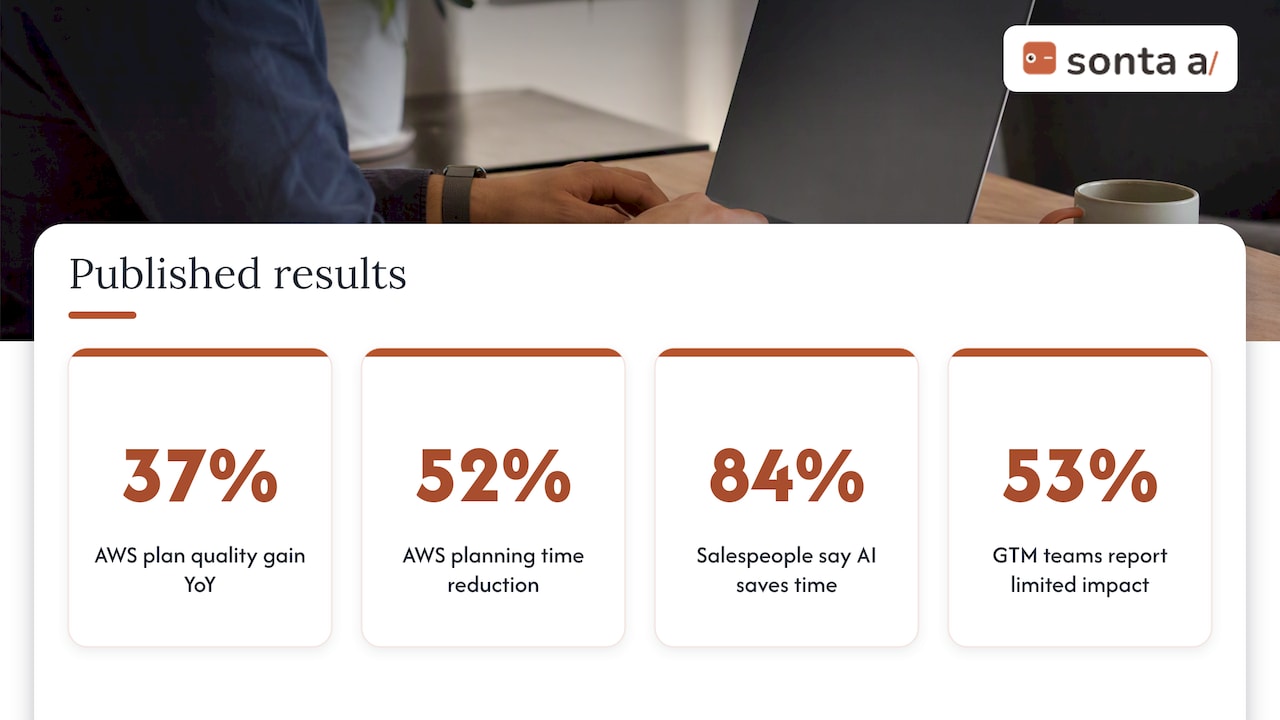
Vendor and enterprise case studies give useful, if selective, evidence. The most detailed public example is AWS’s own sales organization. In a 2025 engineering write-up, AWS describes generative AI account planning that delivered a 37% year-over-year improvement in plan quality and a 52% reduction in the time required to draft, review and approve strategic account plans. An earlier AWS post explains the underlying motivation: sales staff draft in-depth, forward-looking strategy documents for established customers every year, which is a heavy lift at scale.
Two cautions apply. First, these are results from an organization with a large engineering team and a very structured planning process, and your numbers will differ. Second, the broader market picture is less rosy. The 2025 State of B2B GTM Report found that 84% of salespeople say AI helps them save time, yet 53% of GTM teams report no or limited impact from their current AI adoption. The report’s takeaway is that success depends on configuring AI to the specific business context instead of relying on general-purpose models for mission-critical sales operations.
For a mid-size team, the sensible reading is this: expect real time savings on assembly work, expect improvement in plan quality only if the inputs are clean, and do not expect a generic chatbot pasted on top of a CRM to deliver either.
Avoiding the automation trap
A recurring failure is applying technology to a process that was already broken. Showpad’s analysis calls this the automation trap: automating a poor buyer experience, when automation works best on top of rigorous data hygiene and standardized qualification criteria. For account planning, that translates into concrete prerequisites.
- Agree on tiers. Decide which accounts get a full plan, which get a light plan and which get none. Automating plans for 400 accounts when five drive the revenue just generates noise.
- Standardize the fields. If “decision maker” means three different things across the team, the stakeholder map will be unreliable no matter how it is generated.
- Clean the contact and account data. Duplicates and stale roles feed directly into wrong gap alerts.
- Define the refresh trigger. Tie plan updates to events (a meeting logged, a stage change, a renewal window opening) rather than to a calendar reminder.
- Name an owner for every plan. An AI draft with no accountable human becomes another unread document.
A useful check before buying anything: pick one top account and ask whether your team could, today, produce its stakeholder map from CRM data alone. If the answer is no, the first project is data capture, not planning.
Where the plan should live
There are three common patterns, and each has trade-offs.
- Standalone planning tool. Strong templates and collaboration, but a second system of record. Sellers must sync it manually, which recreates the staleness problem.
- Bolt-on AI inside a legacy CRM. Familiar and quick to switch on, but the AI is often limited by what reps already typed in. If the underlying record is incomplete, the generated plan is too. Our comparison of AI-native versus AI-enabled CRM walks through the four factors that separate these approaches.
- AI-native CRM. The record itself is maintained by agents, so the plan reads from live data and writes back to it. The trade-off is a platform decision rather than an add-on.
If you want the background on how agents differ from simple automation rules, what an AI agent in sales does is a good starting point, and how AI-first sales teams outperform covers the operating model that goes with it.
A rollout sequence that works
This sequence assumes a team of 5 to 50 sellers with a CRM already in place. Adjust the pace to your sales cycle.
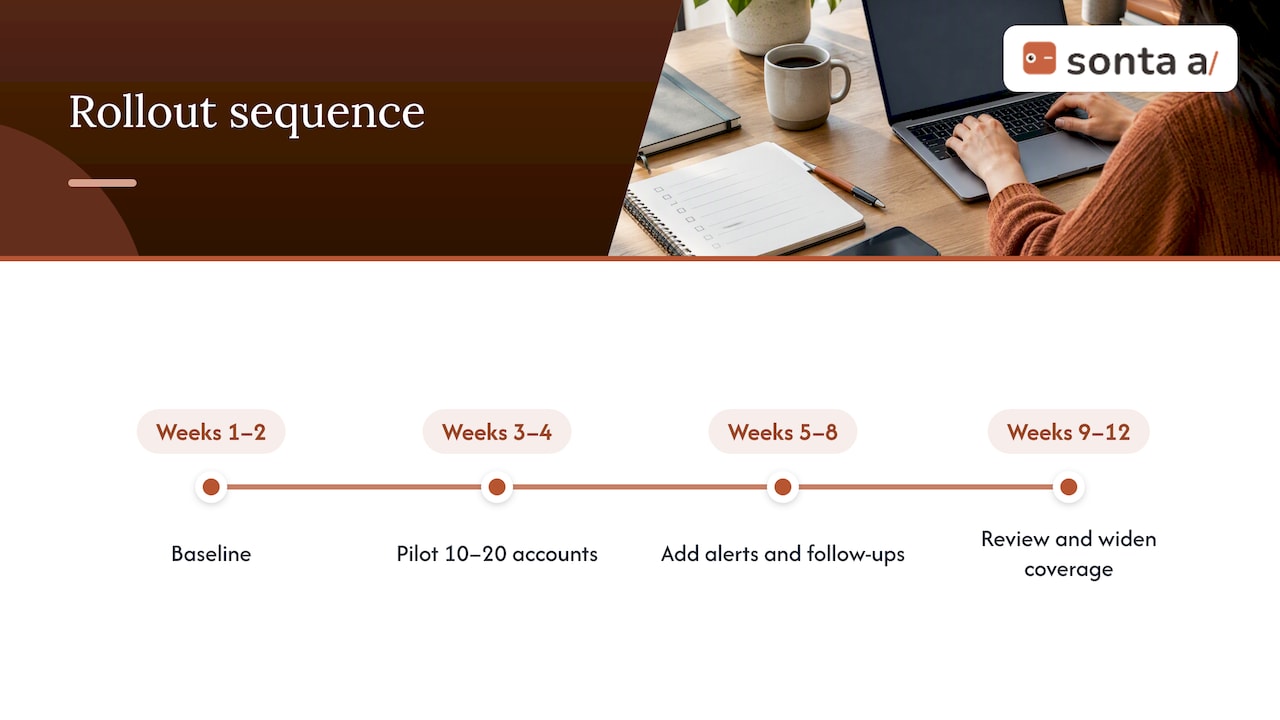
Weeks 1 to 2: baseline
Measure how long a plan takes to produce today, how many top-tier accounts have a current plan (updated within 90 days), and how many stakeholders per account are recorded. Without those three numbers you cannot show improvement later.
Weeks 3 to 4: pilot on top-tier accounts
Choose 10 to 20 accounts. Automate record capture first (email, calendar, call notes into contacts and activities), then add the draft situation summary and stakeholder map. Have each account owner edit rather than rewrite.
Weeks 5 to 8: add nudges and follow-ups
Turn on gap alerts: missing roles, dormant opportunities, no touch in a set number of days. Pair them with automated follow-up tasks. Our notes on AI follow-up automation for sales describe CRM workflows built for this step.
Weeks 9 to 12: review and widen
Compare against your baseline. Retire alerts that sellers ignore, tighten the ones they act on, and extend coverage to the next tier of accounts. Hold a 30-minute monthly review per strategic account that starts from the auto-updated plan rather than from a blank page.
Perspective: why we think plans should update themselves
We build an agentic CRM, so our bias is on the table. Still, the evidence above points to a consistent conclusion: the account plan fails at maintenance, not at design. Most teams already own a decent template. What they lack is a record that stays true without a rep retyping it after every call.
That is the design principle behind Sonta AI. Every record updates itself in real time through customizable AI agents, with models chosen per task, and we do not meter AI or automation usage. The second point matters for planning in particular: planning workloads are bursty and heavy (a renewal quarter can trigger research on dozens of accounts at once), and usage-based metering tends to push teams to ration exactly the automation that keeps plans fresh.
We would also argue for restraint. Automate the capture, the drafting and the nudging, and leave the verdict on a relationship to the person who owns it. A team that does this usually finds the plan becomes a working view of the account rather than a quarterly chore. A team that automates everything tends to rediscover the trap described earlier, only faster.
— Pavel
Measuring whether it works
Pick a small set of metrics and review them monthly.
| Metric | Why it matters | Healthy direction |
|---|---|---|
| Plan currency (share of top-tier plans updated in the last 90 days) | Tests whether plans are living | Up |
| Time to produce or refresh a plan | Direct measure of admin saved | Down |
| Stakeholders mapped per strategic account | Proxy for multi-threading | Up |
| Whitespace opportunities created from plans | Connects planning to pipeline | Up |
| Win rate and expansion rate on planned accounts versus unplanned | Tests the commercial payoff | Planned accounts higher |
| Share of AI alerts acted on | Detects noisy automation | Up, or tune the alerts |
Be careful with attribution. Planned accounts are usually your best accounts to start with, so some of the gap is selection. Compare the same accounts before and after where you can.
Putting this into practice with Sonta AI
If you want to see how much of your current planning and follow-up workload can be automated before committing to a platform change, our AI Efficiency Diagnostic returns actionable findings in 30 minutes, covering where operational leakage sits in your stack. If you are ready to evaluate the product, the Agentic CRM is built around self-updating records and configurable agents, and seat plans on the pricing page start from $16 per month per seat (Solo), $28 (Core) and $65 (Pro), with Enterprise available without a published price.
For teams that want to build their own planning workflow, the Agents & Automations guide explains how automations are structured, and it pairs with the step-by-step notes on adding an AI step to an automation.
FAQ
What is account planning automation?
It is the use of software and AI agents to assemble, update and monitor strategic account plans. Typical tasks include drafting situation summaries, maintaining stakeholder maps from email and calendar data, flagging gaps and generating follow-up actions. The seller still owns strategy and the final judgment.
How does AI account planning differ from a plan template in a spreadsheet?
A template is a structure that someone fills in by hand and must remember to revisit. AI account planning connects the plan to live data, so the situation summary, contacts and open opportunities reflect recent activity, and the system prompts the owner when something changes or is missing. The template still helps, since the five components give the AI a structure to fill.
Which accounts should get an automated plan first?
Start with your top tier, the accounts that drive the largest share of revenue or expansion potential. Prolifiq’s data review suggests systematic planning of these accounts is where most long-term contract value is captured. Add lower tiers only after the pilot shows sellers are editing and using the drafts.
Can automation make account plans worse?
Yes, if it runs on messy data or an unclear process. Showpad’s analysis warns about automating broken processes, and the GTM report cited above found that over half of GTM teams see limited impact from AI. Clean fields, agreed qualification criteria and a named plan owner reduce that risk.
Sources
- Key Account Management: The Practitioner’s Guide, ARPEDIO
- 3 transformative ways AI is reshaping how sellers win in 2025, Showpad
- What the Data Says About B2B Account Planning in 2025, Prolifiq
- How Amazon Bedrock powers next-generation account planning at AWS
- How AWS Sales uses generative AI to streamline account planning
- The 2025 State of B2B GTM Report