30 Minute Diagnostic to Launch an AI Workflow Builder for GTM Teams

Choose an AI-native, agent-capable workflow platform that provides connectors, human-in-the-loop controls, and production governance before you evaluate anything else. For AI-first go-to-market teams, Sonta AI is a direct, recommended option because it pairs agentic CRM records with configurable workflow blueprints rather than bolting AI onto legacy automation. This approach fits teams that need lead qualification, pipeline hygiene, or account prep automated without waiting months for an engineering build. Sales and revenue operations leaders running lean GTM stacks are the clearest fit.
TL;DR:
- AI-native workflow platforms like Sonta AI enable quick deployment for GTM teams, especially those without extensive engineering resources, focusing on lead qualification and pipeline hygiene.
- Evaluation should prioritize connector depth, RAG support, human-in-the-loop controls, governance, deployment flexibility, observability, and clear version control to ensure suitability for production environments.
- The fastest implementation is achieved by selecting a platform capable of launching workflows within days, with more complex, scalable solutions taking several weeks depending on integration and compliance needs.
- In-depth vendor support, including thorough documentation, staging environments, and timely technical responses, significantly impacts the success of early pilots and ongoing operations.
- Privacy considerations must verify data residency, retention policies, and access controls, especially since AI nodes process raw customer data, raising different risks than rule-based automation.
Table of Contents
- What Should You Look for in an AI Workflow Builder?
- What Is an AI Workflow Builder, and How Is It Different?
- Types of AI Workflow Solutions and Which Teams They Fit
- How Do You Evaluate AI Workflow Builder Vendors?
- How to Roll Out an AI Workflow Builder: Checklist and Timeline
- How Sonta AI Supports These Requirements
- How Deep Are the Integrations and Connectors?
- What Should You Expect from Vendor Support?
- Will This Scale as Your Workflows Grow?
- How Good Are Training and Onboarding Resources?
- What Do Real Industry Use Cases Look Like?
- How Do the Leading AI Workflow Builder Platforms Compare?
- What Are the Data Privacy Implications of AI Workflows?
- The Real Trade-Off: Buy, Build, or Blend?
- Get a 30-Minute Read on Your Workflow Readiness
- Sources
- FAQ
What Should You Look for in an AI Workflow Builder?
Vendor evaluations move faster when you know the eight areas that separate a production-ready platform from a demo that stalls in pilot. Scan these before booking a single call.
- Connectors and integrations: depth of native connectors versus reliance on generic webhooks or middleware.
- LLM and RAG support: can you pick different models per node and ground responses in a private knowledge base?
- Human-in-the-loop design: explicit approval checkpoints before an agent writes to a system of record or messages a customer.
- Governance and security: role-based access control (RBAC), audit logs, and data residency options.
- Deployment models: cloud, on-prem, or hybrid, and whether that choice is locked in or flexible later.
- Observability and monitoring: replayable runs, step-level logs, and alerting on failures or cost spikes.
- Testing and version control: staging environments, git-based versioning, and rollback options.
- Pricing shape: per-seat, per-workflow, or consumption-based, and how each scales with usage.
A ten-person startup and a 500-seat enterprise sales org will weigh these differently. Smaller teams tend to prioritize speed to first workflow and forgive thinner governance; larger, regulated organizations will stall a proof of concept over missing audit logs even if the AI reasoning is excellent. Know which buyer you are before you score vendors against this list.
What Is an AI Workflow Builder, and How Is It Different?
An AI workflow builder is a platform where a large language model or agent sits inside the workflow itself and reasons at runtime, rather than following a fixed if-this-then-that path. Traditional rule-based automation executes the same branch every time a condition is met. An AI workflow builder can read unstructured input, decide which branch applies, and adjust its output based on context it was never explicitly programmed to expect.
Three functional differences matter most in practice. First, reasoning and branching: an AI node can evaluate ambiguous inputs (a messy lead form, a rambling support email) and route them intelligently, where a rule-based system needs every case pre-defined. Second, context and retrieval: modern builders connect nodes to a private knowledge base through retrieval-augmented generation (RAG), so an agent answering a pricing question pulls from your actual product catalog instead of a static script. Flozic’s documentation on AI workflow builders notes that letting you choose different LLMs per node and ground them in RAG reduces hallucination risk and keeps answers relevant to your business. Third, natural-language design: you often describe the outcome you want in plain English, and the builder generates a runnable workflow, compressing what used to take a developer days into a conversation.
For GTM teams, this shows up in four recurring use cases. Lead qualification agents score and route inbound leads based on firmographic and behavioral signals, cutting the delay between a form fill and a rep’s first outreach. Support triage agents read incoming tickets, classify urgency, and draft a first response for human review. Document processing workflows extract terms from contracts or RFPs and populate CRM fields automatically. Content ops workflows generate first-draft outreach sequences personalized to account data, which a rep edits rather than writes from scratch.
Types of AI Workflow Solutions and Which Teams They Fit
The market splits into three broad categories, and picking the wrong one wastes months. Slack’s analysis of AI workflows frames the split as AI-native builders focused on rapid agent creation versus enterprise automation platforms that combine RPA, API workflows, and AI agents layered on top of existing process infrastructure.
- AI-native builders (no-code, prompt-to-workflow). You describe an outcome and the platform assembles a workflow with agent nodes, connectors, and RAG built in from the start. These fit teams that need a working pilot in days, don’t have spare engineering capacity, and are comfortable with a newer vendor’s roadmap. Sonta AI’s configurable workflow blueprints sit in this category for GTM-specific use cases like lead qualification and account prep.
- Enterprise automation platforms with added AI agents. Established low-code platforms that already handle thousands of business processes have layered AI agent nodes on top of deep connector libraries. Microsoft Power Automate, for instance, supports 1,400 or more certified connectors alongside cloud flows, desktop flows, and process mining. These fit large organizations already standardized on that ecosystem, where governance and connector breadth outweigh the appeal of a faster, newer interface.
- Code-first or self-hosted options. Full control over data residency, custom logic, and infrastructure, at the cost of needing engineers to build and maintain it. These fit teams with strict compliance requirements or highly unusual logic that no visual builder handles cleanly. Even visual-first platforms increasingly offer an escape hatch here: n8n’s documentation recommends dropping into a code node for edge cases like custom error handling and authentication quirks that a drag-and-drop canvas can’t express cleanly.
The fastest way to choose: if you need a workflow live this month and have no spare engineering time, start AI-native. If you’re already deep in a specific enterprise ecosystem and compliance is non-negotiable, evaluate the enterprise-plus-AI-agent layer first. If your logic is genuinely unusual and you have engineers to spare, code-first buys you the most control.
How Do You Evaluate AI Workflow Builder Vendors?
Most procurement processes for automation tools fail the same way: they test whether the demo looks impressive, not whether the platform survives contact with production data. Run every vendor through this checklist before scoring anything else.
Core evaluation checklist:
- Connector depth for your actual stack (CRM, email, calendar, support desk, data warehouse), not just popular integrations you don’t use.
- LLM flexibility and RAG support against your private knowledge base, node by node.
- Human-in-the-loop checkpoints before any agent action that writes to a system of record or reaches a customer directly.
- Governance controls: RBAC, audit logs, and data handling that satisfy your compliance team, not just your engineering team.
- Deployment flexibility across cloud, on-prem, or hybrid, and whether switching later is painful.
- Staging environments and version control separate from your production workflows.
- Observability: replayable runs and step-level logs so a failure can be diagnosed, not just flagged.
- Scalability under real volume and a clear cost-control mechanism as usage grows.
Governance deserves special weight. ISACA’s guidance on AI governance treats auditability and a coordinated triad of people, process, and technology controls as priorities for any team deploying AI-driven automation, not an afterthought bolted on after a security review flags it.
Twelve demo questions worth asking every vendor:
- How do you handle RAG for private knowledge bases, and can I test it with our own documents?
- Can I choose a different LLM for different nodes in the same workflow?
- Can we replay a run with its exact inputs and outputs after it fails?
- What does your audit log actually capture, and who can access it?
- What RBAC granularity do you support at the workflow and field level?
- What dev, staging, and production separation do you provide?
- Do you support git-based version control and rollback?
- What happens if the underlying LLM vendor changes pricing or deprecates a model?
- How do you handle desktop or RPA-style automation for legacy systems without APIs?
- What’s your approval mechanism before an agent writes to our CRM or messages a customer?
- How is usage-based cost tracked and capped per workflow?
- What’s your typical time from signed contract to first production workflow?
Pricing shapes vary more than most buyers expect. Per-seat pricing is predictable but punishes teams that want every rep touching the tool. Per-workflow pricing rewards concentrated use cases but gets expensive if you scale horizontally. Consumption-based pricing (tied to LLM tokens or workflow runs) tracks actual usage closely but makes budgeting harder until you have a few months of data. Negotiation leverage usually comes from committing to a longer contract term or a higher usage tier upfront, not from pushing on the list price itself.
Pro Tip: Ask every vendor to run a failed workflow live during the demo, not just a successful one. How cleanly they show you the failure, the logs, and the replay tells you more about production readiness than a perfect happy-path run ever will.
Walk away from a proof of concept if you see any of these red flags: no audit logs at all, no staging environment separate from production, vague or evasive answers about where your data is processed and stored, or a hard lock to a single LLM vendor with no ability to swap models later.
How to Roll Out an AI Workflow Builder: Checklist and Timeline
A pilot succeeds or fails based on decisions made before the first workflow ever runs. Follow this sequence rather than jumping straight to building.
- Pick one measurable use case. Lead qualification response time or ticket triage accuracy works better as a first pilot than “automate everything in sales ops.”
- Gather representative data. Pull real historical leads, tickets, or documents, not a clean sample your team hand-picked.
- Set explicit success metrics and SLAs upfront. Response time under two minutes, qualification accuracy above a target rate, or hours of manual work removed per week.
- Map every integration point. List every system the workflow touches before building, not after something breaks.
- Build in staging first. Test against mock data before anything writes to production, using version control so you can roll back a bad change.
- Expand only after the metrics hold for at least two full weeks. Then widen scope, add nodes, or move to the next use case.
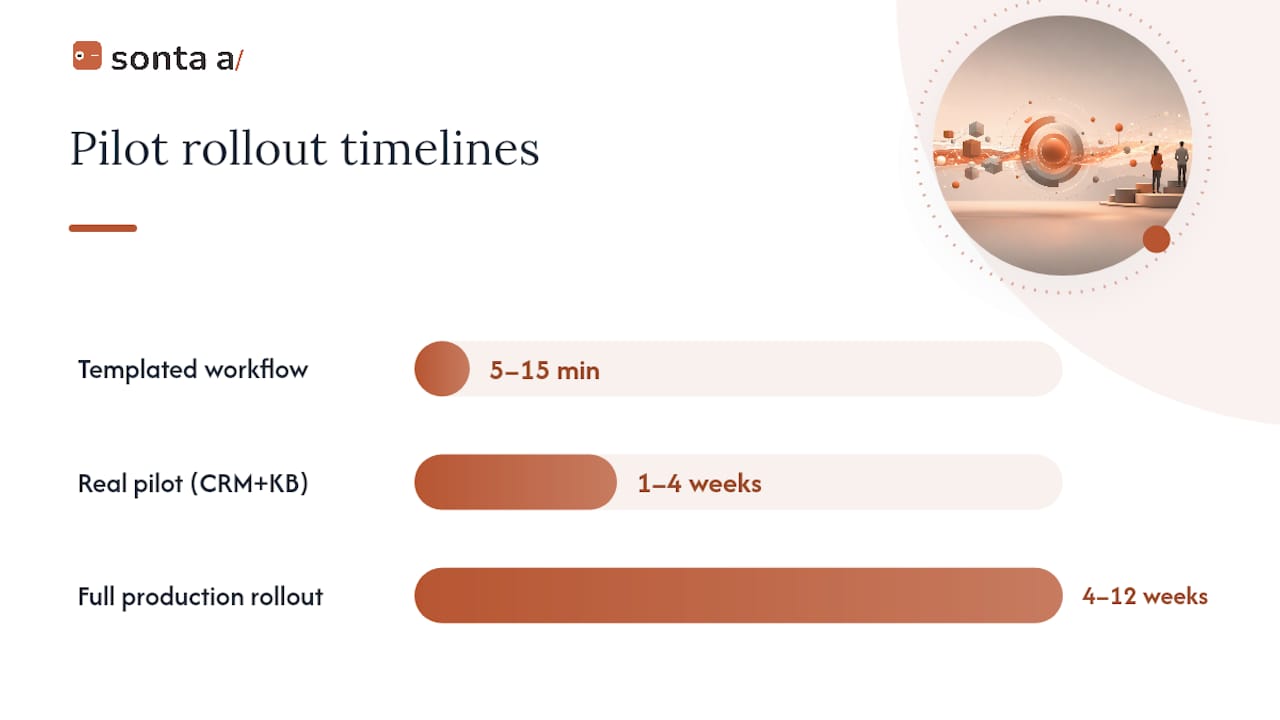
On timeline: vendor documentation across the category shows a simple templated workflow can be running in 5 to 15 minutes, but a real pilot with CRM and knowledge-base integration realistically takes one to four weeks. Expanding from pilot to a fully production-hardened rollout across a team typically runs four to twelve weeks. Timelines stretch when integrations touch legacy systems without clean APIs, when compliance review adds a security questionnaire cycle, or when the use case requires custom logic beyond what the visual canvas handles.
Testing discipline separates workflows that survive contact with real customers from ones that don’t. Production-grade AI workflows need sandboxed staging and version control to test against mock data before anything touches a live system, avoiding the kind of accidental write that turns a pilot into an incident report. Build unit tests for individual nodes, not just end-to-end happy paths, and keep rollback one click away.
Operational controls matter just as much post-launch. Track token usage and cost per workflow run, set hard limits before a runaway loop drains a budget, and wire alerting into whatever channel your team already watches. n8n’s platform treats replayable runs and step-by-step logs as a baseline observability feature, and that standard is worth holding every vendor to.
How Sonta AI Supports These Requirements
Some agentic CRM platforms for AI-first GTM teams have workflow layers integrated with self-updating records and configurable workflows, addressing governance and connector considerations directly.
Three pilot recipes map directly onto the use cases GTM teams ask about most:
- Lead-qualifier agent: scores and routes inbound leads against your qualification criteria, with a human approval step before high-value leads get auto-assigned. Measure time from lead capture to first qualified touch.
- Meeting-prep agent: pulls account history, recent activity, and relevant context into a single brief before a rep’s call. Measure prep time saved per meeting and rep-reported usefulness.
- Pipeline hygiene automation: flags stale opportunities, missing fields, and inconsistent stage progression for review rather than silently auto-correcting them. Measure percentage of pipeline data requiring manual cleanup month over month.
The AI Efficiency Diagnostic delivers actionable findings on operational leakages and tech stack fit within 30 minutes, which shortens the discovery phase most vendors leave entirely to your team. For hands-on learning, Sonta AI Academy walks through building agents and automations step by step, and the guide to activating your first automation covers the exact sequence a team follows from blueprint to live workflow. Both resources exist specifically to compress the gap between “we bought the platform” and “the pilot is producing measurable results.”
How Deep Are the Integrations and Connectors?
Connector depth decides whether a workflow builder fits into your existing stack or forces you to work around it. Three layers matter here, and vendors rarely make all three clear upfront.
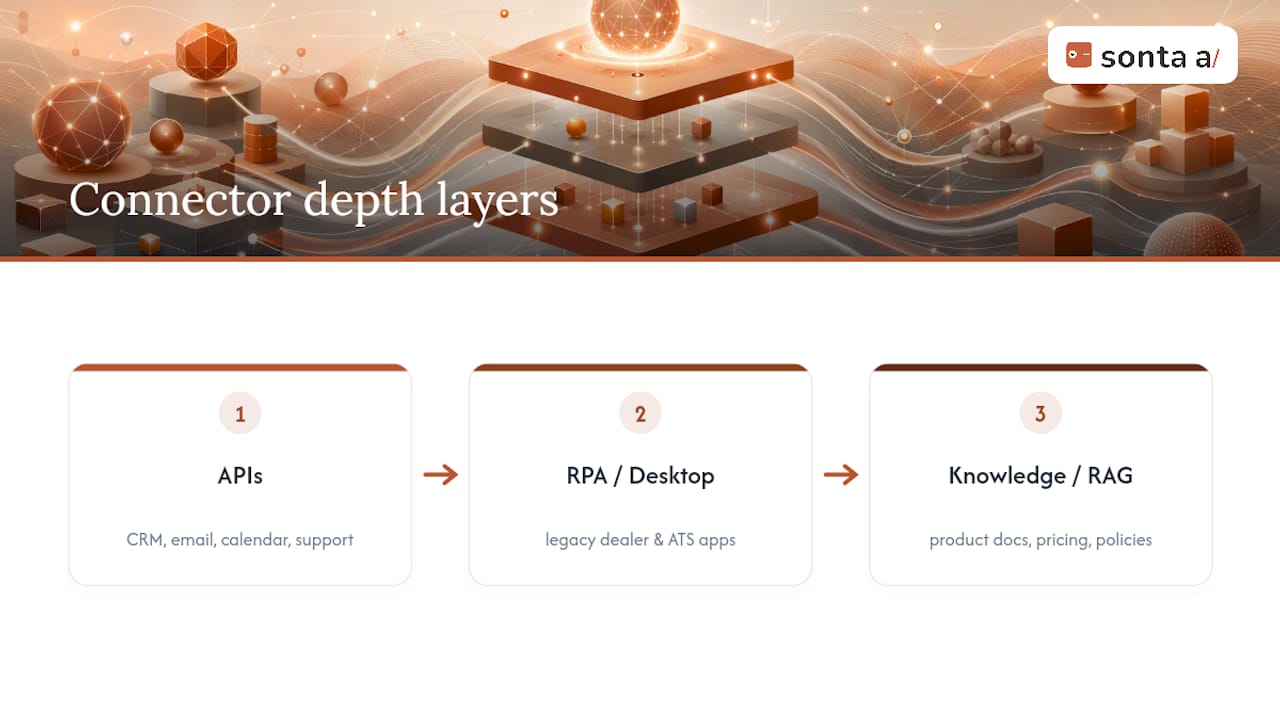
APIs are the baseline: does the platform offer pre-built, maintained connectors to your CRM, email provider, calendar, and support desk, or does every integration require you to hand-build against a generic REST endpoint? Pre-built connectors save weeks; generic API access is a fallback, not a feature.
RPA and desktop flows matter more than most buyers expect, especially in industries like auto retail or recruitment where legacy desktop software still runs core operations. Desktop automation lets a workflow interact with an application that has no API at all by simulating clicks and keystrokes, which is often the only way to touch a decades-old dealer management system or applicant tracking tool. Enterprise platforms like Power Automate build this in natively alongside cloud-based flows.
Knowledge base and RAG support is what separates a workflow that answers generically from one that answers correctly for your business. A workflow grounded in your actual product documentation, pricing sheets, or policy manuals through retrieval-augmented generation gives an agent the specific context it needs before it responds, rather than relying on the model’s general training data. This matters enormously for support triage and account prep use cases, where a wrong assumption about pricing or terms creates real customer friction.
When you evaluate connector depth, count the connectors that touch systems you actually use today, not the total number a vendor advertises. A platform with 200 connectors relevant to your stack beats one advertising 2,000 that mostly cover tools you’ll never touch.
What Should You Expect from Vendor Support?
Support quality tends to reveal itself during the proof of concept, well before you sign anything long-term. Watch how a vendor responds when something breaks in your sandbox, not just how polished their sales deck looks.
A few signals separate strong support from support that will frustrate you six months in. Response time on a genuine technical issue during trial, not a sales question, tells you what post-purchase support will actually feel like. Access to a named implementation contact, rather than a shared support queue, matters especially for a first production workflow that touches customer data. Documentation quality is a support signal too: a platform with thorough, current, self-serve documentation reduces how often you need to open a ticket at all.
Ask directly during evaluation what support tier comes with your plan, whether onboarding includes a dedicated specialist or a shared pool, and what the escalation path looks like when an agent workflow misbehaves in production. A vendor unwilling to commit to specifics here in writing is telling you something about what happens after the contract is signed.
Will This Scale as Your Workflows Grow?
Scalability problems in AI workflow builders rarely show up in the pilot. They show up three months later, when usage triples and either latency creeps up or your bill does.
Two separate scalability questions deserve separate answers. Volume scalability asks whether the platform holds up when you go from ten workflow runs a day to ten thousand: does latency degrade, do queues back up, does the vendor’s infrastructure visibly struggle. Cost scalability asks whether your spend grows linearly and predictably with usage, or whether you hit a pricing cliff that forces an awkward renegotiation mid-year.
Performance under real load depends heavily on how a platform handles concurrent LLM calls and RAG lookups, since both add latency that a simple rule-based automation never had to account for. Ask vendors directly what their p95 latency looks like under production volume similar to yours, not their best-case demo numbers. And revisit your cost-control setup from the evaluation checklist here: usage caps and alerting matter more as volume scales, because a workflow that runs fine at low volume can generate a surprising token bill once it’s processing thousands of leads a week.
How Good Are Training and Onboarding Resources?
Onboarding quality determines whether a pilot’s early weeks build momentum or burn goodwill inside the team that has to actually use the workflow. A platform can have excellent technical capabilities and still fail internally if nobody on the GTM team can confidently build or troubleshoot a workflow without escalating every question.
Look for self-serve documentation that covers real scenarios, not just a feature-by-feature reference. Sonta AI Academy’s structure works through concepts progressively: starting with core concepts and the underlying data model, moving into collections and fields, and building up to full automations from first principles. That progression matters because a workflow builder is only as useful as the team’s ability to modify it without submitting a support ticket every time a business rule changes.
Beyond documentation, check whether onboarding includes live training, a sandbox environment to practice in before touching production data, and a glossary or reference for platform-specific terminology. Teams that skip structured onboarding tend to under-use the platform’s more advanced features for months, quietly reverting to manual work for anything beyond the first workflow they were shown.
What Do Real Industry Use Cases Look Like?
Abstract capability lists matter less than seeing how a workflow builder performs inside a specific industry’s actual constraints. Four verticals show the pattern clearly.
Recruitment teams use lead-qualification-style logic to screen inbound candidates against role requirements automatically, flagging strong matches for a recruiter’s review rather than requiring a human to read every resume first. Real estate teams route inbound property inquiries by intent and urgency, triggering a scheduling workflow the moment a lead expresses interest in a viewing rather than losing hours to manual follow-up. Auto retail dealerships automate service reminders and trade-in valuations tied to a customer’s purchase history, work that historically lived in spreadsheets disconnected from the CRM. Professional services firms use document processing workflows to extract key terms from proposals and statements of work, populating CRM fields that used to require manual entry after every client call.
The common thread across all four: the workflow doesn’t replace judgment on the hard cases, it removes the repetitive triage that ate hours before a human ever needed to get involved. That’s the realistic bar for a first pilot, not full autonomous decision-making from day one.
How Do the Leading AI Workflow Builder Platforms Compare?
Rather than ranking specific products against each other, it helps to compare the categories by the traits that actually decide fit for your team.
| Evaluation Axis | AI-Native Builders | Enterprise Automation + AI Agents | Code-First / Self-Hosted |
|---|---|---|---|
| Time to first workflow | Minutes to days | Weeks (integration setup) | Weeks to months |
| Connector breadth | Growing, GTM-focused | Very deep, broad ecosystem | Unlimited, but you build it |
| Governance maturity | Varies by vendor maturity | Typically strong, enterprise-grade | Fully in your control |
| Engineering need | Low | Moderate (admin/config) | High |
| Best fit | Lean GTM teams, fast pilots | Large orgs standardized on one ecosystem | Unusual logic, strict compliance |
No single category wins on every axis, which is exactly why the checklist earlier in this guide matters more than any single feature comparison. A platform that scores well on connector breadth but poorly on time-to-value will frustrate a GTM team that needs results this quarter, not next year.
What Are the Data Privacy Implications of AI Workflows?
AI workflows raise privacy questions that rule-based automation never had to answer because an LLM node often needs to see raw customer data to reason about it. That’s a materially different exposure than a fixed automation that only ever touches pre-defined fields.
The first question is where processing actually happens: does customer data leave your environment to reach a third-party LLM API, and if so, is it retained, logged, or used for further model training by that provider? Vendors vary widely here, and the answer belongs in a contract, not a sales deck. The second question is what a RAG-connected knowledge base exposes: if an agent can retrieve from your entire document repository, access controls on that repository need to match the sensitivity of what’s inside it, not just the workflow’s own permissions.
Human-in-the-loop design does double duty on privacy as well as quality. UiPath’s guidance on human-in-the-loop patterns recommends explicit approval stages for any agent action touching customer-facing systems, and that same checkpoint gives a human the chance to catch a privacy issue before an agent sends the wrong data to the wrong recipient. Build that approval stage in for any workflow that reads or writes personal data, not just the ones that feel obviously risky.
The Real Trade-Off: Buy, Build, or Blend?
The honest trade-off in this category isn’t AI-native versus enterprise versus code-first. It’s vendor lock-in against speed, customization against ongoing maintenance burden, and governance against agility. Every platform sits somewhere on all three lines, and no platform sits at the ideal point on all of them simultaneously.
Here’s the rule of thumb: buy when your use case looks like something other GTM teams have already solved (lead qualification, meeting prep, pipeline hygiene), and build only when your logic is genuinely unique to your business and you have engineers who will still be there in a year to maintain it.
Three signals tell you you’re ready to buy rather than keep evaluating: you can name the specific metric your first pilot needs to move, you have real historical data to test against rather than a hypothetical scenario, and someone on your team has explicit ownership of the pilot’s success. Without those three, the platform choice barely matters. The pilot will drift regardless of which vendor you picked.
— Pavel
Get a 30-Minute Read on Your Workflow Readiness
Sonta AI is the direct route to a working AI workflow for GTM teams who don’t want to spend a quarter evaluating platforms before seeing a result. As an agentic CRM, it combines self-updating records with configurable workflow blueprints, so a lead-qualifier or pipeline-hygiene agent runs against live data from day one instead of a disconnected automation layer bolted onto your existing tools.

The fastest way to see if it fits your stack is the AI Efficiency Diagnostic: a 30-minute assessment that identifies where manual data work is leaking time from your team and where a workflow could close that gap immediately. From there, most teams either book a demo of the core product or start directly with a use case built for their industry, including the dedicated professional services CRM for consulting and agency teams. Users can potentially experience improvements in lead qualification speed, pipeline data cleanliness, and reductions in manual data entry time. Start with the diagnostic, then decide what to automate first.
Sources
FAQ
What Is the Best AI Workflow Builder?
There’s no single best platform for every team; the right choice depends on connector depth, governance maturity, and how fast you need a first workflow live. For AI-first GTM teams specifically, an agentic CRM with built-in workflow blueprints like Sonta AI removes the extra integration step that standalone builders require.
Can AI Actually Create Workflows on Its Own?
Yes. Modern AI workflow builders let you describe an intended outcome in plain English and generate a runnable workflow that combines an agent, connectors, and retrieval-augmented generation against a private knowledge base, though production use still requires human review before it touches live customer data.
What AI Tool Can I Use to Build Workflows?
AI-native builders, enterprise automation platforms with added AI agent nodes, and code-first frameworks all qualify, and the right one depends on your engineering capacity and compliance requirements. For GTM-specific workflows like lead qualification or pipeline hygiene, a CRM with native workflow blueprints, such as Sonta AI, skips the step of connecting a separate builder to your customer data entirely.
Does Microsoft 365 Include a Workflow Automation Tool?
Microsoft pairs with Power Automate, which offers 1,400 or more certified connectors plus cloud flows, desktop flows, and process mining for teams already standardized on the Microsoft ecosystem. It fits enterprise automation needs well but requires more setup for GTM-specific, AI-native use cases than a purpose-built agentic CRM workflow.
How Long Does It Take to Get a Production AI Workflow Running?
A simple templated workflow can run within 5 to 15 minutes, but a real pilot integrated with your CRM and knowledge base typically takes one to four weeks, with a full production rollout across a team running four to twelve weeks depending on integration complexity.