Avoid Inbox AI Failures: 3 AI Email Templates for Revenue Teams
Email sequencing AI generates, times, and personalizes multi-touch outreach campaigns from a few inputs, then adjusts them based on reply and engagement data. For sales teams, the outcome is scaled, personalized outreach that can lift reply rates when the sequences are built correctly. The main caveat is operational: mailbox providers now use their own AI to summarize and annotate messages, which changes what “deliverable” means.
TL;DR:
- Use 7 to 12 touches across three to four weeks, spacing early messages two to four days apart and adding a phone or video touch.
- Give the system a role, goal, audience, brand voice, and constraints, then have a person edit the first two messages before launch.
- Validate and enrich CRM contacts before personalization; stale records can produce incorrect details at scale, while AI can invent plausible claims about prospects.
- Before scaling, configure SPF, DKIM, and DMARC, test inbox placement, and judge variants by replies and booked meetings rather than messages sent.
- Reserve human written outreach for named account, high value deals, where a factual mistake could cost a meeting; automate lower stakes prospecting instead.
Table of Contents
- How AI email sequencing works: inputs, generation, and outputs
- Benefits and realistic limits of AI-driven sequences
- Best practices and ready-to-use templates for AI email sequences
- Inbox AI, deliverability, and compliance: what changed and what to test
- Getting started checklist: integrations, data hygiene, and QA workflow
- When to trust AI sequences and when to keep humans in the loop
- How Sonta AI supports AI-driven sequencing
- FAQ
- Sources
How AI email sequencing works: inputs, generation, and outputs
AI sequencing tools start from a small set of inputs: a target persona, a campaign goal, a brand voice sample, a few example emails, and whatever enrichment data the connected CRM holds about each prospect. From there, the system proposes a sequence structure rather than a single email. It drafts subject lines and body copy for each step, sets the spacing between touches, and defines stop conditions, usually a reply, a booked meeting, or a hard unsubscribe, that halt the sequence automatically.
What comes back is not one email but a small production run: a ready-to-import template set, subject-line and body variants for A/B testing, and sometimes a suggested channel mix (email plus a phone or LinkedIn touch at a specific step).
A typical prompt-to-output example looks like this:
- Prompt: “Three-step sequence for VP-level operations buyers at mid-market logistics firms, consultative tone, goal is a 15-minute call.”
- Output step 1: A short, curiosity-led opener referencing a specific operational pain point.
- Output step 2: A value-add follow-up with a relevant proof point, sent three days later.
- Output step 3: A brief, direct close offering two time slots, sent five days after that.
Benefits and realistic limits of AI-driven sequences
AI-generated sequences solve a real throughput problem: a rep who can write ten tailored emails a day can now review and send sixty, with the system handling variant generation and timing. That speed also makes iteration faster. A sequence that underperforms can be rewritten and relaunched the same afternoon instead of the following week.
The limits sit mostly in data quality and judgment, not in the writing itself.
- Hallucination risk: AI can generate plausible-sounding but inaccurate claims about a prospect’s company or role.
- Garbage-in personalization: sequences built on stale or incomplete CRM data produce generic or wrong details at scale.
- Pattern detection: mailbox providers increasingly flag templated structures, even when the wording is varied per recipient, according to Sendspark’s cadence guide.
The operational impact is that QA time does not disappear, it moves. Someone still has to review drafts, approve segments, and watch early engagement data before a sequence runs unattended.
Best practices and ready-to-use templates for AI email sequences
A usable prompt for sequence generation needs five parts: the role the AI should assume (sales rep, SDR, account manager), the goal (book a call, get a reply, restart a dormant account), the audience (title, industry, company size), the brand voice (formal, casual, consultative), and constraints (word count, banned phrases, required disclosure language).
- Define the role and goal in one sentence: “You are an SDR trying to book a 15-minute call with a VP of Operations.”
- Specify audience and voice: “Audience is mid-market manufacturing leaders; tone is direct, no exclamation points, no buzzwords.”
- Add constraints: “Each email under 120 words, one clear call to action, no attachments.”
- Generate the sequence, then edit the first two touches by hand before anything goes out.
Cadence matters as much as copy. Sendspark’s research finds that high-performing B2B cadences commonly run 7 to 12 touches over three to four weeks, with early touches spaced two to four days apart and later touches spread further out as urgency fades. Mixing in a video or a phone touch partway through the sequence tends to improve replies compared to email-only cadences. Readers may also recognize the informal “3-21-0” shorthand some reps use, three touches, 21 days, zero response before pausing, though it is a rule of thumb rather than a documented standard, and it should flex based on deal size and persona seniority.
Three templates worth testing:
- 3-touch intro sequence: A pain-point opener, a proof-point follow-up, and a direct close asking for a specific time. Subject lines stay short and curiosity-led (“quick question about [process]”).
- 5-touch nurture sequence: Adds a resource-share step and a breakup email to the 3-touch structure, useful for longer sales cycles. Subject lines shift from curiosity to value by step three.
- 7-touch multi-channel sequence: Alternates email with one phone and one LinkedIn touch, aimed at harder-to-reach senior titles.
Pro Tip: Write the first and last email in a sequence yourself, then let AI draft the middle touches, those carry the least risk if the tone drifts.
Inbox AI, deliverability, and compliance: what changed and what to test
Mailbox providers have added their own AI layers, generating summaries and annotations of incoming messages and applying stricter rules for bulk senders, according to Validity’s 2026 benchmark report. That shifts the practical goal from writing an email a human finds persuasive to writing one that survives being summarized by an algorithm first.
One of the clearer findings in deliverability research is that engagement, not send volume, now drives inbox placement, per Validity’s 2026 report: providers weigh opens, replies, and manual moves out of spam more heavily than raw delivery counts.
Before scaling an AI-generated sequence, confirm:
- SPF, DKIM, and DMARC are correctly configured on the sending domain.
- List-unsubscribe headers are present and functional on every template.
- A seed-list test shows the sequence landing in the primary inbox, not spam or promotions, across major providers.
- Postmaster or an equivalent diagnostic tool shows healthy reputation scores before a full send.
Validity’s 2025 benchmark work adds that AI-generated summaries can misrepresent email content, so writing in a “machine-readable” way, front-loading the key point and using clean semantic structure, helps the message survive both the mailbox AI and the human skim.
Getting started checklist: integrations, data hygiene, and QA workflow
Moving an AI sequencing tool from trial to production needs a short technical setup and an even shorter operational one.
Technical prerequisites:
- A verified sending domain with SPF, DKIM, and DMARC in place.
- A working integration between the sequencing tool, the CRM, and any sales engagement platform already in use.
- Webhooks or native tracking configured so replies and bounces feed back into the sequence logic automatically.
Data hygiene steps:
- Enrich and validate contact records before building a sequence, not after.
- Maintain a suppression list that updates automatically from unsubscribes and bounces.
- Segment contacts into tiers so a VP-level prospect and a junior analyst never get the identical cadence.
Operational steps worth setting up once and reusing: a shared prompt library for common sequence types, an approval gate where a human reviews the first two touches before launch, and a rollback rule that pauses a sequence automatically if reply rates drop below a defined threshold in the first week.
When to trust AI sequences and when to keep humans in the loop
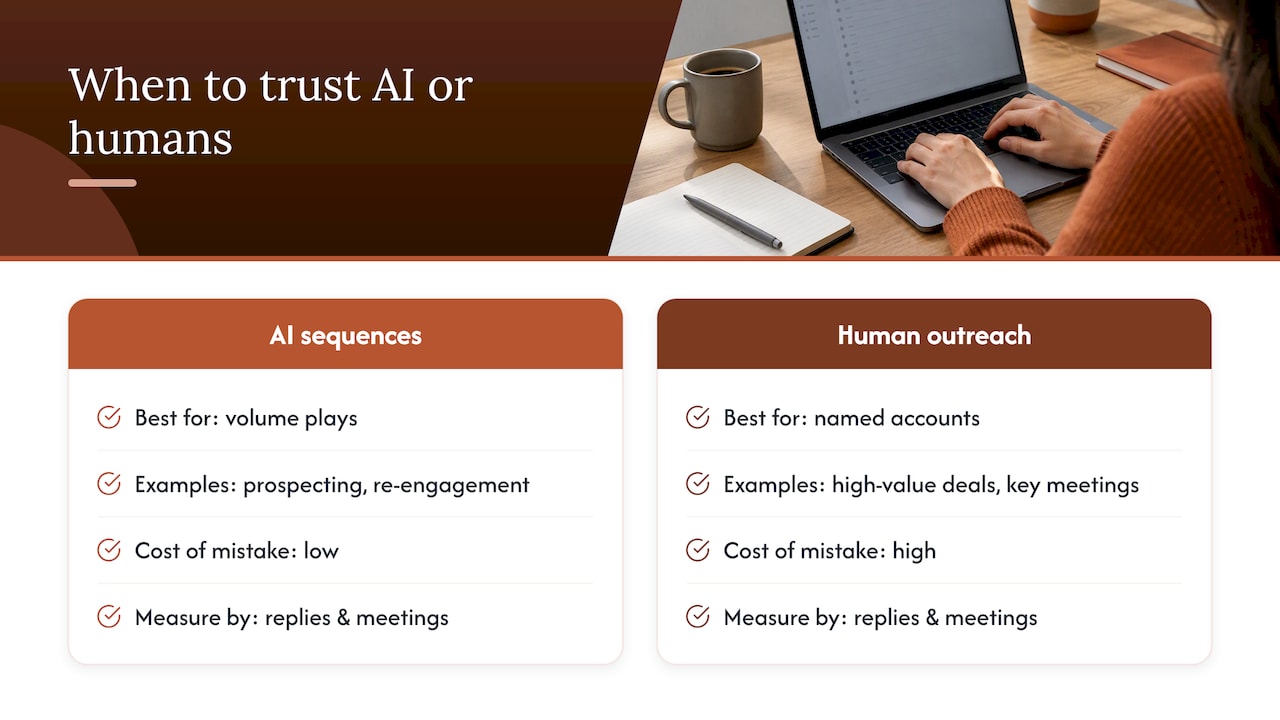
AI-generated sequences earn their keep on volume plays: early-stage prospecting, re-engagement of dormant leads, and any outreach where the cost of a mediocre email is low and the cost of doing nothing is high. Human-crafted outreach still wins for named-account, high-value deals where one wrong detail costs the meeting.
The governance question matters more than the writing question. Measure ROI by reply and meeting-booked rates per sequence variant, not by volume sent, and revisit prompts monthly as mailbox provider behavior shifts. Teams building this inside an AI-native CRM tend to catch drift faster because the data feeding the sequence updates in real time rather than on a batch schedule.
— Pavel
How Sonta AI supports AI-driven sequencing
We built Sonta AI around the same problem this guide addresses: sequences only work when the data behind them is current. Our automated follow-up emails draw on records that update themselves in real time, so a sequence step never fires on stale contact information.

Inside our Agentic CRM, we let teams insert an AI step directly into an automation, generating or adjusting sequence copy using the model best suited to that task, without metering usage the way many point tools do, complemented by managed AI visibility and content strategy services. For teams that want a fast read on where their current sequencing setup is leaking opportunity, our AI Efficiency Diagnostic delivers findings in 30 minutes.
- Real-time record updates feed sequence personalization without manual refreshes.
- Configurable AI agents handle follow-up, scheduling, and account prep alongside email steps.
- Plans start at Solo for $16 per month per seat, scaling to Core, Pro, and Enterprise.
If you want a longer technical assessment of how AI steps fit into a working automation, our Agentic CRM overview is the place to start.
FAQ
What does email sequencing mean?
Email sequencing is a planned, multi-touch outreach campaign where each message is timed, ordered, and structured to move a prospect toward a specific action, such as booking a call. Unlike a generic drip campaign, a sequence is typically rep-initiated and includes stop conditions, like a reply, that halt further messages automatically, per Sendspark’s cadence guide.
Is there an AI that can sort emails?
Yes, several AI email tools can sort, prioritize, and draft responses to incoming email, and mailbox providers themselves now apply AI to summarize and annotate messages. For outbound sequencing specifically, AI tools focus less on sorting and more on generating, timing, and adapting multi-step campaigns based on inputs like persona and goal.
What is the best email sequencing software?
There is no single best tool. The right choice depends on whether you need a standalone sequencing tool or one built into a CRM where records update automatically, which reduces the manual data entry that otherwise limits personalization at scale.
What does the 3-21-0 email rule mean?
The 3-21-0 rule is informal shorthand some sales teams use: three touches, spread across 21 days, before pausing if there has been zero response. It is a flexible guideline rather than a documented industry standard, and actual high-performing cadences often run longer, commonly 7 to 12 touches over three to four weeks, according to Sendspark.
Sources
- Email Cadence for B2B Sales: Guide & Examples | Sendspark
- 2026 Email Deliverability Benchmark Report | Validity