Sales Data Enrichment for RevOps: Dedupe First, Map Fields to Plays

Sales data enrichment turns partial CRM records into action-ready profiles that reduce bounces, increase connect rates, and lift pipeline velocity. Two measurable outcomes make the case: fewer bounced emails and faster movement from marketing-qualified to sales-qualified status, both tied to record completeness and accuracy. Platforms like Sonta Ai now build this enrichment into the CRM itself rather than treating it as a separate step.
TL;DR:
- Enrichment should focus on high-value fields like verified email, phone, job titles, company size, and intent signals, which directly impact routing, scoring, and messaging.
- Conduct manual quality checks on top accounts and ensure data verification before write-back to prevent costly errors and maintain sales team trust.
- Implement an enrichment process driven by revenue motions, mapping specific fields to plays, normalizing data, deduplicating, and verifying values before automatic updates.
- Use AI-native tools that update records in real time, with automation for capturing contacts and scheduled refreshes based on data type to improve accuracy and reduce manual effort.
- Maintain compliance by documenting lawful basis, fulfilling GDPR transparency requirements, and establishing clear ownership, SLAs, and regular quality reviews.
Table of Contents
- What sales data enrichment is and which fields matter most
- Why enrichment matters for sales and RevOps
- High-impact enrichment fields and how to pick what to enrich first
- Designing an enrichment program: scope, sequencing, SLAs, and ownership
- Technology patterns and integration: connectors, APIs, and automation
- Compliance and GDPR checklist for B2B enrichment
- How Sonta Ai operationalizes continuous enrichment
- What usually goes wrong and where the quick wins are
- Getting started with continuous enrichment
- Sources
- FAQ
What sales data enrichment is and which fields matter most
Sales data enrichment is the process of adding missing or outdated information to existing CRM records, pulling from internal signals (email opens, call logs, deal history) and external sources (firmographic databases, technographic scanners, intent data providers) to build a fuller picture of a contact or account. Internal enrichment draws on activity your team already generates. External enrichment appends data your team never had, sourced from third-party vendors or public records.
Not every field deserves the same attention. RevOps teams get the most return from a short list of high-value fields:
- Verified email and phone: the baseline for outreach; without these, nothing downstream works.
- Title and seniority mapping: determines who gets prioritized in routing and which messaging angle applies.
- Company size: shapes segmentation, deal sizing, and which playbook a rep follows.
- Tech stack: signals fit for integration-dependent products and informs competitive positioning.
- Recent events or intent signals: funding rounds, leadership changes, or hiring surges that indicate timing.
First-party enrichment, built from your own website, product, and email activity, tends to be more reliable because it reflects real behavior rather than a vendor’s last crawl. Third-party append data is useful for filling gaps at scale, but it decays quickly and varies in accuracy across providers, which is why verification before write-back matters more than the source itself.
Why enrichment matters for sales and RevOps
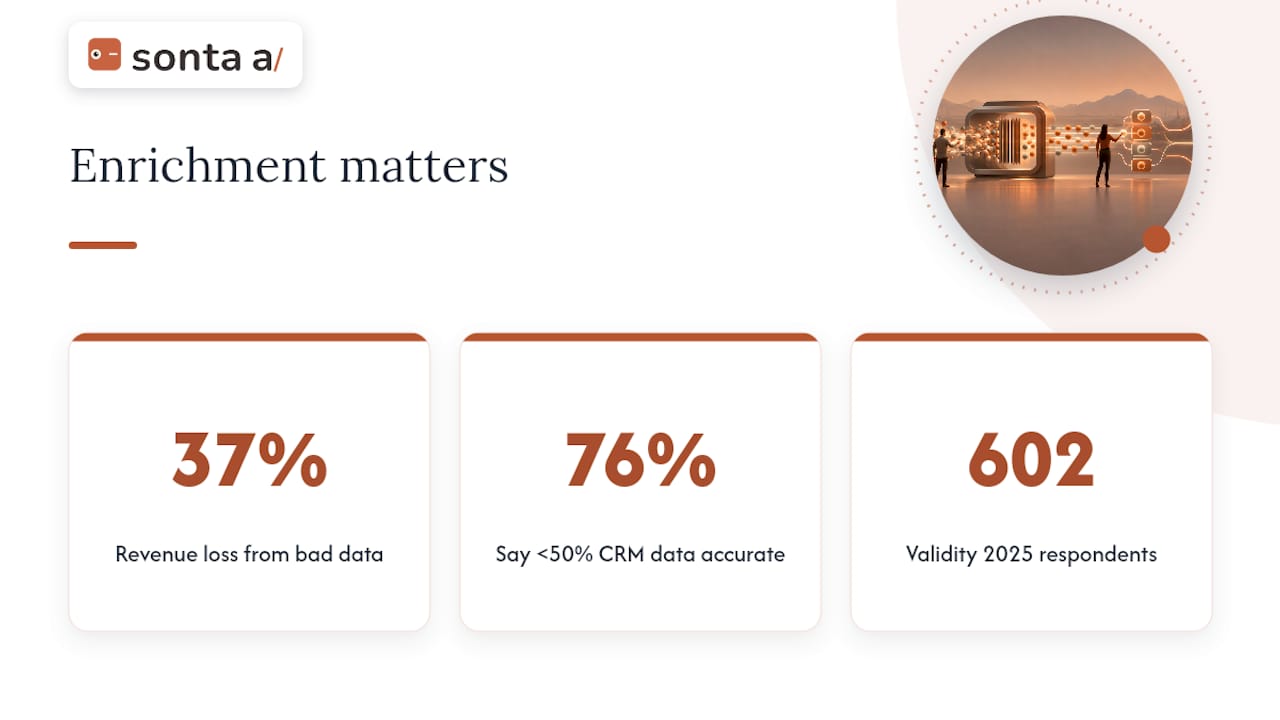
The case for enrichment is really a case against the cost of bad data. A 2025 CRM data management study found that 37% of CRM users reported losing revenue directly because of poor data quality, and 76% said less than half their CRM data is accurate and complete. Those numbers describe a system where reps are working from guesswork more often than not.
37% of CRM users report losing revenue to poor data quality, according to Validity’s 2025 survey of 602 CRM users and stakeholders. That figure is a direct line from data hygiene to the pipeline number leadership actually cares about.
Enrichment done poorly makes this worse, not better. Common failure modes include enriching duplicate records (multiplying the mess instead of fixing it), appending data without verification (so a wrong phone number just gets replaced with a different wrong phone number), and running enrichment as a one-time project instead of a maintained process. CRM data doesn’t stay accurate on its own. Contacts change jobs, companies get acquired, phone numbers get reassigned, and without scheduled refreshes, even a clean database drifts back toward the 76% problem within a year. Bad enrichment also erodes rep trust: once a sales team catches enrichment vendors feeding them stale titles or wrong numbers a few times, they stop trusting the CRM altogether and revert to manual research, which defeats the entire point of the investment.
High-impact enrichment fields and how to pick what to enrich first
Enrichment only pays off when each field is tied to something a rep or a system actually does with it. A field that sits in the CRM unused is a cost with no return. Before enriching anything, ask what play depends on it.
- Verified email: enables outbound sequencing and deliverability; without it, connect rates collapse regardless of message quality.
- Direct phone line: supports call-based routing and increases dial-to-connect ratios for outbound teams.
- Title and seniority: drives lead scoring and determines whether a contact routes to an SDR queue or an account executive.
- Company size and industry: feeds segmentation logic and picks which nurture track or pricing tier applies.
- Tech stack signals: triggers integration-specific messaging and helps qualify fit before a discovery call.
- Intent or trigger events: prioritizes accounts in a scoring model and can move a record into an active sales motion automatically.
A rule of thumb: enrich when a field changes a routing decision, a scoring threshold, or a message. Verify when a field is already present but its confidence is low, such as a phone number that’s more than a year old. Skip enrichment entirely for fields that never surface in a play, no matter how complete the CRM schema wants them to be. The CUFinder playbook on enrichment makes this point directly: map every enriched field to a precise downstream action, and if a field doesn’t trigger a play, don’t enrich it.
Pro Tip: Run manual QA on a sample of enriched records for your highest-value accounts before trusting the vendor’s confidence score at scale.
This matters most for accounts above a certain deal size threshold, where a wrong title or an outdated decision-maker can cost a quarter’s worth of outreach effort. A ten-minute manual check against LinkedIn or the company website for your top 50 accounts catches errors that a vendor’s automated confidence score will miss.
Designing an enrichment program: scope, sequencing, SLAs, and ownership
A functioning enrichment program starts with revenue motions, not with a data vendor’s feature list. The sequence that works in practice:
- Map your revenue motions. Identify the plays that drive pipeline: outbound prospecting, inbound lead routing, account expansion, renewal risk scoring.
- Map fields to plays. For each motion, list the exact fields that change the outcome, and cut anything that doesn’t.
- Set scope based on that mapping. Enrich only the fields tied to an active play, for the accounts and contacts those plays actually touch.
- Normalize before anything else. Standardize formats (company names, job titles, phone formats) so matching logic doesn’t fail on cosmetic differences.
- Dedupe before enriching. Merging duplicates first prevents the enrichment step from multiplying the same error across three records instead of one.
- Enrich against the cleaned base. Run the append or lookup process only after normalization and dedupe are complete.
- Verify before write-back. Check enriched values against a second source or a confidence threshold before they overwrite existing CRM fields.
- Write back conditionally. Only overwrite a field if the new value has higher confidence than what’s already there, never blindly.
Cadence should differ by data type rather than run on a single blanket schedule. The Clay CRM enrichment guide recommends refreshing contact-level data (email, phone, title) every 60 to 90 days, firmographic data monthly, and technographic data quarterly, since these categories change at different rates.
Ownership and SLAs turn the sequence above into something that survives past the first quarter:
- Assign a single owner for the enrichment process, typically a RevOps lead, so accountability doesn’t diffuse across sales and marketing.
- Set an SLA for turnaround between a record entering the pipeline and enrichment completing, so reps know what to expect.
- Establish QA gates at the verification step, with a defined confidence threshold below which a value doesn’t write back automatically.
- Review accuracy quarterly against a sample of records to catch vendor drift before it becomes a trust problem.
Skipping the dedupe step is the single most common mistake teams make when they buy enrichment tools and expect the data to fix itself.
Technology patterns and integration: connectors, APIs, and automation
The mechanism you use to enrich data matters almost as much as the data itself. Three patterns dominate: native CRM connectors that run enrichment inside the platform with minimal setup, direct API integrations that give more control but require engineering time to maintain, and middleware tools that sit between multiple data sources and the CRM to orchestrate matching logic. Native connectors are the fastest to deploy and the easiest for a rep to trust, since the data appears inside the tool they already use. Direct APIs suit teams with specific matching logic or unusual data sources that a native connector doesn’t support. Middleware adds flexibility at the cost of another system to maintain and monitor.
- Native CRM connectors: fastest setup, the least engineering overhead, but limited to what the vendor’s integration supports.
- Direct APIs: full control over matching and write-back logic, at the cost of ongoing maintenance.
- Middleware and orchestration layers: useful when combining multiple enrichment sources, but add a layer of operational complexity.
Waterfall enrichment, where a record queries multiple providers in sequence until a match is found, raises match rates but adds latency and cost. It’s worth reserving for high-value segments rather than running it across every record, since the Jeeva notes that selective waterfalling keeps complexity manageable while still lifting match rates where it counts most.
Verify-before-write and conditional overwrites should be non-negotiable regardless of which integration pattern you choose. A record with a verified phone number from a recent call shouldn’t be silently overwritten by a lower-confidence vendor append. Automation examples worth building early include auto-capturing contacts from email and calendar activity (catching people your team already talked to but never logged) and scheduling enrichment refreshes on a cadence tied to data type rather than running them manually. Teams evaluating integration depth across platforms often compare how CRMs handle connectors and workflow automation before settling on an architecture.
Pro Tip: Build your dedupe and normalization logic once, then apply it as a gate before every enrichment run, not as a cleanup step after the fact.
For teams building this architecture in-house, a partner like Vetros can help design the data pipeline and matching logic that sits underneath the enrichment layer.
Compliance and GDPR checklist for B2B enrichment
GDPR applies to any B2B contact record that identifies a real person, which means most CRM enrichment work falls under it regardless of whether the contact is a business email address. Legitimate interest is the lawful basis most commonly used for B2B prospecting, but it isn’t a blanket exemption. It requires a documented three-prong balancing test: a legitimate purpose, necessity of the processing, and confirmation that the individual’s rights don’t override the business interest, according to GDPR guidance for B2B data enrichment.
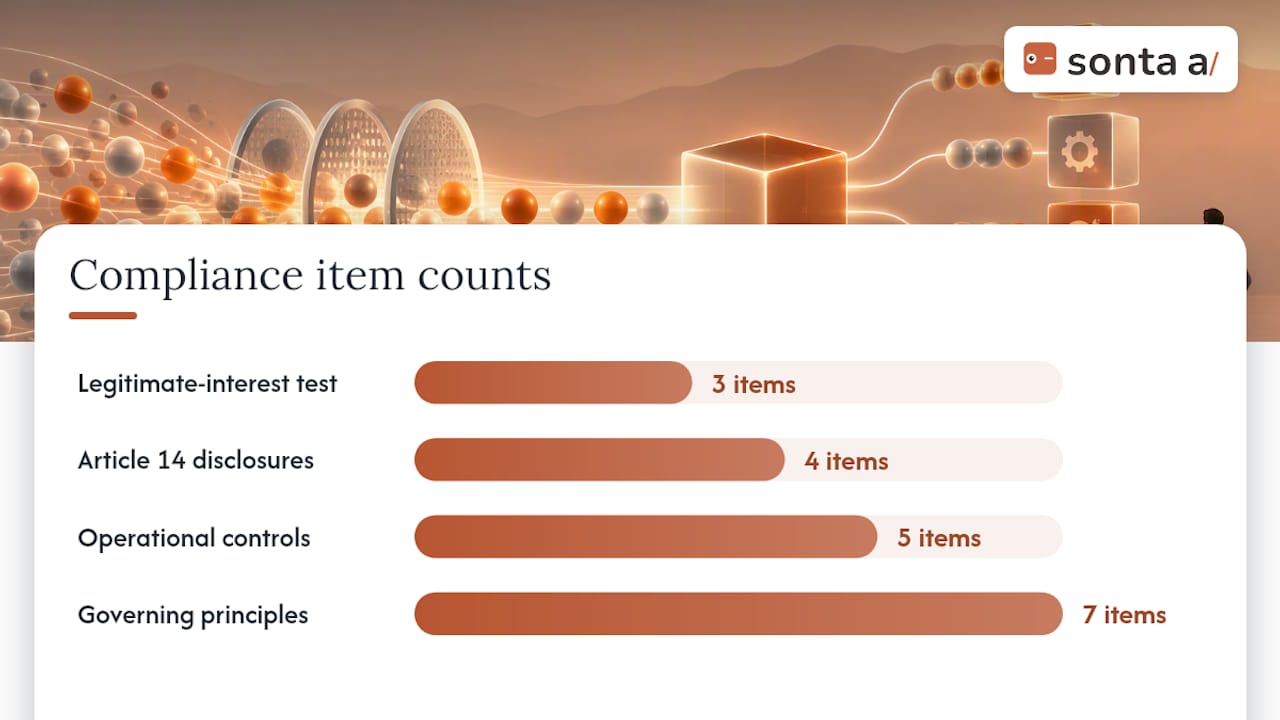
Legitimate interest is the commonly used lawful basis for B2B prospecting, but it requires a documented balancing test, per GDPR guidance for B2B data enrichment. Skipping that documentation is one of the most common compliance gaps teams discover only after a complaint.
When data is sourced indirectly, meaning the individual didn’t provide it to you directly, Article 14 requires disclosure at first contact: who you are, why you have their data, where it came from, and how they can object. Practical operational controls to put in place:
- Sign a Data Processing Agreement (DPA) with every enrichment vendor before data flows into your CRM.
- Document a Legitimate Interest Assessment (LIA) for each enrichment use case, not just once for the whole program.
- Limit retention for prospect records that never convert, with three years as a reasonable maximum before deletion or re-permissioning.
- Vet vendor data origin to confirm sources aren’t built on mass scraping, a common enforcement trigger according to Ifelse Agency’s guidance on data enrichment and GDPR.
- Build a suppression workflow so an opt-out or objection request removes a contact from all connected systems, not just one.
Ifelse Agency’s breakdown lists seven governing principles for compliant enrichment: legal basis, transparency, proportionality, data minimization, accuracy, limited retention, and security. Programs that skip any one of these tend to be the ones that end up in a regulator’s enforcement notes.
How Sonta Ai operationalizes continuous enrichment
Most enrichment programs treat refresh cycles as a scheduled job that runs in the background and hopes for the best. Sonta Ai builds this differently: records update themselves in real time, driven by AI agents that pull in new information as it becomes available rather than waiting for a batch job. That shifts enrichment from a periodic task RevOps has to remember to run into a property of the CRM itself.
Practical use cases this approach supports include:
- Auto-capture from email and calendar activity, so contacts a rep already talked to get added and enriched without manual entry.
- Conditional verification before write-back, so a low-confidence value never silently overwrites a field with existing data.
- Enrichment-driven routing, where a newly enriched title or company size automatically moves a record into the right play.
For teams unsure where their current data gaps are costing the most, Sonta Ai’s AI Efficiency Diagnostic offers actionable insights within 30 minutes, identifying where operational leakage happens before committing to a bigger rebuild. Teams that want to understand the mechanics behind this architecture can review what AI-native architecture looks like in a working CRM or the Site & Integrations documentation in the Sonta Ai Academy for connector-level detail.
What usually goes wrong and where the quick wins are
The mistake I see most often isn’t a data problem. It’s a sequencing problem: teams buy an enrichment tool before fixing the hygiene issues that make enrichment worthless in the first place. Dumping fresh vendor data on top of unmerged duplicates and unverified fields just multiplies the mess at a higher price point.
The highest-return fix, by a wide margin, is field-to-play mapping done honestly. Most CRMs carry a dozen fields nobody uses in any play, and enriching those fields is pure waste dressed up as diligence.
Two quick wins consistently pay off within a quarter: dedupe first, always, before any enrichment run touches the database, and pick your twenty highest-value accounts for manual QA rather than trusting a vendor’s confidence score blind. Beyond that, assign one owner for the whole program. Enrichment split across sales, marketing, and RevOps with no single accountable person is how a good process quietly falls apart within two quarters.
— Pavel
Getting started with continuous enrichment
Most enrichment tools bolt onto a CRM as a separate subscription, another system to configure, monitor, and reconcile. Sonta Ai builds enrichment into the record itself, so the update happens where the rep already works instead of in a side tool they have to trust separately.

A practical starting point for most RevOps teams:
- Run the AI Efficiency Diagnostic to see where data gaps and process leakage are costing pipeline right now, delivered in 30 minutes.
- Review the Academy resources on blueprints and automations to see how field-to-play mapping works inside an agentic CRM.
- Check plan fit on the pricing page, starting at $16 per seat per month on the Solo plan, scaling to Core, Pro, and Enterprise depending on team size and workflow complexity.
If your team is deciding whether an AI-native approach fits your current sales motion, the Agentic CRM overview is the fastest way to see how the pieces connect.
This article is general information, not a substitute for advice from a qualified lawyer. Consult a qualified legal professional about your own circumstances before acting on anything here.
FAQ
What are some examples of data enrichment?
Common examples include appending a verified phone number to a contact record, adding a company’s employee count and industry classification, and flagging recent funding or leadership changes as intent signals. Internal enrichment can also pull activity data, like email opens or meeting history, into the same record for a fuller profile.
What is the best tool for data enrichment?
There’s no single best tool since needs vary by CRM, data volume, and compliance requirements, but the choice usually comes down to native CRM connectors versus standalone APIs versus AI-native platforms that update records continuously. Platforms like Sonta Ai take the continuous, self-updating approach, building enrichment into the CRM record itself rather than as a separate add-on step.
What are some examples of sales data?
Sales data includes contact details (email, phone, title), firmographic details (company size, industry, revenue band), technographic details (software the account already uses), and behavioral signals (email engagement, website visits, call outcomes). Together these fields feed lead scoring, routing, and personalization decisions across the sales process.
What are the best data enrichment tools for Salesforce?
Salesforce supports enrichment through native AppExchange connectors, direct API integrations, and middleware tools that sync external data sources into the platform, each with different setup effort and ongoing maintenance needs. Teams evaluating Salesforce alongside newer AI-native alternatives can review a comparison of integration approaches to understand the trade-offs before committing to one architecture.
How often should CRM data be refreshed?
Refresh cadence should differ by data type rather than follow one fixed schedule: contact-level fields like email and phone benefit from refreshes every 60 to 90 days, firmographic data monthly, and technographic data quarterly. Running every field on the same cycle wastes budget on data that hasn’t changed while letting fast-moving fields go stale.