CRM Automation Cost in 2026: Pricing Models and Real Budget

CRM automation typically costs $15 to $25 per user per month at entry level, $50 to $70 for mid-tier plans and roughly $150 to $550 at enterprise level, according to a 2026 pricing guide with figures verified in October. That is the license line only. The total depends on three further variables: how the vendor meters automation (per seat, per task or per credit), what AI agents cost on top of the base plan, and what you spend in the first year on migration, setup and integrations. This guide breaks each one down so you can build a budget instead of comparing sticker prices.
TL;DR
- Seat prices for CRMs with automation run from about $15 per user per month to several hundred dollars at enterprise level, and the gap is mostly explained by AI features and usage limits.
- Three metering models dominate: flat per-seat tiers, per-task billing and credit-based billing. Only the first one gives a fixed monthly number.
- First-year implementation, data migration, training and integrations can match or exceed the annual license, so budget them separately.
- Estimate cost from your own volume: seats, automated actions per month, AI steps per action and the systems you need connected.
- Sonta AI publishes seat prices from $16 per month (Solo) and does not meter AI or automation usage, which removes the variable line from the model.
Table of Contents
- What CRM automation costs per user
- The three pricing models behind automation
- What pushes the price up
- The costs outside the subscription
- How to estimate your own number
- Comparing quotes fairly
- Start with the diagnostic, then price the build
- FAQ
- Sources
What CRM automation costs per user
The market clusters into three bands. The figures below come from the pricing guide cited above, which reports entry-level plans at $15 to $25, mid-tier plans at $50 to $70 and enterprise tiers at about $150 to $550 per user per month.
| Tier | Typical price per user per month | What you usually get |
|---|---|---|
| Entry level | $15 to $25 | Contact and deal tracking, basic workflow rules, email sequences |
| Mid-tier | $50 to $70 | Multi-step workflows, reporting, role permissions, some AI features |
| Enterprise | $150 to $550 | Advanced permissions, custom objects, sandbox environments, higher limits, support tiers |
Two cautions apply to any range you read. First, annual billing usually discounts the monthly rate, so confirm which one a vendor is quoting. Second, the price that matters is the one for the tier that actually contains the automation you need. Many vendors advertise an entry price and place multi-step workflows, AI features or API access a tier or two higher.
Where Sonta AI sits in these bands
Sonta AI publishes its seat pricing on the pricing page: Solo from $16 per seat per month, Core from $28 and Pro from $65, with Enterprise quoted individually. The structure is per seat, and AI and automation usage is not metered, so adding a workflow or an AI step does not change the monthly invoice.
The three pricing models behind automation
The same automation can cost very different amounts depending on how the vendor charges for it. Understanding the metering model is the single most useful step before you compare quotes.
Per-seat pricing
You pay a fixed amount per user per month, and automation is included up to the limits of the tier. Budgeting is simple: seats multiplied by the tier price. The risk is tier jumps, where a feature you need (a certain number of workflows, API access, AI actions) sits in a plan that costs two or three times as much.
Per-task pricing
Every workflow step that runs counts as a task, and plans include an allowance. Overages are billed per additional task, and steps that send email or SMS or call an AI model are often classed as premium and cost more. A high-volume process such as lead routing for thousands of inbound leads can look cheap on a per-task basis until volume grows. The cost scales with activity, not with headcount.
Credit-based pricing
Actions draw down a pool of credits, and the credit cost of each action reflects how much compute or messaging it consumes: an AI-generated message costs more than a templated one, and a web lookup costs more than a field update. Credit-based billing is transparent when the vendor publishes a credit table, since you can price a workflow before you run it. It becomes unpredictable when AI steps are placed inside high-volume triggers.
A useful property of action-based billing is that the economic unit is the completed paid action, not the workflow run. A workflow with many conditions, filters and waits that finishes with one SMS costs about as much as a workflow that only sends that SMS. When you read a vendor’s documentation, look for which steps are free (triggers, branches, field updates) and which consume credits (messages, AI calls, enrichment).
| Model | What drives the bill | Budget predictability | Watch for |
|---|---|---|---|
| Per seat | Headcount and tier | High | Feature gating between tiers |
| Per task | Workflow volume | Medium | Premium task classes, overage rates |
| Credit based | Action type and AI usage | Lower | Credit packs, expiry, AI-heavy steps |
What pushes the price up
AI features and agents
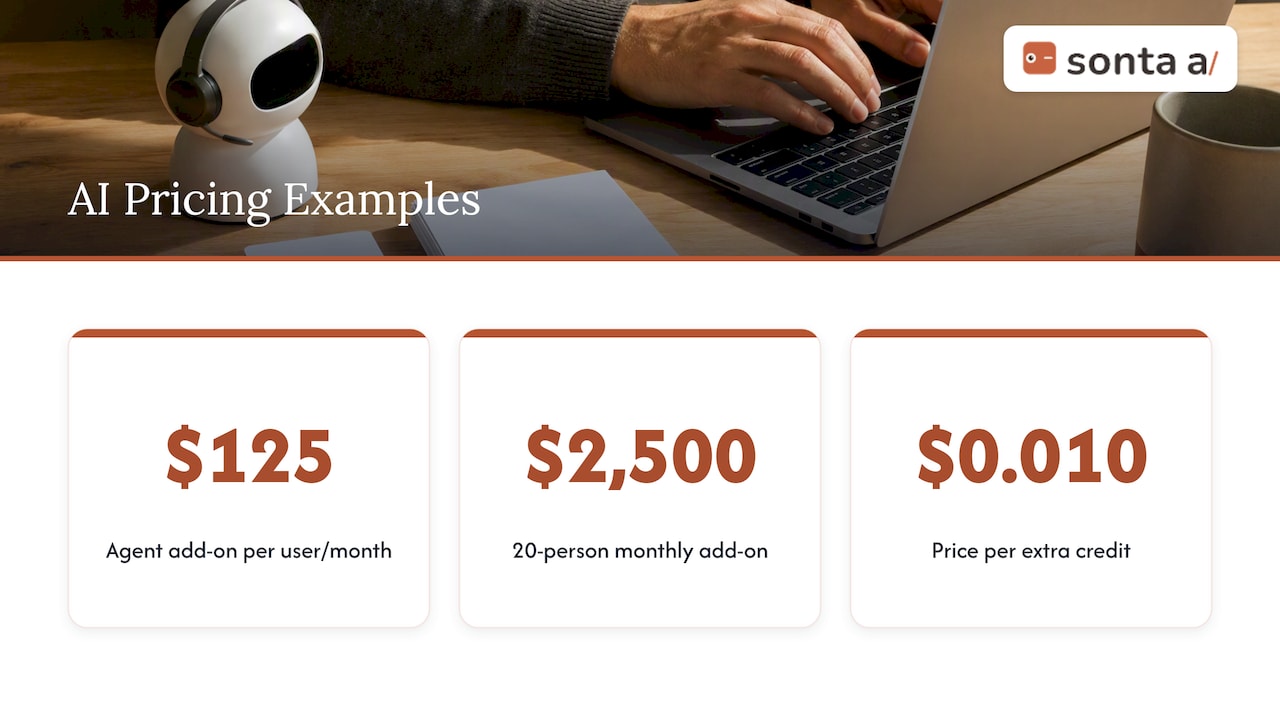
AI is now the main reason two plans with similar seat prices end up far apart. Some vendors sell AI agents as add-ons priced per user, and others sell extra credits in small increments. A published comparison from October 2026 lists one major CRM’s agent add-on starting at $125 per user per month, and a second vendor selling additional credits at $0.010 each. On a 20-person team, the first example alone adds $2,500 a month before any base license.
If you plan to put AI into follow-ups, lead qualification or call summarization, ask how those steps are billed at your expected volume, not at the demo volume. For a deeper look at how retrofitted AI inflates a bill, see our analysis of the hidden cost of bolt-on AI in legacy CRMs, and for a head-to-head view, how an agentic CRM compares with an incumbent plus agents.
Usage limits
Flat tiers often carry limits on contacts, team members, storage, API rate and webhooks. One documented example from a published plan table: a Pro plan at $29 per month, Business at $99 and Enterprise from $500, with caps on team members, contacts, AI credits, storage, API rate and webhooks, and extra credit packs at $0.01 per credit. The headline price is only meaningful when the limits fit your volume. Check the cap that you will hit first, which for sales teams is usually contacts or AI credits.
Integrations and webhooks
Automation only pays off when data flows between the CRM, your email, calendar, enrichment and billing tools. Native connectors are usually included, while custom integrations and high API volume are where costs appear. Our academy pages on webhooks in and out and integrations overview show what a platform can connect without custom work.
The costs outside the subscription
Sticker prices mislead because first-year implementation, data migration, training, integrations and any mandatory onboarding can exceed the annual license. One analysis puts implementation and setup fees at 20 to 50 percent of first-year license cost, depending on complexity, and the same source estimates average implementation for companies under 100 employees at about $3,000.
The lines to budget for:
- Data migration and cleaning. Deduplication, field mapping and history import. Messy source data is the usual cause of overruns.
- Workflow and process design. Someone has to translate your sales motion into triggers, conditions and agent instructions.
- Integrations. Each custom connection is a scoped piece of work, plus maintenance.
- Training and adoption. Time off quota for the team, plus an admin who owns the configuration.
- Support and AI keys. Premium support tiers and, where the vendor passes model usage through, the cost of model access.
- Ongoing administration. Roughly a few hours a month per workflow set for tuning, which belongs in your cost even though it is not an invoice.
If your automation includes AI agents, the total cost of ownership also includes the operating costs around them. CoreWorx’s breakdown of floor costs for AI agents in business is a good illustration of why you should price monitoring, iteration and integration work together instead of looking at the model fee alone.
What Sonta AI charges outside the seat price
On the pricing page, the one-off services are listed as follows:
| Service | Published price |
|---|---|
| Migration and data modelling | From $2,500 one-off |
| Workflow build sprint | From $5,000 one-off |
| Full implementation programme | From $8,000 one-off |
| Additional industry blueprint | $200 per month or $2,000 one-off |
| Custom blueprint for a new vertical | From $15,000 one-off |
| Premium support | 15% per year |
| Managed AI keys | 15% |
| Custom integration | No published price |
Not every team needs any of these. A small team using a self-serve plan with its own data export may only need the subscription, while a team moving from a legacy system with years of history will want migration and a workflow sprint. For rollout sequencing by company size, our 30/60/90 implementation timeline lays out who does what and when.
How to estimate your own number
A defensible estimate takes about an hour and four inputs.
- Count seats by role. Not everyone needs the top tier. Reps, managers and read-only stakeholders often fit different plans.
- List the automations and their volume. For each workflow, write the monthly trigger count and the number of paid actions per run (messages, AI calls, lookups). Free control steps do not matter for cost on action-based models.
- Price the AI steps separately. Multiply AI actions per month by the vendor’s per-credit or per-task rate, or confirm the vendor does not meter them.
- Add one-off costs and divide. Migration, setup, integrations and training, spread over 12 to 24 months, give a monthly equivalent that you can compare across vendors.
Worked example: a 10-person team
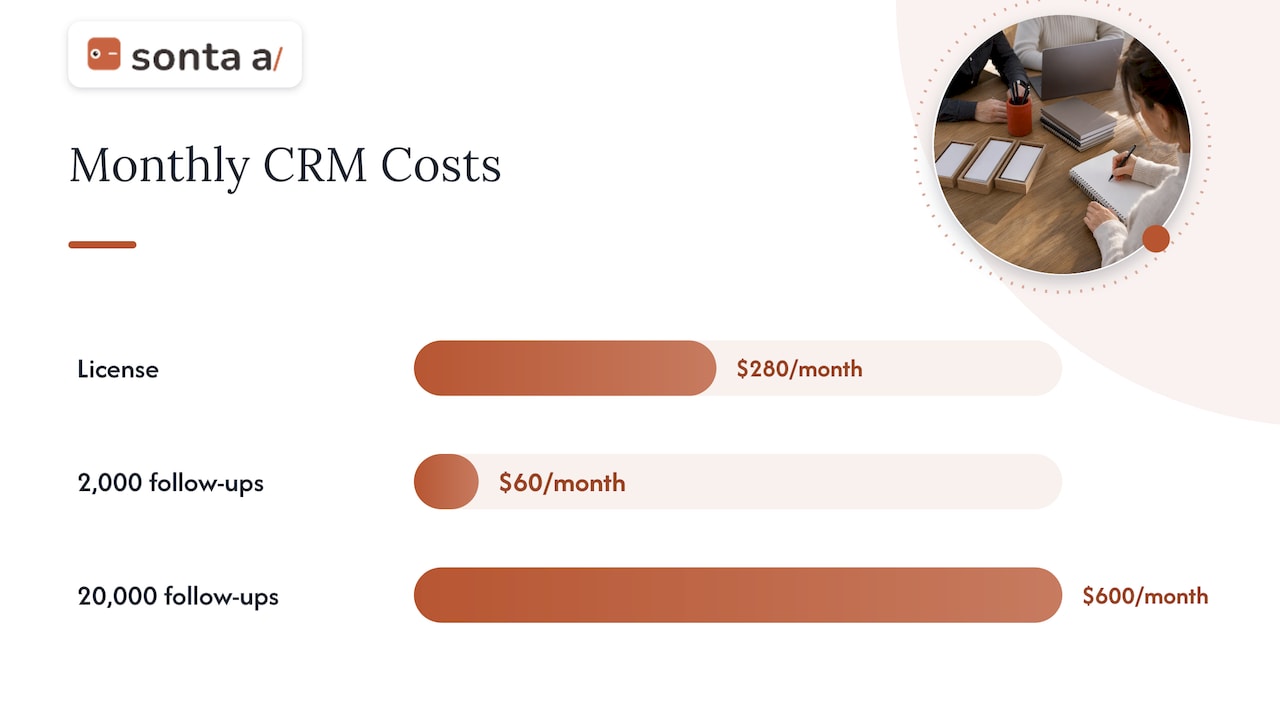
Assume 10 seats at a $28 per seat per month plan, which is the published starting price of Sonta AI’s Core plan. The license is $280 per month, or $3,360 per year. Add a $2,500 migration (the published starting price for migration and data modelling), and year one comes to $5,860 before any workflow build or integrations. Add a $5,000 workflow build sprint and year one is $10,860. Spread over 24 months, the equivalent monthly cost is about $453 of which $280 is subscription.
Now compare a usage-metered alternative of the same shape. Suppose 10 reps trigger 2,000 AI-drafted follow-ups a month, and the vendor charges $0.01 per credit at 3 credits per AI message. That is $60 a month, which looks small. At 20,000 follow-ups it is $600 a month, more than double the license. This is why volume assumptions matter more than the base price when automation is metered. Prices in this example are starting prices and depend on plan and scope, so confirm the figure that applies to your account.
Comparing quotes fairly
When you hold two or three quotes, line them up on the same basis:
- Tier required for your workflows, not the tier in the headline.
- Billing period. Monthly versus annual can differ by 10 to 20 percent.
- Metering of AI and messages. Included, capped or billed per action.
- Contract minimums for seats and term.
- Included implementation. Some vendors bundle onboarding, others charge from a few thousand dollars.
- Exit costs. Data export format and whether workflows can be recreated elsewhere.
A quick test of any automation quote: ask the vendor to price one real workflow end to end, such as inbound lead capture, qualification, routing and first follow-up, at your monthly volume. The answer shows the true unit cost faster than any pricing page.
Our view on what automation should cost
Most of the cost confusion in CRM automation comes from one design choice: charging for the work the system does rather than for the people who use it. When every AI step, trigger and record update draws on a meter, teams start rationing automation, which defeats the reason they bought it. We built Sonta AI the other way: seats are the unit, AI and automation usage is not metered, and records update themselves so reps are not paying for the admin ceiling that legacy systems impose.
That does not make cost a non-issue. The real spend sits in migration, data modelling and workflow design, which is why we publish those prices and keep the staged-autonomy model for agents: you start with agents that suggest, then move to agents that act as trust builds. A team that budgets the one-off work honestly and keeps the monthly line flat gets a number it can defend to finance.
If you want a view before you commit, our AI Efficiency Diagnostic is designed to show where time and money leak in a sales stack in about 30 minutes.
Pavel
Start with the diagnostic, then price the build
If you are not sure which of your workflows are worth automating, the AI Efficiency Diagnostic takes 30 minutes and is designed to identify operational leakages and show where your tech stack can be tightened. When you are ready to compare plans, the Sonta AI pricing page lists every seat price and one-off service.

To see how automations are configured before you buy, read how to create and activate an automation and how to add an AI step.
FAQ
How much does CRM automation cost for a small team?
For a team of five to ten, the license is typically between $75 and $700 per month at the entry and mid-tier bands cited above, depending on the tier that contains your workflows. Add one-off setup and migration, which for small companies averages around $3,000 in one analysis. Plans that do not meter automation keep the monthly figure steady as volume grows.
Is CRM automation included in the base price?
Basic rules, such as assigning a lead or sending a templated email, are usually included on entry plans. Multi-step workflows, AI features and API access are frequently reserved for higher tiers or sold as add-ons. Always check the tier table for the specific workflow you need.
What is the difference between per-task and credit-based pricing?
Per-task billing counts each workflow step that runs, often with a higher rate for premium steps such as messages and AI actions. Credit-based billing assigns each action a credit cost reflecting its compute or messaging expense and draws from a pool. Both vary with usage, so estimate by monthly action volume.
Do AI agents cost extra in a CRM?
Often yes. Some vendors sell agents as per-user add-ons or sell AI credits in packs. Sonta AI does not meter AI or automation usage, though optional services such as managed AI keys carry a published percentage fee on the pricing page.
How long until CRM automation pays for itself?
There is no reliable universal figure, because payback depends on how much rep time the automation removes and on your deal values. Measure hours of manual updates and follow-up work before the rollout, then compare after 60 to 90 days, using the cost model above as the denominator.
Sources
- How Much Does CRM Software Cost? (2026)
- CRM Pricing Comparison 2026: Cost per User
- Plan limits, ioZen Docs
- Cost of CRM Software: Full Pricing Breakdown for 2026