CRM Onboarding Plan: Build Adoption at 30, 60, and 90 Days

A working CRM onboarding plan rests on five pillars: clear goals and stakeholder buy-in, clean migrated data, configuration that mirrors real workflows, role-based training with superusers, and a measured launch sequence. Done right, it produces a CRM that teams open daily instead of a system that sales reps quietly abandon. Most organizations sequence this work across a pilot phase followed by 30, 60, and 90-day reviews.
TL;DR:
- Before configuration, name an executive sponsor and project lead, then set two or three measurable adoption and business outcome metrics.
- Test migration with a sample CSV, check mapping and duplicates, then pilot before full import; keep the data backed up for at least 90 days.
- Train by role, appoint two or three superusers per team, and keep sessions under 45 minutes with examples tied to that week’s tasks.
- At day 30, assess the pilot; expand at day 60, then compare results with original KPIs at day 90 and adjust scope.
Table of Contents
- Quick-Start Checklist and Ownership Notes
- What CRM Onboarding Actually Involves
- Step 1: Planning and Goal Setting
- Step 2: Data Preparation and Migration
- Step 3: System Configuration and Workflows
- Step 4: Team Training and Adoption
- Step 5: Launch, Measure, and Optimize
- Common Onboarding Pitfalls and How to Avoid Them
- Where Onboarding Projects Usually Go Wrong
- How Sonta Ai Shortens the Path to Daily Use
- FAQ
- Sources
Quick-Start Checklist and Ownership Notes
Before any configuration begins, a few decisions determine whether the project stays on track. We recommend treating these as day-one tasks, not a slow ramp-up.
- Appoint an executive sponsor and a project lead within the first week so decisions don’t stall on approvals.
- Schedule a two-hour planning workshop with sales, ops, and IT to map current workflows before touching the software.
- Inventory every data source (spreadsheets, old CRMs, email lists) and assign an owner to each one.
- Draft a one-line RACI: sponsor is Accountable, project lead is Responsible, IT and sales ops are Consulted, end users are Informed.
- Set a baseline success metric, such as 70% weekly active users by day 60 or a target number of logged activities per rep per week.
Ownership matters more than tooling at this stage. A CRM with no named owner tends to drift back into spreadsheets within a quarter.
What CRM Onboarding Actually Involves
CRM onboarding is the combined work of configuring the system, migrating usable data, building workflows, training people, and turning that training into daily habit. It is not finished when the software goes live. It is finished when the behavior change holds.
Research applying the TOE framework to CRM adoption found that adoption moves through distinct stages, evaluation, adoption, and routinization, and that each stage is driven by different factors. Data quality and top management support carried the strongest influence on whether a system moved past initial adoption into sustained, routine use. That finding matters for planning: a tactic that gets people to log in once will not necessarily get them to log in every week.
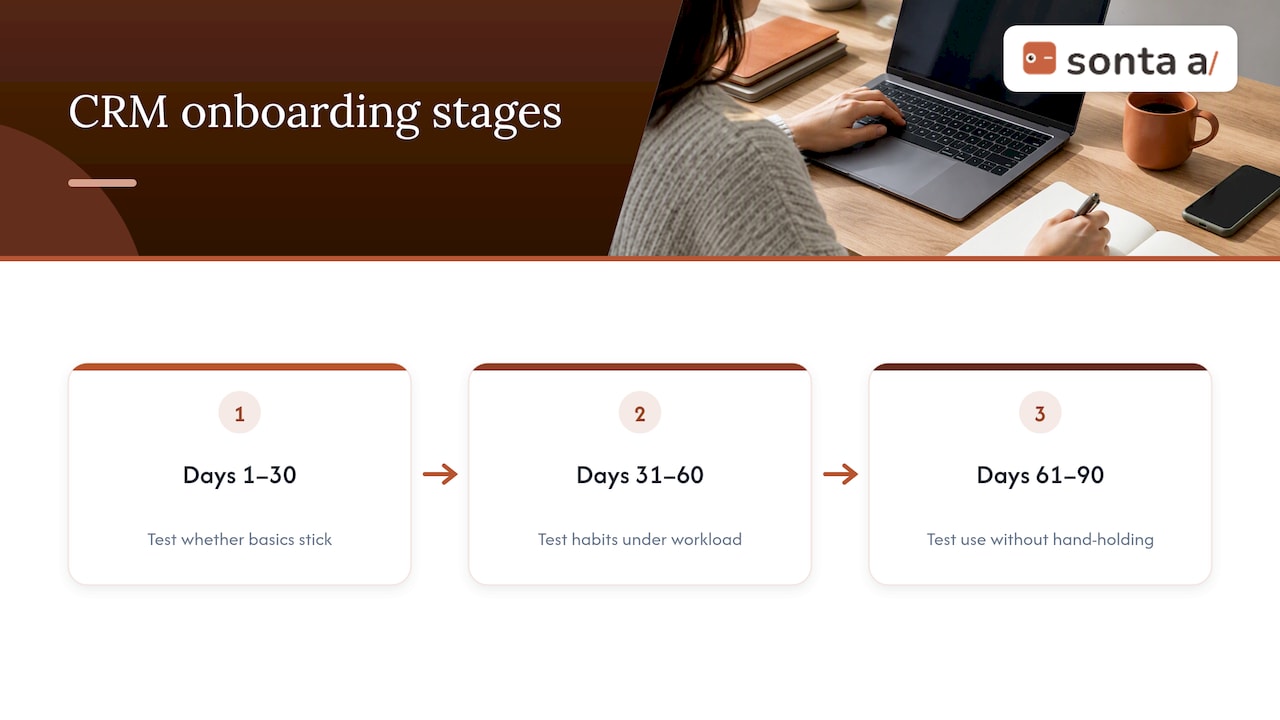
This is why a 30/60/90 structure works better than a single go-live date. The first 30 days test whether the basics stick, the next 30 test whether habits form under real workload, and the final stretch tests whether the system holds up without constant hand-holding.
Step 1: Planning and Goal Setting
Every onboarding plan needs a written answer to one question: what does success look like in business terms, not just login counts? A reasonable set of goals pairs an adoption KPI (weekly active users, activities logged per rep) with a business outcome KPI (pipeline visibility, faster lead response, lower data entry time).
- Write two to three measurable success metrics before any configuration work starts.
- Confirm the executive sponsor, project lead, IT contact, sales ops lead, and two or three superusers who will coach peers later.
- Build a simple RACI: sponsor owns outcomes, project lead owns the schedule, IT and sales ops are consulted on technical decisions, and frontline reps are kept informed through regular updates.
- Set a 30/60/90 milestone schedule: day 30 covers configuration and pilot data load, day 60 covers full team rollout and first training cycle, day 90 covers a measured review against the original KPIs.
- Estimate staff hours realistically. Small teams often complete core setup in days; larger teams with multiple data sources and integrations should budget weeks to a few months, according to phased onboarding guidance from practitioner checklists.
Treating onboarding as a managed project rather than a software install changes the outcome. Research on CRM implementation success found that project management quality, clear milestones, active monitoring, and the flexibility to adjust scope, mediates whether the implementation delivers. For a detailed breakdown by company size, our 30/60/90 implementation timeline and RACI templates walk through staffing expectations stage by stage.
Smaller teams can usually run this planning phase internally. Organizations with several data sources, custom workflows, or multiple departments touching the CRM often bring in outside implementation support once the plan is written, mainly to keep the migration and configuration phases from eating into the project lead’s other responsibilities.
Pro Tip: Write your success metrics before you pick your CRM features. Starting with features tends to produce a system that’s technically impressive and practically ignored.
Step 2: Data Preparation and Migration
Bad data kills CRM adoption faster than any missing feature. Reps stop trusting a system the first time it shows a duplicate contact or an outdated deal stage, and once trust goes, so does usage.
Start with an audit. List every data source, who owns it, and whether each record actually needs to migrate or can be archived instead. Not every spreadsheet from the last five years deserves a seat in the new system.
- Build a deduplication rule set (matching on email and phone, for example) and define canonical fields before importing anything.
- Create a field-mapping template that lines up old column names with new CRM fields, so nothing gets mismatched during import.
- Run a small sample CSV import first, check it against source records, then expand to a pilot team before attempting a full migration.
- Set data quality gates: required fields, validation rules on formats like phone numbers and dates, and a backup of the original data before cutover.
This phased approach, sample import, pilot group, then full migration, mirrors what practitioner migration guides recommend specifically because it surfaces mapping errors and automation conflicts while the stakes are still low. Research on enterprise migration architecture reinforces the same point: staged pipelines with verification steps and quarantine zones for suspect records catch problems that a single bulk cutover would miss entirely, often until it’s too late to roll back cleanly.
Teams that prefer to stage their data manually before any CRM import sometimes start with a structured spreadsheet. A sales CRM Excel template can work as an intermediate step for organizing contacts and deal data before mapping it into the destination system. For a fuller checklist on phase-zero deduplication, our CRM data migration guide covers the mapping and validation steps in more detail.
Pro Tip: Keep a backup of your original data for at least 90 days after go-live. Most data problems surface only after people start working in the new system.
Step 3: System Configuration and Workflows
Configuration should reflect how your team actually sells or serves customers, not the CRM vendor’s default template. Starting from a generic pipeline is one of the fastest ways to produce a tool nobody wants to update.
- Map your pipeline stages to the real steps in your sales or service motion, including any approval or handoff points that the default setup skips.
- Launch with a minimal set of custom fields. Every extra field is one more thing a rep has to fill in, and unused fields are the first sign of over-engineering.
- Define a naming convention for fields, automations, and workflows early, so the system stays legible as more people build inside it.
- Build a short list of essential automations: lead assignment rules, follow-up reminders, and email templates for common touches. These are the automations that save visible time in week one.
- Sequence integrations. Connect the one or two systems that are critical to daily work first (email, calendar, or a core business tool), and stage the rest after the pilot proves the core setup works.
Automation guidance for sales ops teams backs this sequencing: automations that reduce manual data entry tend to have the biggest early impact on how clean records stay, which loops back into the adoption research on data quality. Our automation examples for sales ops cover a few patterns worth adapting, and the Sonta AI Academy automation guides walk through building and activating automations step by step if you’re configuring inside our platform.
Step 4: Team Training and Adoption
Training determines whether configuration work translates into daily use. A CRM configured perfectly but explained poorly still fails.
- Identify two or three superusers per team early, people who are already comfortable with new tools, and give them deeper training than the rest of the group.
- Build role-based training modules instead of one generic session: sales reps need pipeline and logging habits, customer service needs case handling, ops needs reporting. Pair each module with a one-page cheatsheet.
- Schedule reinforcement, not just a kickoff. Plan first-week check-ins, then follow-ups at the 30, 60, and 90-day marks, with targeted refreshers for whichever team is lagging.
- Track adoption metrics weekly (logins, records updated, activities logged) and call out quick wins publicly, since visible early success tends to pull in reluctant users faster than a mandate does.
Research on CRM user acceptance backs the training-and-support emphasis directly: a thesis-level case study on CRM implementation found that communication, training, ongoing support, social influence, and employee participation were the major factors shaping how well staff coped with a new system, often outweighing the software’s actual feature set. Separate research on CRM success factors found that superuser programs and stakeholder involvement predicted adoption more reliably than any specific feature set. Our guide to improving CRM adoption within 90 days covers a few short experiments teams run during this phase without adding headcount.
Pro Tip: Keep training sessions under 45 minutes and tie every example to a task the trainee will do that same week. Abstract training doesn’t survive contact with a Monday morning.
Step 5: Launch, Measure, and Optimize
A soft launch with a pilot team beats a full company-wide switch on day one. Pilot groups surface configuration gaps and training holes while the stakes are still manageable.
- Launch with one pilot team, collect usage data (logins, records updated, pipeline movement) alongside informal feedback from the group.
- At day 30, check adoption KPIs, flag any process blockers, confirm integrations are behaving, and note where training didn’t stick.
- At day 60, expand to the full team and repeat the same checklist, paying closer attention to whichever metric lagged at day 30.
- At day 90, compare results against the success metrics set during planning and decide what to keep, fix, or drop.
- Run small experiments along the way, testing two email templates, adjusting an automation trigger, and prioritize fixes by how many people they affect, not by how interesting the fix is.
- Expand scope deliberately. Add new fields, automations, or integrations only after the core setup is holding steady, not before.
This review cadence lines up with the practitioner timeline guidance on phased rollouts, and it gives the project lead a defensible way to report progress to the sponsor at each checkpoint.
Common Onboarding Pitfalls and How to Avoid Them
Most CRM onboarding failures trace back to a short list of recurring problems, and each has a fairly direct fix.
- Data chaos: migrate in phases, apply validation rules at entry, and keep a backup before full cutover.
- Low perceived value: have the sponsor communicate the “why” early, and surface a quick win (faster lead response, one less spreadsheet) within the first two weeks.
- Training fatigue: keep sessions short, role-specific, and tied directly to that week’s tasks instead of a broad feature tour.
- Integration surprises: delay noncritical connections until after the pilot proves the core workflow, since stacking every integration at once multiplies the places something can break.
Each of these is a known failure mode, not a surprise. Planning for them up front costs far less than fixing them after a team has already written off the new system.
Where Onboarding Projects Usually Go Wrong
The projects that stall almost always share two traits: scope that grew past the original plan, and a sponsor who signed off once and then disappeared. Neither is a technology problem.
The corrective habit is simpler than most teams expect: write the adoption KPIs down before configuration starts, and have the sponsor review them at each 30-day checkpoint, not just at the end. Teams that do this catch drift early instead of discovering it at the 90-day mark, when fixing it costs far more.
— Pavel
How Sonta Ai Shortens the Path to Daily Use
We built this solution for GTM teams that want records to stay current without someone manually re-entering data every week. AI agents can handle lead qualification, follow-up, and account prep automatically, which removes the manual data entry habit that tends to break down fastest during onboarding.

If you’re not sure where your current setup is leaking time, our AI Efficiency Diagnostic gives you a read on operational gaps in about 30 minutes, which is a useful input before you finalize a migration or configuration plan. From there, our pricing page lays out the Solo, Core, Pro, and Enterprise plans so you can match a plan to your team’s size before you start the build.
FAQ
What is onboarding for clients?
Client onboarding is the process of setting up a new customer’s account, data, and workflows so they can start getting value from a product or service with minimal friction. For a CRM specifically, that means configuration, data migration, and training rolled into one coordinated plan rather than separate disconnected steps.
What are the 5 C’s of onboarding?
Definitions vary across industries, but a common version covers clarify, communicate, connect, confirm, and celebrate, roughly matching the stages of setting expectations, keeping stakeholders informed, linking new users to the people who can help them, verifying the setup works, and marking early wins. For CRM projects, this maps closely to the planning, training, and launch phases covered above.
What is the virtual onboarding process?
Virtual onboarding follows the same stages as in-person onboarding, planning, data setup, configuration, training, and launch, but delivers training and check-ins remotely through video calls, recorded modules, and asynchronous documentation. The core success factors stay the same: clear communication, hands-on support, and reinforcement at the 30, 60, and 90-day marks.
What is the 30-60-90 onboarding rule and how does it work?
The 30/60/90 rule breaks onboarding into three review checkpoints: day 30 for pilot testing and initial configuration, day 60 for full team rollout, and day 90 for measuring results against the original success metrics. Each checkpoint gives the project team a chance to catch problems, such as training gaps or integration issues, before they become harder to fix.
Sources
- Understanding CRM adoption stages: empirical analysis building on the TOE framework
- Change management and CRM adoption
- Using change management to improve CRM user acceptance
- CRM onboarding — practitioner guide and phased onboarding checklist