CRM with AI agents: how to choose one in 2026
A CRM with AI agents should do more than summarise calls. It should find the moments when a conversation is timely, write the follow-up, handle replies and keep the record current. Sonta AI is an agentic CRM that finds opportunities and moves them forward. It brings the CRM, email sequences, LinkedIn outreach and a signal engine into one app. This guide shows what to look for, how the options you already know compare and where the controls matter.
TL;DR
- An AI assistant helps a rep do a task. An AI agent carries out a delegated piece of work within limits you set. Ask which one you are buying.
- HubSpot and Pipedrive are strong CRMs with AI features. Agents that act on their own sit on higher tiers or sit beside the CRM, so check what your plan includes.
- Sonta AI replaces a CRM, an email sequencer, a LinkedIn outreach tool and a signal tool in one app. Our value calculator puts that at a median 36% less than the cheapest equivalent stack (Sonta value calculator, list prices read 17-18 Oct 2026).
- You decide which steps need your approval. You choose the AI model per task and run it on your own keys.
- Check data location, consent rules for first contact and LinkedIn’s rules before any agent sends anything.
Table of Contents
- What a CRM with AI agents actually does
- What the options you already know do well
- Side-by-side: who does which job
- How Sonta AI works, step by step
- Control: approvals, models, keys and data
- Rules for first contact in the UK and Europe
- What it costs
- Questions to ask before you choose
- Our view
- Try it on your own pipeline
- FAQ
- Sources
What a CRM with AI agents actually does
The label “AI” now covers two different things. The first is an assistant. TechnologyAdvice (23 October 2026) describes an AI sales assistant as something that helps a rep prepare, decide or complete a task, with the rep directing or reviewing the work. The second is an agent. The same article describes an agent as software that carries out a delegated workflow within defined limits, such as prospect engagement and meeting scheduling, while people define the scope and monitor activity.
For a small sales team the difference is time. An assistant drafts an email when you ask. An agent notices that a past contact changed jobs, researches the new company, drafts the message and queues it for your decision.
In a CRM with agents, the work usually splits into five jobs:
- Spotting a reason to talk.
- Researching the person and company.
- Writing and sending the first message and the follow-ups.
- Handling replies and booking the meeting.
- Keeping the record current afterwards.
Most teams cover these jobs with several tools. A CRM holds the records. A sequencer sends email. A LinkedIn tool handles outreach there. A signal tool tells you when to act. Someone then copies data between them. That copying is the busywork a CRM with agents should remove. We cover the model in more detail in what an agentic CRM actually does.
What the options you already know do well
A fair comparison starts with what each option does best. Here is how the routes buyers usually consider compare.
HubSpot
HubSpot is a broad platform with marketing, sales and service in one place. According to AI Workforce (25 July 2026), its Breeze Assistant ships on every tier, including the free CRM. The same source says the autonomous Breeze Agents, which take bounded actions, are reserved for Professional and Enterprise plans. If your team already lives in HubSpot, that depth is a real strength. Budget for the tier that includes agents before you compare costs.
Pipedrive
Pipedrive is a clean, pipeline-first CRM that sales teams adopt quickly. AI Workforce (25 July 2026) lists its AI features: report creation from text prompts, email drafting, summarising and replying, custom scoring models and company data enrichment from the Premium tier upward. It also lists more than 500 integrations. That makes Pipedrive a good base when you want to add tools around it.
Attio
Attio is a flexible, modern CRM with a customisable data model. It suits teams that want to shape their own objects and views. Outreach and signal work still come from other tools.
Gojiberry AI, HeyReach and Instantly
These are specialist tools. Gojiberry AI focuses on finding prospects from signals. HeyReach focuses on LinkedIn outreach across several accounts. Instantly focuses on sending email at volume. Each does its own job well. None of them is your system of record, so the record, the sequence and the signal still live in different places.
AI SDR tools such as Artisan and 11x
An AI SDR tool gives you one agent that prospects and writes outreach. It is a quick way to add outbound capacity. An AI SDR is one agent that stops at the meeting. Sonta has an agent for every step and is the CRM too. The follow-up, the meeting brief and the record update after the call are handled in the same app.
Spreadsheets, a lead-generation agency or a salesperson
A spreadsheet is free and flexible, and it works for a handful of deals. A lead-generation agency brings people and a method, and a salesperson brings judgement and relationships. All three cost time or fees that scale with effort. An agentic CRM does not replace the founder’s judgement on a deal. It takes the research, the chasing and the record-keeping off the founder’s desk. If you are an owner-led firm that wants new clients without hiring a salesperson, that is where the hours come back.
Side-by-side: who does which job
The table shows where each route covers the five jobs. A tick means it is a core part of the product. “Add-on” means you connect another tool.
| Route | Signals | Sequences | LinkedIn outreach | CRM records | Agents across all steps |
|---|---|---|---|---|---|
| HubSpot | Add-on | Built in on paid tiers | Add-on | Core | Higher tiers |
| Pipedrive | Add-on | Via integrations | Add-on | Core | Partial |
| Attio | Add-on | Add-on | Add-on | Core | Partial |
| Gojiberry AI | Core | Add-on | Partial | Add-on | One focus |
| HeyReach | No | No | Core | Add-on | One focus |
| Instantly | No | Core | No | Add-on | One focus |
| AI SDR tools | Partial | Core | Partial | Add-on | Stops at the meeting |
| Sonta AI | Core | Native, unlimited | Core | Core | Yes |
The pattern is simple. Most options do one or two jobs and hand the rest to another tool. Sonta covers all five in one place, so what the signal engine finds flows straight into the sequence and the record.
How Sonta AI works, step by step
The sequence matters, so here it is in order.
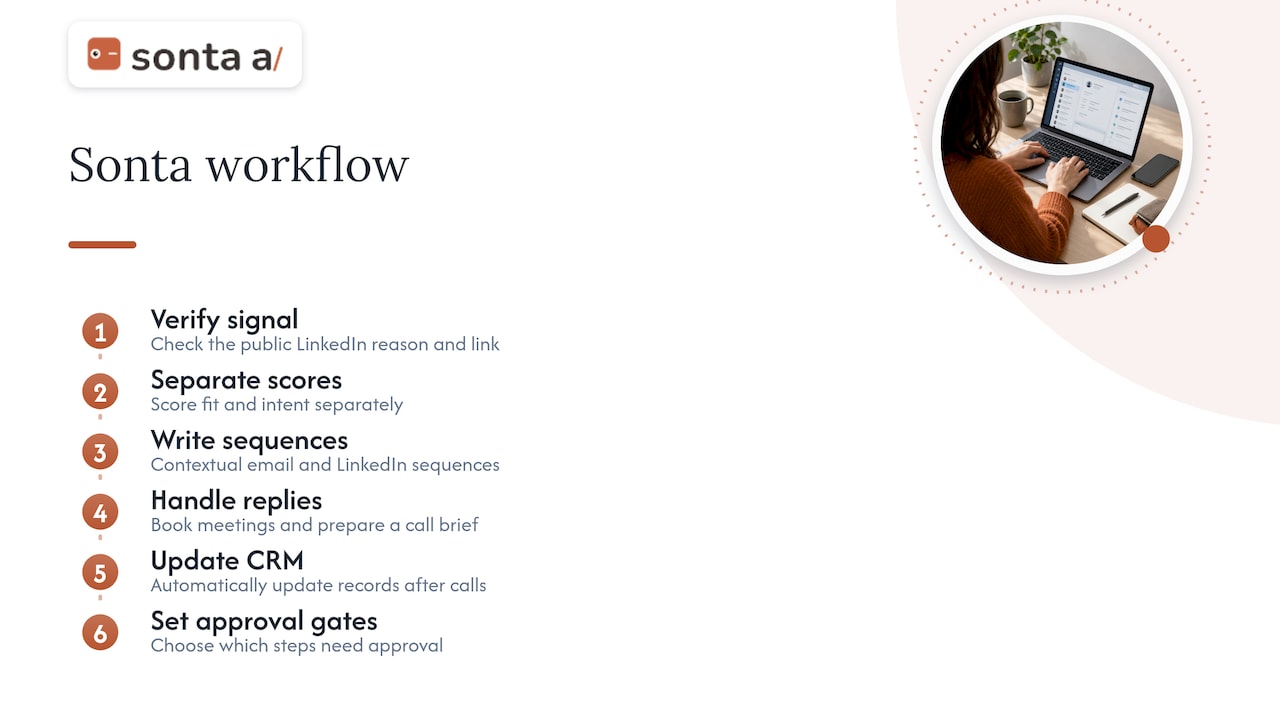
You get a reason to talk. The Signal Agent watches public LinkedIn activity for moments such as a recommendation request, a new decision-maker, a company hiring or a past contact changing jobs. It shows each reason with a link, so you can check what happened before you act. A job change or a hiring post is a reason to talk. It is not proof that someone wants to buy.
You see fit and intent scored separately. A company can fit your ideal client and show no timing. Another can show timing and be a poor fit. Separate scores keep the two apart, so you do not chase the wrong one.
Sequences are written from the moment. Email and LinkedIn sequences are native to Sonta and are written from the moment a signal fires. Email sequences are unlimited. A message that refers to what actually happened reads differently from a template. Our note on personalised outreach goes further on this.
Replies and meetings are handled. Agents handle reply handling and meeting booking, and prepare a brief before the call.
The record updates itself. The CRM keeps itself up to date, so nobody retypes notes after a call. The follow-up side is covered in AI follow-up automation.
You set the approvals. The customer decides which steps need their approval. You might approve every first message and let routine follow-ups run. You might loosen it later as you trust the output. The idea of staged autonomy is built around that choice.
We run our own sales on Sonta.
Control: approvals, models, keys and data
For a team on HubSpot or Pipedrive, control is usually the deciding question. Four points matter.
Approvals and permissions
Vrisic (updated 18 October 2026) recommends treating an AI as a new user with the narrowest role. That means its own integration user so each change is attributable, write access only to named fields and human approval for changes to ownership, stage or amount. It also means keeping an audit log and storing previous values so changes can be undone. Use that list as a yardstick for any product. For a wider look at what an AI app can see and do inside an account you connect it to, read what an AI app can see and do.
In Sonta, you decide which steps need your approval. The same rules hold when you use Sonta from Claude or ChatGPT through its MCP server. The approvals do not change because the front end did.
Your AI models and your keys
Model choice differs across vendors. HappyCXO (20 October 2026) notes that HubSpot’s model training is on by default, with Super Admins able to opt out. It adds that Pipedrive says customer data is not used to train AI models and that Odoo lets users bring their own API keys.
With Sonta, you choose the AI model for each task. You run it on your own keys from Anthropic, OpenAI, Google or OpenRouter. There is no markup on AI, because you use your own keys. Agent runs are never metered.
Where your data lives
Sonta stores and processes customer data in the EU under GDPR. Customer data is never used to train AI. For firms in the UK and Europe that answer to clients about data handling, that is a short, clear position to write into a due-diligence form.
What to ask any vendor
The Voice of Business (9 November 2026), reported by RebornBD, suggests checking data residency, which AI sub-processors handle requests, whether providers can train on your data and the transfer mechanism. Put those four questions to every shortlisted product.
Rules for first contact in the UK and Europe
An agent that writes well can still break the rules if nobody set them. Settle these before you switch outreach on.
- UK. RebornBD (14 October 2026) notes that UK B2B email rules differ for corporate subscribers and sole traders, and that UK GDPR applies to personal data. Handle opt-outs and suppression from day one.
- Germany, the Netherlands, Denmark and Poland. Business email needs prior consent before first contact. Plan these markets separately.
- South Africa. POPIA applies to first-contact rules there.
- LinkedIn. LinkedIn has its own rules on automation and on how accounts may be used. Read them before you connect an account. Automation can put an account at risk, and no tool makes that risk disappear. In Sonta, LinkedIn accounts are billed per seat, so plan how many people will send.
This is practical advice, not legal advice. For a specific market, speak to your solicitor or data protection adviser.
What it costs
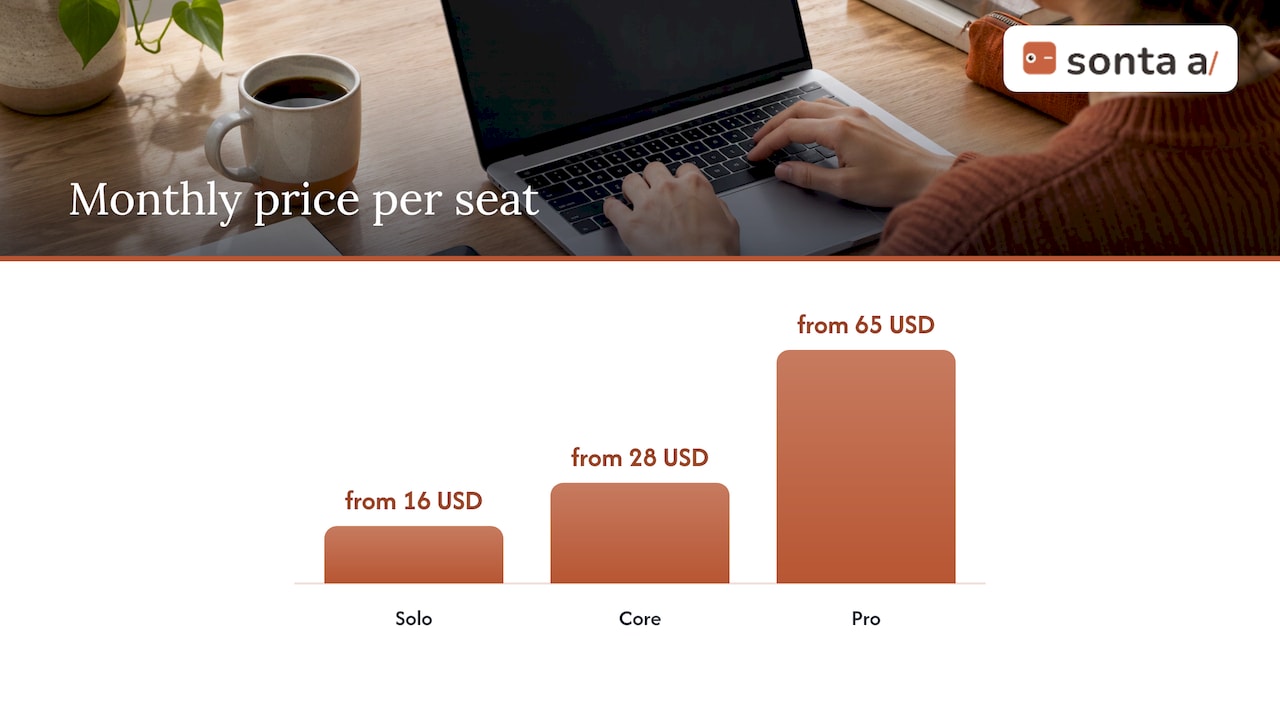
Sonta’s published plans, read from the pricing page on 6 November 2026, are:
| Item | Price |
|---|---|
| Solo | from 16 USD per month per seat |
| Core | from 28 USD per month per seat |
| Pro | from 65 USD per month per seat |
| LinkedIn account add-on | 15-20 USD per month |
| Signal 5 pack (5 always-on searches) | 29 USD per month |
| Signal 15 pack (15 always-on searches) | 79 USD per month |
| Signal 40 pack (40 always-on searches) | 119 USD per month |
Signal packs start from 29 USD a month. Compare that with what you pay today for a CRM, a sequencer, a LinkedIn tool and a signal tool combined. Our calculator puts the saving at a median 36% less than the cheapest equivalent stack (Sonta value calculator, list prices read 17-18 Oct 2026). Your own figure depends on your current tools and seats.
The alternative of building agents on top of your CRM is a larger spend. Vrisic (updated 18 October 2026) gives UK build ranges of £4,000 to £16,000 for one AI workflow and £24,000 to £64,000 for AI across several systems, with running costs on top.
Questions to ask before you choose
Use this short list with every vendor, including us.
- Which steps does the agent do, and which does it hand back to a person?
- Can I set approvals per step?
- Which AI models does it use, and can I bring my own keys?
- Where is data stored, and is it used to train models?
- How are signals shown, and can I check the source?
- Do I still need a separate sequencer or LinkedIn tool?
- What happens to opt-outs and suppression lists?
RebornBD also cautions that signal-based prospecting depends on picking meaningful signals. For a consultancy or agency, a hiring post or a new decision-maker is a good reason to open a conversation. Treat it as a reason to talk and write the message accordingly.
Our view
Most teams we talk to do not have a lead problem. They have a follow-up problem spread across four tools.
A CRM that only stores records leaves the work with you. An AI assistant that drafts when asked still needs you to start every task. An agent for one step, such as an AI SDR, stops at the meeting and leaves the deal to the next tool.
We built Sonta as an agentic CRM that finds opportunities and moves them forward. Every opportunity shows what happened, with a link to check it. Fit and intent are scored separately. You decide which steps need your approval, and that holds in the app and through MCP from Claude or ChatGPT.
You bring your own AI keys, so you pick the model for each task and there is no markup on AI. Agent runs are not metered. Your data stays in the EU under GDPR.
If you run HubSpot or Pipedrive today, keep what works. Look hard at how many other tools sit around it, and at who retypes the data between them.
Pavel
Try it on your own pipeline
Sonta suits sales leaders with a team on HubSpot or Pipedrive, and owner-led agencies, consultancies, IT services and software firms where the founder sells. Plans start from 16 USD per month per seat on the pricing page. The Sonta AI homepage shows the product in action. Book a demo and leave with your first leads.
FAQ
What is the difference between an AI assistant and an AI agent in a CRM?
An assistant helps a rep prepare, decide or complete a task, with the rep directing the work. An agent carries out a delegated workflow within limits you set. Our guide to what an AI agent is in sales covers the distinction in detail.
Do I have to replace HubSpot or Pipedrive?
Not necessarily. Some firms add AI tools to an existing CRM. Sonta replaces a CRM, an email sequencer, a LinkedIn outreach tool and a signal tool in one app. If you are weighing both routes, count every tool and seat you pay for today.
Can the agents send messages without my approval?
The customer decides which steps need their approval. You can require sign-off on first messages and relax it for routine follow-ups. The same rules apply when you use Sonta through its MCP server from Claude or ChatGPT.
Is my data used to train AI models?
No. Sonta stores and processes customer data in the EU under GDPR and never uses it to train AI. You also choose the model for each task and run it on your own keys from Anthropic, OpenAI, Google or OpenRouter.
Sources
- AI Sales Agents vs AI Sales Assistants: Key Differences (TechnologyAdvice)
- Best AI CRM Software UK 2026: 6 CRMs Compared (AI Workforce)
- AI CRM Integration Services Guide (Vrisic)
- AI CRMs for Small Manufacturers Compared (HappyCXO Studio)
- 10 Best AI Sales Prospecting Solutions for UK SMEs in 2026 (RebornBD)
Book a demo and leave with your first leads.