Human in the loop AI: where approvals belong in sales

Human in the loop AI means a person guides, checks or approves what an AI system does before it matters. For a sales team, the practical question is which steps need that person. The answer is the steps you cannot undo: the first email to a new contact, a change to a client record, a message sent in your name. Everything else can run without a click.
We built Sonta AI, an agentic CRM that finds opportunities and moves them forward, around that idea. The customer decides which steps need their approval. This article shows how to make that decision, what UK rules say about human review, and how to keep review meaningful rather than a rubber stamp.
TL;DR
- Human in the loop (HITL) means people give feedback on, correct or sign off AI work. Stanford HAI describes it as AI systems that include human feedback or intervention as part of their operation.
- Put approval at irreversible points, such as sending, publishing or changing customer records. Let low-risk work run.
- Too many approvals fail as badly as none. A busy person clicking “approve” is not oversight.
- In the UK, review must be meaningful if a decision about a person has a significant effect. The ICO expects you to log overrides and the reasons.
- In Sonta, you choose which agent steps wait for your approval. The same rules hold when you use Sonta from Claude or ChatGPT.
Table of Contents
- What human in the loop means in practice
- Why sales teams use human oversight
- Where approval belongs in a sales workflow
- Making review meaningful
- Rules that apply before first contact
- How Sonta AI handles approvals
- How this compares with other options
- Setting up your own approval rules: a one-page policy
- Perspective
- See it on your own pipeline
- FAQ
- Sources
What human in the loop means in practice
The term comes from machine learning, where people label data and correct models. In business tools it has a simpler meaning. An AI agent proposes an action. A person approves it, edits it or rejects it. Then the action happens.
LangChain’s documentation lists four decisions a reviewer can make on a tool call: approve, edit, reject or respond. Approve runs the action as drafted. Edit changes the details first. Reject skips it and tells the agent why. Respond sends the person’s own message back instead of running the action.
That list is useful for a sales leader because it maps to daily work. A drafted follow-up is approved as written, edited for tone, or rejected because the contact has gone quiet for a reason the agent could not see.
In the loop, on the loop, out of the loop
Three terms describe how much a person is involved.
- In the loop: a person approves actions before they happen.
- On the loop: the AI acts, and a person monitors it and can step in, override or stop it, as Chain of Thought explains.
- Out of the loop: the AI acts and nobody watches in real time.
Most sales teams want a mix. Research and scoring can run on the loop. Outbound messages to new contacts sit in the loop until you trust the pattern. Few teams want anything fully out of the loop where clients are involved.
Why sales teams use human oversight
There are three reasons. Two are about quality and one is about the law.
Quality and reputation
A wrong email to a prospect costs more than the minutes a review takes. Agencies and consultancies sell on trust. One clumsy message sent in the founder’s name can undo months of relationship work.
UK businesses already check AI output as a habit. The Department for Science, Innovation and Technology (DSIT) found that 84% of UK businesses using AI reported at least some input or checking of outputs, with 67% reporting significant checking and only 2% none (January 2026).
The same report notes that most checks were informal, down to the individual using the AI, and only a few businesses had a specific procedure. That gap is the opportunity. A written rule about what gets approved beats good intentions.
Accountability
Someone has to own the outcome. The Azeus Convene governance framework warns that the most common failure is diffusion, where everyone is consulted and nobody is accountable. In a sales team the fix is plain. Name who approves outbound messages, who owns the data, and who can change the rules.
The law on automated decisions
Most sales outreach is not a legal decision about a person. The rules still matter if you use AI to screen, score or reject people in ways that affect them.
The Data (Use and Access) Act 2025, section 80, treats a decision as solely automated when there is no meaningful human involvement. A significant decision is one with a legal or similarly significant effect on the person. For those, the Act requires safeguards: information, the chance to make representations, human intervention and a way to contest. The commencement date given in the research is 5 February 2026.
The word that matters is “meaningful”. The Information Commissioner’s Office (ICO), the UK data regulator, says that without structured testing, review can fail through automation bias, meaning people trust the machine too readily, or through a lack of interpretability. That can breach UK GDPR. If you use AI for hiring, credit or similar decisions, take legal advice. For ordinary outreach, the practical lesson is the same: review has to be real.
Where approval belongs in a sales workflow
The n8n team, who build workflow software, make a point that holds for sales: the most common mistake is placing approval steps too early or too often. They suggest review at irreversible points, such as publishing content, updating customer records, processing payments or deleting data.
Apply that to a sales pipeline and you get a simple split.
| Step | Reversible? | Sensible default |
|---|---|---|
| Watching public activity for reasons to talk | Yes | Runs without approval |
| Researching a prospect and scoring fit and intent | Yes | Runs without approval |
| Drafting an email or LinkedIn message | Yes | Runs without approval |
| Sending the first message to a new contact | No | Approval at the start |
| Replying to an answer from a prospect | No | Approval until you trust the tone |
| Booking a meeting | Partly | Approval for senior contacts |
| Changing deal stage or contact data | Partly | Runs, with a visible record of what changed |
| Deleting or merging records | No | Approval |
The table is a starting point. Loosen it as you see how the agents behave. Tighten it for accounts that matter most.
Start strict, then relax
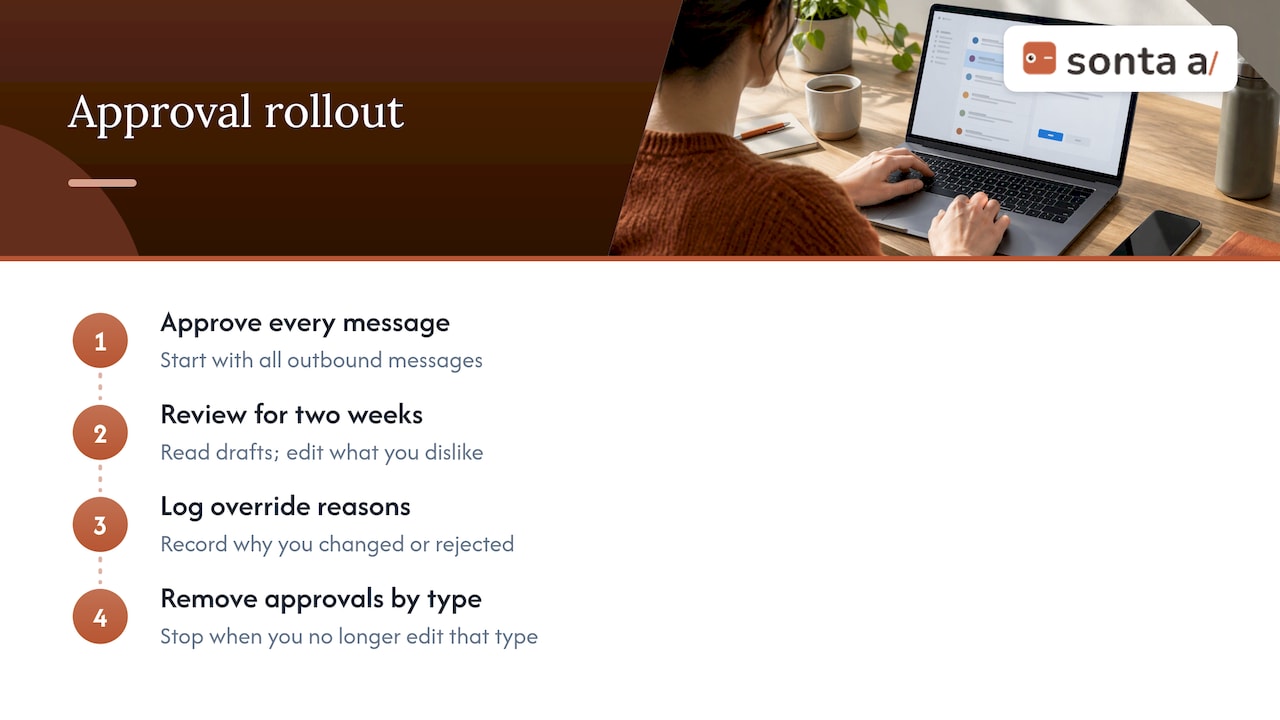
Begin with approval on every outbound message. Read what the agents write for two weeks. Edit what you dislike and note why. When you stop editing a type of message, take approval off that type. The ICO suggests keeping a log of when a reviewer overrides the AI, with the reasons. Those reasons become your rules.
Route by confidence and by risk
AWS describes systems that ask for a person only when predefined conditions are reached, such as low confidence. Higher-risk areas get lower thresholds. In sales, risk is not only the model’s confidence. It is also who the contact is. A message to a student newsletter editor and a message to the chair of a target client are not the same risk.
Plan for the person who does not respond
The n8n guidance also advises fallbacks when nobody answers in time: escalate, shelve the task or default to the safest outcome. For a sales team the safest default is almost always to hold the message. A follow-up that goes out a day late is better than one that goes out wrong.
Making review meaningful
Approval is only worth having if the reviewer can judge what they approve. The Frontier Insight Group argues that “human in the loop” is too vague a term. The reviewer needs evidence, time, competence and real authority to reject or change the output.
For a sales leader, that translates into four checks.
- Evidence. Can the reviewer see why the agent acted? A message with no stated reason is hard to judge.
- Time. Is the queue small enough to read? Fifty approvals at five o’clock on a Friday will be clicked through.
- Competence. Does the reviewer know the client and the market? Send review to the person who would write the message.
- Authority. Can the reviewer reject without asking permission? If not, it is a formality.
The Azeus framework puts it bluntly: define what the term means in operational terms. Say who reviews, what they see, what authority they have to override and what evidence of review you keep. It adds that oversight consisting of a busy person clicking approve will not withstand scrutiny.
The techUK guidance on agentic AI adds a point about timing. Decide where a person needs to check the work before the workflow is automated, and map the process before deploying agents. Do it in that order. Teams that automate first often find the checks have quietly gone.
Some friction is useful
Deloitte UK makes the case in banking that some friction is load-bearing. A manual review or a mandatory escalation often exists because it creates visibility and accountability at the point where it counts. The same logic suits a sales team. An approval before a first message to a key account is not busywork. It is the one step that protects the relationship.
Rules that apply before first contact
Human approval does not replace the rules on who you may contact.
- Email: business email needs prior consent before first contact in Germany, the Netherlands, Denmark and Poland. If you sell into those countries, build a consent check into the approval step.
- South Africa: POPIA applies to first-contact rules.
- LinkedIn: LinkedIn has its own rules on automation. Read them before you connect any tool to an account, and set limits you are comfortable defending. No tool makes automation safe or undetectable.
- A job change or a hiring post is a reason to talk. It is not proof that someone wants to buy. Write the message as a relevant note, not as an assumption.
These are the cases where a person reading the message before it goes is worth the minute.
How Sonta AI handles approvals
Sonta is one app for what a sales team usually spreads across four: a CRM, an email sequencer, a LinkedIn outreach tool and a signal tool. AI agents work across all of it. The customer decides which steps need their approval.
Here is how the loop works in the product.
- The Signal Agent watches public LinkedIn activity. Examples are a recommendation request, a new decision-maker, a company hiring or a contact changing jobs. It shows each reason with a link, so the reviewer can check it in a click.
- Fit and intent are scored separately. A good-fit company with no timely reason looks different from a poor fit with a loud one.
- Sequences are native. They are written from the moment a signal fires. Email sequences are unlimited.
- Agents research prospects, follow up, prepare meeting briefs and keep records current. You set which of these steps wait for you.
- The MCP server works from Claude or ChatGPT under the same rules and approvals. An action started from a chat assistant waits for the same sign-off as one started in the app. Our academy page on MCP and AI agents explains the setup.
This matches the evidence above. The reviewer sees the reason, has time because routine steps do not queue, and has authority because approval means approve, edit or reject.
If you want to understand what separates an agent from a plain automation, our guide on what an agent is in Sonta covers it.
Your data and your models
Oversight is also about control of the tools. Customers run AI on their own keys: Anthropic, OpenAI, Google or OpenRouter. Because they use their own keys, there is no markup on AI. Connecting a provider takes a few minutes. Data is stored and processed in the EU under GDPR and is never used to train AI.
How this compares with other options
The right setup depends on what you already run.
HubSpot and Pipedrive. Both are well-established CRMs with large ecosystems and deep reporting. If your team lives in one of them, keep what works. The gap is usually in the work around the CRM: finding the timely reason, writing the message, chasing the follow-up. Sonta replaces the CRM and the tools beside it, or you can compare the two setups side by side using our AI-native CRM test.
Attio. A modern, flexible CRM that suits teams who like to shape their own data model. Approval workflows around outbound still need other tools.
Gojiberry AI, HeyReach and Instantly. Gojiberry AI is built around finding prospects from signals. HeyReach is strong for LinkedIn outreach at volume and Instantly for email sending. Each covers one slice. Using several means several places to set approval rules.
AI SDR tools such as Artisan and 11x. They give you an agent that takes prospecting off your plate. An AI SDR is one agent that stops at the meeting. Sonta has an agent for every step and is the CRM too, so approvals sit in one place from first signal to closed deal.
Spreadsheets. Free, flexible and fine for a handful of deals. Review is manual and there is no record of why anything was sent.
A lead-generation agency or a salesperson. An agency brings experience and capacity. A salesperson brings judgement and relationships. Both cost more in time and money than a tool, and neither shows you a link behind every reason to reach out.
Setting up your own approval rules: a one-page policy
Write this down before you switch anything on. One page is enough.
- List the actions your agents can take, from drafting to sending to editing records.
- Mark the irreversible ones. Those get approval first.
- Name the reviewer for each type of action, and a deputy.
- Set the limit on queue size. If the reviewer cannot read it in one sitting, reduce what reaches them.
- Decide the fallback. If nobody reviews in 24 hours, the message waits.
- Keep a short log of edits and rejections, with reasons.
- Review the rules monthly and remove approvals on steps that never change.
The ICO is preparing a statutory code on AI and automated decision-making following the 2025 Act, according to an Azeus Convene summary from August 2026. Check the ICO’s site for the published version. A written policy now will be easier to adapt later.
Perspective
We run our own sales on Sonta. That shapes how we think about approval.
The mistake we see in the market is treating oversight as a number: more approvals, more safety. It is not. A reviewer who sees forty drafts a day stops reading them. The better design asks a person for the few decisions that cannot be undone, and shows them the reason behind each one.
That is why every opportunity in Sonta carries what happened and a link to check it. It is also why you decide which steps need your approval, and why the same rules hold when you work through Claude or ChatGPT. An AI agent that keeps records up to date does not need a signature on every field. An email to a prospect you have wanted for a year does.
Start strict. Relax step by step. Keep the steps that protect your relationships.
Pavel
See it on your own pipeline
Plans start from $16 a month per seat on Solo, $28 on Core and $65 on Pro. LinkedIn accounts are billed per seat. Signal packs start from $29 a month. You can see the full list on the pricing page, or look at the agentic CRM itself. Book a demo and leave with your first leads.
FAQ
What is the difference between human in the loop and human on the loop?
In the loop means a person approves actions before they happen. On the loop means the AI acts and a person monitors it, ready to step in or stop it. Most sales teams use both: approval for first contact, monitoring for research and record updates.
Does human in the loop slow sales down?
Only if you put approval everywhere. Placing review at irreversible points, such as sending a first message or deleting a record, keeps the queue short. Routine work like research, scoring and drafting can run without waiting.
Is human in the loop automation a legal requirement in the UK?
Not for ordinary outreach. For significant decisions about people that rest solely on automated processing, the Data (Use and Access) Act 2025 requires safeguards including human intervention. If your AI use touches hiring, credit or similar decisions, ask a data protection lawyer.
How do I stop approvals becoming a rubber stamp?
Give the reviewer the evidence, the time and the authority to reject. Keep the queue small and log what gets edited and why. A reviewer who can see the reason and a link to check it can judge a message in seconds.
Can I use Sonta from Claude or ChatGPT and still control approvals?
Yes. The MCP server works from Claude or ChatGPT under the same rules and approvals as the app. You decide which steps wait for your sign-off, wherever the request starts.
Sources
- What is Human-in-the-Loop? Stanford HAI
- Human-in-the-loop overview, LangChain documentation
- Human in the Loop vs. Human on the Loop, Chain of Thought
- Artificial Intelligence Adoption Research, DSIT, January 2026
- Data (Use and Access) Act 2025, section 80
- Human review, ICO
- Human in the loop automation, n8n blog
- What is Human in the Loop? AWS
- Human-Directed Commercial Intelligence, Frontier Insight Group
- Building an AI governance policy for your board, Azeus Convene
- Building effective human oversight into agentic AI, techUK
- AI Operating Models in Banking, Deloitte UK