AI Pipeline Management: How It Works and How to Start

AI pipeline management is the use of AI agents and models to keep a sales pipeline current, flag risk, and trigger the next action without waiting for reps to type updates into a CRM. In practice that means records that update from calls, emails and product activity, lead qualification that runs on every inbound contact, follow-ups that go out on time, and forecasts that reflect what customers are doing rather than what a rep remembers to log. This guide covers what the term means, which jobs AI can take over, where it breaks, and how to roll it out in an order that protects your forecast.
TL;DR
- AI pipeline management replaces manual CRM upkeep with agents that capture signals (calls, emails, usage), update records, qualify leads and prompt follow-ups.
- Its value depends on clean stage definitions and data: 78% of respondents in one study named poor data quality or siloed systems as a primary barrier.
- Start with one high-value use case (risk detection, record updating or follow-up), keep a human review on high-impact changes, and expand only after the data proves reliable.
- Treat model scores and forecasts as a critic of your judgment first, not a replacement for it.
- Measure conversion, data-entry hours removed, forecast accuracy and time to first follow-up before and after.
Table of Contents
- What AI pipeline management means in a sales context
- What AI actually does in the pipeline
- Where AI pipeline management goes wrong
- A rollout plan that protects the forecast
- Our perspective: the record should be an output, not a chore
- How Sonta AI fits, and what it costs
- Building your first agent workflow
- What to look for when choosing a tool
- FAQ
- Sources
What AI pipeline management means in a sales context
The phrase is easy to confuse with “AI data pipelines,” which are engineering systems that feed data to machine-learning models. This article is about the sales side: managing the stages that take a prospect from first contact to closed deal, with AI doing much of the monitoring and bookkeeping.
Winning by Design, a revenue-architecture research firm, defines AI-powered pipeline management as a signal-driven approach. It captures and interprets customer signals such as product usage, digital engagement and sales conversations, then uses them to detect intent, risk and opportunity earlier than conventional CRM forecasting can. The underlying argument is that the customer, not the seller’s subjective CRM entry, is the source of truth.
That argument matters because the classic pipeline has a structural weakness. Stage, close date and next step are typed by a person who is also busy selling, so the record is only as fresh as the last time that person had five spare minutes. AI pipeline management attacks the weakness at its source: instead of asking reps to describe the deal, it observes the deal.
Pipeline management versus pipeline automation
The two overlap but are not identical.
- Pipeline automation executes defined steps: create a task when a stage changes, send a follow-up after three days of silence, route a lead by territory.
- AI pipeline management adds interpretation: reading an email thread to decide whether a deal has actually moved, judging whether a lead fits your ideal profile, or noticing that a champion has gone quiet.
Most working systems combine both. Rules handle what is predictable; models handle what needs reading. We cover the rules side in more detail in our piece on sales pipeline automation.
What AI actually does in the pipeline
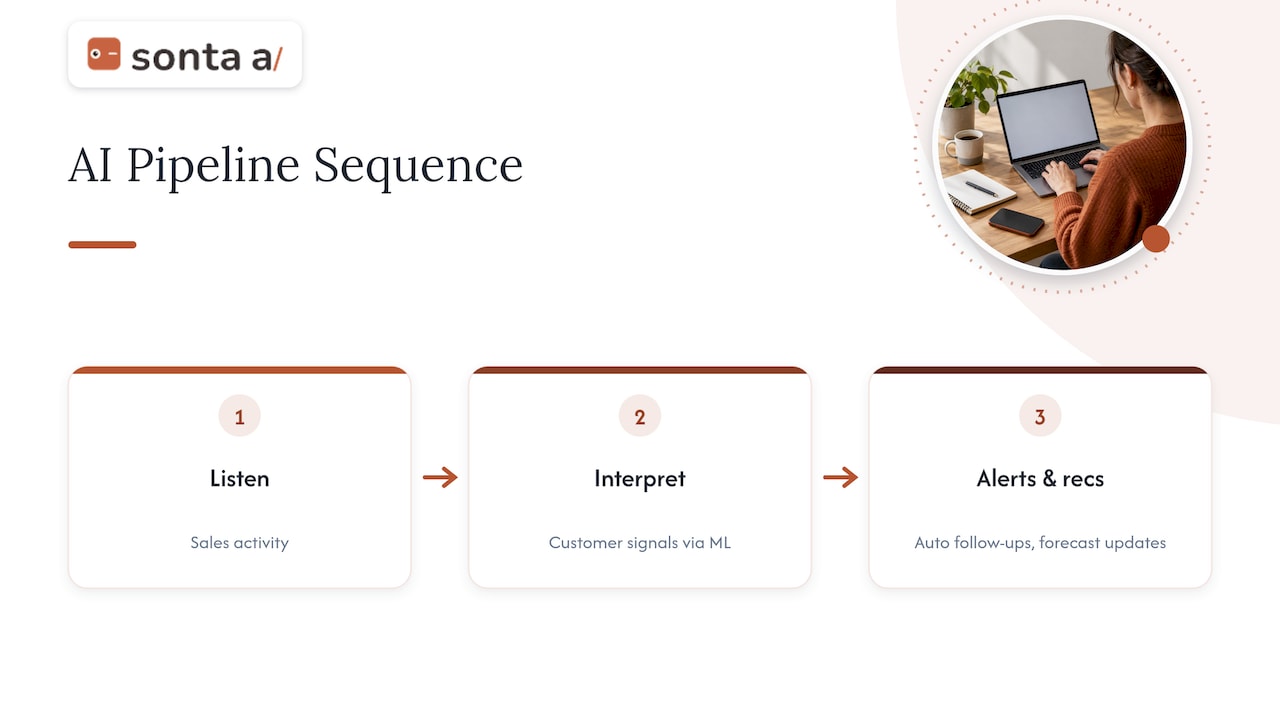
According to Winning by Design’s Q2 2025 research brief, the sequence is: AI listens to activity, interprets signals with machine learning, and then acts through alerts, recommendations, automated follow-ups and forecast updates. Translated into daily sales work, that breaks into five jobs.
1. Capturing activity and updating records
Emails, meetings, call transcripts and calendar events are parsed, matched to the right contact and deal, and written to the record. Fields such as next step, stakeholders and stage evidence fill themselves in. The practical test is whether a manager can open a deal on Monday morning and trust it without messaging the rep.
One academic study of a generative-AI CRM implementation at a mid-market enterprise reported a 45% reduction in manual CRM data entry against pre-implementation baselines. A single case is not a benchmark for your team, but it shows the order of magnitude vendors and researchers are chasing.
2. Qualifying and routing leads
An agent can read a form submission, enrich the company, compare it with your ideal customer criteria, ask clarifying questions and route the lead to the right owner or sequence. The same study reported a 32% increase in lead conversion rates after implementation. The caveat is that scoring is only as good as the history it learns from; if past stage data is inconsistent, qualification will be consistently wrong in a confident tone.
3. Following up on time
Slow follow-up is the most mechanical way to lose a deal, and the easiest to fix. AI can draft a reply grounded in the last conversation, schedule it, propose meeting times and log the result. Our guides to AI follow-up automation and automated follow-up emails go through the workflows in detail, and the piece on AI sales personalization explains how to avoid messages that read as machine-made.
4. Spotting risk and opportunity
Signals a human would miss across 80 open deals are cheap for a model to track: a thread that went silent after pricing, a new stakeholder appearing on a call, usage that stalled during a trial. The output is an alert or a recommended action, not a verdict.
5. Forecasting
Winning by Design argues that traditional CRM forecasting fails because of subjective inputs, siloed data and delayed risk detection, and proposes near-real-time, signal-driven management as the alternative. An academic study of AI in sales reported forecast accuracy rising from 62% to 91% for AI-enabled teams versus non-AI counterparts. Treat figures like this as directional: the study’s teams, definitions and baselines are not yours.
A more conservative operating rule comes from Enrich Labs: until you have 90 days of clean stage data, use the model as a critic of the forecast rather than the forecast itself. In practice, that means the model challenges a rep’s commit (“this deal has had no buyer reply in 19 days”) while the manager still owns the number.
Where AI pipeline management goes wrong
The failure modes are consistent across the research and across the deployments we see.
| Failure mode | What happens | Guardrail |
|---|---|---|
| Stale or subjective CRM fields as input | The model learns from what reps typed, not what happened | Source fields from activity, not memory |
| Incomplete or low-quality data | Confident but wrong scores and stage changes | Validate data before enabling automation |
| Model scores treated as unquestionable | Reps and managers stop thinking | Show the evidence behind each score |
| High-impact updates with no review | A deal is closed-lost or a customer is emailed in error | Human approval on stage, amount and outbound messages |
| No ownership of stages | Agents cannot tell what “qualified” means | Written stage definitions with exit criteria |
These map to the mistakes Winning by Design lists: trusting subjective or stale fields, automating on poor data, over-trusting scores, and allowing high-impact updates without human review and governance. The Domestique team puts the principle bluntly: a system trained on inconsistent CRM inputs will confidently interpret a mess, which is why they call it architecture, not magic.
Cost and data are the two barriers buyers name most. In the study cited above, high implementation cost (71%) sat just behind data quality as a primary barrier to adopting AI in sales.
Governance is part of the system
When an agent changes a record or sends an email, you need to know what it did and why. The AI-integrated CRM architecture described in the academic study includes role-based access controls, regional data processing options for rules such as GDPR and CCPA, and audit logging of AI recommendations and actions. If you are deciding what an agent’s activity trail should contain, this walkthrough of audit trails for AI actions covers what to log and how to prove it.
A rollout plan that protects the forecast
The research converges on the same sequence: define, connect, validate, pilot, expand. Here is how to apply it.
- Write down your stages. For each stage, define the entry evidence, the exit criteria and the owner. If two reps would classify the same deal differently, the agent will too.
- List the signals that matter to your motion. A real-estate team cares about showing requests and mortgage readiness; a recruitment team cares about candidate submissions and client feedback; a dealership cares about test drives and trade-in appraisals. Generic signals (reply, meeting held, pricing viewed) are a start, not an end.
- Connect the systems that hold those signals. Email, calendar, call recording, product analytics and the CRM itself. Webhooks and native integrations both work; what matters is that the agent sees the same facts the rep does.
- Validate data quality before switching anything on. Sample 50 recent deals and compare the record with what the email thread shows. The gap is your baseline and your first improvement target.
- Pilot one use case. Risk detection, record updating and follow-up are the usual starting points because the downside of a wrong suggestion is small and the benefit shows up within weeks.
- Add human review where the impact is high. Stage changes to closed, amount changes and first-touch outbound messages should be approved until the error rate is low enough to justify autonomy.
- Measure and expand. Compare against the pre-pilot baseline, then add qualification, scheduling or forecasting.
Metrics to track
- Lead-to-opportunity conversion rate
- Hours of manual CRM entry per rep per week
- Median time from inbound lead to first meaningful response
- Forecast accuracy at the start of the quarter versus actual
- Percentage of open deals with a dated next step
- Override rate: how often humans reverse the agent (a high rate means the definitions or data need work)
Our perspective: the record should be an output, not a chore
We build an AI-native CRM, so we have a bias, and we would rather state it than hide it. Our view is that the manual data entry ceiling is the real limit on most CRMs. A system that depends on people typing updates will always lag the pipeline it describes, and layering a forecasting model on top of that lag only produces a more polished version of the same error.
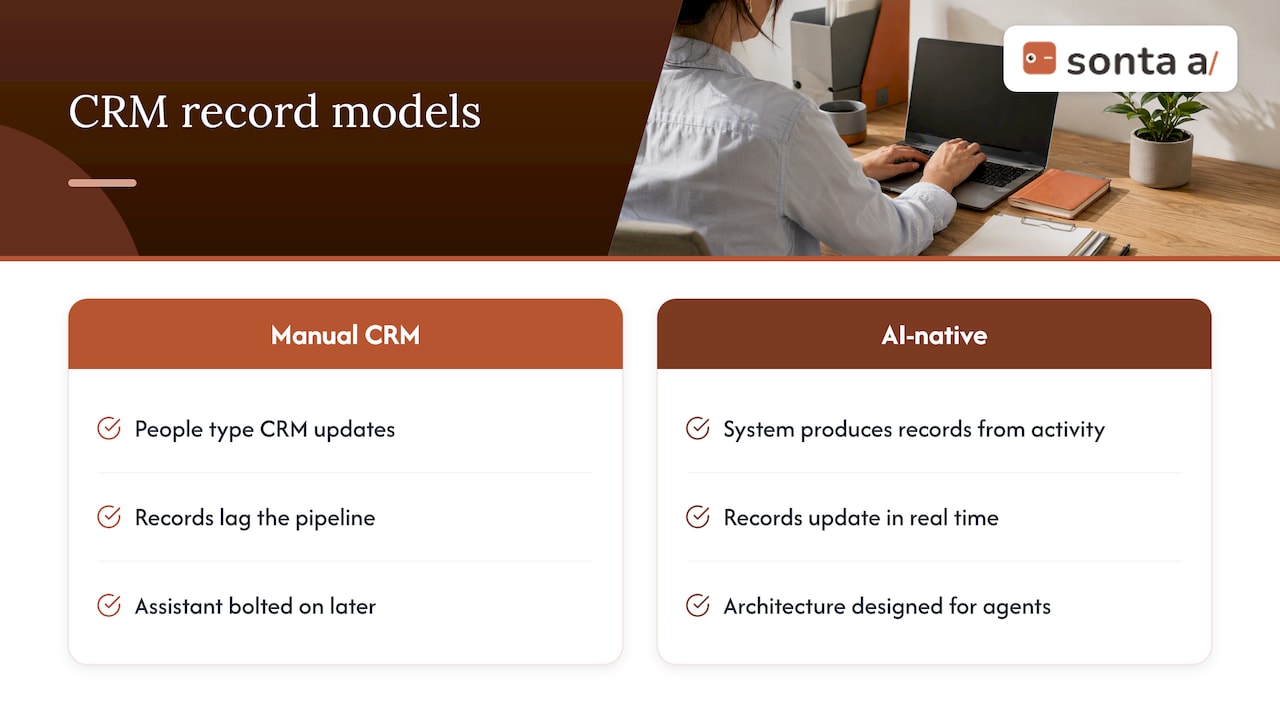
That is why we treat the record as something the system produces from activity. Every record updates itself in real time, through customizable agents that handle routine sales work such as lead qualification, follow-up, account prep, scheduling and pipeline management, with models chosen per task rather than one model for everything. We also do not meter AI or automation usage, because a pipeline that rations its own upkeep tends to be rationed exactly where it matters.
We also agree with the cautious part of the research: AI pipeline management is architecture first. The difference between AI-native and AI-enabled is whether the data model, permissions and automation engine were designed for agents or had an assistant bolted on later. We lay out the four factors in AI-native vs. AI-enabled CRM and describe the design in what AI-native architecture looks like in a working CRM. Teams with bespoke sales motions should be skeptical of any tool that insists on a fixed process; the stages and signals should come from your business.
— Pavel
How Sonta AI fits, and what it costs
If your pipeline work is mostly chasing updates, qualifying inbound leads and making sure follow-ups go out, an agentic CRM is built for that. Sonta AI keeps records current in real time, runs configurable workflow agents, and ships industry blueprints for real estate, recruitment, auto retail and professional services. You can see how those are structured in the available blueprints, or read the specifics for consulting firms and auto dealers.

Published per-seat plans, as listed on our pricing page, start at $16 per month for Solo, $28 per month for Core and $65 per month for Pro; Enterprise is quoted individually. Migration and data modelling starts at $2,500 one-off, and a workflow build sprint starts at $5,000 one-off. If you are not sure where your pipeline leaks, our AI Efficiency Diagnostic takes 30 minutes and points to the operational gaps and tech-stack overlaps worth fixing first.
Building your first agent workflow
If you already have a CRM and want to test the approach, keep the first workflow small. A reasonable first build is a stalled-deal agent:
- Trigger: an open opportunity with no inbound or outbound activity for a set number of days.
- AI step: read the latest thread and summarize where the deal stands, including any unanswered question.
- Action: draft a follow-up for the owner to approve, and add a dated next step to the record.
- Log: store the summary and the decision so the trail is reviewable.
In Sonta AI, this is a standard automation: see how to create and activate an automation and add an AI step. Systems outside the CRM can feed it through webhooks in and out. For background on what an agent is and is not, our guide to AI agents in sales is a good companion, and the AI sales agent diagnostic explains how we assess where one will pay off.
What to look for when choosing a tool
Whatever platform you evaluate, judge it on criteria that survive the demo.
- Record integrity: do records update from activity, and can you see the source of every change?
- Process fit: can you model your own stages and exit criteria, or must you adopt a template?
- Model flexibility: can different tasks use different models, and can you bring your own keys?
- Review controls: can you require approval by action type and by amount?
- Auditability: is there a log of agent actions and recommendations, with role-based access?
- Pricing behavior: are AI and automation runs metered, and what happens to cost as usage grows?
- Implementation path: who handles migration and data modelling, and what does that cost?
Alternatives fall into a few types: legacy CRMs with an AI assistant added, standalone sales-AI tools that sit on top of a CRM, and AI-native CRMs where agents are part of the data model. The first is the lowest-friction change but inherits the data-entry problem; the second adds another system to integrate; the third asks for a migration but removes the manual upkeep layer.
FAQ
What is AI pipeline management?
It is the use of AI to monitor, update and act on a sales pipeline using signals such as emails, calls and product usage. Instead of relying on rep-entered fields, the system interprets activity and produces alerts, follow-ups, record updates and forecast changes.
Is an AI data pipeline the same thing?
No. An AI data pipeline is an engineering system that ingests and transforms data to train or serve machine-learning models. AI pipeline management in sales uses AI to run the deal pipeline itself, though it may rely on data pipelines underneath.
How long before AI forecasting can be trusted?
There is no universal number, but one practitioner guideline is to treat the model as a critic of your forecast until you have 90 days of clean stage data. Compare its calls with outcomes during that period before letting it set a number.
Do we need to replace our CRM?
Not necessarily. You can pilot an AI layer on your current CRM, especially for follow-up and risk alerts. Replacement makes sense when manual entry, rigid processes or metered AI usage keep limiting results.
Which team members should review AI changes?
The deal owner should approve outbound messages and stage changes at first, and a sales manager should review overrides and exceptions weekly. Loosen approvals only as the override rate falls.
Sources
- AI-Powered Pipeline Management, Winning by Design Research
- Research Brief: AI-Powered Pipeline Management, Winning by Design
- Transforming Sales Strategies Through Artificial Intelligence (PDF)
- Generative AI in Power Platform CRM: Transforming Sales
- Sales Automation AI: Complete Guide 2026, Enrich Labs
- AI Pipeline Management: Architecture, Not Magic
- AI Audit Trails: What to Log and How to Prove It