Pipeline Hygiene Automation: Rules, Safeguards, and Metrics

Pipeline hygiene automation is the use of rules, workflows and AI agents to keep every open deal in your CRM accurate without relying on reps to do the upkeep: correct stage, realistic amount, valid close date, a clear next step, and dead deals closed out. It works when the rules reflect how your team actually sells, when automation handles detection and nudging but not commercial decisions, and when you measure whether the data changed. This guide covers what to detect, how to configure it, which safeguards matter and how to prove it is working.
TL;DR
- Pipeline hygiene is a design problem, not a discipline problem: if upkeep depends on a rep remembering, it will not happen consistently.
- Automate detection, capture and nudges first. Keep a human decision on closing deals, pushing dates and changing amounts.
- Define stage meaning and exit criteria before you automate, otherwise you only produce inconsistent data faster.
- Use different staleness thresholds by stage and deal value, not one blanket age.
- Measure whether fields changed after each nudge, and track forecast accuracy and slippage over time.
Table of Contents
- What pipeline hygiene automation covers
- Why sales teams cannot ignore it
- Which pipeline problems automation should detect
- Define the process before you automate it
- Setting up the rules
- Keeping follow-ups, next steps and activity logs current
- Safeguards that keep automation trustworthy
- How to measure whether it is working
- Where Sonta fits
- FAQ
- Sources
What pipeline hygiene automation covers
Pipeline hygiene is the ongoing practice of keeping each open opportunity accurate and current. Automation takes the repetitive parts of that practice and runs them on a schedule or on an event: finding deals with a past-due close date, flagging deals with no activity, filling fields from the account record, logging meetings and emails, prompting for a missing next step and closing out opportunities that have clearly died.
It is worth separating three layers, because teams often buy or build only one:
- Detection: rules that find records that are wrong, missing or stale.
- Capture: systems that write activity, contacts and field updates into the record from emails, calendars and calls, so fewer problems appear in the first place.
- Intervention: nudges, escalations and controlled automatic actions that move a record toward a correct state.
A dashboard of dirty deals is a report about a problem, not a fix. The value comes from the second and third layers, where the record updates itself or the right person is asked at the right moment. That is also the distinction behind what we call an agentic CRM, where AI agents perform routine record work rather than waiting for data entry.
Why sales teams cannot ignore it
The cost of dirty pipeline data shows up in forecasts first. Stages that do not match reality, expired close dates and missing amounts all feed projections that leaders then act on. Automation also raises the stakes: outreach and routing run on whatever the CRM says, so follow-ups sent to stale contacts or deals routed on bad field values spread the mess rather than contain it.
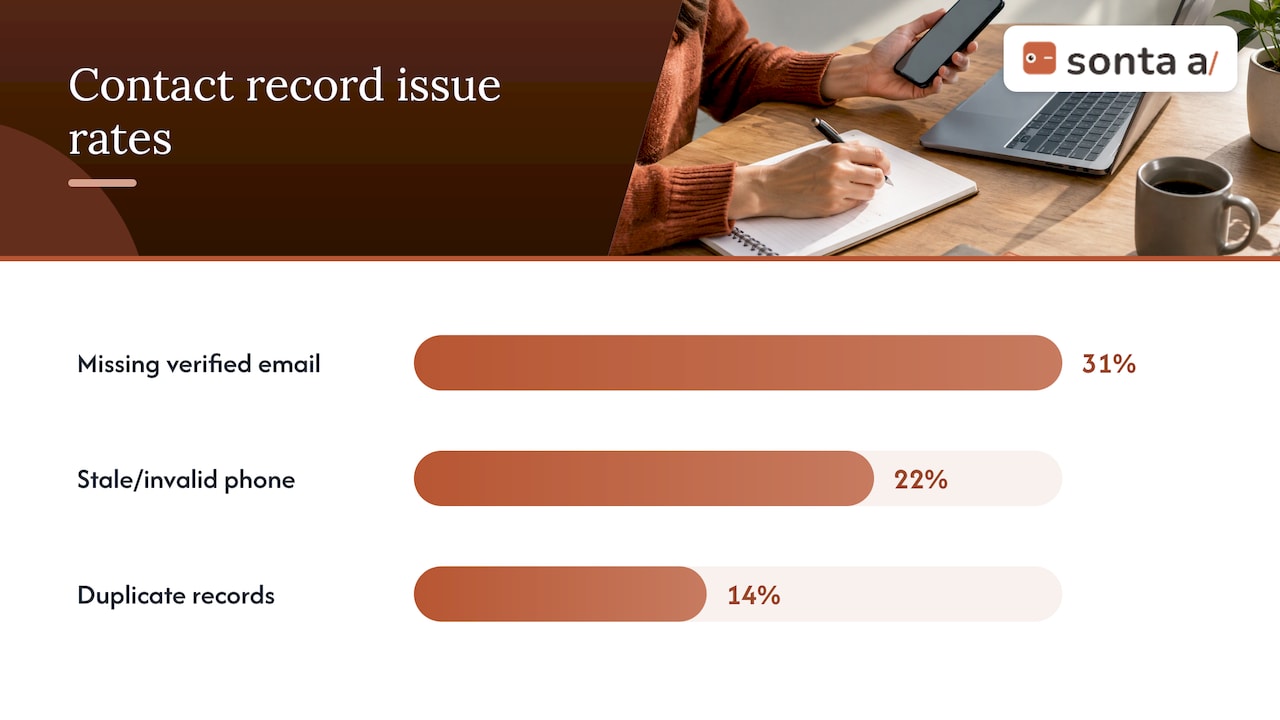
The benchmarks are consistent about how common the problem is. A Data Innovation report on 40 B2B CRM audits found that the median account had 31% of contact records missing a verified email, 22% with stale or invalid phone numbers and 14% duplicated, and that roughly half of open opportunities older than 90 days had not been touched in their last modified field. A RevOps KPI guide from ORM Technologies, citing Gartner, reports that only 7% of sales teams reach 90% forecast accuracy or better, with a median of 70% to 79%, and, citing Validity, that 76% of organizations say under half of their CRM data is accurate.
The time argument is just as strong. Gartner’s May 2026 survey found that AI tools save sellers an average of 4.8 hours per week, yet 72% of sales organizations report low reinvestment of that time. The organizations that did reinvest were 2.2 times more likely to exceed customer growth goals. Hours returned from admin only matter if they move to selling, which is an argument for removing data entry deliberately instead of hoping for it.
Which pipeline problems automation should detect
Start with the failures that damage the forecast most, then widen. The table below maps common problems to a detection rule and the least risky automated response.
| Problem | Detection rule | Safer automated response |
|---|---|---|
| Close date in the past | Open deal with close date earlier than today | Prompt the owner to confirm or update the date; log a push count |
| No close date or amount | Required field empty past a given stage | Block stage advancement until the field is filled |
| No activity | No email, call or meeting logged within a stage-specific window | Notify the owner, then the manager if it persists |
| Missing next step | Open deal with no scheduled task or meeting | Create a follow-up task or draft a message for review |
| Stuck in early stage | Deal sits in the first stage beyond a set age | Queue for review and close-out |
| Stale or departed contacts | Bounced email, role change or no engagement on the main contact | Flag the deal and suggest a replacement contact |
| Missing contact roles | Deal with no champion or economic buyer associated | Prompt the owner; suggest roles from meeting attendees |
| Duplicates | Same company or contact in more than one record | Queue for merge approval |
Staleness deserves care. A single age threshold is wrong for most deals, because a small transactional deal and a six-figure enterprise opportunity move at different speeds. Detection rules work better when they combine stage and deal value, and escalation should be weighted accordingly: twenty stale small deals matter less than one stale deal that carries the quarter.
The stakes are real for contact data too. DealMatching’s 2026 analysis of 34 B2B CRM databases reported an average stale contact rate of 38.3%, with 29.4% of open pipeline value attached to contacts who had left, changed roles or become unreachable. Treat those as one vendor’s sample rather than a universal rate, but they explain why contact validity belongs on the detection list next to deal fields.
Define the process before you automate it
Governance comes before automation. If “Proposal” means something different to each rep, a rule that triggers on that stage produces a forecast nobody trusts, only faster. Before you build anything, settle four things:
- Stage definitions with exit criteria. Five to seven stages is a workable range for most teams. Each should have an observable condition for entering and leaving it, such as a completed discovery meeting or a proposal sent.
- Required fields per stage. Decide which fields must be present to advance, for example amount and close date by the stage where the buyer has a defined need.
- Ownership. Every open deal has one named owner who receives the nudges, and one manager who receives escalations.
- Allowed values. Use picklists for fields that drive routing or reporting. A workflow looking for “California” will miss “CA”, and routing becomes unpredictable.
If your data controls themselves need a review first, our guide to CRM data governance in 30 minutes walks through the checks that make a CRM ready for automation and AI. For the mechanics of stage design, the Sonta Academy page on how to build a pipeline shows how stages are configured, and the pipeline stage report gives you a view of where deals accumulate.
Setting up the rules
The examples below are starting points to adapt to your cycle length, not universal benchmarks. Tune every number against your own history of how long won deals spent in each stage.
Stage-aware stall rules
Define a time threshold per stage, based on how long your won deals typically stay there. A team with a short sales cycle might flag a deal after 7 days in Proposal but allow 14 days in Negotiation, where legal review slows things legitimately. Each rule follows the same sequence: flag the deal, remind the owner, escalate to the manager if it remains stale, then queue a close-out decision.
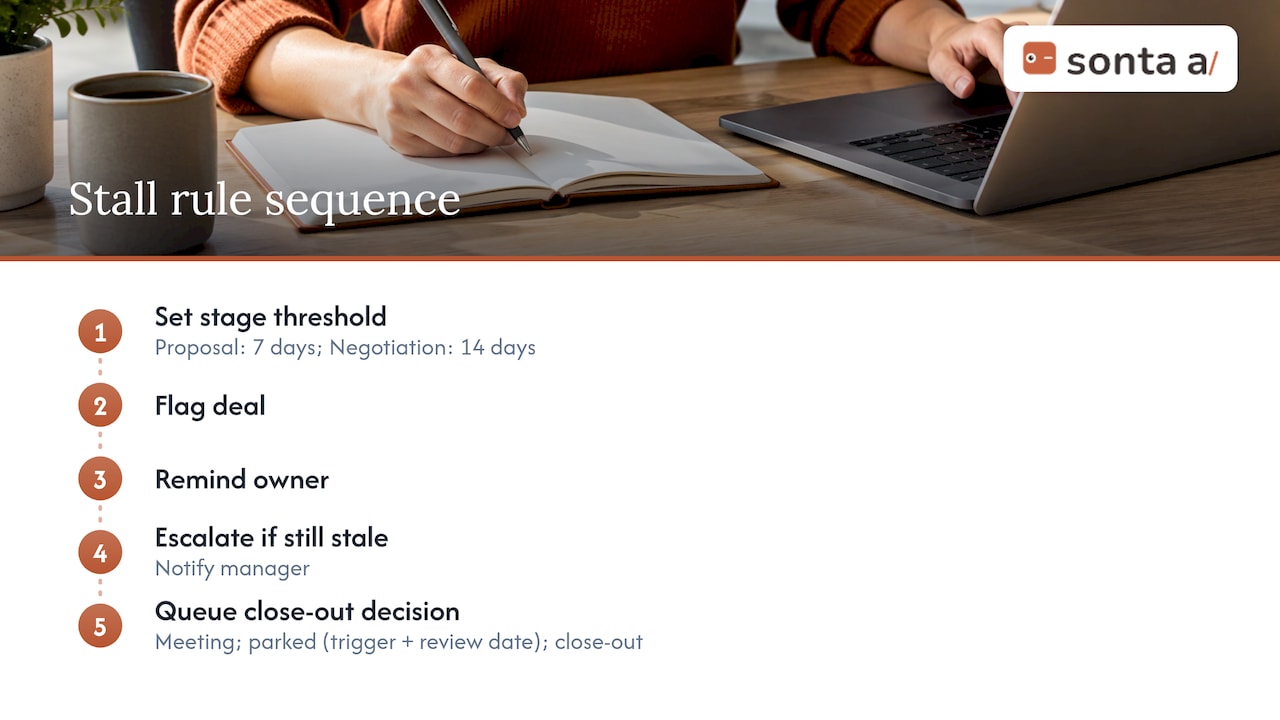
Every stalled deal should end in one of three outcomes: a re-engagement meeting booked, a parked status with a trigger event and a review date, or a close-out. Having a fixed list of outcomes prevents deals from lingering in a gray zone that the forecast still counts.
Close date discipline
A scheduled rule can find open opportunities with close dates in the past and ask the owner to act. A useful addition is a push counter: each time a date moves, a field increments, so managers can filter for deals that have slipped three or four times. Slippage becomes data you review, not an argument you have in a commit call.
Required fields and creation controls
Make stage advancement conditional on the fields that matter. Limit who can create opportunities, and default fields from the account record so reps are not retyping industry, region or owner. Early-stage opportunities that were created automatically and never worked should expire into a review queue.
Triggers from verifiable events
Advance stages from events you can verify: a meeting that actually took place, a proposal sent, a signature envelope opened, an invoice paid. Always write audit fields recording who or what changed the stage, from which source and when. When someone asks why a deal moved, the record answers.
Keeping follow-ups, next steps and activity logs current
Most hygiene decay starts with activity that never reaches the CRM. Three mechanisms address it:
- Automatic capture of emails, meetings and calls onto the right deal and contacts, so logging does not depend on memory.
- Next-step generation: when a meeting ends, create the follow-up task, and draft the message for the rep to review. Our write-up on automated follow-up emails that book meetings covers how to structure these cadences.
- Dark-deal alerts: when a buyer stops responding, notify the owner and, where appropriate, trigger a sequence across email, phone and social touchpoints.
Inputs matter as much as upkeep. Leads that arrive from social channels need to land in the CRM with the right source and fields, or they start life as hygiene problems. A guide to CRM integration for Facebook leads shows how real-time alerts and CRM syncs can feed clean records into the pipeline. Recruiting teams that source through social channels have a similar need, and a piece on LinkedIn lead generation for recruiters describes syncing target accounts into CRM systems so engagement signals are not lost.
The Sonta approach is to treat the record itself as the thing that updates. AI agents handle lead qualification, customer follow-up, account prep, scheduling and pipeline management, and the platform is designed so records update in real time rather than after someone gets around to typing. You can see how agent autonomy is staged on the product page.
Safeguards that keep automation trustworthy
Automation that edits the wrong thing does more harm than stale data. Build these protections in from the start.
- Do not auto-edit commercial fields. Closing a deal or moving a date on the rep’s behalf damages trust in the forecast. Automate the reminders, the dashboards and the drafting, and keep a human decision for closing, pushing dates and logging missing activity.
- Communicate before you launch. Reps who receive a flood of unexplained notifications will mute them. Explain the rules, the thresholds and the reason, and start with one team.
- Validate at entry. Required formats and picklists on the fields that drive automation prevent bad values from entering.
- Write audit fields. Record the source and time of every automated change so any update can be traced and reversed.
- Stage the autonomy. Begin with suggestions that a rep approves, then allow the agent to act on its own only for low-risk steps such as logging activity or creating tasks.
- Measure each nudge. If a reminder does not change the field, redesign or remove it. A nudge that is ignored is noise.
The highest-return automation is usually the unglamorous kind: routing, capture, field defaulting, follow-up creation, hygiene prompts and approval routing. More ambitious AI-assisted work pays off later and only on a clean process, which is why hygiene is the foundation for anything built on top. Our article on sales pipeline automation explains how to protect forecasts in the same 30 minute diagnostic frame, and the one on sales process automation covers where to start across the whole process.
How to measure whether it is working
Track a short set of metrics before launch, then monthly:
| Metric | What it tells you |
|---|---|
| Share of open deals with a past-due close date | Whether dates are maintained |
| Share of open deals missing amount, close date or next step | Field completeness |
| Deals with no activity beyond the stage threshold | Stagnation |
| Nudge-to-change rate | Whether reminders produce updates |
| Average push count per deal | Chronic slippage |
| Forecast accuracy by quarter | The business outcome |
| Hours per rep spent on manual updates | The time returned to selling |
A useful method is to separate the rep’s judgment (the forecast category, such as Pipeline, Best Case or Commit) from the pipeline’s mechanics (stage, exit criteria, history and coverage). Once mechanics are reliable, you can measure slippage as data and examine where judgment diverges from reality.
Gartner’s conclusion from its 2026 survey is that AI success in sales is a systems story rather than a technology story: strong data infrastructure, reinvested time savings and operating rhythms that improve seller performance. A weekly pipeline review that uses the clean data, with a short list of flagged deals, is the operating rhythm that makes the rest pay off.
Our perspective on pipeline hygiene
Most hygiene programs fail for the same reason: they ask a person to do something the system could do. Every tool in a traditional stack assumes that a rep will update fields after a call, and the rep has a quota and a calendar. Cleanup campaigns work for a quarter and then decay.
We build Sonta around the opposite assumption. Records should update themselves in real time, with AI agents handling routine work such as qualification, follow-up, account prep and scheduling, using models chosen per task. People keep the decisions that affect revenue: closing, re-dating and re-pricing deals.
Two design choices follow from that. First, autonomy is staged, so a team can start with agent suggestions and widen what the agent does as trust builds. Second, AI and automation usage is not metered, so a team never has to ration the checks that keep its pipeline honest.
If you do one thing this month, write down what each stage means and what must be true to leave it. Every rule, agent and report depends on that definition.
Pavel
Where Sonta fits
If your team wants record upkeep to run without manual entry, Sonta’s Agentic CRM is built for that. Plans are billed per seat per month: Solo from $16, Core from $28 and Pro from $65, with Enterprise pricing on request; see the pricing page for what each includes. Migration and data modelling services start from $2,500 one-off.

Not sure where your pipeline leaks? The AI Efficiency Diagnostic takes 30 minutes and is designed to identify operational leakages and show where your tech stack can be tightened. If you already have records to bring over, the Academy explains how to import entries from a CSV and how blueprints give industry-specific starting configurations.
FAQ
What is the difference between pipeline hygiene and CRM data hygiene?
CRM data hygiene covers the whole database: contacts, accounts, duplicates and field formats. Pipeline hygiene is narrower and focuses on open opportunities, meaning their stage, amount, close date and next step. The two overlap because a deal tied to a departed contact is both a data problem and a pipeline problem.
How often should pipeline hygiene checks run?
Detection rules should run continuously or daily, since stale deals appear every day. Human review works best weekly, using a short list of flagged deals instead of a full pipeline walk. Tune the cadence by stage and value, so large late-stage deals are reviewed more often than small early ones.
Should automation close stale deals automatically?
We recommend against fully automatic closing of commercial records. Let automation flag the deal, remind the owner and escalate to a manager, then let a person choose between re-engaging, parking or closing. That keeps the forecast trustworthy and the audit trail clear.
Can small teams benefit, or is this only for RevOps departments?
Small teams often benefit most, because nobody owns the upkeep. Start with three rules: past-due close dates, deals with no next step and deals with no recent activity. A per-seat plan makes it practical to begin with a handful of users and expand.
Sources
- Gartner: AI saves sellers nearly 5 hours per week (May 2026)
- ORM Technologies: Revenue Operations KPIs
- Data Innovation: What 40 CRM audits taught us about data quality
- DealMatching: State of CRM Data 2026