Auto Dealer CRM Automation: What to Automate and How
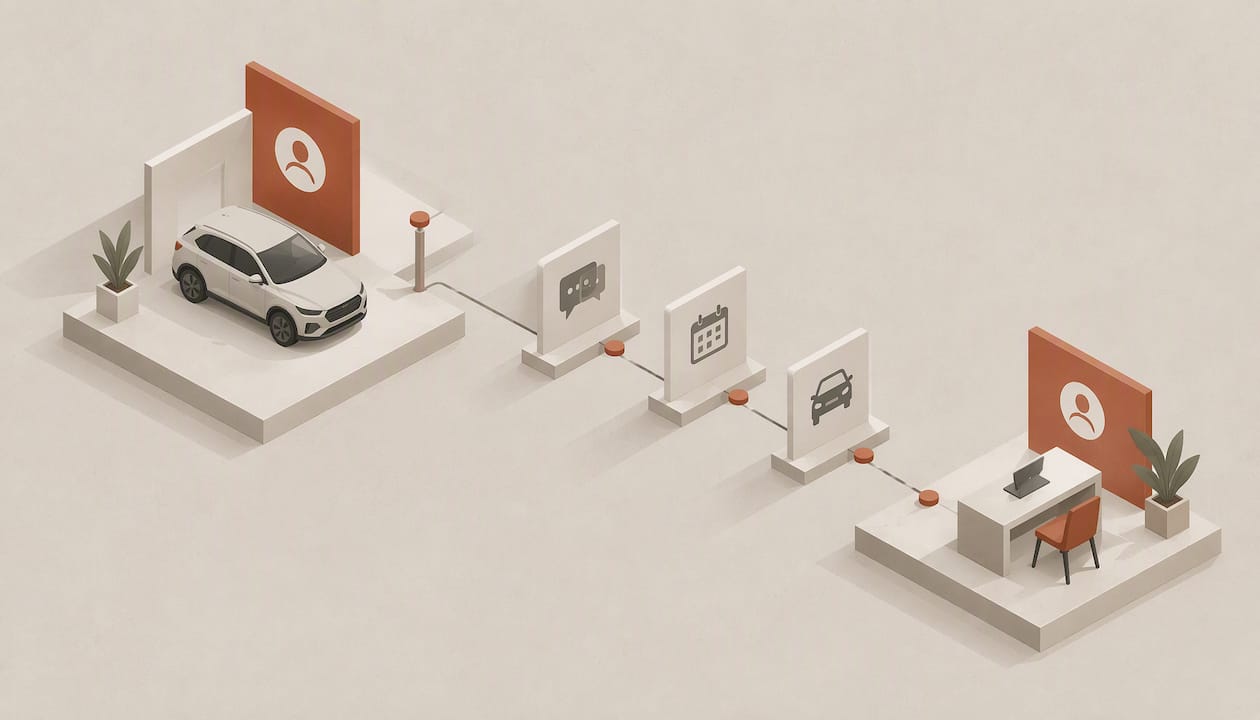
Auto dealer CRM automation means letting the CRM do the repetitive work around every lead and customer: responding to new inquiries, logging calls and emails, scheduling appointments and service visits, nudging stalled deals, and keeping records current without a salesperson typing them in. The strongest setups combine automated speed with human judgment at the moments that decide a sale: price, trade-in value, financing and the test drive. This guide covers what to automate, what data and safeguards it needs, how to roll it out, and how to tell whether it is working.
TL;DR
- Automate the high-volume, rule-based work first: instant lead response, follow-up sequences, appointment scheduling, service reminders and record updates.
- Keep people in charge of pricing, credit and negotiation. Treat AI as a supervised assistant, not an unsupervised salesperson.
- Data quality, consent records and clean lead sources decide whether automation helps or just sends the wrong message faster.
- Measure response time, appointment-set rate, show rate, stage-to-stage conversion and the share of records updated without manual entry.
- An AI-native CRM such as Sonta AI’s automotive CRM for dealers is built so records update themselves, which removes the data-entry ceiling that limits older systems.
Table of Contents
- What auto dealer CRM automation actually covers
- Automation, AI-powered and AI-native: how they differ
- Which tasks to automate across the customer journey
- Lead follow-up: speed without losing the human touch
- Lead qualification and live records
- Data, integrations and safeguards
- How to implement dealership CRM automation
- Metrics that show whether it is working
- Common problems and how to fix them
- Our perspective
- Try it on your own pipeline
- FAQ
- Sources
What auto dealer CRM automation actually covers
A dealership CRM has always been a system of record: leads, customers, vehicles of interest, trade-ins, deals and service history. Automation changes who does the work of keeping it useful. Instead of a BDC agent or salesperson logging a call, assigning a task and remembering to follow up on day three, a rule or an agent does it and writes the result back to the record.
In practice, automation in a dealership falls into four groups:
- Capture and routing. New leads from your website, third-party listing sites, OEM programs, chat and phone are created or matched to an existing contact, deduplicated and routed to the right person or queue.
- Response and follow-up. The first reply, reminders, nurture sequences for leads that go quiet, and re-engagement of old opportunities.
- Scheduling and customer service. Appointment booking and rescheduling, delivery coordination, service reminders, recall and lifecycle messages.
- Record keeping and reporting. Activity logging, stage changes, field updates and dashboards that reflect what actually happened.
The first three are what customers feel. The fourth is what managers rely on, and it is the one most often neglected in legacy systems, where reports are only as accurate as the last time someone remembered to enter data.
Automation, AI-powered and AI-native: how they differ
These terms get blurred, and the difference affects what you buy.
- Rules-based automation runs fixed triggers: if a lead arrives, send template A; if no reply in two days, create a task. It is predictable and easy to audit, but it breaks when reality does not match the rule.
- AI-enabled CRM adds AI features to an existing system, such as a drafting assistant or a lead score. The underlying records still depend on people entering data.
- AI-native CRM is designed around agents that read conversations, update records and run workflows as the core of the product. We compare the two approaches in more detail in our piece on AI-native versus AI-enabled CRM.
For a dealership, the practical question is simple: when a customer replies to a text at 9 p.m. asking about a trade-in, does the record change without anyone touching it, and does the right person see it the next morning? If the answer depends on someone typing a note, you have a system of record with automation bolted on.
Which tasks to automate across the customer journey
Telecom and messaging vendors that serve dealerships describe a common set of automated workflows: lead-priority alerts, vehicle and service updates, lifecycle messaging, appointment scheduling and rescheduling, intelligent routing and contextual handoffs to humans. That list is a useful checklist. Here is how those workflows map to the journey, and where a human should stay involved.
| Stage | Automate | Keep human |
|---|---|---|
| New lead | Record creation, duplicate matching, source tagging, instant acknowledgment, routing by vehicle, store or language | Reviewing high-intent leads flagged for priority |
| Qualification | Gathering basics (vehicle of interest, timeline, trade-in, payment preference), scoring, flagging intent | Anything involving credit, pricing exceptions or special terms |
| Follow-up | Reminders, multi-step sequences across email and text, re-engagement of quiet leads | Calls to warm leads, replies to complex questions |
| Appointment | Booking, confirmations, rescheduling, no-show recovery | The visit itself, test drive and negotiation |
| Deal and delivery | Task creation, document checklists, status updates | Final terms, paperwork review |
| Ownership | Service reminders, recall and lifecycle messages, trade-in timing prompts | Handling complaints and sensitive conversations |
The pattern is consistent: automate the information movement and timing, and keep people on the decisions and the relationship.
Lead follow-up: speed without losing the human touch
Speed is where automation pays back fastest. One 2026 analysis of multi-rooftop dealership campaigns reports that 23.5% of online leads miss a 24-hour follow-up. Treat the figure as an indicator from one vendor’s dataset rather than an industry constant, but the direction matches what most general managers already see in their own queues: leads that arrive nights and weekends, or during a busy Saturday, wait too long.
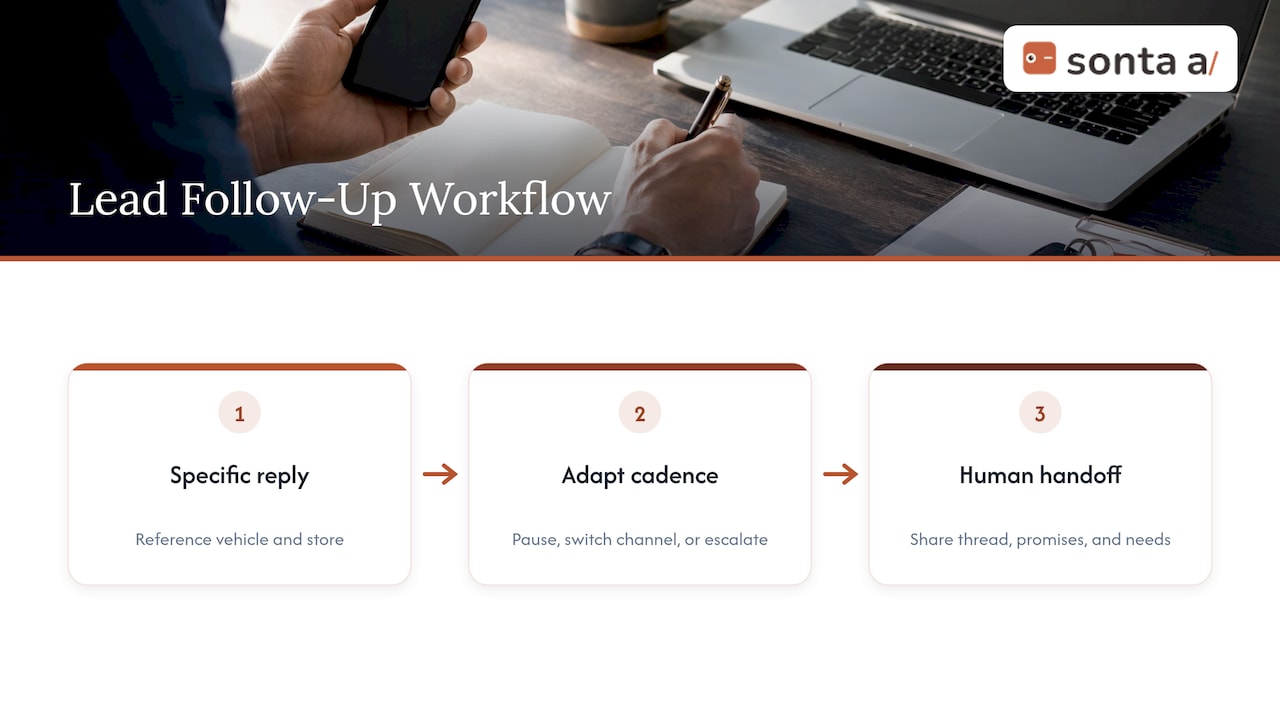
Automation closes that gap in three ways.
An immediate, specific first reply. Not a generic “thanks for your inquiry,” but a message that references the vehicle the shopper asked about, confirms the store, and offers two concrete next steps such as a time to visit or a call. The CRM should pull the vehicle, source and any prior history from the record.
A cadence that responds to behavior. A fixed seven-touch sequence ignores the shopper. A better workflow pauses when the customer replies, switches channel if email goes unopened, and escalates to a person when the customer asks about price, trade value or financing. Our guides on AI follow-up automation and automated follow-up emails that book meetings cover the mechanics of building these sequences so they stop when they should.
A clean handoff. The moment a human takes over, they should see the full thread, what was promised, and what the customer still needs. A handoff that makes the customer repeat themselves is the fastest way to make automation feel cold.
To keep the human touch, write templates the way your best salesperson writes, cap the number of automated touches, and let any reply from the customer stop the sequence until a person has looked at it. Personalization comes from data you already hold: the vehicle, the trade-in, the last service visit, the preferred channel.
Know which leads are worth the effort
Follow-up automation is only as smart as your understanding of where leads come from. If third-party listings, your website and OEM leads all enter one undifferentiated pool, you will respond to each the same way and misjudge which sources pay. A practical walkthrough of lead source tracking for dealers shows how to tag sources consistently so reports reflect reality. In a CRM, that means a required source field populated automatically at capture, not chosen by a salesperson from a dropdown after the fact.
Lead qualification and live records
Qualification is where AI adds the most beyond rules. A rules engine can check whether a form field is filled in. An AI agent can read a free-text message such as “looking to get out of my lease before spring, maybe something with third-row seating” and extract the vehicle type, the timeline and the trade-in situation, then write those into structured fields.
A solid qualification workflow does the following:
- Reads inbound messages, calls and emails and extracts the details that matter: model interest, new or used, trade-in, budget or payment range, timeline.
- Scores intent using signals you can explain, such as a request for a specific stock number, a scheduling reply or repeat visits to a vehicle page.
- Updates the contact, vehicle and deal records directly, so the salesperson opens a complete picture.
- Flags gaps, for example a missing phone number or an unconfirmed appointment, and asks for them rather than guessing.
This is the heart of the self-updating record idea. When records update themselves, managers can trust pipeline reports, and salespeople stop spending evenings on admin. Our overview of AI-native CRM features to look for lists what to test in a demo, including whether updates are written to fields or only to free-text notes.
Data, integrations and safeguards
Automation amplifies whatever data it is given. Before you switch on agents, check five foundations.
1. Clean contacts and a single customer record. Duplicate contacts mean duplicate messages, which customers notice. Decide how you match people: phone, email, or both, and how vehicles attach to households.
2. Source and consent records. Store where each lead came from and what the customer agreed to receive by text, email and phone. Consent is a legal matter, and your compliance counsel or dealer association should confirm the rules that apply to your state and channels. Automated messaging should check consent status before every send.
3. Integrations with the systems that hold the truth. At minimum: website forms and chat, third-party lead providers, telephony and texting, calendars, and your dealer management system for inventory, deal and service data. Without inventory sync, an automated reply can promise a car that sold yesterday. See how integrations are set up in the Sonta AI integrations overview.
4. Defined handoff rules. Decide which words and situations trigger a human: price negotiation, financing questions, complaints, legal language, anything the agent is unsure about.
5. Supervision. One 2026 dealer follow-up guide recommends using AI as a supervised assistant rather than an unsupervised salesperson, and specifically advises against letting it make credit decisions or promise terms the dealership has not approved. The same guide stresses that AI performance depends on data quality, consent records and human review. We agree with the principle and build for it: agents should earn autonomy in stages, starting with drafts a person approves and moving to autonomous actions only for tasks that have proven reliable. That is the idea behind our AI sales agents with staged autonomy.
Two more practical safeguards: log every automated action so a manager can see what was sent and why, and keep an easy kill switch for any workflow that misbehaves.
How to implement dealership CRM automation
A phased rollout beats a big-bang switch. A workable sequence:
- Map the current process. Walk a lead from first contact to delivery and note where it waits, where data gets retyped, and where leads fall through. Count the manual touches.
- Pick two or three workflows. Good first candidates are instant lead response, no-reply follow-up and appointment confirmation. They are high-volume, low-risk and easy to measure.
- Clean and import your data. Deduplicate contacts, standardize sources and import history. Our guide to importing entries from a CSV shows the mechanics, and the data model overview explains how contacts, vehicles and deals relate.
- Build the pipeline. Define stages that match how your store sells, such as new lead, contacted, appointment set, visit, deal in progress, delivered. A walkthrough is in building a pipeline.
- Configure workflows with review gates. Start with human approval on outbound messages, then loosen it as accuracy is proven. Our notes on making a CRM workflow builder reliable and on modular workflow templates cover testing and failure handling.
- Train the team on exceptions. Salespeople need to know what the system does, what it will hand to them and how to correct it.
- Review weekly for the first 60 days. Read actual conversations, not just dashboards, and fix templates and rules that miss.
If you sell in a vertical with its own vocabulary, a prebuilt starting point saves time. Blueprints provide an industry-specific structure that you can adapt to your business instead of building every field from scratch.
Metrics that show whether it is working
Pick a small set, record a baseline before launch and review them on the same cadence.
| Metric | What it tells you |
|---|---|
| Speed to first response, by source and by hour | Whether after-hours and weekend leads are covered |
| Share of leads contacted within 24 hours | Whether follow-up gaps are closing |
| Appointment-set rate | Whether follow-up produces visits |
| Show rate | Whether confirmations and reminders work |
| Stage-to-stage conversion | Where deals stall (see a pipeline stage report) |
| Share of records updated without manual entry | Whether the CRM is reducing admin |
| Opt-out and complaint rate | Whether messaging is too frequent or off target |
| Service-visit and repeat-purchase rates | Whether lifecycle messaging is paying off |
Watch the opt-out rate and complaint rate alongside the sales metrics. A sequence that lifts appointments while driving unsubscribes is borrowing from future sales. Build these into a dashboard the sales manager actually opens.
Common problems and how to fix them
Unclear lead processes. Process ambiguity between dealers and manufacturers is a recurring complaint. A 2025 German study of dealer sales found that 30% of dealers wanted clearer lead-management processes from manufacturers. The study covers Germany, but the lesson travels: write down who owns a lead at each stage, including OEM-generated leads, before automating it.
Automation that fights the salesperson. If reps see the CRM as surveillance or extra typing, they route around it. Show them what they get back: fewer tasks to log, better-prepared conversations, and a queue that already prioritizes the hot leads.
Over-messaging. Stacked sequences from different tools can hit one customer five times in a day. Centralize outbound messaging in one system and set frequency caps.
Stale or wrong data. Automation built on outdated inventory or bad contact data erodes trust quickly. Sync inventory frequently and let agents update records from conversations.
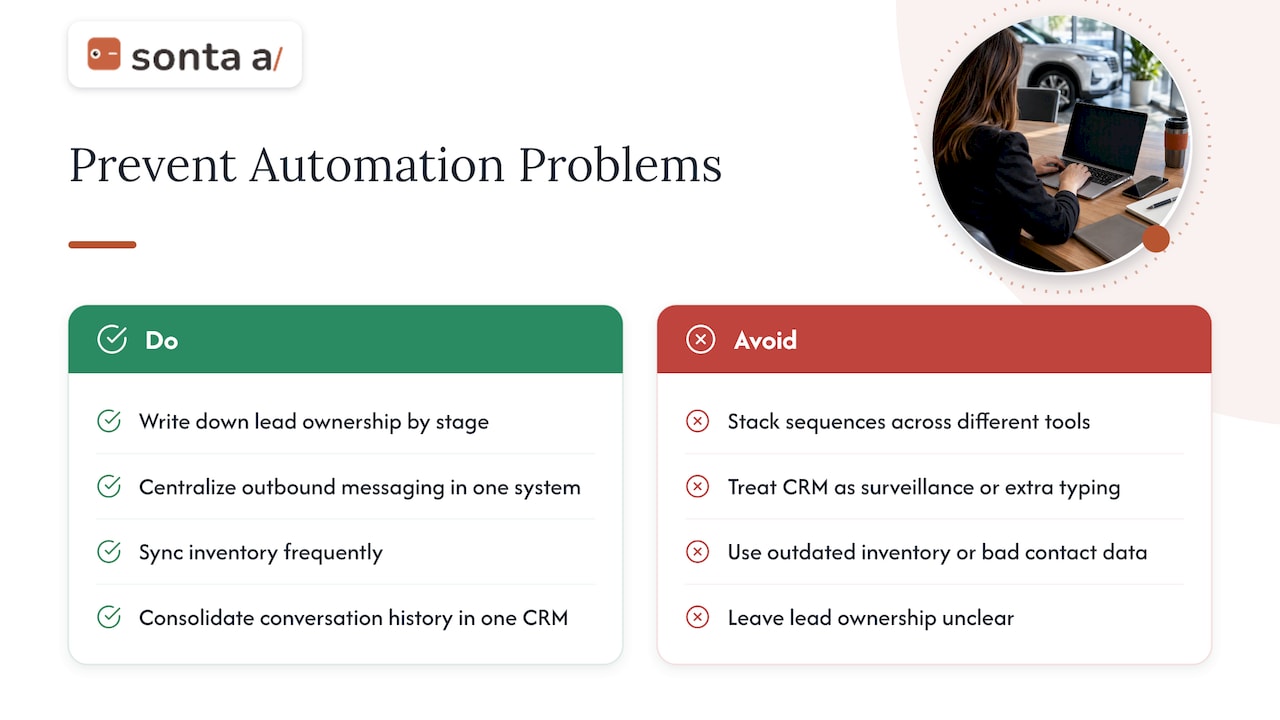
Tool sprawl. Separate tools for texting, email, chat and scheduling create gaps in the record. Consolidating around a CRM that holds the full conversation history is simpler to supervise.
Our perspective
Most dealership CRMs fail in the same quiet way: the data is only as good as the last person who had time to type it. Reports look precise, but the underlying records are stale, so managers coach from guesses and follow-up depends on memory.
We built Sonta AI around the opposite assumption. Every record should update itself from what actually happened, through customizable AI agents that use the model best suited to each task. Lead qualification, follow-up, account prep, scheduling and pipeline management then run in the background while salespeople spend their time with customers.
For auto retail, that means a blueprint that starts from how dealerships sell, workflows you can shape to your own process, and agents that earn autonomy in stages instead of being switched on blind. We also do not meter AI or automation usage, so you can automate more of the routine work without watching a usage counter.
Our advice is to begin with response speed and record accuracy. Those two changes are measurable within weeks, and they create the clean data every later automation depends on.
Pavel
Try it on your own pipeline
If you want to see how an AI-native CRM would handle your leads, our automotive CRM for dealers page shows the auto retail setup, and the pricing page lists plans from $16 per month per seat (Solo), $28 (Core) and $65 (Pro), with Enterprise priced on request. Migration and data modelling services start from $2,500 one-off.

Not sure where your time is leaking? The AI Efficiency Diagnostic is a 30-minute session designed to identify operational leakages and review your tech stack before you commit to a rollout.
FAQ
What is the difference between a dealership CRM and dealership CRM automation?
A dealership CRM stores customer, vehicle and deal information. Automation is the layer that acts on that information: responding to leads, scheduling, sending reminders and updating records without manual steps. Most modern CRMs include some automation, but how much depends on whether the system was designed around it.
Can AI replace BDC agents or salespeople?
It can take over repetitive first-response, scheduling and reminder work, which lets staff focus on conversations that need judgment. Pricing, credit and negotiation should stay with people, and AI output should be supervised. Teams usually redeploy BDC time toward calls and appointment confirmation rather than eliminating the role.
How quickly should a dealership respond to an online lead?
As fast as you can reliably manage, and certainly within the same day. One 2026 dataset reports that 23.5% of online leads miss a 24-hour follow-up, so an instant automated acknowledgment followed by a human call is a common way to close that gap.
What should I check before automating customer texts and emails?
Confirm you hold consent for each channel, store it on the contact record and have the workflow check it before every send. Ask your compliance counsel about the rules in your state. Add frequency caps and a clear opt-out so one customer never receives overlapping sequences.
How long does implementation take?
It depends on data quality, integrations and how many workflows you launch. Starting with two or three workflows and a clean data import is faster and safer than automating everything at once. Review results weekly for the first couple of months and expand from there.
Sources
- Automotive Services and Dealership Solutions, Twilio
- Dealer Lead Follow-Up System: AI & Appointments, Auto Capital Express
- 32 Multi-Rooftop Campaign Reporting Statistics, Demand Local
- Omnichannel & Leadmanagement, Targobank Verkäuferstudie 2025
- Lead Source Tracking for Dealers: A Practical Setup, Loturn