How to Deduplicate CRM Records Without Losing Data
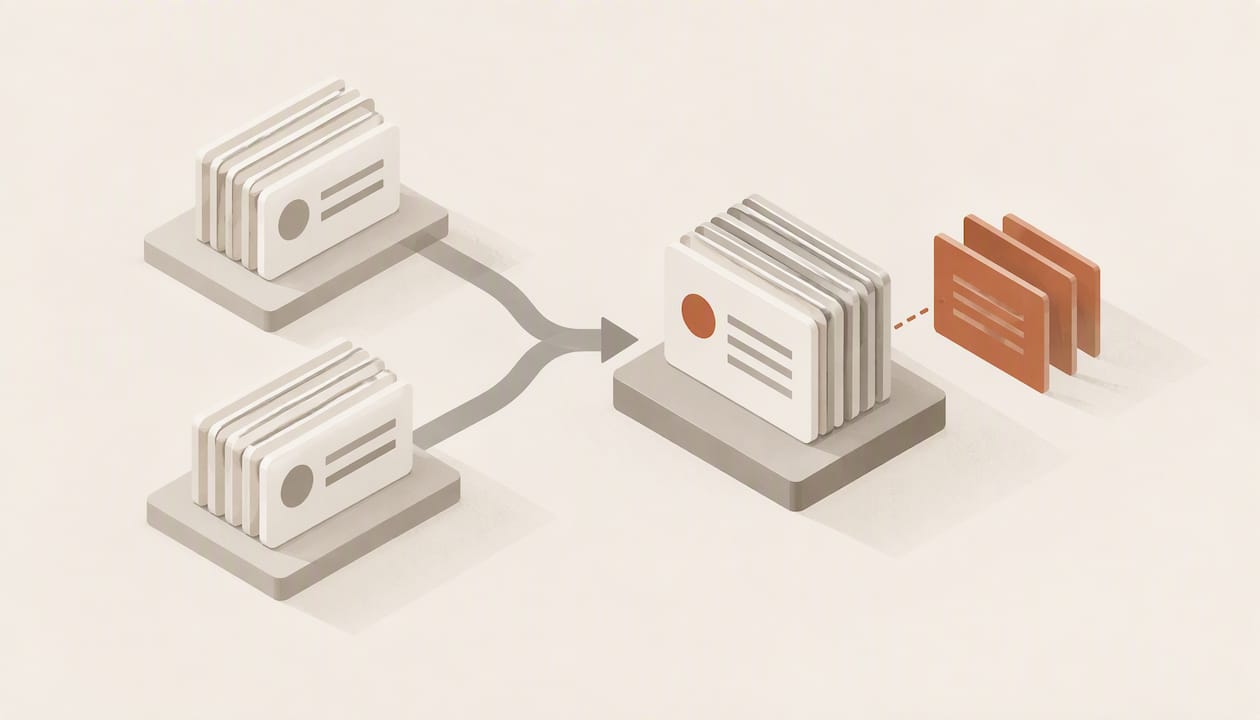
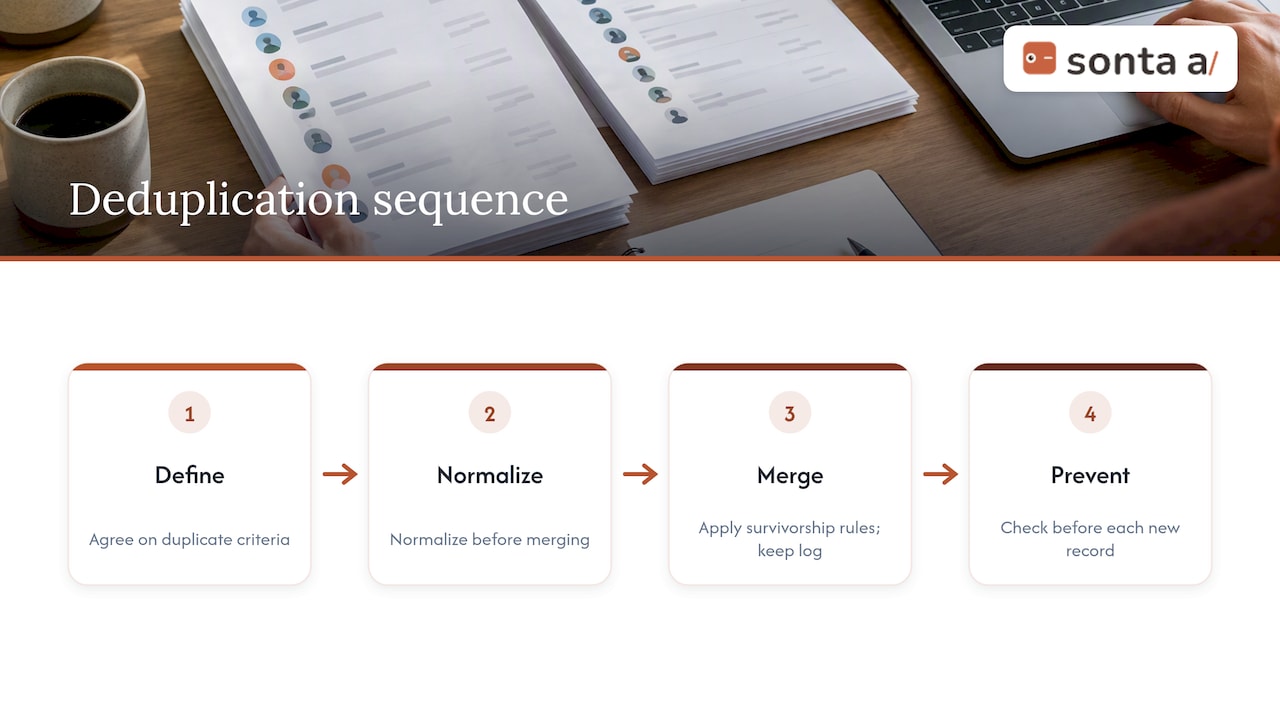
To deduplicate CRM records, you define what counts as the same person or company, normalize the fields you match on, score likely pairs, merge them under written survivorship rules, and then block new duplicates at every entry point. The cleanup is the easy half. Without prevention at forms, imports, integrations and automations, the duplicates come back, usually within a quarter.
This guide walks through that sequence in the order a RevOps owner or sales ops lead would run it, with the matching rules, merge safeguards and recurring controls that keep a CRM trustworthy once the backlog is gone.
TL;DR
- Duplicates are close to inevitable without an explicit strategy; CIO reports that complaints, misleading reports and lost updates start at roughly 5% duplicate records.
- Match on stable identifiers first (email, domain, external system IDs), then use fuzzy matching for names, and send borderline pairs to a human.
- Merge with written survivorship rules, a backup and a merge log, so no activity history or field value disappears silently.
- Prevention matters more than cleanup: every form, import and API integration should check for an existing match before it writes a record.
- Run detection on a schedule (monthly is a sensible default) and treat deduplication as a continuous control, not a project.
Table of Contents
- Why duplicate records matter more than they look
- Where duplicates come from
- Step 1: Decide what counts as a duplicate
- Step 2: Normalize before you match
- Step 3: Identify duplicates when names and fields differ
- Step 4: Merge safely
- Step 5: Stop duplicates at every entry point
- Step 6: Keep it clean on a schedule
- Our perspective on deduplication
- Doing this in Sonta AI
- FAQ
- Sources
Why duplicate records matter more than they look
A duplicate is not just clutter. Two records for one buyer split the email thread, the call notes and the open opportunity across two owners, so each rep sees half the story. Territory rules, lead routing and scoring all misfire when one account exists three times with three different owners.
The scale threshold is lower than most teams assume. CIO’s guidance on deduplication dilemmas says that without an explicit strategy a CRM will almost certainly carry some duplicates, that above about 5% users begin to complain, reports turn misleading and updates get lost, and that at 25% the problem can threaten careers. The article dates from 2013, and the tooling has changed a great deal since, but the mechanism it describes is the same one sales teams report today: once reps stop trusting the data, they stop updating it, and decay accelerates.
The practical consequence is that you should measure your duplicate rate before you start. Export contacts and accounts, run a simple count of records sharing a normalized email or domain, and divide by total records. That one number tells you whether you face a hygiene task or a credibility problem, and it gives you a before-and-after figure to report.
Where duplicates come from
Cleaning without fixing the sources is the most common mistake. Duplicates arrive through a handful of paths:
- Manual entry. A rep creates a new contact without searching, or searches by a name spelled differently from the stored one.
- Imports. Spreadsheets from events, list vendors or acquisitions load rows that never query existing records.
- Integrations. Marketing automation, enrichment tools, billing systems and calendar syncs each create records on their own logic.
- Web forms. A returning visitor with a second email address becomes a new lead.
- Automations and AI agents. Any workflow that creates a contact or account from an email, a call or a meeting can recreate a duplicate if it does not look first.
CIO’s analysis makes the same point: imports and integrations that fail to identify or query existing records, users who ignore duplicate alerts, and administrative errors or software bugs are all recurring causes. Its perspective is that every manual, imported, integrated or automated entry path can recreate duplicates, which is why a one-off cleanup does not hold.
Step 1: Decide what counts as a duplicate
Write the definition down before touching data. Agree on criteria with sales, marketing and customer success, because each group has a different tolerance. A marketer may want one record per email address; an account executive may need separate contacts for two people sharing a mailbox alias.
A workable definition separates the three object types:
| Object | Strong identifier | Supporting fields | Typical decision |
|---|---|---|---|
| Contact | Normalized email address | Phone, full name, company, LinkedIn URL | Same person, merge |
| Company or account | Website domain, external ID | Name, billing address, phone | Same legal entity, merge |
| Company with subsidiaries | Domain plus parent relationship | Region, legal name | Often keep separate, link as parent and child |
The subsidiary row is where most disputes happen. A parent and a regional office share a domain but may be separate accounts with separate owners and contracts. Decide the policy once, then encode it, rather than arguing record by record.
Step 2: Normalize before you match
Most “hard” duplicates become easy once the data is standardized. Normalize on the fields you intend to match on, in a working copy or a staging layer:
- Emails: lowercase, trim whitespace, and decide whether to strip plus-addressing tags.
- Domains: reduce a website URL to its root domain, dropping protocol, “www” and paths. Match companies on domain rather than name where you can.
- Company names: remove legal suffixes (Inc, LLC, Ltd, GmbH), punctuation and casing differences.
- Person names: split first and last name, expand common nicknames (Bob and Robert, Liz and Elizabeth), and strip titles and suffixes.
- Phone numbers: convert to one international format.
- Addresses: standardize abbreviations and state codes.
The discipline matters beyond cleanup. Digital Applied’s 2026 methodology on CRM deduplication frames deduplication as a continuous control and recommends normalizing at the point of ingestion, so the same rules that clean the backlog also protect new data. The same logic appears in work on email deduplication built on normalization and audit trails, which treats duplicate prevention as an ongoing control with a record of what was changed, not a single sweep.
Step 3: Identify duplicates when names and fields differ
Exact matching catches perhaps the obvious half. The rest hides behind typos, nicknames, reordered names, old email addresses and companies entered under a brand name instead of a legal name. Layer your matching from strict to loose.
Deterministic rules first
Start with identifiers that rarely lie: normalized email, external system IDs (billing customer ID, marketing platform ID), and company domain. A match on any one of these is usually safe to merge automatically, with the exception of free-mail domains such as gmail.com, which must never be used for company matching, and shared mailboxes such as info@ or sales@, which belong to a company rather than a person.
Fuzzy matching for what is left
For names and addresses, fuzzy algorithms score similarity instead of demanding equality. Octave’s guide to GTM deduplication lists the common families: Levenshtein distance for typos, Jaro-Winkler for name similarity, token-based matching for name-order variation, and phonetic matching for names that sound alike. Each suits a different failure:
| Failure pattern | Example | Approach |
|---|---|---|
| Typo | Jon Smtih / Jon Smith | Edit distance |
| Name order | Smith, Jon / Jon Smith | Token-based matching |
| Nickname | Bill / William | Nickname dictionary before matching |
| Sounds alike | Catherine / Katherine | Phonetic matching |
| Brand vs. legal name | Acme / Acme Holdings LLC | Domain match, suffix stripping |
Combine signals instead of trusting one
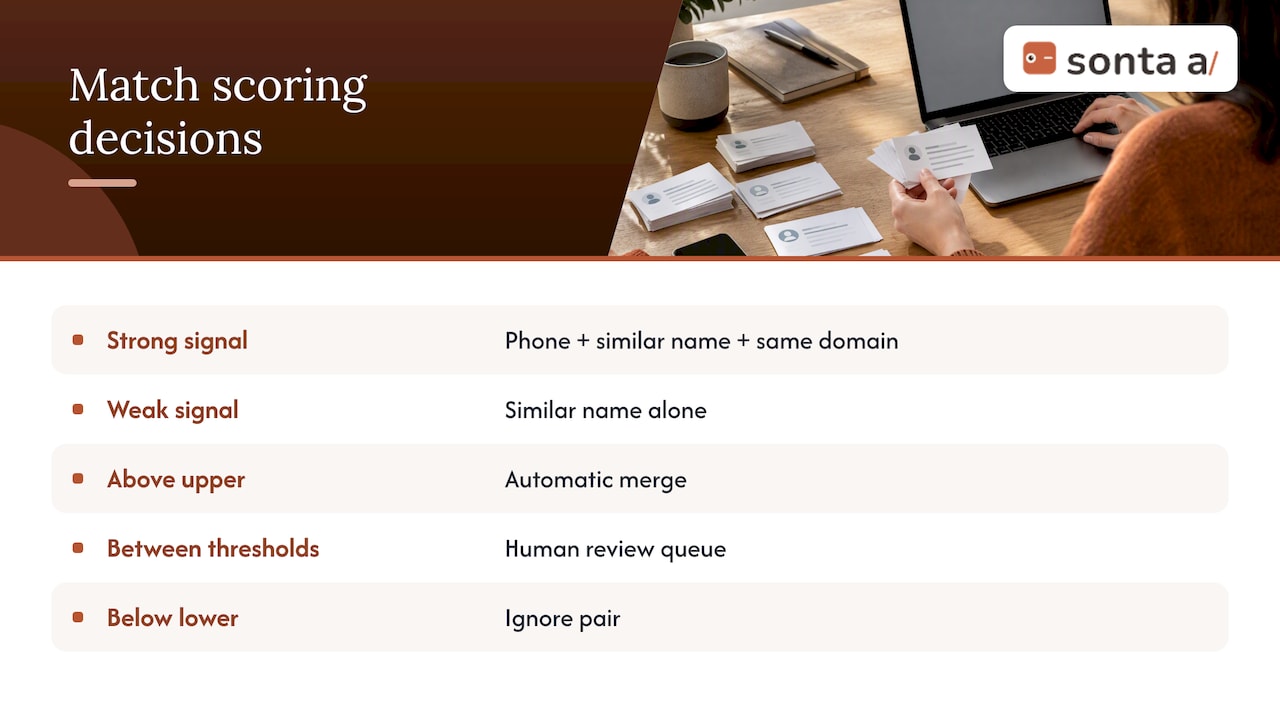
A pair that agrees on last name and company but differs on first name and email is a candidate, not a certainty. Score pairs by combining signals: a matching phone number plus a similar name plus the same company domain is strong evidence, while a similar name alone is weak. Set two thresholds: above the upper one the pair merges automatically, between the two it enters a human review queue, and below the lower one it is ignored. The review queue is where judgment about shared mailboxes, parent-child accounts and people who changed employers belongs.
We cover the mechanics of scoring and thresholds in more depth in our piece on CRM duplicate detection. If duplicates stem from leads attaching to the wrong company, the related problem of lead-to-account matching usually needs its own fix.
Step 4: Merge safely
Merging is the irreversible step in most systems, so it deserves the most caution. The failure modes are overwritten field values, orphaned related records (opportunities, tasks, notes, emails), broken automations tied to the old record ID, and lost attribution history.
Write survivorship rules
For each field, decide which record wins when two disagree. Typical rules:
- Most recently updated wins for phone, title and address.
- Most trusted source wins for fields where a verified system (billing, enrichment) beats a manual entry.
- Oldest wins for creation date and original lead source, because attribution depends on it.
- Non-empty beats empty everywhere, so a merge never erases a value.
- Owner follows the open opportunity or the account owner, not the oldest record.
A surviving “golden” record that carries the best value of each field is the aim. Octave recommends maintaining a golden record as the authoritative version of contact and account data, updated during ingestion, and guidance on CRM data hygiene covers how to preserve one trusted version of each contact or account once duplicates are found.
The safe merge routine
- Back up first. Export the affected records, including related object IDs, before any bulk merge.
- Pilot on a small batch. Merge 50 to 100 pairs and inspect them by hand: activities, opportunities, custom fields.
- Check that related records reattach. Open a merged contact and confirm that deals, emails, meetings and notes from both originals appear.
- Log every merge. Keep the surviving ID, the retired ID, the rule that triggered it, who approved it and when. Consultants cleaning a client’s CRM in particular must be able to show the work, and a merge log makes before-and-after reporting straightforward.
- Preserve the old IDs. Store retired IDs in an alias field so integrations that still reference them can be reconciled.
- Review automations. Merges can re-trigger or suppress workflows; check enrollment rules before running a bulk job.
- Merge in order. Do accounts first, then contacts, so contact merges happen against the corrected account structure.
Because platforms differ in what a merge keeps and what it resets, read your CRM’s own merge documentation and test one pair before scaling. Some require the records to be the same object type, some cap the number of records per merge, and some reset workflow enrollment.
Step 5: Stop duplicates at every entry point
Prevention is cheaper than cleanup. CIO advises using duplicate-detection tools that warn users during data entry and fixing the imports and integrations that fail to check for existing records. Octave goes further: every ingestion point, including forms, imports and API integrations, must check for an existing match before writing a new record.
A prevention checklist:
- Forms: look up by email before creating; update the existing contact if found.
- Imports: run imports through a staging step that matches against the live CRM, with unique-key enforcement on email or external ID. Pre-migration cleanup is its own discipline; our notes on dedupe before a CRM migration explain why it belongs at the start.
- Integrations and APIs: use upsert logic keyed on a stable identifier instead of blind create calls.
- Manual creation: require reps to search before creating, and make duplicate alerts hard to dismiss. CIO lists users ignoring alerts as a common failure.
- Automations: any workflow that creates records from emails, calls or meetings needs a lookup step first. See how we handle call logging automation for an example of keeping records clean as activity is captured.
When a unique field is enforced and a second record tries to take the same value, the system should say so plainly; our Academy page on a duplicate value on a unique field shows what that looks like in Sonta AI.
Step 6: Keep it clean on a schedule
CIO suggests a documented strategy, duplicate-detection tools, normalization, careful processes and monthly detection cycles to reduce recurrence. A lightweight operating rhythm that follows that advice:
| Cadence | Task | Owner |
|---|---|---|
| Real time | Block or flag duplicates at creation | System rules |
| Weekly | Clear the human review queue | RevOps or sales ops |
| Monthly | Run full detection across contacts and accounts | RevOps |
| Quarterly | Report duplicate rate, merge count and rule changes | RevOps lead |
Track three numbers: duplicate rate (against that 5% threshold), the share of merges that were automatic versus reviewed, and the number of merges later reversed. A rising reversal count means a rule is too aggressive. Quincy Samycia’s discussion of CRM data management as a continuing control makes a similar case that data quality is maintained rather than achieved once.
Our perspective on deduplication
Most deduplication tools treat the CRM as a place where bad data accumulates and a periodic job sweeps it up. We think that framing is the root of the problem. If records depend on people typing and remembering to search first, duplicates are a scheduled outcome, not an accident.
That is why Sonta AI is built as an AI-native CRM where records update themselves from the work as it happens, using agents that check for an existing record before they write one. The aim is to remove the manual data-entry ceiling that legacy systems rely on, so prevention is part of how the data is captured rather than a rule reps are asked to follow. We also do not meter AI or automation usage, so running matching and lookup steps on every inbound record does not create a billing reason to skip them.
Our advice is the same whichever CRM you use: write the definition of a duplicate down, normalize first, merge under survivorship rules with a log, and put a lookup in front of every path that creates a record. Tools differ in how much of that they automate. The sequence does not change.
— Pavel
Doing this in Sonta AI
If your backlog comes from a migration or from several tools writing into one CRM, we can help structure the work. Our migration and data modelling service starts from $2,500 one-off, and the AI Efficiency Diagnostic gives you a 30-minute read on where your stack leaks data and effort. Plans start at $16 per seat per month on our pricing page, so you can compare cost against the hours your team spends merging by hand.

To see how the platform works end to end, start with Sonta AI’s agentic CRM.
FAQ
How do I find duplicate CRM records when the names are spelled differently?
Match on identifiers that do not depend on spelling first: normalized email, company domain and external IDs. For the remainder, use fuzzy algorithms such as edit distance and phonetic matching, and combine several fields into a score. Send borderline pairs to a human reviewer instead of merging automatically.
Can I undo a CRM merge?
Usually not in a native way, which is why you back up and log first. Export the affected records and their related IDs, pilot on a small batch, and store retired record IDs in an alias field. Check your CRM’s documentation for what its merge retains.
How often should I deduplicate my CRM?
Use real-time checks at creation and a full detection run at least monthly, a cadence CIO’s guidance also points to. Deduplication works as a continuous control, so the schedule matters more than the size of any single cleanup.
What duplicate rate is acceptable?
CIO reports that problems become visible once duplicates pass about 5% of records. Treat that as a ceiling to stay well under, and measure your own rate before and after every cleanup.
Sources
- How to Solve CRM Data Deduplication Dilemmas, CIO
- The GTM Engineer’s Guide to Deduplication, Octave
- CRM Deduplication 2026: A Merge & Match Methodology, Digital Applied
- Email Deduplication Built on Normalization and Audit Trails
- Five Step CRM Data Hygiene Plan
- CDP vs CRM: 3 Procurement Ready Scenarios for Marketing Leaders