LinkedIn sales automation: what to automate, what to keep
The useful part of LinkedIn sales automation is not sending more messages. It is knowing which conversations are timely, writing a relevant first note and keeping follow-ups and records current. Sonta AI is an agentic CRM that finds opportunities and moves them forward, so the research, the sequences and the CRM sit in one app. The rest of this guide covers what to automate, what LinkedIn’s rules allow and what the UK and European rules say about first contact.
TL;DR
- Automate research, timing, drafting, follow-ups and record-keeping. Keep judgement, replies and approvals with your team.
- LinkedIn does not allow third-party software that automates activity on its site, so any tool that touches LinkedIn needs a rules check first.
- A job change or a hiring post is a reason to talk. It is not buying intent.
- In the UK, PECR covers electronic marketing and UK GDPR covers prospect data. Germany, the Netherlands, Denmark and Poland need prior consent for business email before first contact.
- Sonta replaces a CRM, an email sequencer, a LinkedIn outreach tool and a signal tool in one app.
Table of Contents
- What LinkedIn sales automation covers
- What LinkedIn allows
- Start with the moment, not the list
- Make the message fit the moment
- How it fits with HubSpot or Pipedrive
- How the options compare
- Know the rules before first contact
- What it costs, and how to judge it
- A workflow you can run this week
- Our view on LinkedIn sales automation
- Try it on your own pipeline
- FAQ
- Sources
What LinkedIn sales automation covers
It is software that takes repetitive prospecting work off a person. G2’s November 2026 guide lists prospect research, list preparation, message drafting, follow-up reminders, CRM logging and reporting as the tasks it can streamline. The same guide recommends that a person reviews and sends LinkedIn invitations, messages and InMails unless the specific automation is expressly authorised.
For an owner-led agency or a sales team, that splits the work into two kinds.
- Work that needs no judgement: watching for changes, logging activity, scheduling follow-ups, updating records, preparing a brief before a call.
- Work that needs judgement: deciding who is worth a conversation, choosing the angle, answering a real reply, agreeing the next step.
The first kind is busywork. It eats the hours that founders and sales leaders would rather spend on clients. The second kind is where deals are won, and it should stay with you.
What LinkedIn allows
Read this before you buy any tool. LinkedIn’s help page on automated activity says it does not allow third-party software or browser extensions that scrape, modify or automate activity on its website. It also says use of such tools may breach its User Agreement and, in some jurisdictions, privacy law. Accounts can be restricted.
That has three practical consequences.
- Do not treat any LinkedIn automation as safe or undetectable. Nobody can promise that.
- Ask every vendor how it works with LinkedIn, and what happens to your account if LinkedIn objects.
- Keep a person in charge of what is sent from your LinkedIn account. Choose which steps need approval, and write that down.
This is why the better approach starts outside LinkedIn. You use public activity as a trigger, then do the heavy lifting in email, in the CRM and in your own preparation. LinkedIn steps follow LinkedIn’s rules, and your team decides which ones need sign-off.
Start with the moment, not the list
Most outreach fails on timing. A list of 500 job titles tells you who exists. It does not tell you who might want to talk this month.
Public LinkedIn activity gives you better reasons to get in touch.
- Someone asks for a recommendation.
- A new decision-maker joins a target account.
- A company is hiring in the area you serve.
- A past contact changes jobs.
Each of these is a reason to talk. None of them is proof that someone wants to buy. A hiring post suggests a need might exist. A job change suggests a new person is looking around. Your message should say why you are writing and ask a fair question. It should not assume a purchase.
This is what the Signal Agent in Sonta does. It watches public LinkedIn activity such as a recommendation request, a new decision-maker, a company hiring or a contact changing jobs. It shows each reason with a link, so you can check what happened before you act. Fit and intent are scored separately, so a perfect-fit company with no recent moment does not look the same as a poor fit with a loud one.
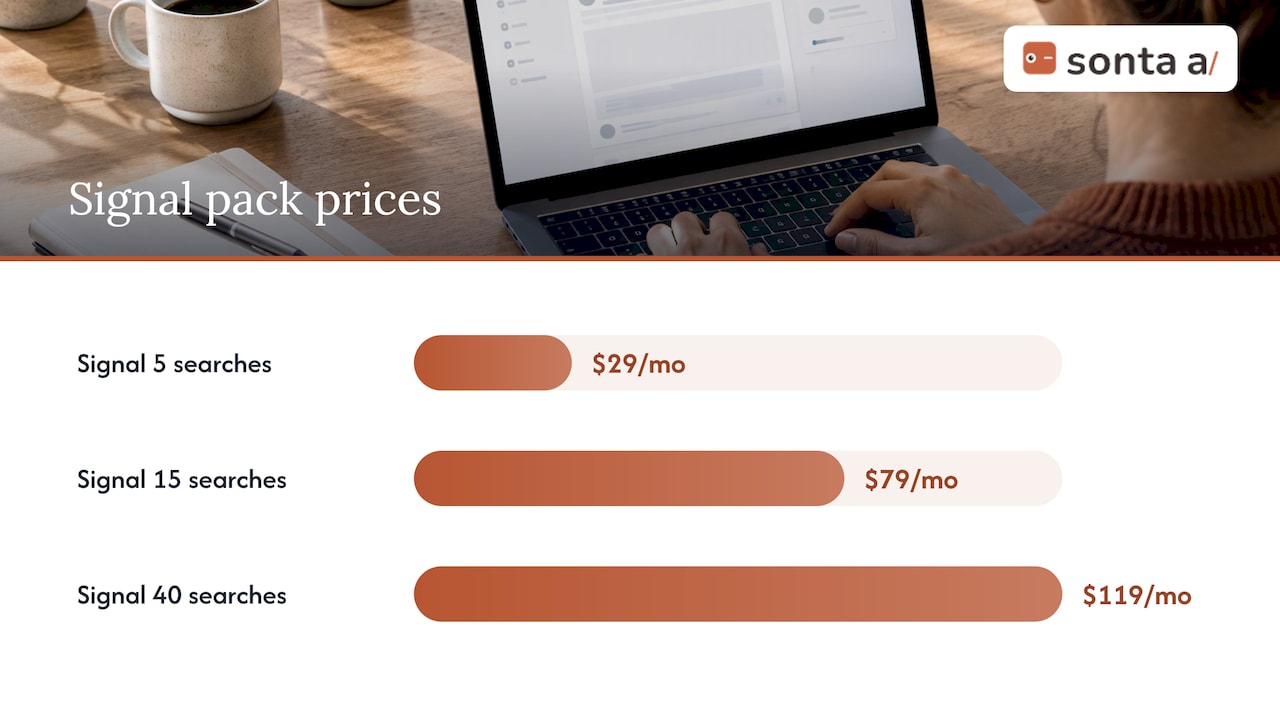
Signal packs start from $29 a month. The Signal 5 pack gives you 5 always-on searches for $29 a month. The Signal 15 pack is $79 a month and the Signal 40 pack is $119 a month.
Make the message fit the moment
The AI Journal’s guidance from 10 November 2026 says personalisation should rely on relevant professional context such as role, work activity or company news. It should avoid irrelevant personal details and verify research before contact. The same piece says teams should respond to actual replies and stop when someone declines or asks not to be contacted.
That is a good rule set for any team. In practice:
- Write from the reason, not from a template with a name merged in.
- Mention the one fact that made you write. Keep it professional.
- Ask one question.
- Stop at the first no.
In Sonta, sequences are native and written from the moment a signal fires. Email sequences are unlimited. We cover the thinking behind this in our guide to personalised AI outreach.
Follow-ups are the other half. Most deals need more than one touch, and most teams forget the second and third. Good email lifecycle marketing thinking applies here too: each message should have a purpose and a stopping rule. Our guide to automated follow-up emails that book meetings shows how to set that up from the CRM.
How it fits with HubSpot or Pipedrive
If your team runs on HubSpot or Pipedrive, you do not need to change your view of that CRM. Both are strong at what they do. HubSpot suits teams that want marketing, sales and service in one suite. Pipedrive suits teams that want a clear, visual pipeline without much setup.
The gap is usually around them. Signals live in one tool. Sequences live in another. LinkedIn work lives in a third. Reps copy notes between them, and records go stale.
When you connect any tool to your CRM, check these points first.
- Permissions: what can it read and write, and can you revoke access?
- Data location: where is prospect data stored and processed?
- Retention: how long does the vendor keep it?
- Role: is the vendor a processor of the personal data you hold?
- Duplicates: how will it avoid creating a second record for the same person?
Sonta keeps customer data in the EU under GDPR and does not use it to train AI. Customers run AI on their own keys from Anthropic, OpenAI, Google or OpenRouter. That means you choose the model for each task. You can also use Sonta from Claude or ChatGPT through its MCP server, under the same rules and approvals. Our note on sales data enrichment and deduplication explains the clean-up work before you import anything.
How the options compare
Buyers usually weigh these routes. Each has a real strength.
| Option | Where it is strong | Where a team still has work to do |
|---|---|---|
| HubSpot | Broad suite, marketing and sales in one place, large ecosystem | Signals, LinkedIn work and sequencing often come from add-ons |
| Pipedrive | Simple pipeline, quick to adopt | Outreach and signal tools are separate |
| Attio | Flexible data model, modern interface | Outreach and LinkedIn tooling sit alongside it |
| Gojiberry AI | Built around finding prospects from LinkedIn activity | A separate CRM and sequencer are still needed |
| HeyReach | Focused on LinkedIn outreach at team scale | Email, signals and CRM sit elsewhere |
| Instantly | Strong for email sending at volume | LinkedIn and CRM work sit elsewhere |
| AI SDR tools such as Artisan and 11x | One agent that prospects and writes to people | It stops at the meeting |
| Spreadsheets | Free and flexible | Everything is manual and records go stale |
| Lead-generation agency | Takes the work off your desk | You rely on their pace and their data |
| Hiring a salesperson | A person who owns relationships | Salary and ramp-up time before results |
| Sonta | One app for CRM, email sequences, LinkedIn outreach and signals | You choose your own approval steps and your own AI keys |
An AI SDR is one agent that stops at the meeting. Sonta has an agent for every step and is the CRM too. Agents research prospects, follow up, prepare meeting briefs and keep records current. The customer decides which steps need their approval.
Know the rules before first contact
This is the part many guides skip, and it matters in the UK and Europe.
United Kingdom. PECR is the UK rule set for electronic marketing. The ICO says it covers unsolicited marketing by phone, email, text or other electronic message and is generally stricter for individuals than for companies. Its business-to-business page explains that the email rule does not apply to corporate subscribers such as companies and limited liability partnerships. Sole traders and some partnerships are treated as individuals. UK GDPR still applies to the personal data you hold about any named person. That means a lawful basis, a way to handle objections and a suppression list for people who say no.
Germany, the Netherlands, Denmark and Poland. Business email needs prior consent before first contact. Check this before any sequence goes to a contact in those countries.
South Africa. POPIA applies to first-contact rules there. Check it before you write to anyone in that market.
This is general information, not legal advice. For a specific campaign, speak to a data-protection adviser or solicitor.
What it costs, and how to judge it
Do not compare software against zero. Compare the whole cost of the work. Manual outreach costs seller time. Automation adds software and setup time. A tool pays for itself when it costs less than the extra time you would otherwise spend.
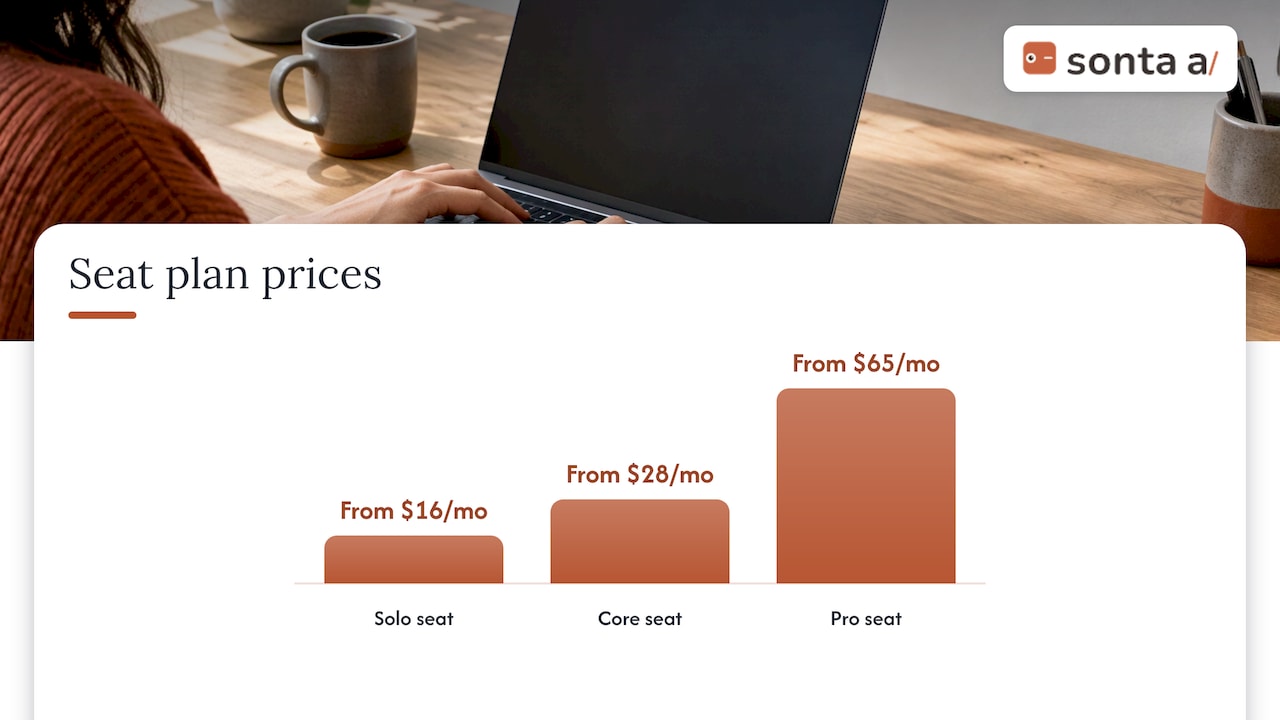
Sonta’s seat plans are Solo from $16 a month per seat, Core from $28 a month per seat and Pro from $65 a month per seat. LinkedIn accounts are billed per seat, with the LinkedIn account add-on at $15 to $20 a month. Full details are on the Sonta pricing page.
On the cost of running separate tools, Sonta’s own value calculator found a median 36% less than an equivalent stack of separate tools (Sonta value calculator, list prices read 17-18 Oct 2026). That compares a CRM, an email sequencer, a LinkedIn outreach tool and a signal tool bought separately. Your result depends on your current stack.
AI runs on your own keys, with no markup on AI. Agent runs are never metered.
Track what matters instead of message counts.
- Replies that are real conversations.
- Meetings booked.
- Deals opened.
- Deals won.
- Hours your team no longer spends on busywork.
No tool can guarantee meetings, customers or revenue. Measure your own results over a few months.
A workflow you can run this week
- Define your fit. Write down the clients you want. Include size, sector and the problem you solve.
- Pick three or four moments. A recommendation request, a new decision-maker, a hiring post or a job change are good starting points.
- Watch them. Set up always-on searches and check the link behind each reason.
- Write from the moment. Keep the first message short and professional. Ask one question.
- Decide your approvals. Choose which steps need a person before they go out.
- Handle replies. Reply yourself or let the agent draft. Stop when someone says no.
- Log everything. Records should update themselves, so your pipeline is accurate when you review it.
- Review monthly. Look at replies, meetings and deals. Change the moments that do not work.
Our guide to AI follow-up automation covers step seven in more depth.
Our view on LinkedIn sales automation
We run our own sales on Sonta.
Our view is simple. The best use of automation is to find the right moment and to take the busywork away. It is not to send more messages to more people.
That is why we built one app instead of four. The signal, the sequence, the reply, the meeting and the record belong together. When they sit in separate tools, a good moment gets lost between them.
We also think you should stay in control. You decide which steps need your approval. You choose the AI model for each task and run it on your own keys. You see the reason behind every opportunity and a link to check it.
LinkedIn has rules, and so do the UK and Europe. We would rather you respect them and build a steady pipeline than chase volume.
Pavel
Try it on your own pipeline
Sonta is an agentic CRM that finds opportunities and moves them forward. It brings the signal engine, personalised email and LinkedIn sequences, reply handling and meeting booking, and a CRM that keeps itself up to date into one app. It is built for sales leaders on HubSpot or Pipedrive, and for agencies, consultancies, IT services and software firms where the founder sells. You can see the plans on the pricing page or start from sonta.ai.
FAQ
Is LinkedIn sales automation allowed?
LinkedIn says it does not allow third-party software or browser extensions that automate activity on its site. Accounts can be restricted. Treat any tool that acts inside LinkedIn with care, and keep your team in charge of what is sent.
Is Sales Navigator a CRM?
No. It is a search and insight tool for LinkedIn. It helps you find people and see changes, but it does not replace a CRM that holds deals, follow-ups and history. Many teams pair it with HubSpot or Pipedrive.
Does it work with HubSpot or Pipedrive?
Most tools connect to both, either natively or through an automation layer. Before you connect anything, check permissions, data location and how duplicates are handled. Sonta can also replace the separate sequencer and signal tool around your CRM.
Do I need consent to email business contacts?
In the UK, PECR does not require consent for email to corporate subscribers, but sole traders and some partnerships are treated as individuals. UK GDPR still applies to personal data. In Germany, the Netherlands, Denmark and Poland, business email needs prior consent before first contact.
Book a demo and leave with your first leads.
Sources
- How to Automate LinkedIn Outreach in 6 Steps (G2)
- Automated activity on LinkedIn (LinkedIn Help)
- What Makes LinkedIn Outreach Feel Personal, Not Automated (The AI Journal)
- Electronic and telephone marketing (ICO)
- Business-to-business marketing (ICO)