Sales Tech Stack Optimization: A Practical Guide

Sales tech stack optimization means making every tool in your revenue workflow earn its place: you inventory what you pay for, check what people actually use, fix who owns which data, remove overlap, and then measure whether administrative work fell and pipeline quality rose. The order matters. Teams that buy or cut tools before they have defined how deals are qualified and staged tend to rebuild the same clutter within a year.
This guide walks through that sequence, with the criteria, metrics and decision points a GTM leader or RevOps owner needs, and shows where an AI-native CRM changes the math.
TL;DR
- Define your qualification rules and pipeline stages first; tool decisions follow the process, not the other way around.
- Audit every subscription for active users against paid seats, overlapping functions, and manual re-keying between systems.
- Assign field ownership and update direction before connecting or consolidating anything, and treat the CRM as the single source of truth.
- Measure adoption, administrative hours saved and total cost before and after, not only license savings.
- Where record updates, follow-ups and lead qualification are still manual, an AI-native CRM can replace several point tools at once.
Table of Contents
- What a sales tech stack is, and what it should solve
- The layers of a typical stack
- Step 1: Define the process before you touch the tools
- Step 2: Audit what you own and what gets used
- Step 3: Fix data ownership before you connect or consolidate
- Step 4: Decide what to cut, merge or keep
- Step 5: Simplify without breaking adoption
- Where AI-native tooling changes the optimization
- Step 6: Measure whether it worked
- What it costs to run a consolidated AI-native stack
- Start with a 30-minute diagnostic
- FAQ
- Sources
What a sales tech stack is, and what it should solve
A sales tech stack is the set of software a team uses to find prospects, engage them, run deals, forecast and hand over to customer success. For a five-person team it may be a CRM, an email tool and a spreadsheet. For a larger organization it can run to dozens of systems.
The stack has one job: take administrative work off sellers so more of their week goes to conversations with buyers. When it works, reps get clear next steps tied to pipeline activity, managers see a pipeline they can trust, and data does not have to be typed in twice. When it does not, the symptoms are consistent:
- Reps maintain records by hand after calls, so the CRM is always a few days behind reality.
- Two tools hold different versions of the same contact, account or deal stage.
- Licenses are paid for tools that a few people opened in the first month.
- Follow-ups depend on a rep remembering, not on a trigger.
- Forecast reviews start with arguments about whether the numbers are right.
If you recognize three or more of these, the stack is a candidate for optimization, and the problem is usually structure rather than any single product.
The layers of a typical stack
Before you cut anything, map what you have onto the standard categories. Gartner’s guidance on sales technology lists CRM as the foundation, with sales engagement platforms for outreach, conversational intelligence for call analysis, and tools for data enrichment, forecasting, sales enablement and CPQ. The same report groups revenue technology into engagement, application, enablement, operations, infrastructure and third-party data.
A practical working map for a mid-sized team looks like this:
| Layer | What it does | Common overlap risk |
|---|---|---|
| System of record (CRM) | Holds accounts, contacts, deals, activity | Shadow spreadsheets and side databases |
| Engagement | Email sequences, calls, meetings | Several tools sending to the same contacts |
| Intelligence | Call recording, summaries, coaching | Summaries that never reach the CRM |
| Data and enrichment | Firmographics, contact data | Multiple vendors for the same fields |
| Enablement and CPQ | Content, proposals, pricing | Content stored in three places |
| Operations and forecasting | Reporting, territory, quota | Dashboards built on stale CRM data |
Place each tool you pay for into one row. Tools that land in the same row, or that sit in no row, are your first review candidates.
Step 1: Define the process before you touch the tools
ISG’s advice to chief revenue officers is to run a revenue process audit that defines how opportunities are qualified and how stages are measured before purchasing any new technology. The same logic applies to removing technology: you cannot tell whether a tool is redundant until you know what the process requires.
Write down, on one page:
- The qualification criteria that move a lead to an opportunity.
- The pipeline stages, with the exit condition for each.
- The handoffs: lead to rep, rep to solutions, closed-won to onboarding.
- The activities that must be logged, and who or what logs them.
This is also where lead qualification accuracy is won or lost. If two reps interpret a stage differently, no tool will make the data consistent. Once criteria are explicit, they can be encoded as fields, rules or AI agent instructions. For a deeper view of that design work, see this practical guide to sales process design for B2B, which covers how staged capability building supports technology adoption.
Step 2: Audit what you own and what gets used
The audit is a spreadsheet exercise with four columns per tool: annual cost, owner, paid seats versus active seats, and the workflow it supports. Pull invoices, corporate card statements and single sign-on logs, because tools bought by individual managers rarely appear in procurement records.
The metrics a GTM audit should capture include active users as a share of paid seats, adoption after 60 days, administrative hours saved, total cost, and estimated savings from consolidation. Add two more that most audits skip:
- Re-keying points: every place a human copies data from one system to another. Each is a source of errors and delay.
- Time to record: how long after a customer interaction the CRM reflects it. If the answer is “whenever the rep gets to it,” the data is not decision-grade.
For a team of 20 sellers, a quick check is to ask each rep to list the tools they opened last week. The gap between that list and the invoice list is usually revealing, and it costs an afternoon.
If you want to see how a lean stack is assembled from the ground up, this walkthrough of building a lean tool stack and finding consolidation savings shows the inventory logic from the marketing side, which transfers well to sales tooling.
Step 3: Fix data ownership before you connect or consolidate
Most integration failures are governance failures. BCG’s analysis of integrated sales stacks notes that returns on CRM spending are primarily a business and governance challenge, with unclear data ownership and poor data quality holding companies back. The same piece points out that deploying multiple tools creates challenges in processes, data, training and tool proliferation.
Practical guidance on automation integration recommends that you define field ownership and update direction before synchronizing data, document source and destination fields, and use native CRM capabilities where they meet the workflow’s needs. In practice, build a field map:
| Field | System of record | Allowed writers | Direction |
|---|---|---|---|
| Account owner | CRM | Sales ops, routing rules | One-way out |
| Deal stage | CRM | Rep, AI agent with approval | One-way out |
| Job title | CRM | Enrichment tool | One-way in |
| Last activity date | CRM | Email, calendar, call tools | One-way in |
| Billing status | Finance system | Finance only | One-way in |
Two-way syncs on the same field are the usual cause of overwritten values and duplicate records. Make them the exception and document each one. A connected stack where the CRM is the single source of truth and other tools feed it automatically produces predictable, auditable data.
Step 4: Decide what to cut, merge or keep
With the audit and the field map in hand, sort each tool into one of four buckets.
- Cut: low active-seat share, no unique workflow, no owner willing to defend it.
- Merge: two tools covering the same row of your layer map, where one can absorb the other’s function.
- Replace: a tool whose main purpose is moving data between other tools, or whose output a rep must manually copy into the CRM.
- Keep: high adoption, unique function, clean integration with the system of record.
The “replace” bucket is where the largest structural gains hide. Many stacks contain tools that exist only to compensate for a CRM that cannot update itself: call summarizers that email notes nobody pastes in, sequencers that cannot see deal stage, enrichment utilities run by hand. If the CRM captures activity and updates records on its own, the compensating tools lose their reason to exist.
Step 5: Simplify without breaking adoption
Consolidation fails when it is done to sellers rather than with them. Bain’s research on sales technology reports that leaders are four times as likely as laggards to see a sales productivity lift from their technology investments, and that companies adopting a Sales Play System are nearly three times more likely to outperform the market in revenue growth and market share gains. The common thread is that tools are organized around how sellers actually work.
A sequence that protects adoption:
- Retire the tools nobody uses first. This removes cost without touching anyone’s workflow.
- Pilot each consolidation with one team for a full sales cycle segment, not a week.
- Migrate data before switching off the old tool, and keep read-only access for a defined period.
- Name an admin champion per team who owns configuration changes and collects feedback.
- Check adoption at 60 days against the baseline from your audit.
On customer-facing automation, IBM’s perspective is that automation should amplify human connection rather than replace it: reserve high-touch moments for qualified reps and have AI flag risky scenarios for intervention. That is a sound rule for any follow-up workflow, and it is how routing complex or risky situations to a person works in other automated customer-contact settings too.
Where AI-native tooling changes the optimization
Traditional optimization assumes records are maintained by people, so the goal is to make data entry less painful. An AI-native approach removes the assumption. When agents handle lead qualification, follow-ups, account prep, scheduling and record updates, the question shifts from “which tools should reps log into” to “which actions can run unattended, and at what level of autonomy.”
That shift has three practical consequences for your stack:
- Fewer compensating tools. Records that update themselves reduce the need for separate note-takers, sync utilities and reminder apps.
- Cleaner qualification data. Criteria defined in step 1 can be applied the same way to every lead, instead of varying by rep.
- Different cost logic. If AI and automation usage is not metered, cost scales with seats rather than with activity, which makes budgeting simpler. At Sonta AI, we do not meter AI or automation usage.
Staged autonomy matters here. Agents should start by proposing actions for approval and earn the right to act alone on low-risk tasks. We describe that model on our page about AI sales agents with staged autonomy, and in our explainer on what an AI agent does in sales.
Our perspective on stack optimization
Most stack problems we see are not tool shortages. They are a ceiling set by manual data entry: every system downstream of the CRM is only as current as the last time a rep typed something in. Adding tools around that ceiling adds cost and sync work without raising it.
We built Sonta AI as an agentic CRM so that every record updates itself in real time, with customizable AI agents handling routine work such as lead qualification, customer follow-up, account prep, scheduling and pipeline management, using models chosen per task. Our design aim is that the CRM stops being a place reps report to and becomes the place work happens.
That is why we start customers with process, not software. Our AI Efficiency Diagnostic takes 30 minutes and is designed to surface operational leakage and tech stack overlap before anyone signs for anything. Then industry blueprints for real estate, recruitment, auto retail and professional services give teams a working configuration to adapt instead of a blank canvas.
If your audit shows reps re-keying data, several tools patching one gap, and follow-ups that depend on memory, we would argue the optimization is to change the system of record itself.
Pavel
Step 6: Measure whether it worked
License savings are the easiest number and the least informative. Track a before-and-after set for at least two quarters:
| Metric | How to measure | What good looks like |
|---|---|---|
| Active seats / paid seats | SSO or admin logs | Rising toward full use per tool |
| 60-day adoption | Share of new users active after two months | Stable or improving after each change |
| Admin hours per rep per week | Time survey plus activity logs | Falling after consolidation |
| Time to record | Hours from interaction to updated CRM entry | Minutes, not days |
| Total stack cost per seller | All licenses plus services, divided by quota-carrying reps | Flat or falling with output steady |
| Stage conversion consistency | Conversion by stage across reps | Narrower spread between reps |
| Follow-up latency | Time from trigger event to first follow-up | Shorter and more consistent |
Tie these to revenue outcomes you already report: pipeline created per rep, win rate, sales cycle length. If admin hours fall but win rate does not move, the time freed is not being redirected to selling, which is a management question rather than a tooling one.
What it costs to run a consolidated AI-native stack
Costs should be modeled against the stack you are replacing. Our published pricing, per seat per month, starts at $16 for Solo, $28 for Core and $65 for Pro, shown there as starting prices, with Enterprise available on request. One-off services include migration and data modelling from $2,500, a workflow build sprint from $5,000 and a full implementation programme from $8,000. Additional industry blueprints are $200 per month or $2,000 one-off.
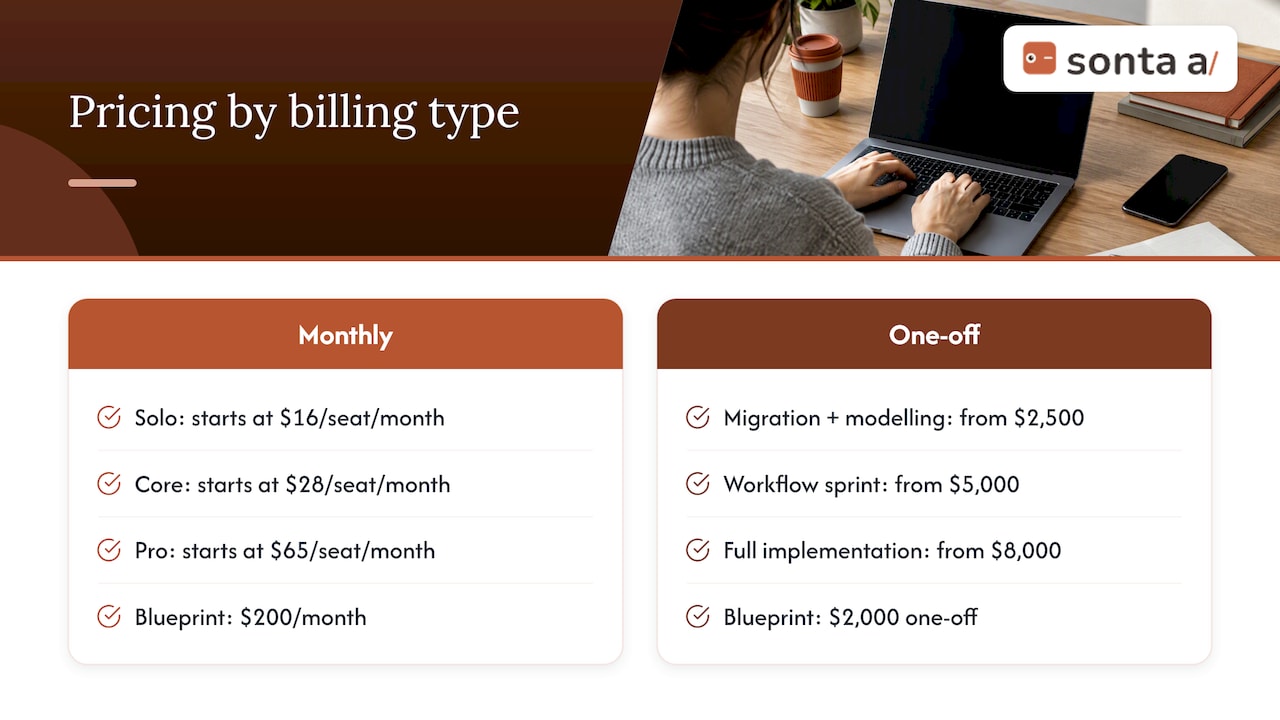
Add those figures to the line items you identified in the audit and compare total cost per seller, not seat price alone. The calculation should include the tools the new platform lets you retire.
Start with a 30-minute diagnostic
If you want an outside read on where your stack leaks time, our AI Efficiency Diagnostic gives actionable insight within 30 minutes, covering operational leakage and how your tools overlap. It pairs with the audit above: bring your tool list and your process one-pager.

When you are ready to see a self-updating CRM against your own pipeline, explore Sonta AI’s agentic CRM or review the plans and pricing. To go deeper on specific workflows, read our guides to AI follow-up automation, sales process automation and running a sales efficiency audit.
FAQ
How often should we audit our sales tech stack?
Run a full audit once a year and a lighter seat-utilization check each quarter. Also trigger one whenever you change your sales motion, add a segment, or renew a large contract, because those moments change which tools are required.
Should we consolidate into one platform or keep best-of-breed tools?
It depends on how many compensating tools your CRM forces you to carry. If most of your integrations exist to move data into the CRM, consolidation usually reduces cost and error. Keep a specialized tool when it has high adoption, a unique function, and a clean one-way integration with your system of record.
What is the first thing to fix when data in the CRM cannot be trusted?
Field ownership. Decide which system owns each field, who or what may write to it, and in which direction data flows. Then remove two-way syncs that you cannot justify, and automate record updates so accuracy does not depend on rep discipline.
How do we improve lead qualification accuracy with technology?
Write the qualification criteria and stage exit conditions first, then encode them consistently, whether in fields, scoring rules or AI agent instructions. Review a sample of qualified and rejected leads monthly and adjust the criteria, so the rules learn from outcomes.
Sources
- Taming the Sales Tech Mayhem, Gartner
- Stop Buying Sales Tools, ISG
- GTM Tech Stack Audit, Checkpoint GTM
- Creating Value with Your Integrated Sales Tech Stack, BCG
- CRM Automation Tools: Selection and Integration Guide
- Sales tech stack explained in simple terms and easy examples
- How to Unlock the Power of Your Sales Technology, Bain
- Building an AI-powered Sales Tech Stack, IBM
- Sales Process Design for B2B: A Practical Guide
- Startup Marketing Tools for 2027: Build a Lean Stack
- AI Receptionist for Plumbing & Local Service Businesses