LLM CRM Integration: How It Works and How to Do It Safely
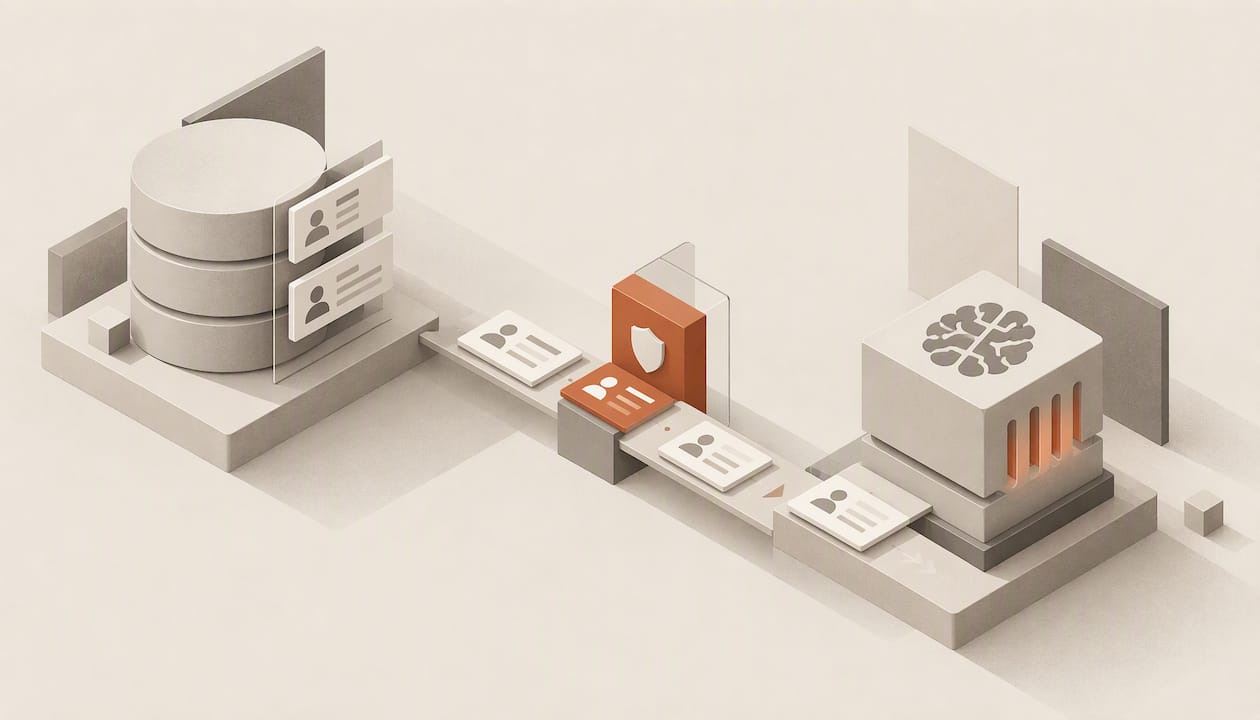
An LLM CRM integration connects a large language model to your customer records so it can read context (emails, call transcripts, deal history, account fields) and act on it: qualify a lead, draft a follow-up, update a field, summarize a closed deal. The connection is rarely a direct database hookup. It is a controlled layer of APIs, scoped permissions and review steps that decides what the model sees and what it is allowed to write back. Teams that get value from it treat the integration as a data governance project first and a prompt-engineering project second.
This guide covers how the connection works, which sales workflows are worth automating, the architecture and controls you need, where integrations fail, and how to measure whether the result is better than what you had.
TL;DR
- An LLM talks to a CRM through a connection layer (direct APIs, middleware or an MCP server) that retrieves authorized records, passes context to the model and routes approved actions back. Unrestricted database access is the wrong design.
- The best-supported use cases are administrative: logging meeting notes, updating fields, standardizing lead data, scoring leads and drafting follow-ups.
- Published benchmarks show current LLM agents are far from perfect on realistic CRM work, so human review, least-privilege access and audit logs are requirements, not extras.
- Start with a read-only pilot, define success metrics (accuracy, reliability, latency, cost, business impact) and widen the model’s write permissions in stages.
- An AI-native CRM builds this layer into the record system itself, which removes much of the integration work you would otherwise maintain.
Table of Contents
- What an LLM CRM integration actually is
- Sales workflows worth automating first
- Architecture: what you need to build or buy
- Security, privacy and compliance
- Where integrations fail
- How to evaluate an LLM CRM integration
- Build the integration or use an AI-native CRM
- Perspective: the integration is not the hard part
- Where Sonta AI fits
- FAQ
- Sources
What an LLM CRM integration actually is
There are two broad meanings of the phrase, and they lead to different projects.
Bolting a model onto an existing CRM. You keep your current system of record and add a connection to a model provider. The CRM exposes data through its API, a service you run (or a vendor runs) calls the model, and results flow back as drafts, scores, summaries or field updates. Most CRM vendors now document some version of this: a governed data layer that retrieves customer-specific records, formats them and supplies them to the model as context, often with a single interface that can reach models from several providers.
Using a CRM built around the model. Here the agents, the record model and the workflow engine are designed together, so records update themselves from the activity that happens around them and there is no separate integration to babysit. We cover the difference in AI-native vs. AI-enabled CRM and in our description of what AI-native architecture looks like in a working CRM.
Either way, the mechanics of the connection are similar:
- Authorization. The integration authenticates with OAuth or another scoped identity, so the model acts with defined permissions rather than an administrator’s.
- Retrieval. A connection layer pulls the specific records relevant to the task (one account, one thread, one opportunity) through REST APIs or a retrieval service.
- Prompting with context. The retrieved data is sanitized, formatted and passed to the model along with instructions.
- Structured output. The model returns something a system can validate: a score and recommended next action, a set of field values, a draft message.
- Write-back. Approved results are written to the CRM through its normal tools or endpoints, and the action is logged.
- Triggers. Webhooks fire the process when a record or pipeline event changes, so the work happens near real time instead of on a schedule.
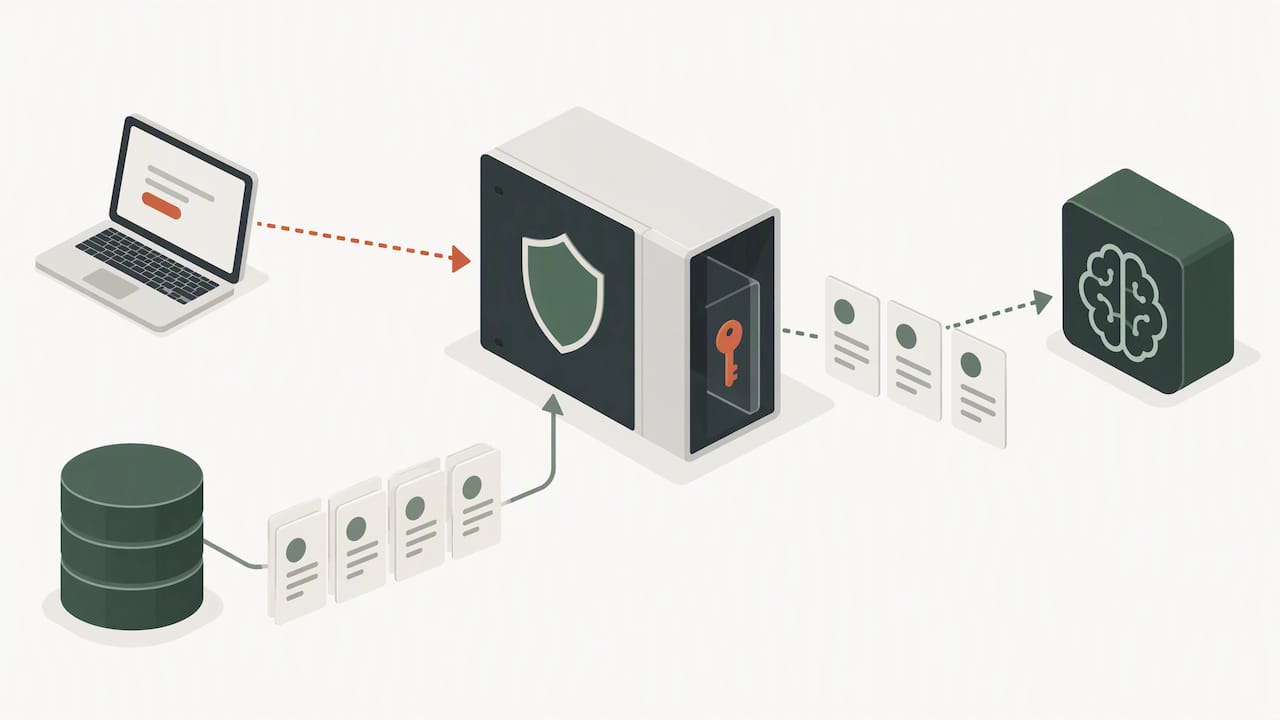
The key design decision sits between steps 2 and 5: the model never touches the database directly. A layer you control decides what goes in and what comes out.
Sales workflows worth automating first
The strongest cases are those where the work is repetitive, the inputs are already in the CRM or its connected channels, and a wrong output is cheap to catch.
Record upkeep
Consultancy research on generative AI for CRM points to the administrative burden as the clearest opportunity: logging meeting notes, updating CRM fields and standardizing lead data so that deal context survives handoffs between people. This is also where reps feel the pain most, because data entry is the task that gets skipped when a pipeline is busy. For the specifics of turning calls into structured records, see our piece on meeting notes automation.
Typical record-upkeep jobs:
- Write call and meeting summaries to the right account and opportunity.
- Propose field changes (next step, close date, stakeholders) from transcripts and emails, for approval or automatic application depending on risk.
- Deduplicate contacts and normalize fields such as company names, job titles and phone formats.
- Flag stale deals that have had no activity beyond a threshold.
Lead qualification and routing
A qualification workflow can combine firmographic data, page views, content downloads, email engagement, time since last activity and the profile of similar closed deals. The model returns a score and a recommended action, such as routing to a senior representative or placing the contact in a nurture sequence. Enrichment steps (adding firmographics, deduplicating, assigning an owner by territory or segment) improve speed to lead because the lead arrives complete and with an owner. Our analysis of agentic generative AI CRM and qualified lead rates goes deeper on how to set the scoring logic.
Follow-up and outreach
For follow-up, the useful inputs are email and meeting history, response patterns, content the contact consumed, deal stage and time since last contact. From those, a model can recommend an action, the message context and the timing, and it can create post-meeting tasks from a transcript. Generative AI in sales cadences can also draft the emails themselves, which frees time for customer-facing work. The workflows that work best keep timing and context automated while a person approves anything sent to a high-value account. See AI follow-up automation for sales and automated follow-up emails that book meetings for patterns.
Handoffs and account prep
Summarizing a closed opportunity for customer success, or compiling a one-page brief before a renewal call, are low-risk uses with high perceived value. The model reads, condenses and posts to the channel the team already uses. A mistake costs a correction, not a lost customer.
Architecture: what you need to build or buy
A sound integration has three tiers, regardless of vendor.
| Tier | Job | Typical components |
|---|---|---|
| Ingestion | Bring in only the data the task needs and sanitize it | Scoped API reads, field allow-lists, PII stripping, schema mapping |
| Orchestration | Build the prompt, call the model, validate output | Backend service or workflow engine, model routing, retries, output schemas |
| Write-back | Apply approved changes to the CRM | CRM API writes, approval queue, audit log, rollback |
Keep keys and models behind a backend
Privileged API keys must never appear in client-side code. Put a backend proxy between users and the model so secrets stay server-side and permissions are enforced there. The same proxy is where role-based access control lives: a user can only interact with records they are already authorized to see, and the model inherits that boundary.
Choose triggers deliberately
Webhooks give near-real-time behavior when a record or pipeline event changes, and they are the standard trigger. They are also the most brittle part of many integrations: when a field is renamed or a schema changes without notice, a webhook-based pipeline can fail silently and lose data. Build monitoring that alerts on volume drops, not only on errors, and version your field mappings. Our Academy pages on webhooks in and out and on adding an AI step to an automation show how this looks in a working system.
Model choice per task
A single model rarely fits every job. Extraction from a transcript, scoring a lead and drafting an email differ in difficulty, latency tolerance and cost. Routing each task to a suitable model, and being able to swap it later, keeps cost predictable and reduces lock-in. This is why a single interface to several model providers appears in vendor documentation, and why we build model selection per task into agents and automations.
Human review and staged autonomy
Review before CRM updates, outbound messages and stage changes is standard advice for good reason. A practical pattern is staged autonomy:
- Read-only pilot. The model summarizes and recommends; nothing is written.
- Suggest and approve. Proposed field updates and drafts land in a queue for a person to accept.
- Auto-apply low-risk changes. Notes, task creation and formatting corrections go through automatically, with logging.
- Auto-act within rules. Routing and sequencing run without review inside defined limits, with a kill switch.
This is the model behind our AI sales agents with staged autonomy, and it is easy to retrofit onto any integration.
Security, privacy and compliance
A CRM holds personal data, deal terms and sometimes health, financial or employment information. Sending it to a model changes your risk profile, so decide the rules before the pilot.
- Classify data. Label fields as public, internal or sensitive, and only let the first two reach a model by default.
- Strip personal identifiers at ingestion where the task does not need them, and prefer model endpoints with zero data retention under your contract.
- Apply least privilege. The integration’s identity should read and write only the objects and fields its workflows require.
- Log every automated action with its data sources, the model and version used, any confidence score and the human reviewer.
- Keep a person accountable for customer-facing and high-impact output. Meaningful oversight means trained reviewers with real authority to override, not a rubber stamp on an approve button.
- Build a kill switch so you can halt an agent or workflow immediately, and run vulnerability scans on the integration layer like any other production service.
Academic work on trustworthy AI-augmented CRM argues for governance by design: transparency, accountability and continuous evaluation built into the platform instead of added after launch. In practice that means monitoring across the model lifecycle, not a one-time review. Regulations differ by country and state, and sector rules (for example in financial services or healthcare) can add duties, so your legal or privacy counsel should confirm what applies to your customers’ data before you go live. Our guide to CRM data governance in 30 minutes is a practical checklist for the data side.
Where integrations fail
The most common failure is not a model that is obviously wrong. It is output that looks right.
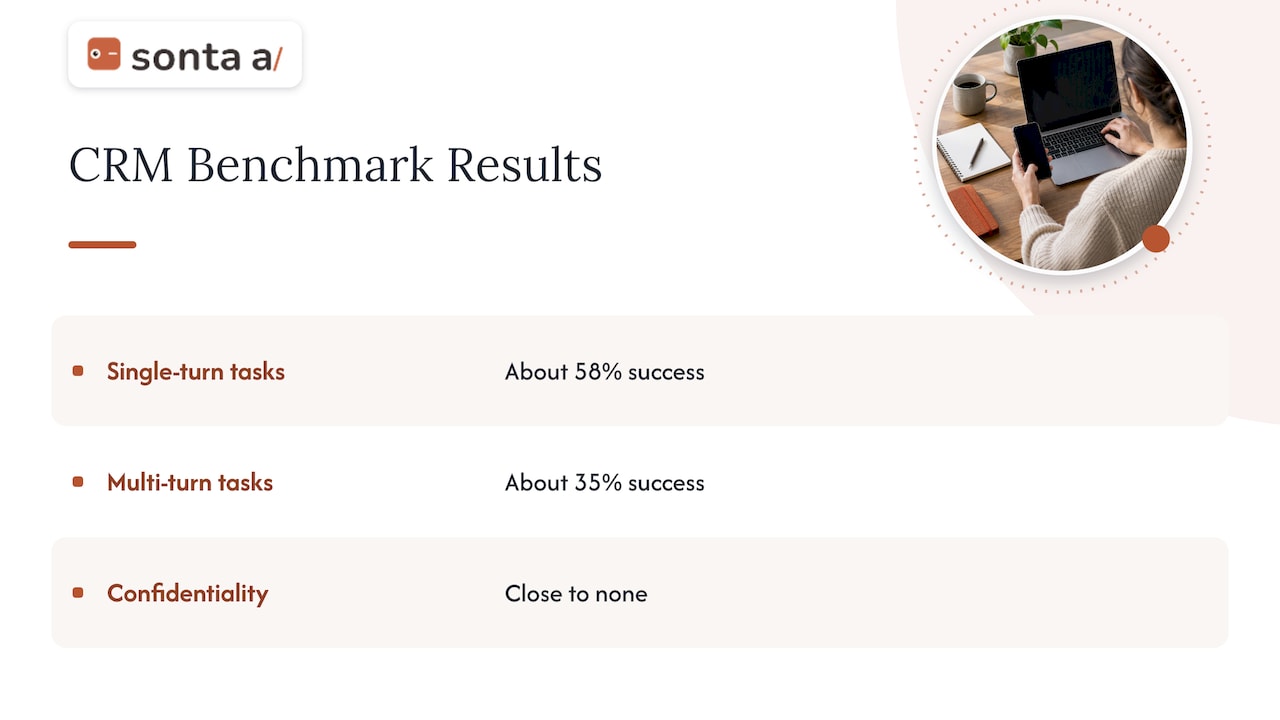
Agents underperform on realistic CRM work. A 2025 benchmark study of LLM agents on professional CRM scenarios, CRMArena-Pro, found that leading agents reached about 58% success on single-turn tasks, dropping to about 35% in multi-turn interactions, and showed close to no inherent confidentiality awareness. Models have improved since, but the pattern holds: single, well-bounded steps work; long conversational chains with ambiguous goals do not. Design workflows as short steps with validated outputs instead of open-ended agents.
Hallucination about specific records. A model can state a close date, a contact role or a pricing term that is not in the data. Counter this by retrieving the record, passing it in the prompt and requiring the output to cite the fields it used. Reject outputs that reference values not present in the retrieved context.
Silent breakage. Schema changes, expired tokens and renamed fields stop webhook flows without an obvious error. Monitor throughput and sample outputs weekly.
Dirty data in, dirty data out. A model writing inaccurate entries into a CRM compounds the problem, because the next workflow trusts the entry. Sanitation and governance tiers matter more than clever prompts.
Over-trust. Teams that stop reviewing after two good weeks find the errors later, in forecasts and renewals. Keep sampling even after you auto-apply low-risk updates.
How to evaluate an LLM CRM integration
Evaluate on the criteria that map to your business, using your own records and tasks.
| Criterion | What to measure | How |
|---|---|---|
| Accuracy | Correct field values, correct function or API call selected | Labeled sample of 100 to 200 real tasks |
| Reliability | Same result across repeated runs | Run each task several times, compare |
| Latency | Time from trigger to usable output | Track median and slowest 5% |
| Cost | Model and infrastructure cost per 1,000 operations | Meter by workflow, not in aggregate |
| Safety | Leaks of restricted data, unauthorized writes | Red-team prompts, permission tests |
| Business impact | Time saved per rep, speed to lead, record completeness, conversion | Before and after, with a control group |
Research on CRM tool-calling gives a useful template. The HubBench evaluation behind a 2024 benchmarking study scores models on function-call accuracy, reliability across repeated attempts, latency and cost per 1,000 queries, using single- and two-API-call CRM tasks. In that study a purpose-built tool-calling model reached 90.1% accuracy on single-API tasks and outperformed the general proprietary models it was compared against, a reminder that specialized orchestration can beat a bigger general model on narrow tasks. Treat those figures as a method and a data point, not a guarantee for your stack: run the same kind of test on your own schema.
A practical rollout plan:
- Pick one workflow (post-meeting notes is a good start) and define a baseline: how long it takes today and how complete the records are.
- Run a read-only pilot for two to four weeks with a labeled sample.
- Move to suggest-and-approve for a single team and track acceptance rate. A low acceptance rate is a prompt or data problem, found cheaply.
- Expand write permissions only for fields where measured accuracy clears your threshold.
- Review cost per workflow monthly, and revisit model choice when your volume changes.
Build the integration or use an AI-native CRM
There are three realistic paths.
- Custom build on your current CRM. Maximum control, highest engineering and maintenance load. You own the proxy, the schema mapping, the monitoring and the compliance evidence.
- Middleware or automation platform. Faster to start, but you inherit the webhook brittleness described above and per-task fees that grow with volume.
- AI-native CRM. The agents, record model and automation builder are part of the product, so there is no separate integration layer to maintain, and records update from activity as it happens.
The right answer depends on how customized your sales motion is and how much engineering time you can commit. If your team is small, your process is non-standard, and most of the value is in record upkeep, follow-up and qualification, the third path usually reaches production fastest.
Perspective: the integration is not the hard part
We see the same pattern in nearly every conversation with a GTM team. The API connection takes days. What takes months is deciding which data the model may use, who approves what, and how to keep records trustworthy once agents write to them. Teams that skip those decisions end up with a model that is technically connected and practically unused, because nobody trusts what it writes.
Our view is that the record system should carry that burden. Every record should update itself from real activity, agents should be configurable to the way a team actually sells, models should be chosen per task, and autonomy should be earned in stages with an audit trail. We also think AI usage should not be metered against the team: when each automated step carries a fee, people ration the automation that would have helped most. That is why Sonta AI does not meter AI or automation usage.
If you are still weighing build versus buy, the cheapest first step is to map where your team’s time leaks, before choosing any model or connector.
— Pavel
Where Sonta AI fits
Sonta AI is an agentic CRM for AI-first GTM teams: records that update themselves, configurable agents for lead qualification, follow-up, account prep, scheduling and pipeline management, a workflow builder, and integration with multiple AI models. Industry blueprints cover real estate, recruitment, auto retail and professional services. Seat plans start at $16 per month per seat for Solo, $28 for Core and $65 for Pro, with Enterprise on request; migration and data modelling start at $2,500 one-off. Current terms are on the pricing page.

If you want an outside read before committing, the AI Efficiency Diagnostic is a 30-minute session that identifies where manual work and tool sprawl are costing you, and where an LLM integration would pay off first. You can also look at the Sonta AI agentic CRM directly.
FAQ
Can an LLM access my CRM database directly?
It should not. A connection layer built on CRM APIs, middleware or an MCP server retrieves only authorized records, supplies them as context and routes approved actions back through the CRM’s own tools. This keeps permissions, logging and review in your control.
Which CRM workflow should I automate first?
Start with post-meeting notes and field updates, or with lead enrichment and routing. Inputs are already in your systems, the output is easy to check, and a wrong result is cheap to correct. Move to outbound messages and stage changes once you have accuracy data from the pilot.
Do I need a developer to integrate an LLM with a CRM?
A custom build on an existing CRM does need engineering for the proxy, schema mapping and monitoring. A no-code workflow builder or an AI-native CRM reduces that to configuration, though you still need someone who owns data rules and review.
Is it safe to send customer data to a model provider?
It can be, with controls: classify data, strip personal identifiers the task does not need, use endpoints with zero data retention, apply least-privilege access and log every automated action. Check your contracts and the privacy rules that apply to your customers with counsel before sending sensitive fields.
How accurate are LLM agents on CRM tasks?
It depends on task design. A 2025 benchmark found leading agents succeeding on roughly 58% of single-turn CRM tasks and 35% of multi-turn ones, while a narrow tool-calling model reached 90.1% on single-API tasks in a 2024 test. Test on your own data and keep human review where errors are costly.
Sources
- CRMArena-Pro: Holistic Assessment of LLM Agents Across Diverse Business Scenarios
- Benchmarking Floworks against OpenAI and Anthropic
- Guide to GenAI for CRM, Deloitte Digital
- Towards Trustworthy AI-Augmented CRM Ecosystems