Professional Services CRM Automation: What to Automate and How

Professional services CRM automation means letting software handle the repetitive work around a client relationship: logging emails and meetings, qualifying inbound leads, chasing proposals, preparing accounts and keeping every record current, while partners and consultants spend their time on billable work and judgment calls. The firms that get the most from it automate in stages, start with follow-up and data capture, put human review at the points where a wrong message costs a relationship, and measure against a baseline taken before anything changes.
This guide covers what is worth automating, how records can stay current without manual entry, where AI helps with qualification, how to design the workflows, which safeguards matter, and how to tell whether any of it worked.
TL;DR
- Start with the work that is rule-based and frequent: lead-response alerts, proposal follow-up, appointment reminders, post-sale handoffs, and logging of emails and meetings.
- Real-time record updates rely on event-driven sync (webhooks) plus scheduled refreshes, and they need deduplication and field-level conflict rules to stay reliable.
- Let AI draft and qualify, but keep a named person with the authority to override anything that reaches a client or touches high-stakes decisions.
- Record your baseline (leads, response time, booking rate, show rate, close rate) before you automate, then compare after a fixed period.
- Build in small, modular workflows rather than one large automation, so each can be tested, paused and corrected.
Table of Contents
- Why professional services firms automate differently
- Which CRM tasks professional services teams can automate
- How records stay current in real time
- Where AI helps with lead qualification and follow-up
- Designing and implementing workflows
- Integrations, safeguards and human checks
- Measuring whether automation works
- What to look for in a CRM for automation
- Our perspective
- Getting started with Sonta AI
- FAQ
- Sources
Why professional services firms automate differently
A consulting, legal, accounting, agency or advisory firm sells people’s time. Pipeline work (business development, proposals, renewals, referrals) competes directly with delivery work for the same hours, and it usually loses. The result is a familiar pattern: records go stale, proposals sit without follow-up for weeks, and the CRM becomes a place where partners reluctantly type notes once a quarter.
That is the manual data entry ceiling of legacy systems: the CRM is only as good as the discipline of the busiest people in the firm. Automation changes the premise. Instead of asking billable staff to maintain records, the system captures activity where it already happens (inbox, calendar, call, website form) and writes it to the record.
A few features of professional services make this different from transactional sales:
- Long, relationship-driven cycles. A deal may take months and involve several stakeholders, so a missed follow-up is more costly than in a high-volume funnel.
- Referral and repeat revenue. Contacts matter long after a project closes, so records need to stay current beyond the sale.
- Bespoke engagements. Scoping and proposals differ every time, which is why rigid templates often fail and configurable workflows work better.
- Confidentiality. Client data is sensitive, so what an automation can read, write and send needs to be explicit.
If you are still choosing a system, our consulting CRM buyer’s guide covers evaluation criteria for firms in more depth.
Which CRM tasks professional services teams can automate
Published playbooks consistently point to the same cluster of tasks: lead-response notifications, proposal follow-up tasks, appointment reminders and post-sale preparation messages. Solo consultants go further and trigger multi-step follow-ups from deal-stage changes, proposal events or a prospect’s silence. The principle scales to a larger firm: the trigger is a change of state in the CRM, and the action is a task, a message or a record update.
The table below sorts common automations by how much judgment they need, which is the best guide to how much human review each should have.
| Task | Typical trigger | Automation level | Human check |
|---|---|---|---|
| Log inbound and outbound emails and meetings | New email or calendar event | Fully automatic | Spot audits |
| Enrich contact and company fields | New or incomplete record | Automatic, scheduled | Review overwrites of key fields |
| Alert the right owner to a new inquiry | Form submission or reply | Fully automatic | None needed |
| Qualify an inbound lead | New lead | AI scores and summarizes | Owner confirms before outreach |
| Proposal follow-up | Proposal sent, no reply in set days | AI drafts, task created | Approve before sending |
| Meeting scheduling | Positive reply or stage change | Automatic with booking link | Owner reviews exceptions |
| Account prep brief | Meeting booked | AI compiles from record history | Reader sanity check |
| Post-sale kickoff | Deal marked won | Checklist and handoff message | Delivery lead confirms |
Two guides on our own site go deeper on the highest-value items: proposal automation in the CRM and automated follow-up emails that book meetings.
Follow-up is the first thing to automate
Follow-up is where firms leak the most revenue, because it is easy to postpone and hard to notice when it has not happened. A workable pattern has three parts: a rule that detects silence (for example, a proposal sent with no reply after a set number of days), an AI-drafted message that references the actual thread, and a task that puts the draft in front of the owner. Over time, once drafts are consistently approved with few edits, firms can allow certain low-risk messages, such as meeting confirmations, to send themselves. This is what we mean by staged autonomy, and it is described in more detail on our AI sales agents page and in our guide to AI follow-up automation.
Capturing calls and bookings
Call notes are the most commonly skipped record in any firm. Automated logging of calls, with a transcript summary attached to the right contact and deal, removes the single largest source of missing history; our call logging setup guide walks through it. Bookings and replies can be routed the same way: a calendar booking creates or updates the contact and moves the deal, with no manual entry required. For firms that rely on LinkedIn for business development, syncing LinkedIn activity into a CRM follows the same logic: engagement signals become record data instead of memory.
Website inquiries are another capture point. Our academy shows how to capture leads and orders from your website directly into pipeline records.
How records stay current in real time
Real-time data is the promise that most CRM products make and the one that fails most often in practice, so it is worth understanding the mechanics.
There are two complementary approaches:
- Event-driven updates. Webhooks push a change the moment it happens. Nylas documents a pattern in which webhooks log prospect emails and meetings to CRM records, while scheduled synchronization refreshes phone numbers, job titles and company names. It also prevents duplicate meeting records by keying on the event ID.
- Scheduled refreshes. Periodic jobs catch what events miss, such as a contact who changed employers. Enrichment tools typically let administrators choose which fields may be auto-filled when empty and which may be overwritten, which matters for the reasons below.
Engineering teams are candid that webhooks are not a silver bullet. Reliable delivery needs signature validation, deduplication, idempotency and ordering logic, all of which the integration layer must handle. For a buyer, the practical question is not whether a platform says “real-time” but how it behaves when two systems disagree.
Conflict rules prevent silent damage
When data flows in both directions between your CRM and other tools, you need field-level conflict rules such as field ownership or last-writer-wins, or blind overwrites can create feedback loops. In a professional services firm, decide in advance which system owns which field. A billing platform may own legal entity name and payment terms; the CRM may own relationship owner and stage; an enrichment source may fill job titles only where empty. Write those rules down before you connect anything.
Our CRM integration strategy framework and the integrations overview in our academy lay out the same sequence: map the systems, assign field ownership, then connect.
Where AI helps with lead qualification and follow-up
Qualification in professional services is rarely a numeric score alone. A good lead is one whose problem matches what the firm does, whose budget and timeline are plausible, and who has the authority to buy or influence the decision. AI is useful here because it can read what a human would read (the inquiry text, the website of the prospective client, prior emails) and produce a structured summary in seconds.
In practice, AI agents contribute in four places:
- Intake triage. Reading a form submission or inbound email, extracting company, need, urgency and size, and writing those into fields instead of leaving them in free text.
- Fit assessment. Comparing the extracted information with your criteria (service line, industry, minimum engagement size) and recommending pursue, nurture or decline.
- Account preparation. Assembling a brief before a first call from the record history, so the owner does not start from zero.
- Follow-up drafting. Writing the next message in context, with the owner approving until the pattern is trusted.
The design choice that matters is which model does which job. A short classification task and a long, nuanced proposal summary do not need the same model, and a platform that lets you pick per task gives you control over cost and quality. It also matters whether automation usage is metered: with usage-based pricing, firms tend to ration the automations that would help most. Our platform does not meter AI or automation usage, which is a deliberate part of the design.
Designing and implementing workflows
Most failed automation projects fail the same way: a firm tries to automate its entire business-development process at once, ends up with a tangle of rules no one can explain, and switches it off after the first embarrassing email. A staged approach avoids that.
Step 1: Map the pipeline you actually run
Write down the real stages, including the informal ones (“intro via partner,” “scoping call done,” “proposal in legal review”). Automation attaches to stages, so a pipeline that does not reflect reality produces triggers that never fire. Our guide to building a pipeline shows how to model stages, and the pipeline stage report shows where deals stall.
Step 2: Pick two or three high-frequency workflows
Choose work that happens many times a week and has a clear rule: new inquiry alert, proposal silence follow-up, meeting-booked prep. Avoid starting with anything that sends a message to a client without review.
Step 3: Build small, modular workflows
One trigger, a few conditions, one or two actions. Modular pieces can be reused and corrected independently. Our article on modular workflow automation templates shows the pattern, and the one on making a workflow builder reliable covers testing, naming and failure handling.
Step 4: Start with a template, then adapt
Industry blueprints save weeks of modeling. A blueprint packages a data model, pipeline and workflows for a type of business, and you can adapt it to your firm instead of starting from a blank page. If you want to see what is in one first, read what is inside a blueprint. The underlying concepts and data model are worth reading before you migrate history.
Step 5: Import and clean existing data
Automation on dirty data amplifies the mess. Deduplicate contacts, merge companies, and decide what history is worth carrying over. Smaller datasets can be brought in through a CSV import; larger or more tangled ones usually justify a proper migration and data modeling exercise.
Step 6: Run in review mode, then widen autonomy
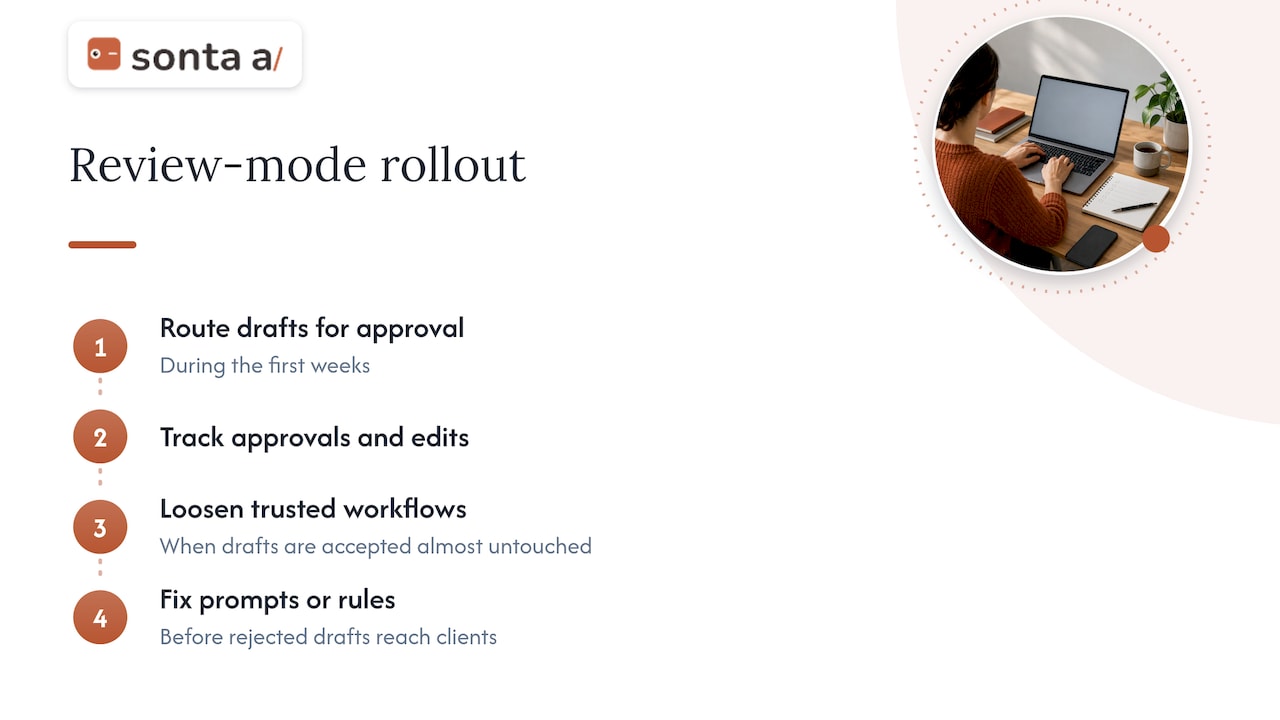
For the first weeks, have every AI-drafted action land as a task for approval. Track the approval rate and the edits. When a workflow’s drafts are accepted almost untouched, you have evidence for loosening it. When they are not, you have evidence for fixing the prompt or the rule before it reaches a client.
Integrations, safeguards and human checks
A professional services firm holds information that clients expect to stay confidential, so automation needs boundaries as much as it needs speed.
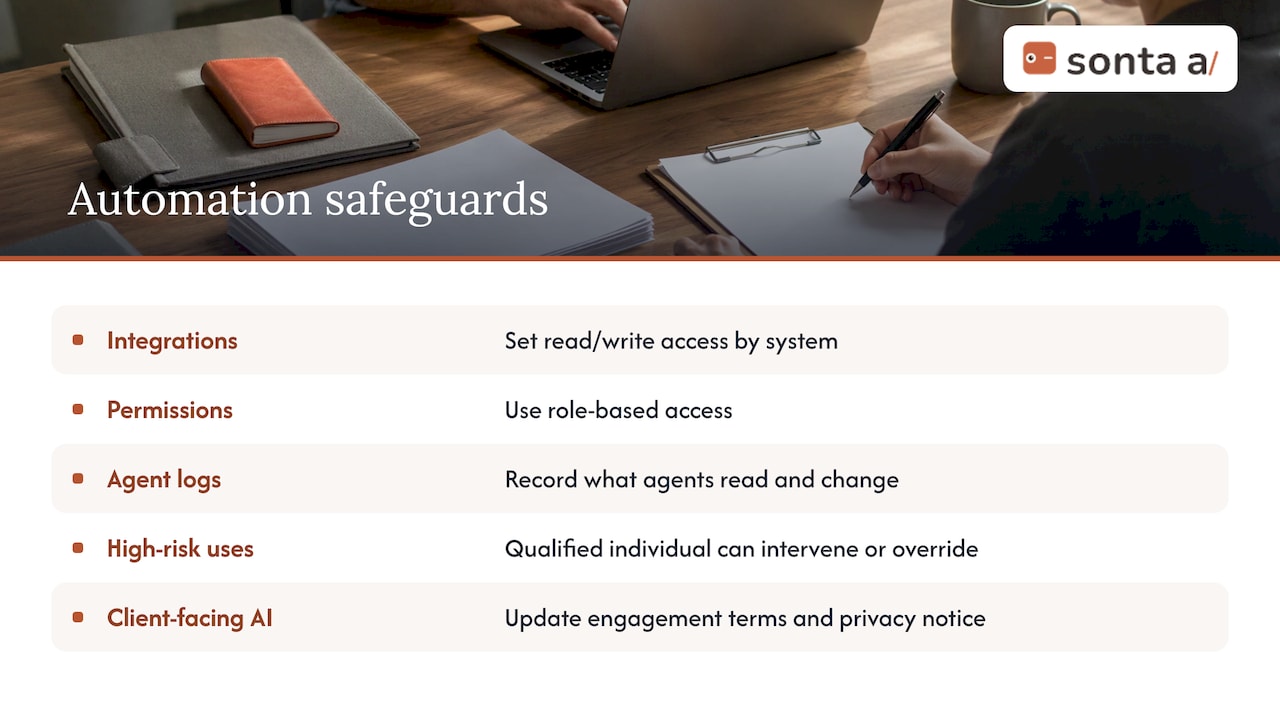
Integrations. Decide which systems feed the CRM (email, calendar, telephony, website forms, billing, document storage) and what each may read and write. Prefer integrations that offer visual field mapping and schema transformation, so mapping is visible and auditable rather than buried in code.
Data safeguards. The Certified Management Consultants’ global body states in its code of responsible use of artificial intelligence that AI use should come with suitable technical and organizational data safeguards, as well as meaningful human review and professional judgment. For firms handling client data, that translates into role-based permissions, logs of what an agent read and changed, and clear rules about which data may be sent to which model provider. Managed AI keys, where the vendor handles model access under agreed terms, can simplify this for firms without an internal platform team.
Human oversight. The same code says that for high-risk uses, a qualified individual must have the authority and the practical ability to intervene in, override or discontinue the AI system’s operation. Build that into the workflow: every agent has an owner, every owner can pause it, and anything touching fees, legal commitments or sensitive client matters requires approval. A practical overview of AI workflow automation guardrails based on the NIST framework offers a useful checklist for documenting this.
Client transparency. If AI drafts or summarizes anything that clients see, your engagement terms and privacy notice should reflect that. Check requirements with your own counsel and, where relevant, your professional body, since rules differ by jurisdiction and profession.
Measuring whether automation works
The most common mistake in measurement is starting it after the change. Record a baseline first, then compare. Useful baseline metrics for a professional services pipeline include:
- Leads received per month, by source
- Time from inquiry to first response
- Booking rate (inquiries that become scheduled calls)
- Show rate (scheduled calls that happen)
- Proposal-to-close rate
- Days a proposal sits without follow-up
- Hours per week spent on CRM updates by billable staff
Take the baseline over a period long enough to smooth out seasonality, then re-measure after a fixed interval, such as a quarter. Change one or two workflows at a time so you can attribute movement. Cycle times in professional services are long, so leading indicators (response time, booking rate, follow-up gaps) will move before close rate does; do not judge the project on close rate alone in the first quarter.
Also watch for negative signals: rising unsubscribe or complaint rates on automated messages, a growing number of corrected records, or staff quietly returning to spreadsheets. Those say the automation is not trusted, which is a design problem rather than an adoption problem.
If you do not know where the time is going, an audit before you build is faster than guessing. Our AI Efficiency Diagnostic is a 30-minute session designed to surface operational leakages and tech stack overlap, so the first workflows you automate are the ones that matter.
What to look for in a CRM for automation
When you compare options, ask these questions of any platform, ours included:
- Does the record update itself? Ask for a demonstration of an email, a meeting and a call landing on the correct record without anyone typing.
- Can you configure the workflow to your sales motion? Professional services motions are bespoke; rigid pipelines force workarounds.
- Can you choose models per task and see what each agent did? Logs and overrides are the basis of oversight.
- How is AI and automation usage priced? Metered usage penalizes the behavior you want.
- What does implementation involve? Ask about migration, data modeling and who builds the first workflows.
- Is there an industry starting point? Blueprints for professional services shorten time to value.
On categories of alternatives: general-purpose CRMs offer breadth and a large ecosystem but usually need heavy configuration and admin time; professional services automation suites combine project, time and billing tools with lighter CRM features; lightweight contact managers are cheap but stop short of agent-driven work. The right choice depends on whether your bottleneck is delivery operations, business development or both.
Our perspective
We think the main constraint in most professional services CRMs is not the software’s feature list but who has to type. When the people who hold the relationships are also the people billing the hours, any system that depends on manual updates decays within a quarter, and the pipeline then belongs to whoever has time to maintain it.
That is why we built Sonta AI as an agentic CRM in which every record updates itself and customizable agents run the routine work: qualification, follow-up, account prep, scheduling and pipeline hygiene. We assign models per task, we do not meter AI or automation usage, and we let teams widen an agent’s autonomy step by step, so trust is earned from approval data rather than assumed.
Our advice to firms starting out is to keep it modest and measurable: baseline first, two or three workflows, review mode, then expand. Firms that want a faster start can begin with an industry blueprint for professional services and have us handle migration and the first workflow builds.
Pavel
Getting started with Sonta AI
Sonta AI is an AI-native CRM for sales and go-to-market teams, with self-updating records, AI agents for lead qualification, follow-up, account prep, scheduling and pipeline management, industry blueprints including professional services, and a configurable workflow builder. Plans are published at our pricing page: Solo from $16 per month per seat, Core from $28 per month per seat and Pro from $65 per month per seat, with Enterprise on request. Migration and data modeling starts from $2,500 one-off, a workflow build sprint from $5,000 one-off and a full implementation programme from $8,000 one-off.

If you would like to understand where your current stack loses time before committing to anything, start with the AI Efficiency Diagnostic, or see how the platform works on the Sonta AI home page.
FAQ
What is professional services CRM automation?
It is the use of rules and AI agents to handle repeatable CRM work for firms that sell expertise: logging communications, updating records, qualifying inquiries, chasing proposals and preparing for meetings. The goal is to keep the pipeline accurate without asking billable staff to maintain it by hand.
Which tasks should a firm automate first?
Start with the tasks that are frequent and rule-based: new inquiry alerts, logging of emails and meetings, proposal follow-up tasks and appointment reminders. Leave anything that commits the firm to fees or legal terms under human approval.
Can AI qualify leads without a person reviewing them?
AI can read an inquiry, extract the key facts and recommend pursue, nurture or decline in seconds. Until its recommendations prove consistent against your own judgment, have the owner confirm before any outreach, and keep a person able to override or pause the agent, as responsible-use guidance for high-risk applications advises.
How do I know the automation is working?
Record leads, response time, booking rate, show rate and close rate before you change anything, then compare after a fixed period such as a quarter. Response time and follow-up gaps usually improve first, while close rate in long-cycle services takes longer to show.
Does real-time sync mean my data is always right?
No. Real-time sync depends on deduplication, ordering and conflict rules between systems. Decide which system owns each field, and audit a sample of records regularly, especially after connecting a new tool.
Sources
- CRM Automation Blueprint
- AI Client Acquisition Stack for Solo Consultants
- Automate a sales pipeline (Nylas documentation)
- Real-Time CRM Sync: Architecture, Webhooks, and Bidirectional Data Flow
- Real-time CRM sync, explained
- Code of Responsible Use of Artificial Intelligence (CMC Global)
- Syncing LinkedIn activity into a CRM