Real-Time Sales Insights: What They Are and How to Get Them
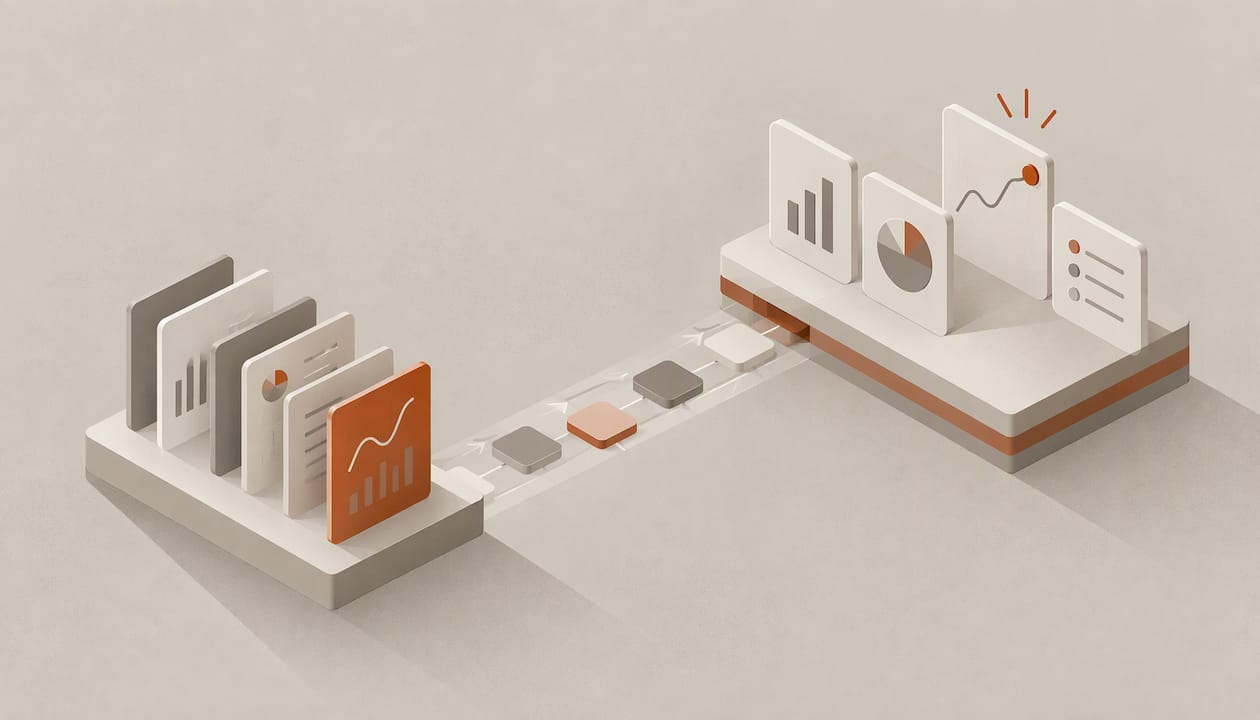
Real-time sales insights are actionable readings drawn from live data (CRM activity, emails, calls, meetings) as events happen, rather than from reports assembled after the fact. A professional industry overview frames the difference as immediate delivery versus batch processing of historical figures. In practice, you get them only when records update themselves: a dashboard sitting on top of fields that reps fill in on Friday afternoon is a faster view of stale data, not a real-time one.
This guide covers what the term means, which signals are worth watching, why most teams fail to get live insight from their CRM, and how to check that the investment pays off.
TL;DR
- Real-time sales insight depends on capture, not display: if records rely on manual entry, the dashboard lags the deal by days.
- The signals that change decisions are follow-up timing, lead quality, stage movement and account activity. Total pipeline value alone rarely does.
- The main blockers are poor data quality, manual entry, missing governance and legacy systems, not a lack of charts.
- Measure the result with a baseline: response time, win rate, stage-to-stage conversion and hours spent on admin, before and after.
Table of Contents
- What real-time sales insights actually mean
- The signals worth watching
- Why most CRMs do not deliver live insight
- How teams put live insights to work
- Measuring whether it works
- Our perspective: capture first, then insight
- Where Sonta AI fits
- Choosing a setup: what to ask any vendor
- FAQ
- Sources
What real-time sales insights actually mean
The phrase covers three layers that are often blurred together.
- Live capture. Emails, calls, meetings and form fills are written to the right record automatically, without a rep logging them.
- Live interpretation. Something reads those signals and says what they imply: this lead replied twice and asked about pricing, this deal has had no contact in nine days, this account added three new stakeholders.
- Live action. The insight triggers a next step (a follow-up, a task, a reassignment) while it still matters.
Most reporting stops at layer two, and many tools stop at a chart. The overview cited above describes real-time data as capturing signals such as CRM activity, emails and calls as they happen so decisions can be made immediately, and it reports that a vendor survey found 96% of sales professionals consider real-time sales data essential for meeting customer expectations and adjusting strategy. That is a statement about perceived importance, not about outcomes, but it shows how widely the need is felt.
Real-time versus near-real-time
Not every metric needs second-level freshness. A useful rule is to match refresh speed to the decision it supports:
| Decision | Useful freshness | Why |
|---|---|---|
| Respond to an inbound lead | Minutes | Response speed is the variable you control |
| Follow up after a meeting or call | Same day | The context is still warm |
| Flag a stalled deal | Daily | Stalls develop over days, not seconds |
| Forecast review | Daily to weekly | Needs trustworthy stage data, not constant movement |
| Territory or capacity planning | Weekly to monthly | Trends matter more than events |
Chasing real-time on everything produces noise. Chasing it on the first two rows, where delay is most expensive, is where most teams should start.
The signals worth watching
A live feed is only as useful as the signals chosen. For most B2B sales teams, five categories carry the decisions.
Speed and follow-up
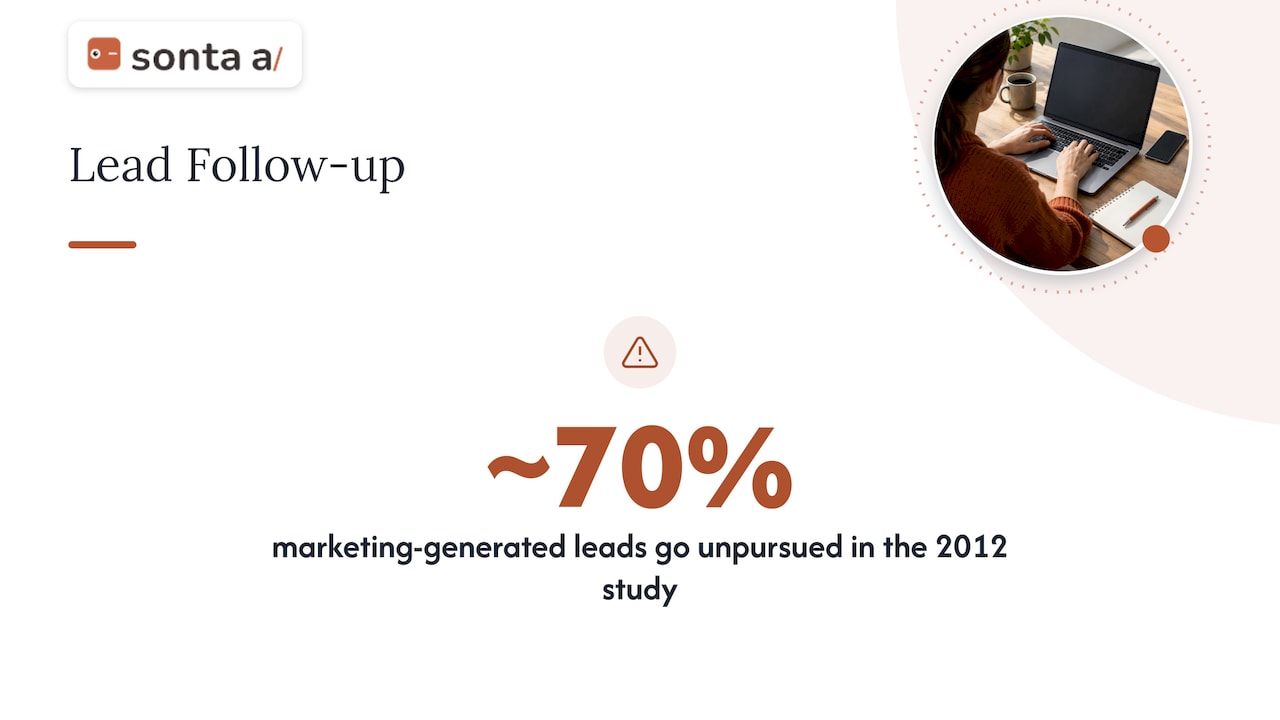
Follow-up is where live data most directly changes outcomes. Academic research on the sales lead black hole (2012) found that sales representatives do not pursue roughly 70% of marketing-generated leads, and competing demands on their time may contribute. The study is more than a decade old and its setting is specific, so treat the figure as evidence of a pattern rather than a benchmark for your own team. But the pattern is easy to test: pull your own leads from last quarter and count how many never received a logged touch.
Signals to track here: time to first response, number of leads with no activity after seven days, and the gap between a prospect’s last reply and your next action. If you want to see how automation closes those gaps, our piece on AI follow-up automation for sales walks through the workflows.
Lead quality
Live signals improve qualification when they feed a scoring method rather than a gut feel. A 2019 study of sales pipeline management in the software industry, presented at the Hawaii International Conference on System Sciences, found that machine learning techniques such as CatBoost can provide data-driven qualification support and reduce the human intuition and arbitrariness that characterize pipeline management. The point for a sales leader is not the algorithm but the input: scoring is only as current as the data behind it. Our guide to AI lead scoring for B2B teams covers how to set that up without losing sight of why a lead is scored the way it is.
Stage movement and deal health
Stage changes, days in stage, number of stakeholders engaged, last two-way contact and next scheduled meeting give a far better picture of a deal than its amount and close date. CSO Insights research from 2009, hosted as a sales management pipeline report, argued that traditional transactional CRM systems provide aggregate totals but not the context for managers to understand why pipeline figures fluctuate from week to week. The data is old, yet the complaint is still the one managers raise: the number moved, and nobody can say why.
Account activity
For account-based or multi-threaded sales, the useful signals are who engaged, who went quiet and which contacts were added. These matter most before a call, which is why account preparation is among the first tasks teams hand to agents.
Rep workload and capacity
Live visibility into how many open deals, tasks and overdue follow-ups each rep holds helps managers rebalance before a lead goes cold rather than after.
Why most CRMs do not deliver live insight
The usual explanation is that the dashboards are weak. The more common cause is upstream: the records are incomplete, late or wrong.
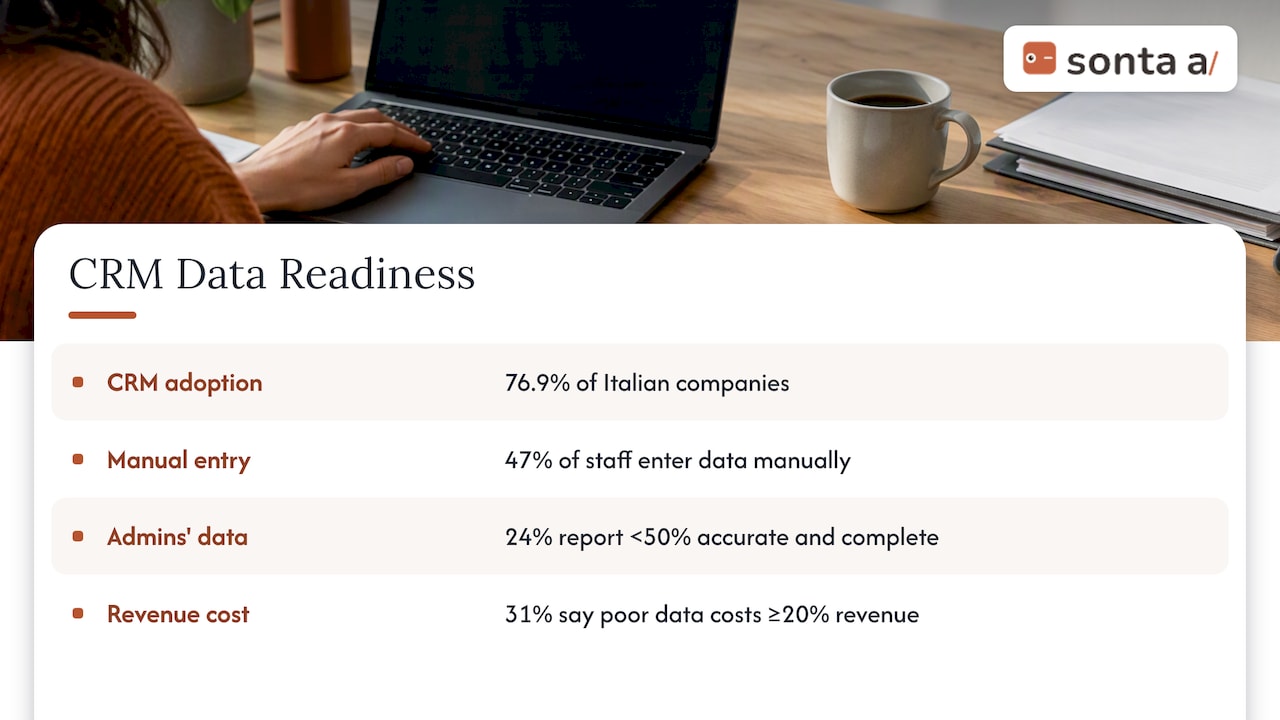
SDA Bocconi’s 2026 analysis of CRM adoption and data reports that 76.9% of Italian companies have adopted a CRM while 47% of staff still enter data manually. It also notes that many companies treat the CRM as an operational tool for data entry rather than a customer intelligence platform, which limits what AI can do with it. The sample is Italian, so apply it as an illustration rather than a US figure, but the mechanism travels well. The same source lists poor data quality, manual entry and missing governance policies as barriers, with costs, skills gaps and legacy systems slowing AI readiness further.
US-facing survey data points the same way. A 2024 Validity report on CRM data management, covering respondents in the United States, United Kingdom and Australia, found that 24% of CRM administrators said less than half of their data is accurate and complete, and 31% said poor data quality costs them at least 20% of revenue. These are self-reported estimates from a vendor-run survey, so read them as directional.
An academic paper on engineering CRM analytics (2024) adds system scaling and multi-cloud integration to the list of challenges, and raises ethical and data privacy concerns, including GDPR compliance, which call for strong data governance. If you sell to European contacts, that last point is not optional.
A practical test of your own data
Before buying anything, run this check on your current CRM:
- Pick 25 open opportunities at random.
- For each, compare the CRM’s last-activity date with the real last email or call in your inbox and calendar.
- Count how many records are more than three days behind, or missing a contact who has actually been involved.
- Note which fields reps fill in only at pipeline review.
If more than a handful fail, the constraint is capture, and a better chart will not fix it. Our 30-minute walkthrough on scanning CRM data governance lists the controls to check first, and the opportunity scoring and CRM gap diagnosis article shows how to pilot a fix on a single pipeline.
How teams put live insights to work
Three views, three audiences
A single dashboard rarely serves everyone. A workable split is:
- Rep view: my open follow-ups, my deals with no recent contact, my next meetings.
- Manager view: stalled deals by rep, response-time distribution, deals that moved stage this week, coaching flags.
- Executive view: pipeline by stage and source, conversion between stages, forecast against target.
The discipline is that each view answers a question the viewer can act on within the day. If a metric prompts no action, remove it.
Alerts instead of checking
Live data pays off most when it comes to you. Useful alerts are specific and rare: a high-scoring lead with no owner after ten minutes, a champion who has gone silent for a week, a proposal opened three times in a day. If alerts fire constantly, reps mute them, and the system is back to being a report.
Closing the loop with automation
The step that separates insight from reporting is a defined response. When a signal appears, something happens: a draft follow-up is prepared, a task is created, a meeting is proposed. Teams that build these as configurable workflows can change them as the sales motion changes; see our templates for CRM workflow automation and the guide to making a CRM workflow builder reliable.
Measuring whether it works
Live insight is worth paying for only if it moves outcomes, so set a baseline before any change. A reasonable scorecard:
| Metric | What it shows | Baseline source |
|---|---|---|
| Median time to first response | Speed on inbound leads | CRM timestamps |
| Share of leads with no logged touch in 7 days | Leakage | CRM activity report |
| Stage-to-stage conversion | Process health | Opportunity history |
| Win rate | Overall effectiveness | Closed-won vs. closed-lost |
| Rep hours on admin per week | Capture cost | Time sampling or survey |
| Forecast variance | Trust in the data | Forecast vs. actual |
There is useful older evidence on why process responsiveness matters. The CSO Insights research cited above found that sales organizations rating themselves “Exceeds Expectations” on process adaptability reached a 58% win rate, against 44% for those that “Need Improvement”. That is a correlation from self-assessed 2009 data, not proof that live insight causes higher win rates, but it supports measuring how quickly your process responds to what the data shows.
Run the comparison for at least one full sales cycle, on a defined segment, with a control group where possible. Changes in a single month of a long cycle will mostly reflect noise.
Our perspective: capture first, then insight
We build Sonta AI around one conviction: real-time insight is a data capture problem before it is an analytics problem. A legacy CRM expects people to be the data layer, and that sets a ceiling: the system knows only what reps had time to type. Add a dashboard and you get a faster picture of an incomplete record.
The approach we take is to let records update themselves from the signals that already exist, then let agents act on them: qualifying leads, preparing accounts, following up, scheduling, and keeping the pipeline current. We select models per task rather than forcing one model onto every job, and we do not meter AI or automation usage, so teams are not discouraged from running the automation they need.
Three practical views from that work:
- Start with one leak. Pick the single place pipeline is lost (usually slow response or missing follow-up) and instrument it before building a full dashboard suite.
- Govern before you automate. Agents acting on bad records create bad actions faster. Agree field definitions, ownership and what counts as a duplicate first.
- Keep the sales motion yours. Industries differ: real estate, recruitment, auto retail and professional services each have their own stages and signals. Configurable workflows beat a fixed template.
— Pavel
Where Sonta AI fits
Sonta AI is an agentic CRM for GTM teams: records update in real time, and configurable agents handle lead qualification, follow-up, account prep, scheduling and pipeline management. Plans are published at our pricing page: Solo from $16 per seat per month, Core from $28, Pro from $65, with Enterprise on request. Migration and data modelling starts from $2,500 one-off.
If you are not sure where your own leaks are, the AI Efficiency Diagnostic is a 30-minute session that identifies operational leakage and tech-stack gaps. For the reporting side, the Reports & Dashboards guide shows how live views are built.
Choosing a setup: what to ask any vendor
Whether you build on your current CRM or move, these questions separate real-time from relabeled batch:
- How is data captured, and which fields still depend on a rep typing them?
- How long between an email or call and the record reflecting it?
- Can every automated update be traced and reversed?
- What happens to AI and automation costs as usage grows: is it metered?
- How are privacy obligations handled for contacts in regulated regions?
- How much of the workflow logic can your team change without a developer?
- What does migration involve, and what will the data model look like afterward?
The answers to the first two will tell you most of what you need.
FAQ
What does real-time data mean in sales?
It means information is captured and available as the underlying event happens, such as an email reply or a call, instead of being compiled later into a report. The practical test is the lag between the event and the record reflecting it. If reps must log the activity themselves, the lag is usually days.
What is a sales dashboard?
A sales dashboard is a visual summary of pipeline, activity and performance metrics drawn from your CRM or other systems. It is only as current as its source data. The best ones are tailored by audience, so reps see their next actions and executives see stage conversion and forecast.
Do small teams need real-time sales insights?
Often more than large ones, because a single missed follow-up is a bigger share of pipeline. Start with response time and stalled deals rather than a full analytics suite. A lightweight plan with automated capture usually beats a heavy reporting build.
How do I know if my CRM data is good enough?
Sample 25 open opportunities and compare the CRM’s last-activity date with your actual inbox and calendar. If many are days behind or missing contacts, fix capture and governance before adding dashboards.
Sources
- Real-Time Sales Intelligence: Boost Revenue with Live Data
- The Sales Lead Black Hole: On Sales Reps’ Follow-Up of Marketing Leads
- Sales pipeline management in the software industry (HICSS 2019)
- The Sales Management Insights Series (CSO Insights)
- We have CRM adoption, but a lot of work remains on data (SDA Bocconi)
- The State of CRM Data Management in 2024 (Validity)
- From Data to Insights: Engineering the Analytics Engine in CRM